
Casio GA2100-1A
G-Shock Casio GA-2100 Series Analog-Digital Watch User Manual
Model: GA2100-1A
1. Pengenalan
This manual provides detailed instructions for the proper use and maintenance of your Casio G-Shock GA-2100 Series Analog-Digital Watch. The GA-2100 series inherits the robust toughness and innovative design of the original G-SHOCK DW5000C models, featuring a slim profile and an iconic octagonal bezel. Constructed with a highly rigid fine resin reinforced with carbon fiber, this watch offers exceptional durability while maintaining a lightweight and comfortable fit. Please read this manual thoroughly to ensure optimal performance and longevity of your timepiece.

Rajah 1: Depan view of the G-Shock GA-2100 watch.
2. Ciri-ciri Produk
- Carbon Core Guard Structure: A new carbon core guard structure protects the module by enclosing it in a carbon case, ensuring superior shock resistance.
- Rintangan Air 200 Meter: Designed for robust use, including swimming and diving.
- Paparan Analog-Digital: Combines traditional analog hands with a digital display for versatile timekeeping and data presentation.
- Slim Profile: At 11.8 mm, it is one of the slimmest G-SHOCK models, offering a comfortable fit.
- Masa Dunia: Displays the current time in 48 cities (31 time zones) around the world.
- Jam randik: 1/100-second stopwatch with measuring capacity up to 24 hours.
- Pemasa undur: Unit pengukur 1 saat, julat undur 24 jam.
- 5 Daily Alarms: Includes one snooze alarm.
- Lampu LED Berganda: Separate LED light for the face (Super Illuminator) and the digital display, with afterglow.
- Ciri Anjakan Tangan: Hands move out of the way to provide an unobstructed view of digital display contents.
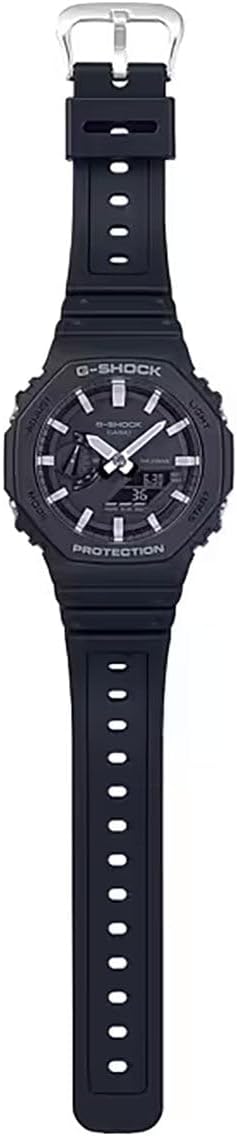
Rajah 2: Penuh view of the G-Shock GA-2100 watch, highlighting its strap and overall design.
3. Persediaan
3.1 Penetapan Masa Awal
- Dalam Mod Penjagaan Masa, tahan butang SESUAIKAN button (top left) for about two seconds until the city code starts to flash on the digital display. This indicates the setting mode.
- Tekan ke MODE button (bottom left) to cycle through the settings: City Code → DST (Daylight Saving Time) → 12/24-hour format → Seconds → Hour → Minute → Year → Month → Day.
- Gunakan CAHAYA button (top right) to increase the flashing value and the MULAKAN button (bottom right) to decrease it. For city code, use these buttons to select your desired home city.
- Setelah semua tetapan dikonfigurasikan, tekan butang SESUAIKAN button to exit the setting mode. The watch will automatically adjust the analog hands to match the digital time.
3.2 Hand Home Position Correction
If the analog hands do not align with the digital time, you can correct their home positions:
- Dalam Mod Penjagaan Masa, tahan SESUAIKAN button for about five seconds until "0.00" appears and starts flashing, indicating the hand home position adjustment mode.
- Gunakan CAHAYA button (top right) and MULAKAN button (bottom right) to move the hour and minute hands until they point to 12 o'clock.
- Tekan ke SESUAIKAN button to confirm the setting and return to Timekeeping Mode.
4. Arahan Operasi
The GA-2100 features four buttons: SESUAIKAN (kiri atas), CAHAYA (kanan atas), MODE (bottom left), and MULAKAN (bottom right).
4.1 Mod Navigasi
Tekan ke MODE button (bottom left) to cycle through the different modes:
- Timekeeping Mode (TME)
- Mod Masa Dunia (WT)
- Mod Jam Rangup (STW)
- Countdown Timer Mode (TMR)
- Mod Penggera (ALM)
4.2 Timekeeping Mode (TME)
This is the default mode, displaying the current time and date. Refer to Section 3.1 for setting the time and date.
4.3 World Time Mode (WT)
Membolehkan anda view waktu semasa di pelbagai bandar di seluruh dunia.
- Masuk ke Mod Waktu Dunia dengan menekan butang MODE butang.
- Gunakan CAHAYA button (top right) or MULAKAN butang (kanan bawah) untuk menatal kod bandar yang berbeza.
4.4 Stopwatch Mode (STW)
Measures elapsed time.
- Masuk ke Mod Jam Rangup dengan menekan butang MODE butang.
- Tekan ke MULAKAN button (bottom right) to start the stopwatch.
- Tekan ke MULAKAN butang sekali lagi untuk berhenti.
- Tekan ke SESUAIKAN button (top left) to reset the stopwatch to zero.
4.5 Countdown Timer Mode (TMR)
Counts down from a preset time.
- Masuk ke Mod Pemasa Undur dengan menekan butang MODE butang.
- tahan SESUAIKAN button (top left) until the current countdown time starts to flash.
- Gunakan MODE button to move the flashing between hours and minutes.
- Gunakan CAHAYA button (top right) and MULAKAN button (bottom right) to set the desired countdown time.
- Tekan ke SESUAIKAN butang untuk keluar dari mod tetapan.
- Tekan ke MULAKAN button to begin the countdown. Press again to pause/resume.
- Apabila undur mencapai sifar, penggera akan berbunyi. Tekan sebarang butang untuk menghentikan penggera.
4.6 Alarm Mode (ALM)
Set up to five independent daily alarms.
- Masuk ke Mod Penggera dengan menekan butang MODE butang.
- Gunakan CAHAYA button (top right) to cycle through alarms (AL1, AL2, AL3, AL4, AL5, SIG - Hourly Time Signal).
- To set an alarm, hold down the SESUAIKAN button (top left) until the alarm time starts to flash.
- Gunakan MODE button to move between hour and minute settings.
- Gunakan CAHAYA butang dan MULAKAN butang untuk menetapkan masa penggera yang diingini.
- Tekan ke SESUAIKAN butang untuk keluar dari mod tetapan.
- To turn an alarm ON/OFF, select the alarm and press the MULAKAN button. "ON" or "OFF" will appear.
4.7 Illumination (Light)
Tekan ke CAHAYA button (top right) to illuminate the watch face and digital display. The illumination duration can be set in Timekeeping Mode settings.

Figure 3: G-Shock GA-2100 watch worn on a wrist.
5. Penyelenggaraan
5.1 Membersihkan Jam Tangan Anda
Lap jam tangan dengan kain lembut dan kering untuk menghilangkan kotoran dan lembapan. Untuk kotoran degil, gunakan kain lembut dampdicairkan dengan air dan detergen neutral yang lembut, kemudian lap sehingga kering. Elakkan menggunakan agen meruap seperti pencair atau benzin, kerana ia boleh merosakkan komponen resin.
5.2 Langkah Berjaga-jaga Rintangan Air
Your GA-2100 watch is water resistant to 200 meters. To maintain water resistance:
- Jangan kendalikan butang semasa jam tangan basah atau tenggelam dalam air.
- Avoid exposing the watch to extreme temperatures (hot water, saunas).
- Jika jam tangan terdedah kepada air masin, bilas dengan teliti menggunakan air tawar dan lap sehingga kering.
- Have the gaskets checked periodically (every 2-3 years) by an authorized service center to ensure water resistance.
5.3 Penggantian Bateri
The watch uses a CR2016 lithium battery. When the display becomes dim or the light function weakens, it's time to replace the battery. Battery replacement should be performed by an authorized Casio service center to ensure proper sealing and water resistance.
6. Penyelesaian masalah
- Jarum Analog Tidak Padan dengan Masa Digital: Perform the Hand Home Position Correction as described in Section 3.2.
- Paparan Digital Kosong atau Malap: The battery may be low. Replace the battery at an authorized service center.
- Watch Not Responding to Button Presses: The watch may be in a frozen state. Try holding down all four buttons simultaneously for a few seconds to perform a soft reset. If the issue persists, the battery might be completely drained.
- Incorrect Time After Travel: Ensure your Home City setting and DST (Daylight Saving Time) setting are correct in Timekeeping Mode.

Figure 4: G-Shock GA-2100 watch as part of a casual outfit.
7. Spesifikasi
| Ciri | Perincian |
|---|---|
| Nombor Model | GA2100-1A |
| Saiz Kotak (P×L×T) | 48.5 × 45.4 × 11.8 mm |
| Berat badan | 51 g |
| Bahan Sarung dan Bezel | Carbon / Resin |
| Bahan Band | Resin Band |
| Tahan Air | 200-meter Water Resistance |
| Bekalan Kuasa | Lebih kurang 3 tahun pada CR2016 |
| kaca | Kaca Mineral |
| Jenis Genggam | gesper |
8. Waranti dan Sokongan
Your Casio G-Shock GA-2100 watch is covered by a manufacturer's warranty against defects in materials and workmanship. Please refer to the warranty card included with your purchase for specific terms and conditions, including the warranty period.
Untuk sokongan teknikal, perkhidmatan atau tuntutan jaminan, sila hubungi khidmat pelanggan Casio atau lawati khidmat pelanggan rasmi mereka webtapak. Simpan bukti pembelian anda untuk pengesahan waranti.
Casio Official Webtapak: www.casio.com
Ask a question about this manual
Ask about setup, troubleshooting, compatibility, parts, safety, or missing instructions. Manuals+ will review the question and use this page’s manual context to help answer it.