
1. Arahan Keselamatan Penting
Please read these instructions carefully before using the appliance and keep them for future reference. Incorrect operation can lead to damage to the appliance and injury to the user.
- Sentiasa sambungkan perkakas ke soket kuasa yang dibumikan.
- Jangan rendam perkakas, kord, atau palam ke dalam air atau cecair lain.
- Jauhkan perkakas daripada kanak-kanak.
- Do not operate the appliance if the power cord or plug is damaged. Contact authorized service personnel for repair.
- Elakkan sentuhan dengan permukaan panas. Gunakan pemegang atau tombol.
- Unplug the appliance from the outlet when not in use and before cleaning. Allow it to cool before putting on or taking off parts, and before cleaning the appliance.
- Perkakas ini bertujuan untuk kegunaan isi rumah sahaja.
2. Produk Lebihview dan Komponen
Familiarize yourself with the parts of your Cloer 5258 Filter Coffee Machine.
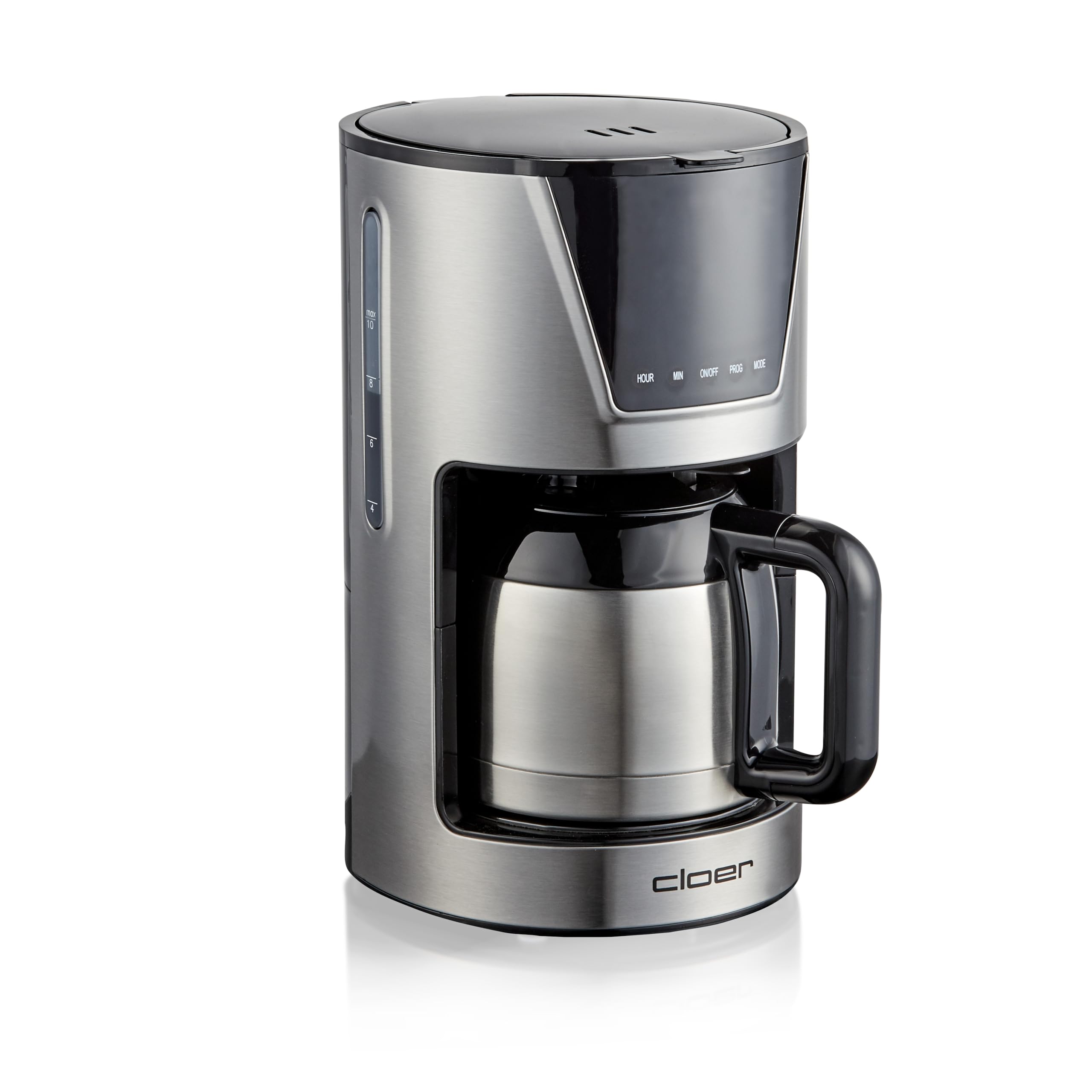
Rajah 2.1: Depan view of the Cloer 5258 Filter Coffee Machine with the thermal carafe in place. The digital display shows '12:00'.

Rajah 2.2: Atas view of the coffee machine with the lid open, revealing the water reservoir and filter basket area. The thermal carafe is positioned below.
- Takungan Air: Untuk mengisi dengan air tawar.
- Tudung: Menutup takungan air dan bakul penapis.
- Bakul Penapis: Holds the paper filter (size 1x4) and coffee grounds.
- Teko Thermal: Stainless steel carafe with a capacity of 10 cups (1.25 liters) to keep coffee warm.
- Paparan LCD: Shows time, timer settings, and aroma level.
- Butang Kawalan: HOUR, MIN, ON/OFF, PROG, MODE for setting time, timer, and aroma.
- Dosing Spoon: Termasuk untuk sukatan kopi yang tepat.
3. Persediaan
3.1 Membongkar
- Keluarkan semua bahan pembungkusan dari mesin kopi dengan berhati-hati.
- Periksa sama ada semua bahagian ada dan tidak rosak.
- Place the coffee machine on a stable, flat, heat-resistant surface, away from water sources.
3.2 Pembersihan Penggunaan Pertama
Before first use, clean the appliance to remove any manufacturing residues.
- Fill the water reservoir with cold water up to the MAX mark.
- Place a paper filter (size 1x4) into the filter basket. Do not add coffee grounds.
- Place the thermal carafe with its lid on the warming plate.
- Press the ON/OFF button to start a brewing cycle with only water.
- After the cycle is complete, discard the water and rinse the carafe and filter basket.
- Repeat this process 2-3 times to ensure thorough cleaning.
4. Arahan Operasi
4.1 Membancuh Kopi
- Isi takungan air: Open the lid and fill the water reservoir with fresh, cold water to the desired number of cups. The capacity is 1.25 liters (10 cups).

Rajah 4.1: Pouring water into the open water reservoir of the coffee machine.
- Insert Filter and Coffee: Place a paper filter (size 1x4) into the filter basket. Add the desired amount of ground coffee using the included dosing spoon. A general guideline is one spoon per cup, adjusted to personal preference.
- Close Lid and Place Carafe: Close the lid securely. Ensure the thermal carafe with its lid is correctly placed on the warming plate.
- Select Aroma Level (Optional): Use the MODE button to cycle through the available aroma levels (3 levels). This adjusts the brewing process for stronger or milder coffee.
- Mulakan Pembuatan Bir: Press the ON/OFF button to begin the brewing process. The indicator light will illuminate.

Rajah 4.2: A hand pressing the ON/OFF button on the control panel of the coffee machine. A cup of coffee is visible next to the machine.
- Fungsi Kekal Panas: The thermal carafe is designed to keep your coffee warm for an extended period after brewing. The machine automatically switches off after brewing is complete.
4.2 Menetapkan Pemasa
Pemasa membolehkan anda memprogram mesin untuk mula membancuh pada masa tertentu.
- Tetapkan Masa Semasa: With the machine plugged in, use the HOUR and MIN buttons to set the current time on the LCD display.
- Bersedia untuk Pembuatan Bir: Follow steps 1-3 from '4.1 Brewing Coffee' (fill water, add filter and coffee, place carafe).
- Tetapkan Masa Program: Press the PROG button. The display will flash. Use the HOUR and MIN buttons to set the desired start time for brewing.
- Aktifkan Pemasa: Press the PROG button again to confirm the timer setting. The timer indicator light will illuminate, indicating the timer is active.
- The coffee machine will automatically start brewing at the set time.
5. Penyelenggaraan dan Pembersihan
Pembersihan tetap memastikan prestasi optimum dan memanjangkan jangka hayat mesin kopi anda.
5.1 Pembersihan Harian
- Sentiasa cabut plag perkakas dan biarkan ia sejuk sepenuhnya sebelum dibersihkan.
- Remove the filter basket and discard the used coffee grounds and paper filter. Rinse the filter basket under running water.
- Wash the thermal carafe and its lid with warm, soapy water. Rinse thoroughly and dry.

Rajah 5.1: jarak dekat view of the thermal carafe, showing its handle and lid mechanism.
- Lap bahagian luar mesin kopi dengan iklanamp kain. Jangan gunakan pembersih atau penyental yang kasar.
5.2 Penyahkelasan
Depending on water hardness and frequency of use, descaling should be performed regularly (e.g., every 2-4 months) to prevent mineral buildup.
- Sediakan larutan penyahkerak mengikut arahan pengilang (cth., cuka putih atau agen penyahkerak komersial).
- Tuangkan larutan penyahkerak ke dalam takungan air.
- Place an empty paper filter in the filter basket and the thermal carafe on the warming plate.
- Start a brewing cycle. Allow half of the solution to brew through, then switch off the machine and let it stand for 15-20 minutes.
- Switch the machine back on and allow the remaining solution to brew through.
- After the descaling cycle, run 2-3 cycles with fresh, clean water to rinse out any descaling residue.
6. Penyelesaian masalah
If you encounter problems with your coffee machine, refer to the following table before contacting customer service.
| Masalah | Kemungkinan Punca | Penyelesaian |
|---|---|---|
| Kopi tidak dibancuh. | Machine not plugged in; ON/OFF button not pressed; water reservoir empty. | Ensure plug is in outlet; press ON/OFF button; fill water reservoir. |
| Kopi terlalu lemah. | Not enough coffee grounds; incorrect aroma setting; filter clogged. | Add more coffee; select a stronger aroma level; replace filter. |
| Kopi melimpah dari penapis. | Too much coffee grounds; filter not correctly placed; machine needs descaling. | Reduce coffee amount; ensure filter is seated correctly; descale the machine. |
| Kebocoran mesin. | Water reservoir overfilled; carafe not correctly placed. | Do not exceed MAX fill line; ensure carafe is properly positioned. |
7. Spesifikasi
- Jenama: Cloer
- model: 5258
- warna: Keluli Tahan Karat
- kapasiti: 1.25 Liters (10 cups)
- Kuasa: 800W
- Dimensi Produk: 19 x 25.5 x 32.5 cm
- Berat: 2.8 kg
- Saiz Penapis: 1 x 4
- Ciri Khas: LCD Display, 3 selectable aroma levels, Timer and Time function, Automatic shut-off.
8. Waranti dan Sokongan
For warranty information, please refer to the warranty card included with your purchase or contact Cloer customer support. Keep your proof of purchase for any warranty claims.
If you require further assistance or have questions not covered in this manual, please visit the official Cloer webtapak atau hubungi bahagian perkhidmatan pelanggan mereka.