
1. Pengenalan
This manual provides detailed instructions for the setup, operation, and maintenance of your Topping D50 III DAC Preamplifier and KGUSS Mini Audio Component Rack. Please read this manual thoroughly before using the products to ensure proper functionality and to maximize your audio experience. Keep this manual for future reference.
2. Produk Lebihview
2.1 Topping D50 III DAC Preamplebih hidup
Topping D50 III ialah Penukar Digital-ke-Analog (DAC) berprestasi tinggi dan pra-amplifier designed for superior audio reproduction. It features dual ES9039Q2M DAC chips, LDAC Bluetooth 5.1, and supports high-resolution audio formats up to DSD512 and PCM768kHz. The device includes a remote control and offers PEQ adjustment capabilities.
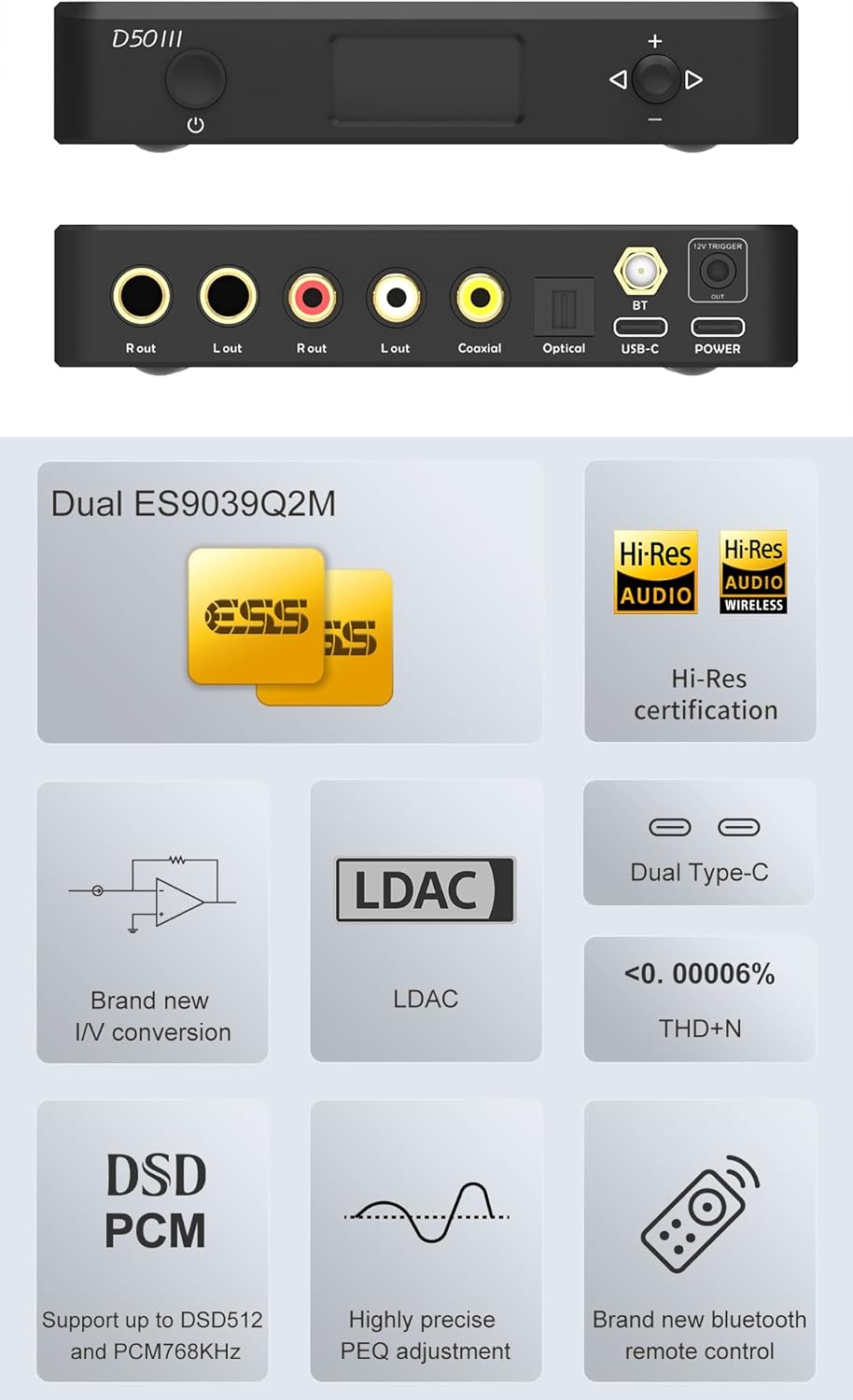
Imej: Depan dan belakang views of the Topping D50 III DAC Preamplifier, showing the display, control buttons, and various input/output ports including USB-C, Coaxial, Optical, Bluetooth antenna, and RCA/TRS outputs.
Imej: Berakhirview of the Topping D50 III's key features, including Dual ES9039Q2M DACs, Hi-Res Audio certification, LDAC support, dual Type-C ports, low THD+N, DSD512/PCM768kHz support, precise PEQ adjustment, and a new Bluetooth remote control. Also includes a table of DAC parameters.
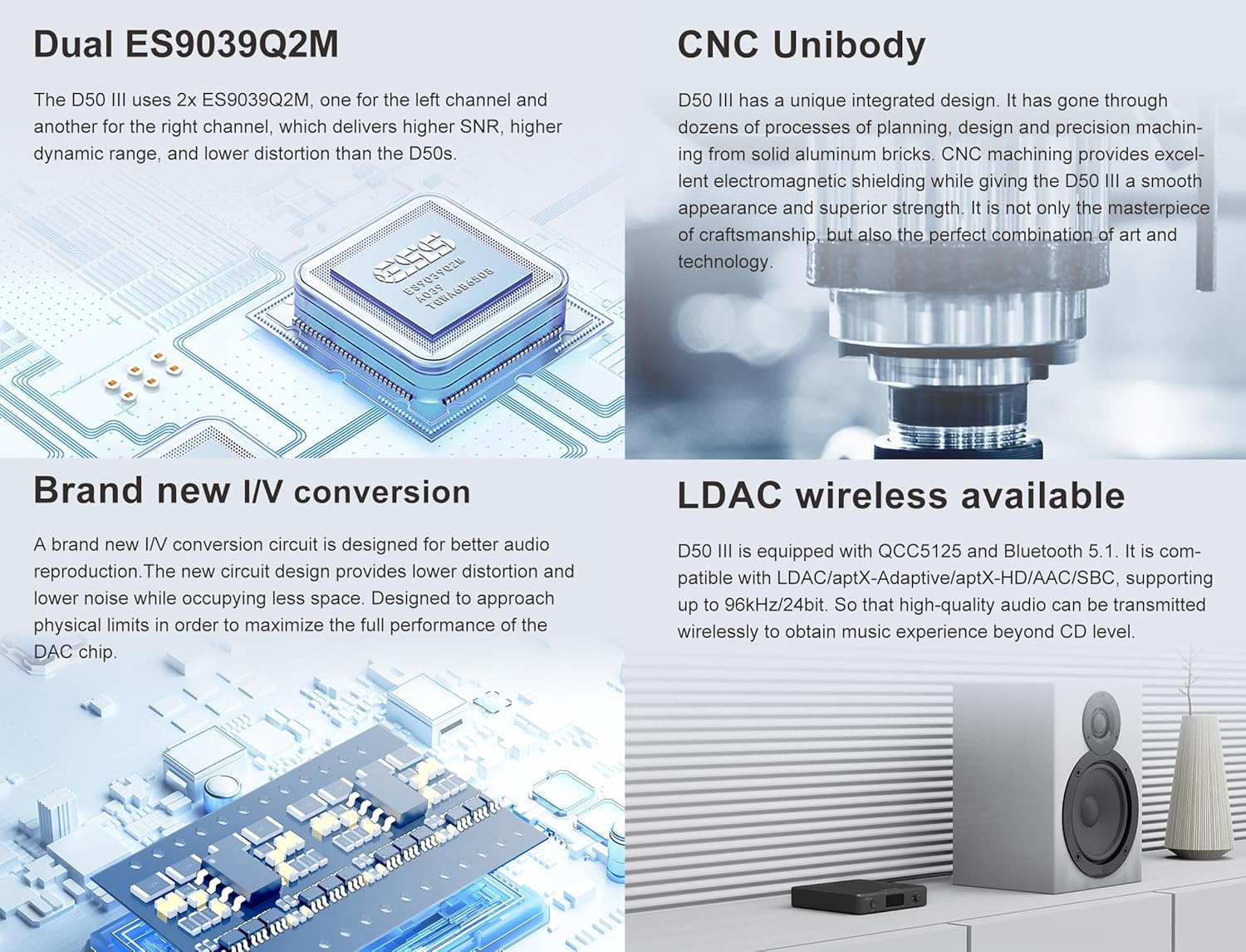
Imej: Detailed explanation of the Topping D50 III's advanced features: Dual ES9039Q2M DACs for improved SNR and dynamic range, CNC Unibody construction for electromagnetic shielding, brand new I/V conversion for lower distortion, and LDAC wireless capability for high-quality audio transmission.

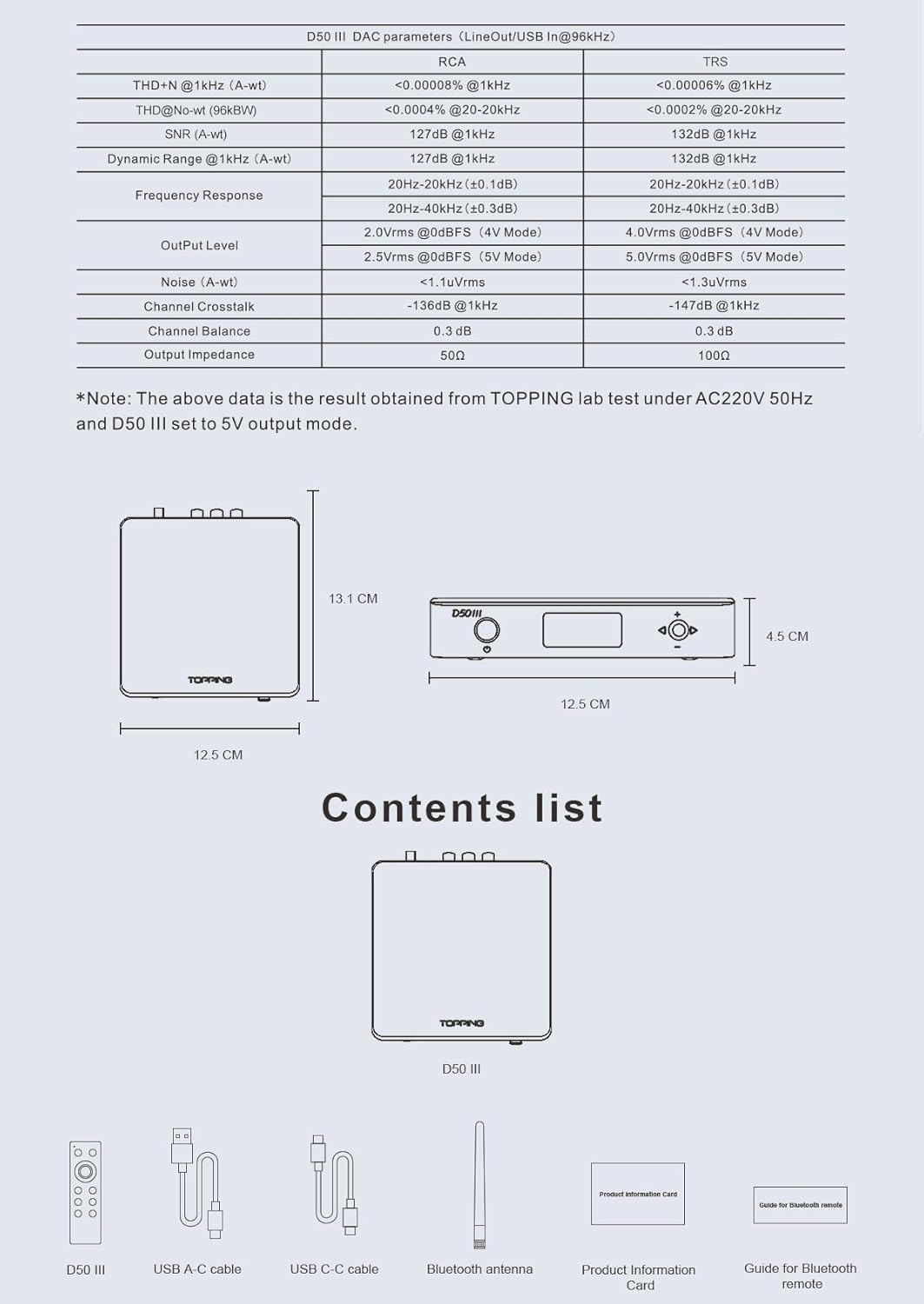
Imej: A visual representation of the Topping D50 III's package contents, including the D50 III unit, USB A-C cable, USB C-C cable, Bluetooth antenna, product information card, and a guide for the Bluetooth remote.
2.2 KGUSS Mini Audio Component Rack
The KGUSS Mini Audio Component Rack is a compact and modular storage solution for small HiFi amppengangkat, fon kepala amps, DACs, and other audio components. It features an acrylic board and aluminum structure, offering a sturdy design with a weight capacity of up to 3kg per shelf.

Imej: Detailed dimensions of the KGUSS Mini Audio Component Rack, showing its height, width, and depth, along with individual shelf spacing. Note that the rack panel is made of acrylic material and has a maximum weight capacity of 3kg per shelf.

Imej: The KGUSS Mini Audio Component Rack displayed with various audio components, highlighting its function as a desktop organizer and its modular, stackable design. It also emphasizes ease of cleaning.

Imej: A breakdown of the KGUSS Mini Audio Component Rack's assembly components: four pieces of component A (top caps), four pieces of component B (threaded posts), eight pieces of component C (support tubes), and three pieces of component D (acrylic shelves).
3. Persediaan
3.1 Topping D50 III DAC PreampPersediaan penguat
- Sambungan Kuasa: Connect the D50 III to a suitable power source using the provided USB-C power cable.
- Sambungan Sumber Audio:
- USB: Connect your computer or audio source to the D50 III's USB-C input using the supplied USB cable. For Windows users, install the dedicated Thesycon driver for optimal performance (available on the Topping official website). macOS, Linux, iOS, and Android devices are plug-and-play.
- Koaksial/Optik: Connect your digital audio source (e.g., CD player, TV) to the D50 III's Coaxial or Optical input ports.
- Bluetooth: Attach the provided Bluetooth antenna to the designated port on the rear panel.
- Sambungan Output Audio: Connect the D50 III's RCA or TRS outputs to your amplifier, active speakers, or other audio receiving equipment. Ensure correct left and right channel connections.
3.2 KGUSS Mini Audio Component Rack Assembly
- Buka Pembungkusan Komponen: Carefully unbox all components (A, B, C, D) and verify against the contents list.
- First Layer Assembly: Take one acrylic shelf (D). Screw four threaded posts (B) into the designated holes on the underside of the shelf.
- Add Support Tubes: Place four support tubes (C) onto the threaded posts (B).
- Lapisan Kedua: Place another acrylic shelf (D) on top of the support tubes (C). Screw the remaining four threaded posts (B) into the holes of this second shelf, securing it to the support tubes below.
- Final Layer: Place the last four support tubes (C) onto the threaded posts (B) of the second shelf. Then, place the final acrylic shelf (D) on top. Secure it by screwing the four top caps (A) into the holes of the top shelf.
- penempatan: Position the assembled rack on a stable, level surface. Ensure adequate ventilation around your audio components.
4. Arahan Operasi
4.1 Topping D50 III DAC PreampOperasi penguat
- Hidupkan/Mati Kuasa: Tekan butang kuasa pada panel hadapan atau alat kawalan jauh untuk menghidupkan atau mematikan unit.
- Pemilihan Input: Use the input selection button on the front panel or the remote to cycle through available inputs (USB, Coaxial, Optical, Bluetooth). The selected input will be displayed on the screen.
- Kawalan Kelantangan: Adjust the volume using the knob on the front panel or the volume buttons on the remote control.
- Pairing Bluetooth: Select Bluetooth input. The D50 III will enter pairing mode. On your device (phone, tablet, etc.), search for "Topping D50 III" and connect.
- PEQ Adjustment: Refer to the detailed instructions in the separate D50 III user manual for advanced PEQ (Parametric Equalizer) adjustments. This feature allows fine-tuning of the audio frequency response.
5. Penyelenggaraan
5.1 Pembersihan Am
To maintain the appearance and performance of both the Topping D50 III and the KGUSS Mini Audio Component Rack, follow these guidelines:
- Disconnect power before cleaning any electronic components.
- Use a soft, dry, lint-free cloth to wipe surfaces.
- Untuk tanda degil, ringankan dampen the cloth with water. Avoid harsh chemicals, abrasive cleaners, or solvents, as these can damage finishes.
5.2 KGUSS Rack Specific Care
The acrylic shelves of the KGUSS rack are susceptible to scratches. Use only soft cloths and avoid excessive pressure when cleaning. Do not place excessively heavy or sharp objects directly on the acrylic surfaces.
6. Penyelesaian masalah
6.1 Topping D50 III DAC Preamplifier Penyelesaian masalah
- Tiada Keluaran Bunyi:
- Check all cable connections (source, D50 III, amplifier/speakers).
- Ensure the correct input is selected on the D50 III.
- Verify the volume level on the D50 III and your amppembesar/ pembesar suara.
- If using USB, ensure the correct driver is installed (for Windows) and selected as the audio output device on your computer.
- Isu Sambungan Bluetooth:
- Pastikan antena Bluetooth dipasang dengan selamat.
- Make sure the D50 III is in Bluetooth input mode and pairing mode.
- Delete previous pairings on your source device and try pairing again.
- Reduce the distance between the D50 III and your Bluetooth device.
- Unit Tidak Dihidupkan:
- Check the power cable connection and ensure the power adapter is functioning.
- Cuba sumber kuasa atau kabel USB yang berbeza.
7. Spesifikasi
7.1 Topping D50 III DAC Preamplebih hidup
| Parameter | Keluaran RCA | TRS Output |
|---|---|---|
| THD+N @ 1kHz (A-wt) | <0.00008% @ 1kHz | <0.00006% @ 1kHz |
| THD+N @ No-wt (90kBw) | <0.00008% @ 20-20kHz | <0.00007% @ 20-20kHz |
| SNR (A-wt) | 127dB @ 1kHz | 132dB @ 1kHz |
| Julat Dinamik @ 1kHz (A-wt) | 127dB @ 1kHz | 132dB @ 1kHz |
| Respons Kekerapan | 20Hz-40kHz (±0.3dB) | 20Hz-40kHz (±0.3dB) |
| Tahap Keluaran | 2.0Vrms @0dBFS (Mod 4V) 2.5Vrms @0dBFS (Mod 5V) | 4.0Vrms @0dBFS (Mod 4V) 5.0Vrms @0dBFS (Mod 5V) |
| Bunyi bising (A-wt) | <1.1uVrms | <1.3uVrms |
| Saluran Crosstalk | -136dB @ 1kHz | -147dB @ 1kHz |
| Baki Saluran | 0.3 dB | 0.3 dB |
| Impedans Keluaran | 50Ω | 100Ω |
Nota: Data di atas adalah hasil yang diperoleh daripada ujian makmal TOPPING di bawah AC220V 50Hz dan D50 III yang ditetapkan kepada mod output 5V.
- Cip DAC: Dwi ES9039Q2M
- Versi Bluetooth: 5.1 (QCC5125)
- Codec Bluetooth: LDAC, aptX-Adaptive, aptX-HD, AAC, SBC
- Input USB: XMOS XU316, supports PCM up to 768kHz/32bit, DSD512 Native
- Input Koaksial/Optik: Supports PCM up to 192kHz/24bit, DSD64 (DoP)
- Dimensi: Approximately 12.5 cm (W) x 13.1 cm (D) x 4.5 cm (H)
7.2 KGUSS Mini Audio Component Rack
- Bahan: Acrylic board and Aluminum structure
- Kapasiti Berat: Approximately 3kg per shelf
- Dimensi Keseluruhan: Approximately 24 cm (W) x 20 cm (D) x 16 cm (H)
- Shelf Spacing: Approximately 4.8 cm (1.89 inches) between shelves
8. Waranti dan Sokongan
This product is covered by a manufacturer's warranty. Please refer to the warranty card included in the packaging for specific terms and conditions. For technical support, troubleshooting assistance, or warranty claims, please contact the retailer where you purchased the product or visit the official KGUSS/Topping support webtapak.
Sumber Dalam Talian:
- For Topping D50 III drivers and firmware updates, visit the official Topping webtapak.
- For KGUSS product information, visit the official KGUSS brand store or webtapak.