
1. Pengenalan
Thank you for choosing the Inwa MZ-622 Outdoor Bluetooth Speakers. This active and passive speaker system delivers 400W peak power for a loud stereo sound experience, suitable for both indoor and outdoor environments. Featuring Bluetooth 5.2 connectivity and an auxiliary input, these speakers offer versatile audio streaming options. Their weatherproof design ensures durability against splashes and light rain, making them ideal for patios, porches, gazebos, and garages. This manual provides detailed instructions for setup, operation, and maintenance to ensure optimal performance and longevity of your speaker system.

Imej: Selesaiview of Inwa 400W Outdoor Bluetooth Speakers highlighting key features like Bluetooth 5.2, AUX input, weatherproofing, stereo system, and remote control.
2. Apa yang ada di dalam Kotak
Sila semak kandungan pakej untuk memastikan semua item ada:
- 1 x Pembesar Suara Aktif
- 1 x Pembesar Suara Pasif
- 1 x 12V Penyesuai Kuasa DC
- 1 x Alat Kawalan Jauh
- 1 x RCA Cable (5m)
- 1 x 3.5mm Auxiliary Input Cable
- Mounting Accessories (4 x Expansion screws, 4 x Fastener screws)
- 1 x Manual Pengguna
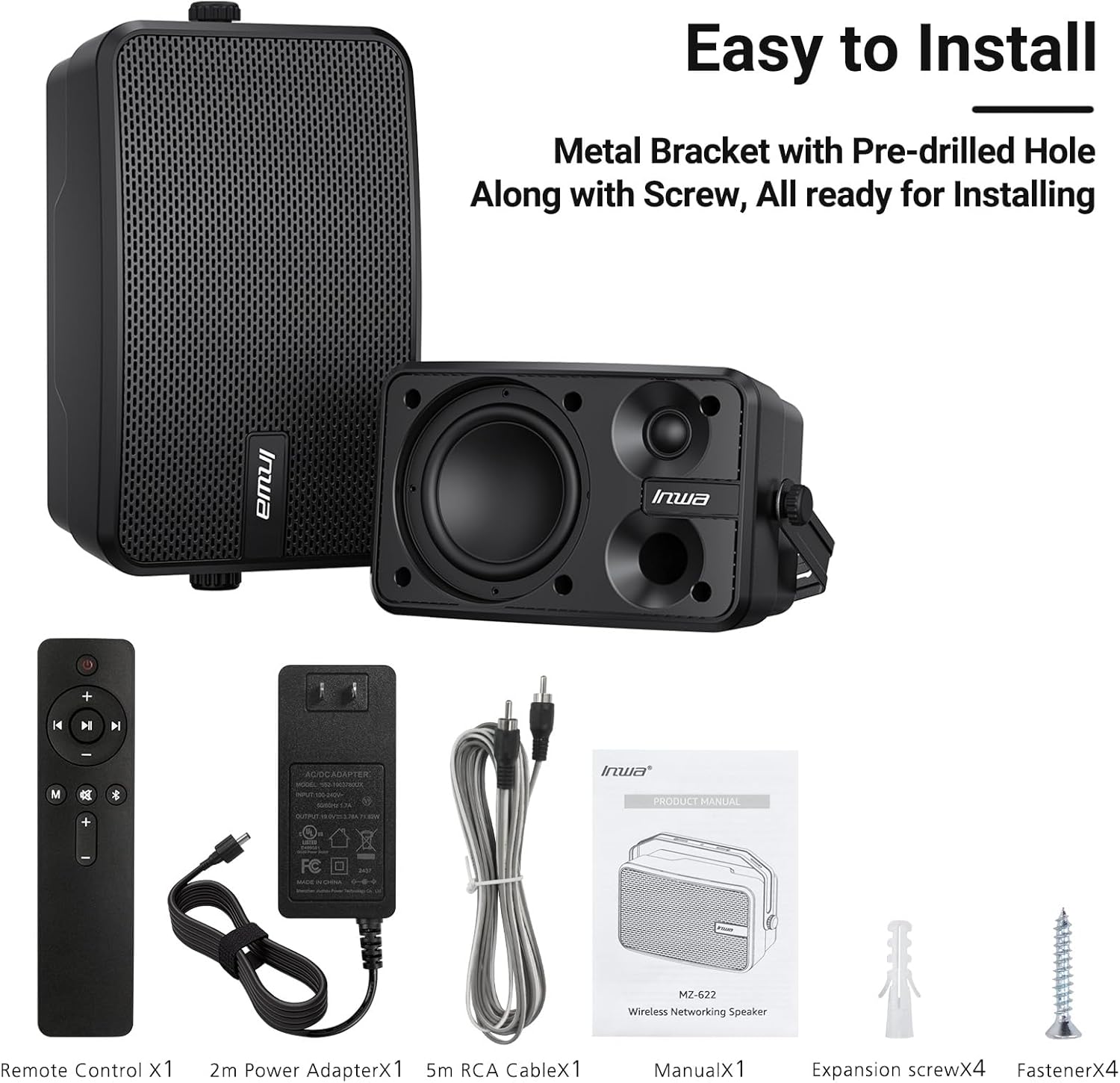
Image: All included components of the Inwa MZ-622 speaker system.
3. Arahan Persediaan
3.1 Menyambung Pembesar Suara
The Inwa MZ-622 system consists of one active speaker and one passive speaker. The active speaker contains the amplifier and controls, while the passive speaker connects to the active speaker.
- Connect the Passive Speaker: Use the provided RCA cable to connect the passive speaker to the active speaker. Ensure a secure connection.
- Sambungkan Kuasa: Plug the 12V DC power adapter into the active speaker's power input, then plug the adapter into a power outlet.
- Hidupkan kuasa: After connecting the power, the active speaker will automatically power on and enter Bluetooth mode, indicated by a flashing blue light.

Imej: Terperinci view of the rear connections for the active and passive speakers.
3.2 Sambungan Sumber Audio
The speakers support both Bluetooth wireless streaming and wired auxiliary input.
3.2.1 Sambungan Bluetooth
- Ensure the active speaker is powered on and the blue indicator light is flashing, indicating Bluetooth pairing mode.
- On your smartphone, tablet, or PC, enable Bluetooth and search for available devices.
- Select "Inwa MZ-622" (or similar name) from the list to pair. Once paired, the blue light will become solid.

Image: Illustration of Bluetooth 5.2 connectivity with a mobile device.
3.2.2 Auxiliary (AUX) Input Connection
- Connect one end of the provided 3.5mm auxiliary input cable to your external device (e.g., mobile phone, laptop, TV).
- Connect the other end of the 3.5mm auxiliary input cable to the AUX IN port on the active speaker.
- Press the 'M' button on the remote control to switch to AUX input mode. The indicator light on the active speaker will turn red.

Image: Connection diagram for AUX input with various devices.
3.3 Video Guide: Connection Method for MZ-622 Active + Passive Speakers
Video: A step-by-step guide demonstrating how to connect the active and passive Inwa MZ-622 speakers, including power and audio cables.
4. Arahan Operasi
The Inwa MZ-622 speakers can be easily operated using the included remote control. The remote control primarily functions with the active speaker.
4.1 Fungsi Kawalan Jauh
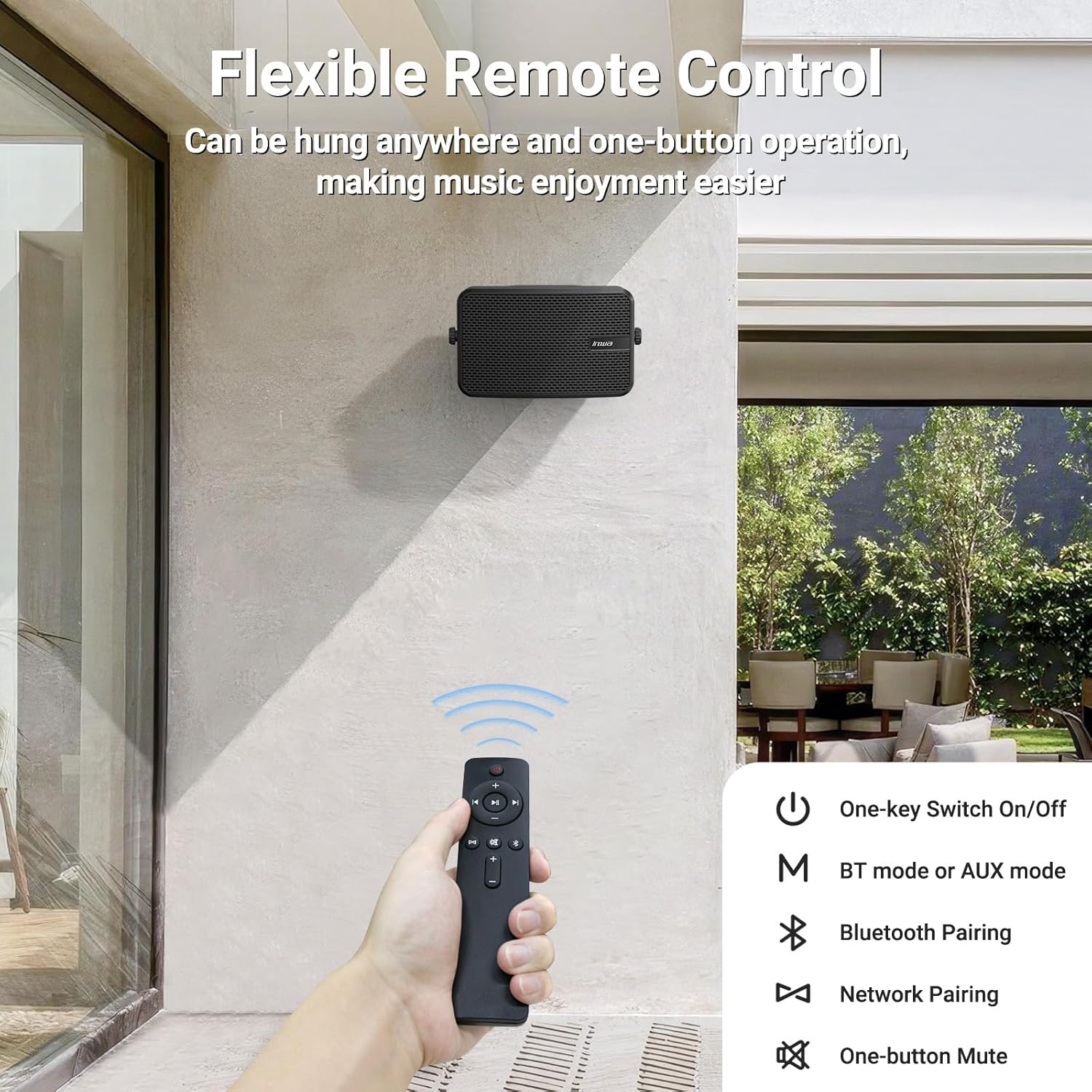
Image: The remote control for the Inwa MZ-622 speakers.
- Butang Kuasa (⏻): Turns the speaker system on or off.
- Butang Mod (M): Switches between Bluetooth mode (blue indicator light) and AUX input mode (red indicator light).
- Bluetooth Pairing Button (Ⓘ): Memulakan mod berpasangan Bluetooth.
- Kelantangan Naik (+): Meningkatkan kelantangan.
- Perlahankan suara (-): Mengurangkan kelantangan.
- Mute Button (🔇): Membisukan atau menyahredamkan audio.
- Butang Main/Jeda (⏸): Plays or pauses audio in Bluetooth mode.
- Previous Track (⏮): Skips to the previous track in Bluetooth mode.
- Next Track (⏭): Skips to the next track in Bluetooth mode.
Nota: In AUX input mode, track control buttons (Play/Pause, Previous, Next) on the remote are disabled as audio control is managed by the connected external device.
5. Penempatan dan Pemasangan
The Inwa MZ-622 speakers are designed for versatile placement, both indoors and outdoors. Their compact size (9.41"W x 6.54"D x 4.61"H) and included mounting accessories make installation straightforward.
5.1 Outdoor Placement Considerations
While the speakers are weatherproof and can withstand splashes and light rain, it is recommended to install them in locations that offer some protection from direct, heavy downpours or prolonged exposure to harsh elements. Ideal locations include:
- Under a patio cover
- On the underside of a porch roof
- Within a gazebo or outdoor bar area
- Inside a garage or small workshop

Image: The weatherproof construction of the Inwa speaker.
5.2 Arahan Pemasangan
The speakers come with metal brackets and pre-drilled holes for easy wall mounting. Use the provided expansion and fastener screws for secure installation.
- Pilih Lokasi: Select a suitable mounting location, considering sound dispersion and protection from extreme weather.
- Tandakan Lubang: Hold the speaker bracket against the wall and mark the positions for drilling.
- Lubang gerudi: Drill pilot holes at the marked positions. Insert expansion screws if necessary for added stability.
- Kurungan Selamat: Attach the speaker bracket to the wall using the fastener screws.
- Lampirkan Pembesar Suara: Mount the speaker onto the secured bracket. Adjust the angle as desired for optimal sound direction.

Imej: Cthample of outdoor wall mounting.
6. Spesifikasi
| Ciri | Perincian |
|---|---|
| Nama Model | MZ-622 |
| Jenis Pembesar Suara | Luar |
| Kuasa Output Maksimum Pembesar Suara | 400 Watt |
| Teknologi Ketersambungan | Bantu, Bluetooth |
| Teknologi Komunikasi Tanpa Wayar | Bluetooth |
| Versi Bluetooth | 5.2 |
| Mod Keluaran Audio | Stereo |
| Konfigurasi Saluran Bunyi Sekeliling | 2.0 |
| Diameter Woofer | 4 Inci |
| Saiz Tweeter | 1 inci |
| bahan | Akrilonitril Butadiena Stirena (ABS) |
| Adakah Kalis Air | betul |
| Dimensi Produk | 6.54"D x 9.41"W x 4.61"H |
| Berat Barang | 7.78 paun |
| Sumber Kuasa | Elektrik Bertali |
| Kaedah Kawalan | Jauh |
7. Penyelenggaraan
To ensure the longevity and optimal performance of your Inwa MZ-622 speakers, follow these maintenance guidelines:
- Pembersihan: Lap penutup pembesar suara dengan kain lembut,amp cloth. Avoid using harsh chemicals or abrasive cleaners, as these can damage the ABS material and mesh grille.
- Perlindungan Cuaca: Although weatherproof, it is advisable to protect the speakers from extreme weather conditions such as heavy storms, prolonged direct sunlight, or freezing temperatures when not in use for extended periods.
- Pengurusan Kabel: Ensure all cables are securely connected and not under strain. Periodically check cables for any signs of wear or damage.
- Storan: If storing the speakers for a long time, disconnect them from power, clean them, and store them in a cool, dry place.
8. Penyelesaian masalah
If you encounter issues with your Inwa MZ-622 speakers, refer to the following common problems and solutions:
| Masalah | Kemungkinan Punca | Penyelesaian |
|---|---|---|
| No power/Speaker not turning on | Penyesuai kuasa tidak disambungkan atau rosak. | Ensure the 12V DC power adapter is securely connected to the active speaker and a working power outlet. Test the outlet with another device. |
| Tiada suara dari pembesar suara | Volume too low; incorrect input mode; cables loose; device not playing audio. | Increase volume on both the speaker and the connected device. Press the 'M' button on the remote to cycle through modes (Bluetooth/AUX) until the correct mode is selected. Check all audio cables (RCA, AUX) for secure connections. Ensure your audio source is playing. |
| Bluetooth tidak berpasangan | Pembesar suara tidak dalam mod berpasangan; peranti Bluetooth dimatikan; gangguan. | Ensure the active speaker's blue indicator light is flashing. Turn Bluetooth off and on again on your device. Move closer to the speaker. Disconnect other Bluetooth devices from your source. |
| Alat kawalan jauh tidak berfungsi | Battery low/dead; remote out of range; line of sight blocked. | Replace the remote control battery. Ensure you are within range and have a clear line of sight to the active speaker. |
| Audio yang diputarbelitkan | Volume too high; poor audio source quality; damaged cables. | Reduce the volume on both the speaker and the audio source. Test with a different audio source or cable. |
9. Waranti dan Sokongan
The Inwa MZ-622 speakers come with a limited warranty. For specific warranty terms and conditions, please refer to the warranty information provided with your purchase or contact Inwa customer support.
For technical assistance, troubleshooting, or any other inquiries, please visit the official Inwa website or contact their customer service department. Contact details can typically be found in the product packaging or on the manufacturer's webtapak.