
FLUKE 5540A
Fluke 5540A High-Performance Multi-Product Calibrator User Manual
Model: 5540A
pengenalan
The Fluke 5540A High-Performance Multi-Product Calibrator is designed to provide the highest accuracy in calibrating a wide range of electrical and electronic test equipment. It supports the broadest range of power loads and excels in calibrating the most demanding loads. This calibrator is capable of achieving a 4:1 accuracy ratio (TUR) or better when calibrating common benchtop 6.5-digit multimeters.
This manual provides essential information for the safe and effective operation, maintenance, and troubleshooting of your Fluke 5540A calibrator. Please read this manual thoroughly before operating the device.
Ciri-ciri Utama
- Achieves a 4:1 accuracy ratio (TUR) or better for calibrating common benchtop 6.5-digit multimeters.
- Continuous current output of 30 A (without duty cycle) and synthetic inductance function.
- Easy connection and wide temperature range with various thermocouple types and new thermocouple connectors.
- Current output expandable up to 6000A when used with the 52120A Transconductance Amplifier and appropriate coils.
- Capable of calibrating high-current devices such as Rogowski coils.

Image: The Fluke 5540A Multi-Product Calibrator, emphasizing its versatility to handle diverse measurement instruments and its industry-leading calibration accuracy. It also highlights efficiency in quality control and cost reduction.
Persediaan
Before setting up the Fluke 5540A, ensure you have a stable power source and a clean, dry environment. Place the calibrator on a sturdy, level surface with adequate ventilation around the unit.
Sambungan Kuasa
- Connect the supplied power cord to the AC inlet on the rear panel of the calibrator.
- Palamkan hujung kord kuasa yang lain ke dalam salur keluar AC yang dibumikan.
- Ensure the power switch is in the OFF position before connecting to the power supply.
Pemeriksaan Awal
Upon unpacking, inspect the calibrator for any signs of physical damage. If any damage is observed, do not attempt to operate the unit and contact Fluke customer support immediately.
Arahan Operasi
The Fluke 5540A features an intuitive interface designed for ease of use. Its touch operation and advanced automation functions significantly reduce working time and improve productivity.
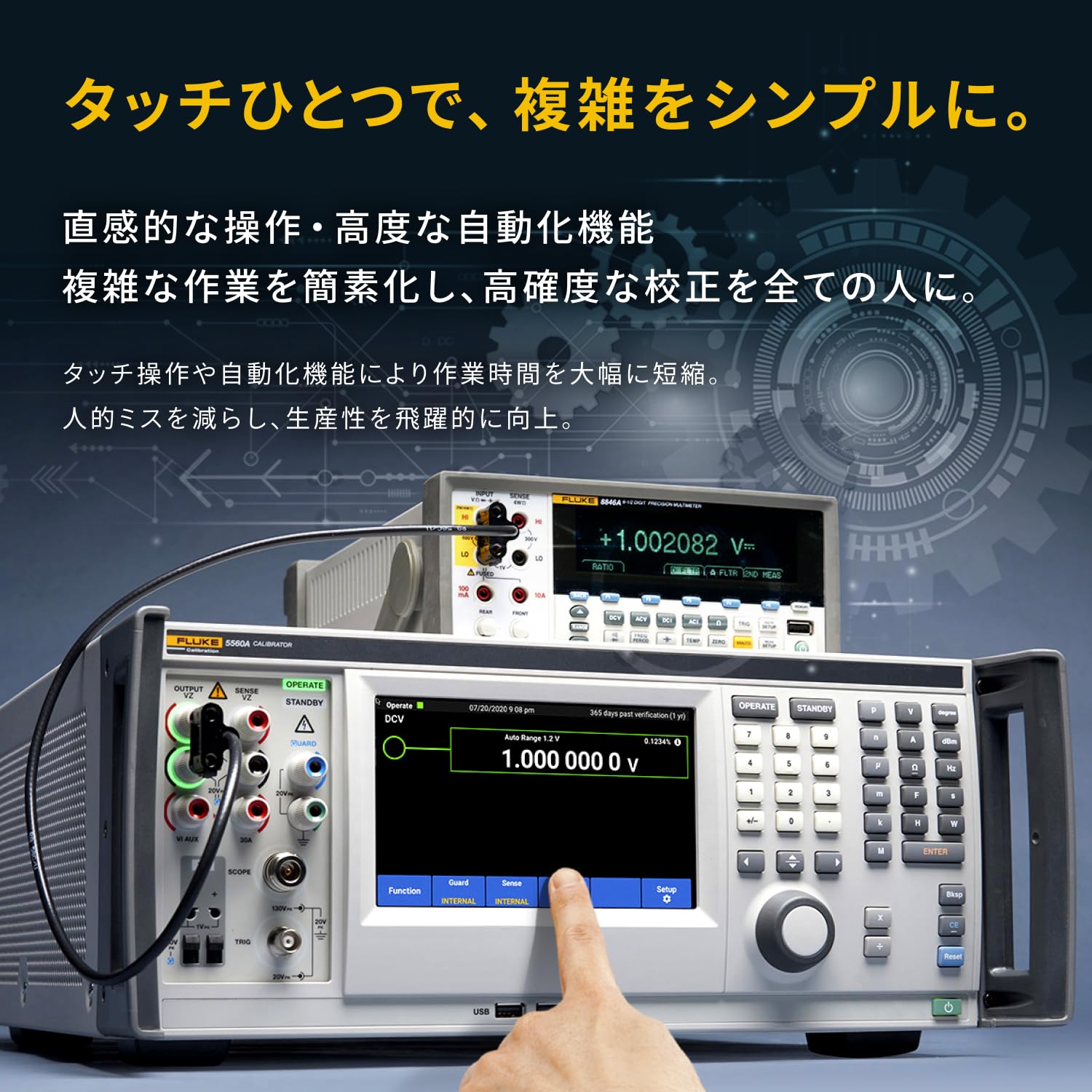
Image: A close-up of the Fluke 5540A's display, showing a hand interacting with the touchscreen interface. This illustrates the intuitive operation and advanced automation features that simplify complex tasks.
Operasi Asas
- Press the power button to turn on the calibrator.
- Allow the unit to warm up for the recommended period (refer to specifications for optimal performance).
- Select the desired output function (e.g., DC Voltage, AC Current) using the front panel controls or touchscreen.
- Adjust the output value and range as required for your calibration task.
- Connect the device under test (DUT) to the appropriate output terminals.
- Initiate the calibration process according to the DUT's specifications.
Fungsi Lanjutan
The 5540A supports various advanced functions, including synthetic inductance and high-current calibration capabilities. For detailed instructions on these functions, refer to the comprehensive user manual available on the Fluke webtapak atau hubungi sokongan teknikal.
Penyelenggaraan
Proper maintenance ensures the longevity and accuracy of your Fluke 5540A calibrator.
Pembersihan
- Disconnect the calibrator from the power source before cleaning.
- Gunakan yang lembut, damp cloth with a mild detergent to clean the exterior surfaces.
- Do not use abrasive cleaners or solvents that could damage the finish or display.
- Ensure no liquid enters the ventilation openings or ports.
Penentukuran
To maintain its specified accuracy, the Fluke 5540A requires periodic calibration by qualified personnel. Fluke recommends annual calibration. Refer to the official Fluke documentation for detailed calibration procedures and recommended service intervals.

Image: A computer monitor displaying a calibration certificate, with the Fluke 5540A calibrator in the foreground. This illustrates the product's adherence to international calibration standards and its proven accuracy.
Menyelesaikan masalah
This section provides solutions to common issues you might encounter with your Fluke 5540A calibrator. For more complex problems, contact Fluke technical support.
| Masalah | Kemungkinan Punca | Penyelesaian |
|---|---|---|
| Unit tidak dihidupkan. | No power supply; Power cord not connected; Blown fuse. | Check power outlet; Ensure power cord is securely connected; Check and replace fuse if necessary (refer to service manual). |
| Incorrect output readings. | Incorrect settings; Unit not warmed up; Calibration required. | Verify function and range settings; Allow sufficient warm-up time; Schedule professional calibration. |
| Paparan kosong atau beku. | Software error; Hardware malfunction. | Restart the unit; If problem persists, contact technical support. |
Spesifikasi
The Fluke 5540A Multi-Product Calibrator offers robust performance for a variety of calibration needs.
| Atribut | Nilai |
|---|---|
| Pengeluar | FLUKE |
| Nombor Bahagian | FLUKE-5540A |
| Berat Produk | 250 g |
| Dimensi Pakej | 50 x 40 x 30cm; 250g |
| Saiz | 5540A |
| Ketepatan Pengukuran | +/-0.05 |
| Komponen yang Disertakan | Multi-product calibrator, ISO 17025 calibration certificate with international traceability and data. |
| Penggunaan Bateri | Tidak |
| ASIN | B0DKXV8KSK |
| Tarikh Tersedia Pertama | 2024/10/25 |

Image: A comparison table detailing the specifications of the Fluke 5560A, 5550A, and 5540A models, including DC voltage accuracy, AC/DC current output, and other features relevant to benchtop multimeters and oscilloscopes.
Support and Certification
Fluke is committed to providing comprehensive support for its products and ensuring the highest standards of quality and traceability.

Image: Certifications displayed, including ISO/IEC 17025 and NIST Traceable Certification, affirming Fluke's commitment to international standards and reliability. This ensures traceable calibration capabilities and robust quality management.
Sokongan Teknikal
Fluke offers expert technical support from experienced engineers to assist with any operational or technical queries. For assistance, please visit the official Fluke support website or contact your local Fluke representative.
Pendidikan dan Latihan
Fluke provides educational programs, from basic to advanced levels, to help users maximize the utility of their calibrators. These programs are designed to enhance user proficiency and understanding of calibration principles.
Pensijilan
The Fluke 5540A is supplied with an ISO 17025 calibration certificate, ensuring international traceability and adherence to rigorous quality standards. This certification guarantees the accuracy and reliability of your product.
Image: An abstract image representing continuous evolution and investment in the future, with concepts such as functional expansion through physical module additions, rapid response to new calibration standards, and long-term support for the latest calibration requirements.
Ask a question about this manual
Ask about setup, troubleshooting, compatibility, parts, safety, or missing instructions. Manuals+ will review the question and use this page’s manual context to help answer it.