1. Pengenalan
This manual provides essential information for the installation, operation, and maintenance of your new Generic replacement laptop keyboard. This keyboard is compatible with various DELL Latitude and Precision laptop models, including E5520, E5520M, E5530, E6520, E6530, E6540, M2800, M4600, M4700, M4800, M6600, M6700, and M6800. Please read these instructions carefully before proceeding with installation or use.
2. Langkah-langkah Keselamatan
- Always disconnect the laptop from its power adapter and remove the battery before performing any internal hardware installation or replacement.
- Use appropriate tools to avoid damaging the laptop components.
- Handle the new keyboard by its edges to prevent damage to the keys or internal components.
- Ensure static electricity is discharged before handling sensitive electronic components.
3. Panduan Pemasangan
Replacing a laptop keyboard requires careful handling. Refer to your specific laptop model's service manual for detailed disassembly instructions. The general steps are outlined below:
- Sediakan Laptop: Power off your laptop, disconnect the AC adapter, and remove the battery.
- Akses Papan Kekunci: Depending on your laptop model, you may need to remove screws from the bottom of the laptop, or release clips around the keyboard bezel. Some models require removing the palm rest or even the motherboard to access the keyboard connectors.
- Putuskan Sambungan Papan Kekunci Lama: Carefully detach the ribbon cables connecting the old keyboard to the motherboard. These usually have small latches that need to be flipped up.
- Remove Old Keyboard: Once disconnected, gently lift and remove the old keyboard.
- Pasang Papan Kekunci Baharu: Position the new keyboard into the keyboard tray.
- Connect Ribbon Cables: Carefully insert the ribbon cables of the new keyboard into their respective connectors on the motherboard and secure the latches. Ensure the cables are fully seated and not creased.
Imej 3.1: Bahagian bawah view of the replacement laptop keyboard. This image displays the main ribbon cable for key input, a smaller ribbon cable for the pointing stick (if applicable), and a circuit board. These components are crucial for connecting the keyboard to the laptop's motherboard.
- Pasang semula Komputer Riba: Reverse the disassembly steps to reassemble your laptop. Ensure all screws and clips are securely fastened.
- Papan Kekunci Ujian: Reinstall the battery and connect the AC adapter. Power on the laptop and test all keys, including function keys, backlight (if present), and the pointing stick (if present).
4. Arahan Operasi
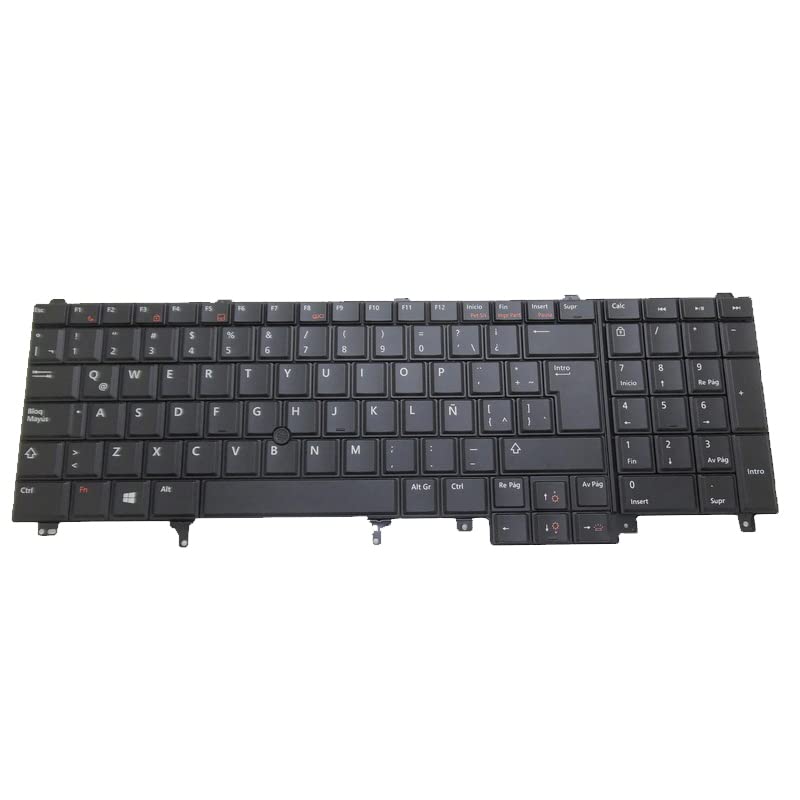
This replacement keyboard functions identically to the original keyboard it replaces. It features a standard QWERTY layout, a pointing stick, and backlighting for improved visibility in low-light conditions.
- Penaipan Standard: Use the keys as you would any standard keyboard.
- Kekunci Fungsi (Fn): The 'Fn' key, typically located in the bottom-left corner, can be used in combination with the F1-F12 keys to access special functions such as volume control, screen brightness, external display toggling, and keyboard backlight control. Refer to your laptop's user manual for specific Fn key combinations.
- Pointing Stick: The pointing stick (TrackPoint) located between the G, H, and B keys allows for precise cursor control. Use the associated mouse buttons below the spacebar for left and right clicks.
- Kawalan Lampu Latar: If your laptop supports it, the keyboard backlight can typically be toggled or adjusted using an Fn key combination (e.g., Fn + F10 or Fn + Right Arrow).
5. Penyelenggaraan
Proper maintenance can extend the life of your keyboard and ensure optimal performance.
- Pembersihan: Gunakan kain lembut dan tidak berbulu sedikit dampened with water or a mild cleaning solution to wipe the keycaps. For dust and debris between keys, use compressed air. Avoid spraying liquids directly onto the keyboard.
- Tumpahan: In case of a liquid spill, immediately power off the laptop, disconnect the power, remove the battery, and turn the laptop upside down to drain the liquid. Do not attempt to use the laptop until it is completely dry. Professional inspection is recommended after a significant spill.
- Elakkan Paksa: Do not apply excessive force to the keys or the pointing stick.
6. Penyelesaian masalah
If you encounter issues with your new keyboard, consider the following troubleshooting steps:
- Kunci Tidak Menjawab:
- Ensure all ribbon cables are securely connected to the motherboard. Power off, disconnect, and re-seat the cables.
- Mulakan semula komputer riba anda.
- Check for updated keyboard drivers from the DELL support webtapak untuk model komputer riba khusus anda.
- Lampu latar tidak berfungsi:
- Verify that your laptop model originally supported a backlit keyboard.
- Ensure the backlight ribbon cable (if separate) is properly connected.
- Try the Fn key combination to toggle the backlight (e.g., Fn + F10).
- Check BIOS/UEFI settings for keyboard backlight options.
- Pointing Stick Not Functioning:
- Ensure the pointing stick's ribbon cable is correctly connected.
- Check for updated pointing device drivers from the DELL support webtapak.
- Verify that the pointing stick is enabled in your laptop's settings or BIOS/UEFI.
If problems persist after these steps, contact customer support or a qualified technician.
7. Spesifikasi
| Jenis Produk | Laptop Replacement Keyboard |
| Pengeluar | Generik |
| Model yang Serasi | DELL Latitude E5520, E5520M, E5530, E6520, E6530, E6540; DELL Precision M2800, M4600, M4700, M4800, M6600, M6700, M6800 |
| Nombor Bahagian | PK130FH1D21, 07T437, 7T437 |
| Ciri-ciri | Backlit, Pointing Stick (TrackPoint), Latin America Layout (LA) |
| Dimensi Produk | 11.81 x 7.87 x 3.94 inci |
| Berat Barang | 2.2 paun |
| ASIN | B0DKY82SN2 |
| Tarikh Mula-mula Tersedia | 25 Oktober 2024 |
8. Maklumat Waranti
Produk ini disertakan dengan a Waranti 90 hari from the date of purchase. This warranty covers manufacturing defects. It does not cover damage caused by improper installation, misuse, accidents, or unauthorized modifications. Please retain your proof of purchase for warranty claims.
9. Sokongan
For further assistance, technical support, or warranty claims, please contact the seller directly through the platform where the purchase was made. It is recommended to check your registered email after payment for any specific instructions from the seller regarding support or product details.


