
1. Pengenalan
The MESTEK EMF Meter (Model EMF02R-YW) is a multi-functional device designed to detect and measure various types of radiation and environmental factors. It integrates five key measurement capabilities: Electromagnetic Field (MF), Electric Field (EF), Radiofrequency (RF) radiation, and ambient Temperature and Humidity. This meter provides quick and accurate readings, making it suitable for assessing radiation levels in homes, offices, and other environments.
Apa yang ada dalam Kotak
- 1x MESTEK EMF Meter
- 1x Kabel Pengecas USB Jenis-C
- Beg Penyimpanan 1x
- 1x Manual Pengguna (dokumen ini)

Rajah 1.1: Kandungan Pakej
2. Ciri-ciri Utama
- Pengukuran 5-dalam-1: Simultaneously detects Electromagnetic Field (MF), Electric Field (EF), Radiofrequency (RF) radiation, and measures ambient Temperature and Humidity.
- Julat Frekuensi Tinggi: RF detection up to 8GHz, suitable for identifying radiation from base stations and various wireless devices.
- Large VA Color LCD Display: Provides clear, intuitive readings with a three-color analog bar display for quick radiation level assessment (Green: Low, Yellow: Moderate, Red: High).
- Penggera Boleh Didengar dan Visual: Alerts users with sound and screen indicators when radiation levels exceed preset safety thresholds. The audible alarm can be muted.
- Data Functions: Includes Data Hold, Maximum Value (MAX), and Average Value (AVG) display for comprehensive analysis.
- Reka Bentuk Mesra Pengguna: Features a low battery reminder, auto-power off after 15 minutes of inactivity, and unit switching for temperature (°C/°F) and magnetic field (mG/µT).
- Tahan lasak dan mudah alih: Compact size with soft rubber casing for drop resistance, making it easy to carry and operate with one hand.

Figure 2.1: 5-in-1 Function Modes

Figure 2.2: Large VA Color LCD Display
3. Persediaan
3.1 Mengecas Peranti
The MESTEK EMF Meter is equipped with a rechargeable Lithium-Ion battery. Before first use, or when the low battery indicator appears, charge the device using the provided USB Type-C cable.
- Connect the USB Type-C cable to the charging port at the bottom of the meter.
- Sambungkan hujung kabel yang satu lagi ke penyesuai kuasa USB standard (tidak disertakan) atau port USB komputer.
- The charging indicator on the screen will show the charging status. A full battery icon indicates charging is complete.

Figure 3.1: Charging the EMF Meter

Figure 3.2: Low Battery Indicator
3.2 Menghidupkan/Mematikan
- Untuk menghidupkan: Tekan dan tahan butang Butang kuasa (
 ) located below the screen.
 - Untuk mematikan kuasa: Tekan dan tahan butang Butang kuasa again. The device will also automatically power off after 15 minutes of inactivity to conserve battery.
4. Arahan Operasi
4.1 Fungsi Butang
- Butang Kuasa (): Press and hold to power on/off.
- Butang SEL: Short press to switch between Electric Field (E-field) and Magnetic Field (H-field) measurement modes.
- Butang AVG/MAX: Short press to cycle through current value, maximum value (MAX), and average value (AVG) display.
- Butang HOLD: Short press to freeze the current reading on the display. Press again to release.
- Butang RF: Short press to enter Radiofrequency (RF) measurement mode. Press again to exit RF mode and return to EF/MF measurement.
- Butang Redam (Bell icon): Short press to toggle the audible alarm on or off.
4.2 Measurement Modes and Display
The meter's display shows real-time readings, an analog bar, and environmental data. The analog bar changes color to indicate radiation intensity:
- hijau: Low radiation level.
- Kuning: Moderate radiation level.
- merah: High radiation level, indicating potential concern.

Figure 4.1: Three-Color Analog Display Indication
4.2.1 Electric Field (EF) Measurement
In EF mode, the meter measures electric field strength in V/m. Press the SEL button until 'E-field' is indicated on the display. Common sources include power lines, electrical appliances, and wiring.
4.2.2 Magnetic Field (MF) Measurement
In MF mode, the meter measures magnetic field strength in mG or µT. Press the SEL button until 'H-field' is indicated. You can switch between mG and µT units. Common sources include motors, transformers, and high-current devices.
4.2.3 Radiofrequency (RF) Measurement
In RF mode, the meter measures radiofrequency power density in µW/cm². Press the RF button to enter this mode. The meter can detect frequencies from 30 MHz to 8 GHz. Common sources include Wi-Fi routers, mobile phones, cell towers, and microwave ovens.

Figure 4.2: RF Measurement near a Wi-Fi Router

Figure 4.3: EMF Measurement near Appliances
4.2.4 Pengukuran Suhu dan Kelembapan
The meter continuously displays ambient temperature in °C or °F and relative humidity in %. Use the appropriate button (refer to the full manual for specific button if not SEL) to switch between Celsius and Fahrenheit.
4.3 Fungsi Penggera
When the measured radiation value exceeds the safety threshold, the meter will activate both an audible alarm (beeping sound) and a visual alarm (screen flashing, analog bar turning red). This alerts you to potentially high radiation areas.
- To mute the audible alarm: Press the Butang bisu (bell icon). The visual alarm will remain active.
- To unmute: Press the Butang bisu sekali lagi.
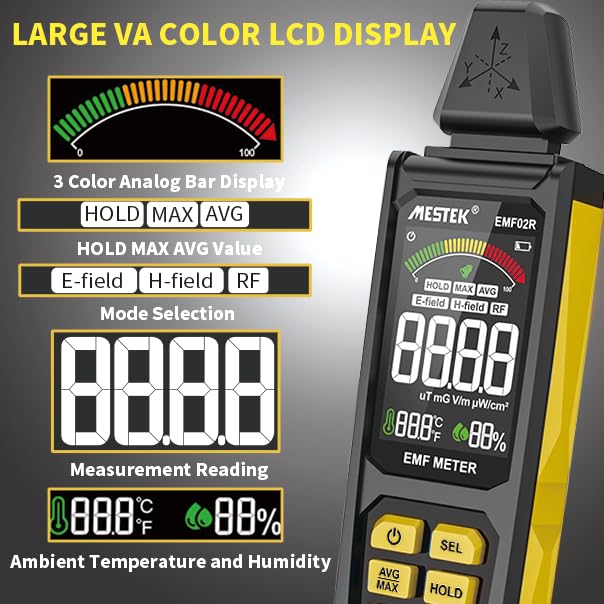
Figure 4.4: Sound-Light Alarm Indication
4.4 Analog Digital Comparison Table
The following table provides a general guide for interpreting the analog bar display and corresponding digital values for different radiation types. These are indicative thresholds and may vary based on specific regulations or personal sensitivity.
| Unit Analog Display | RF (µW/cm²) | EF (V/m) | MF (mG) | MF (µT) |
|---|---|---|---|---|
| Hijau (Rendah) | 0.0 ~ 9.9 | 0 ~ 9 | 0.0 ~ 0.9 | 0.00 ~ 0.09 |
| Yellow (Moderate) | 10 ~ 39.9 | 10 ~ 399 | 1.0 ~ 39.9 | 0.10 ~ 3.99 |
| Merah (Tinggi) | 40 ~ 9999 | 400 ~ 999 | 40.0 ~ 199.9 | 4.00 ~ 19.99 |
Figure 4.5: Analog Digital Comparison Table for Radiation Levels
5. Aplikasi
The MESTEK EMF Meter is a versatile tool for various applications:
- Home and Office: Identify radiation sources from household appliances (TVs, computers, printers, microwave ovens, refrigerators) and office equipment.
- Pemantauan Alam Sekitar: Detect high-frequency radiation signals near base stations, mobile phone antenna masts, and high-voltagkabel e.
- Keselamatan Diri: Assess potential exposure to harmful electromagnetic fields in your living and working spaces.
- Penggunaan Khusus: Can be used for ghost hunting or identifying unusual electromagnetic phenomena.
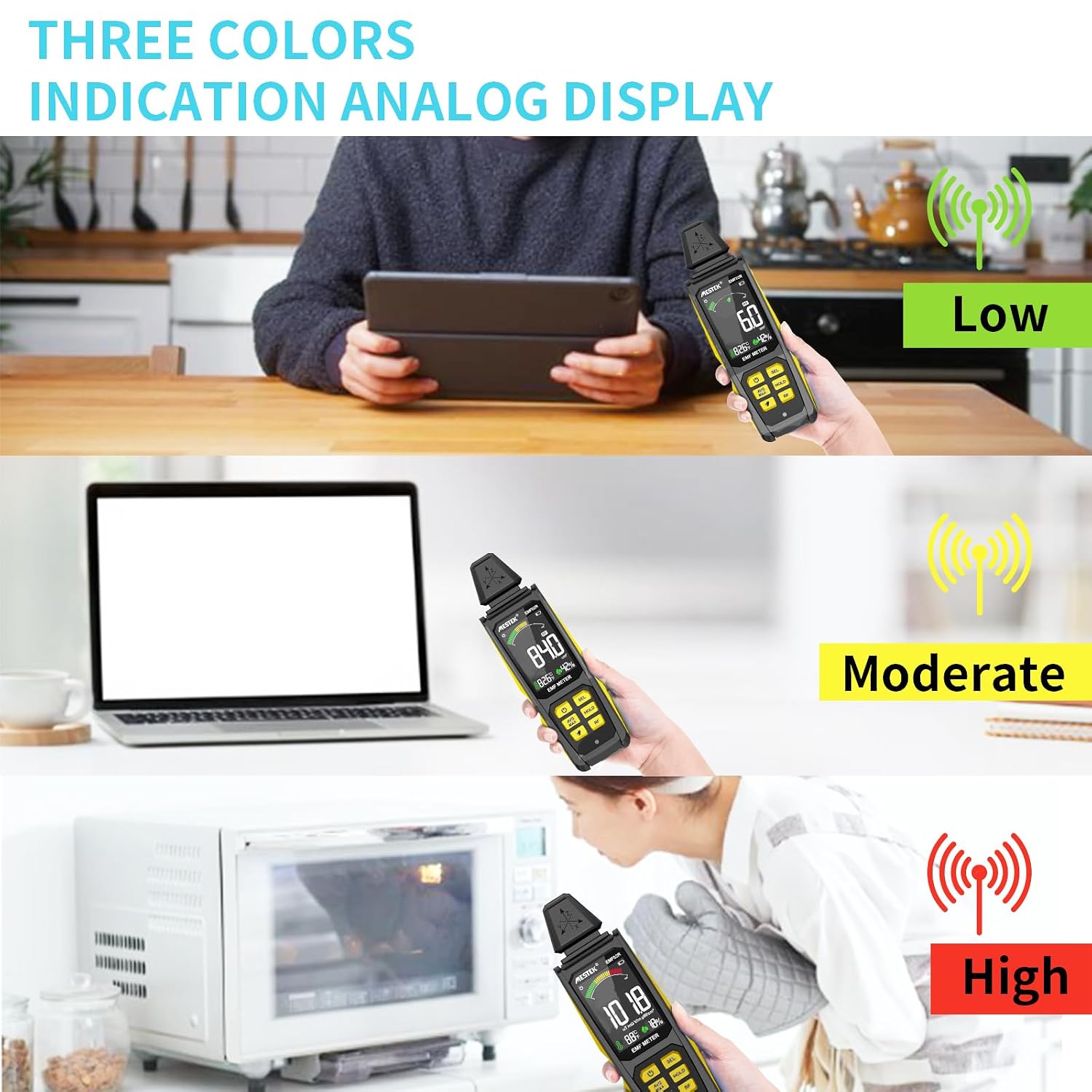
Figure 5.1: Widely Used EMF Radiation Tester

Figure 5.2: Identifying High Radiation Sources

Figure 5.3: Suitable for Various Users
6. Penyelenggaraan
6.1 Pembersihan
To clean the device, use a soft, dry cloth. Do not use abrasive cleaners, solvents, or immerse the device in water. Ensure the device is powered off before cleaning.
6.2 Penyimpanan
When not in use for extended periods, store the meter in its provided storage bag in a cool, dry place, away from direct sunlight and extreme temperatures. Ensure the battery is partially charged before storage to prolong its lifespan.
6.3 Penjagaan Bateri
The integrated Lithium-Ion battery should be recharged regularly, even if the device is not frequently used, to maintain battery health. Avoid completely draining the battery for prolonged periods.
7. Penyelesaian masalah
If you encounter issues with your MESTEK EMF Meter, refer to the following common problems and solutions:
- Peranti tidak dihidupkan:
- Ensure the battery is charged. Connect the device to a power source using the USB Type-C cable.
- Press and hold the Power button for a few seconds to ensure it registers.
- Bacaan tidak tepat atau tidak konsisten:
- Ensure there are no strong interfering electromagnetic sources nearby that are not the target of measurement.
- Check if the device is in the correct measurement mode (EF, MF, or RF) for the type of radiation you are trying to detect.
- Move the device slowly and steadily during measurement.
- Audible alarm not working:
- Press the Mute button (bell icon) to ensure the alarm is not muted.
- Check if the radiation level is above the alarm threshold.
- Skrin kosong atau beku:
- Try pressing the HOLD button to see if the display was simply frozen.
- Power off the device and restart it. If the issue persists, ensure the battery is charged.
Jika langkah ini tidak menyelesaikan isu, sila hubungi sokongan pelanggan.
8. Spesifikasi
| Ciri | Spesifikasi |
|---|---|
| Nombor Model | MESTEK EMF02R-YW |
| Pengeluar | MESTEK |
| Dimensi | 20.32 x 6.35 x 3.3 cm (8 x 2.5 x 1.3 inci) |
| Berat badan | 220 g |
| Jenis Bateri | 1x Litium Ion (termasuk) |
| Ketepatan Pengukuran | +/-1 |
| MF Test Range | 0.1-99.9 mG / 0.01-9.99 µT |
| EF Test Range | 1-999 V/m |
| RF Test Range | 0.0-9999 µW/cm² (30 MHz - 8 GHz) |
| Julat Suhu | °C/°F (32-122°F) |
| Julat Kelembapan | 0-90% RH |
| Auto Matikan | Selepas 15 minit tidak aktif |
| Paparan | Large VA Color LCD with Analog Bar |
9. Waranti dan Sokongan
MESTEK provides a Waranti 24 bulan for this product, covering manufacturing defects and malfunctions under normal use. Additionally, lifetime technical support is available to assist you with any questions or issues you may encounter.
For warranty claims, technical assistance, or any product-related inquiries, please contact MESTEK customer service through the platform where you purchased the product or refer to the contact information provided in your product packaging.
Kami komited untuk menyediakan produk berkualiti tinggi dan perkhidmatan pelanggan yang cemerlang. Kepuasan anda adalah keutamaan kami.