
1. Pengenalan
This manual provides detailed instructions for setting up, operating, and maintaining your Mercusys MR27BE BE3600 Dual-Band Wi-Fi 7 Router. The MR27BE is designed to deliver high-speed wireless connectivity with Wi-Fi 7 technology, featuring dual-band operation and multiple high-speed Ethernet ports for a robust home or small office network.
2. Kandungan Pakej
Sahkan bahawa pakej anda mengandungi item berikut:
- Mercusys MR27BE Wi-Fi 7 Router
- Penyesuai Kuasa
- Kabel Ethernet
- Panduan Pemasangan Pantas

This image displays the retail packaging for the Mercusys MR27BE BE3600 Dual Band Wi-Fi 7 Router, highlighting key features and branding.
3. Fizikal Overview
3.1 Panel Belakang
The rear panel of the MR27BE router features various ports and buttons for connectivity and control.
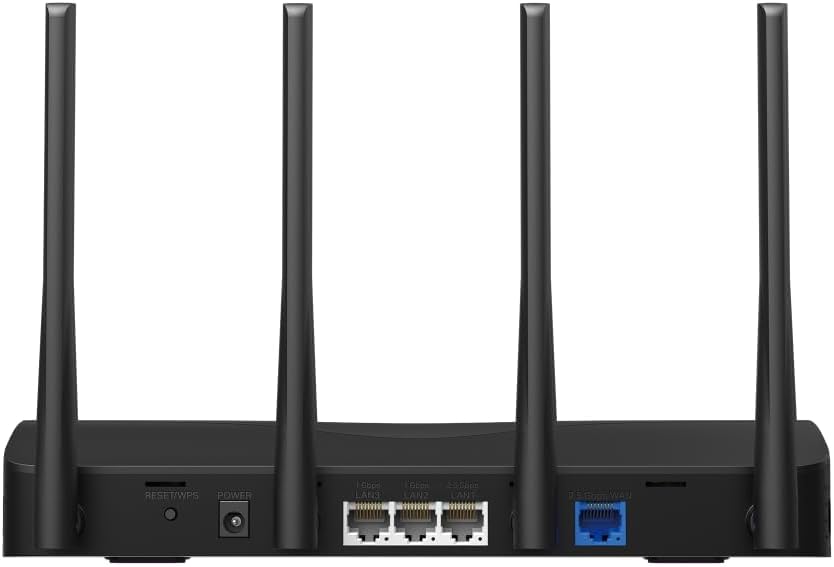
This image displays the rear panel of the MR27BE router, highlighting the 2.5 Gbps WAN port (blue), 2.5 Gbps LAN port, two 1 Gbps LAN ports, the Reset/WPS button, and the power input.
- Pelabuhan Kuasa: Sambungkan penyesuai kuasa yang disediakan di sini.
- Butang Tetapkan Semula/WPS: Press and hold for 1 second to activate WPS. Press and hold for more than 5 seconds to factory reset the router.
- LAN Ports (1 Gbps): Two Gigabit Ethernet ports for connecting wired devices.
- LAN Port (2.5 Gbps): One 2.5 Gigabit Ethernet port for high-speed wired connections.
- WAN Port (2.5 Gbps): One 2.5 Gigabit Ethernet port for connecting to your modem or internet service provider's (ISP) network.
3.2 Ciri-ciri Utama
The MR27BE router incorporates advanced features for enhanced network performance.

This graphic illustrates key features of the MR27BE, including its Wi-Fi 7 capabilities, the presence of 2x 2.5 Gbps ports and 2x Gigabit ports, four omni-directional high-gain antennas, EasyMesh compatibility, and easy app control.

This image demonstrates the speed performance of the MR27BE router, indicating up to 2880 Mbps on the 5 GHz band and 688 Mbps on the 2.4 GHz band, showcasing its Wi-Fi 7 capabilities.
4. Persediaan
4.1 Sambungan Perkakasan
- Matikan: Disconnect the power from your modem (if applicable).
- Sambungkan Port WAN: Connect one end of the Ethernet cable to your modem's Ethernet port and the other end to the blue 2.5 Gbps WAN port on your MR27BE router.
- Sambungkan Kuasa: Connect the power adapter to the router's Power port and plug it into an electrical outlet.
- Hidupkan kuasa: Wait for the router to power on completely. The LED indicator should turn solid green.
- Sambungkan Peranti (Pilihan): For wired devices, connect an Ethernet cable from your computer or other device to one of the yellow LAN ports on the router.

This image shows the 2.5 Gbps ports of the MR27BE router in use, illustrating connections for 2.5 Gbps wired devices and multi-gig internet access, emphasizing high-performance networking.
4.2 Tatarajah Awal
You can configure your router using the MERCUSYS app or a web pelayar.
Using the MERCUSYS App:
- Download the MERCUSYS app from the App Store or Google Play.
- Connect your smartphone to the router's default Wi-Fi network (SSID and password are on the label at the bottom of the router).
- Open the MERCUSYS app and follow the on-screen instructions to complete the setup.
Menggunakan a Web pelayar:
- Connect your computer to the router via an Ethernet cable or the default Wi-Fi network.
- Buka a web pelayar dan taip
mwlogin.netor192.168.1.1ke dalam bar alamat. - Cipta kata laluan log masuk apabila diminta.
- Follow the Quick Setup wizard to configure your internet connection and Wi-Fi settings.
5. Mengendalikan Penghala
5.1 Menyambung Peranti
- Peranti Wayarles: Cari untuk your Wi-Fi network name (SSID) on your device and enter the Wi-Fi password you set during setup.
- Peranti Berwayar: Sambungkan kabel Ethernet daripada peranti anda ke mana-mana port LAN yang tersedia pada penghala.
5.2 Keserasian EasyMesh
The MR27BE router supports EasyMesh, allowing you to create a seamless whole-home Wi-Fi network by adding compatible EasyMesh range extenders or other routers.

This diagram visually explains how the EasyMesh system, compatible with the MR27BE router, can expand Wi-Fi coverage throughout an entire home, ensuring seamless connections.
To set up an EasyMesh network, refer to the instructions provided with your EasyMesh compatible devices or the MERCUSYS app.
5.3 Advanced Settings (via Web Antara muka)
Akses ke web antara muka (mwlogin.net) untuk mengkonfigurasi tetapan lanjutan seperti:
- Rangkaian Tetamu: Cipta rangkaian Wi-Fi berasingan untuk tetamu.
- Kawalan Ibu Bapa: Urus akses internet untuk peranti tertentu.
- Keselamatan Rangkaian: Configure firewall rules and access control.
- Mod Operasi: Switch between Router, Access Point, or Range Extender modes.
6. Penyelenggaraan
6.1 Kemas kini Firmware
Regularly updating the router's firmware ensures optimal performance and security. You can check for updates via the MERCUSYS app or the web interface under System Tools > Firmware Upgrade.
6.2 Restarting the Router
If you experience network issues, a simple restart can often resolve them. You can restart the router via the MERCUSYS app, the web interface, or by unplugging and replugging the power adapter.
6.3 Tetapan Semula Kilang
A factory reset will restore the router to its default settings. This can be done by pressing and holding the Reset/WPS button on the rear panel for more than 5 seconds until the LED blinks rapidly, or via the web interface under System Tools > Factory Defaults.
7. Penyelesaian masalah
7.1 Tiada Akses Internet
- Check all cable connections, especially the WAN port connection to your modem.
- Pastikan modem anda berfungsi dengan betul.
- Mulakan semula modem dan penghala anda.
- Sahkan tetapan internet anda dalam penghala web antara muka.
7.2 Isu Isyarat Wi-Fi
- Pastikan penghala diletakkan di lokasi pusat, jauh daripada halangan dan sumber gangguan (cth., ketuhar gelombang mikro, telefon tanpa wayar).
- Laraskan antena penghala untuk liputan optimum.
- Consider using EasyMesh compatible devices to extend coverage in larger homes.
7.3 Kata Laluan Wi-Fi atau Kata Laluan Log Masuk Terlupa
- Kata laluan Wi-Fi lalai terdapat pada label di bahagian bawah penghala.
- If you changed it and forgot, you will need to perform a factory reset to restore default settings, then reconfigure the router.
8. Spesifikasi
| Nama Model | MR27BE |
| Standard Tanpa Wayar | 802.11be (Wi-Fi 7) |
| Kelas Band Kekerapan | Dwi-Jalur |
| Pelabuhan WAN | 1x Port WAN 2.5 Gbps |
| Pelabuhan LAN | 1x 2.5 Gbps LAN Port, 2x 1 Gbps LAN Ports |
| Ciri Khas | EasyMesh Serasi |
| Dimensi Produk | 7.87 x 5.91 x 3.94 inci |
| Berat Barang | 2.23 paun |
| Komponen yang Disertakan | MR27BE, Power Adapter, instruction manual |
9. Sokongan
For technical support, warranty information, or further assistance, please visit the official Mercusys website or contact Mercusys customer support.
- Rasmi Mercusys Webtapak: www.mercusys.com
- Refer to the Quick Installation Guide for initial setup and contact details.