
1. Pengenalan
Thank you for choosing the JISULIFE FA13R Auto-Oscillating Clip-on Fan. This versatile fan is designed to provide personal cooling comfort in various settings, functioning as both a clip-on and a stand-up desk fan. With its powerful battery, multiple speed settings, and oscillation features, it offers a convenient and efficient cooling solution. Please read this manual carefully before use to ensure proper operation and maintenance.
2. Arahan Keselamatan
Untuk mengelakkan kerosakan pada produk atau kecederaan pada diri sendiri dan orang lain, sila patuhi langkah berjaga-jaga keselamatan berikut:
- Jangan rendamkan kipas dalam air atau cecair lain.
- Keep the fan away from open flames, heat sources, and direct sunlight.
- Do not insert fingers or any objects into the fan grille while it is operating.
- Ensure the fan is placed on a stable surface when used as a stand-up fan, or securely clipped when used as a clip-on fan.
- Gunakan hanya kabel USB-A ke USB-C yang disediakan untuk pengecasan.
- Perkakas ini tidak dimaksudkan untuk digunakan oleh orang (termasuk kanak-kanak) yang kurang keupayaan fizikal, deria atau mental, atau kurang pengalaman dan pengetahuan, melainkan mereka telah diberi pengawasan atau arahan mengenai penggunaan perkakas oleh orang yang bertanggungjawab untuk keselamatan mereka.
- Do not attempt to disassemble, repair, or modify the fan. Contact customer support if service is required.
- Unplug the fan from the power source when not in use for extended periods or before cleaning.
3. Kandungan Pakej
Sila semak pakej untuk item berikut:
- JISULIFE FA13R Fan x1
- Kabel USB-A ke USB-C x1
- Manual Pengguna x1
4. Produk Lebihview
The JISULIFE FA13R fan features a robust design with multiple functionalities for enhanced user experience.

The JISULIFE FA13R fan in its stand-up configuration, showcasing its compact design and green color.
Ciri-ciri Utama:
- Dwi Fungsi: Can be used as a stand-up desk fan or a clip-on fan.
- Tetapan Kelajuan 5: Includes a Nature Wind Mode for gentle, fluctuating airflow.
- Auto-Oscillation: 90-degree horizontal oscillation for wider coverage.
- Putaran Menegak: Manual 25-degree vertical adjustment.
- Fungsi Pemasa: Set for 1, 2, or 4 hours.
- Operasi senyap: Equipped with a brushless DC motor for powerful yet quiet performance.
- Hayat Bateri yang Panjang: 8000mAh battery provides 5 to 28 hours of runtime.
- Pembinaan Tahan Lama: Made from ABS Plastic and Alloy Metal.

A composite image detailing various aspects of the fan: LED indicators for clear display of settings, a silicone base for stable desktop or clip use, and the use of premium ABS material for durability and comfort.

An exploded diagram illustrating the internal structure of the fan, highlighting features such as the double-layer enclosed electric engine room, brushless motor, deflector fan cover, and flexible airfoil fan blades, all contributing to noise reduction.
5. Persediaan
Using as a Stand-up Fan:
- Place the fan on a flat, stable surface such as a desk or table.
- Ensure the silicone base is fully in contact with the surface for maximum stability.
Using as a Clip-on Fan:
- Open the strong clasp clip at the base of the fan.
- Attach the clip securely to the edge of a table, shelf, stroller, or any suitable surface. Ensure the clip has a firm grip to prevent the fan from falling.
Adjusting Fan Angle:
- The fan head can be manually tilted up or down by 25 degrees to direct airflow.
- For horizontal oscillation, refer to the Operating Instructions section.
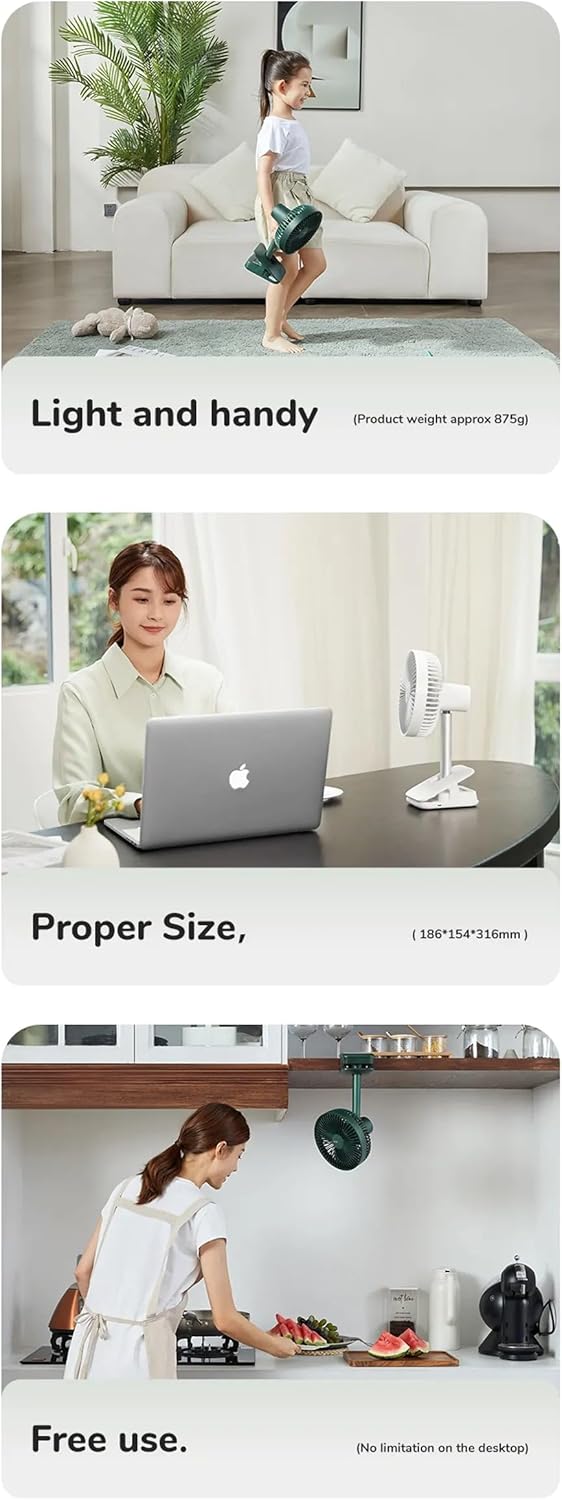
This series of images illustrates the fan's practical applications: its light and handy design (approx. 875g), its proper size for desktop use (18.6D x 31.6W x 15.4H cm), and its free use capability, including clipping under a cabinet, showing no limitation on desktop placement.
6. Arahan Operasi
The fan features a simple button control interface located on its base.

Detail of the fan's control panel, featuring buttons for power and fan speed, along with LED lights indicating active timer settings (1h, 2h, 4h) and fan speeds (1-4).
Kuasa Hidup/Mati dan Kawalan Kelajuan:
- Tekan ke Butang Kuasa (butang kanan) once to turn the fan on at Speed 1.
- Tekan ke Butang Kuasa repeatedly to cycle through Speed 1, Speed 2, Speed 3, Speed 4, Speed 5 (Nature Wind Mode), and then Off.
- The LED indicators on the control panel will show the current speed setting.
Kawalan Ayunan:
- Semasa kipas dihidupkan, tekan butang Oscillation/Timer Button (butang kiri) once to activate 90-degree horizontal auto-oscillation.
- Tekan ke Oscillation/Timer Button sekali lagi untuk menghentikan ayunan.
Tetapan Pemasa:
- While the fan is on, press and hold the Oscillation/Timer Button (butang kiri) to set the timer.
- Each press will cycle through 1 hour, 2 hours, 4 hours, and then turn the timer off.
- The corresponding LED indicator (1h, 2h, 4h) will light up to show the active timer setting. The fan will automatically turn off after the set time.
Mengisi Kipas:
- Connect the provided USB-A to USB-C cable to the charging port on the fan's base.
- Connect the other end of the cable to a USB power adapter (DC5V-2A/1A recommended) or a computer USB port.
- Lampu penunjuk pengecasan akan menyala semasa pengecasan dan padam apabila dicas sepenuhnya.
- A full charge typically takes 6-10 hours. The 8000mAh battery provides 5-28 hours of operation depending on the speed setting.
7. Penyelenggaraan
Pembersihan berkala membantu mengekalkan prestasi kipas dan memanjangkan jangka hayatnya.
Membersihkan Kipas:
- Ensure the fan is turned off and unplugged from any power source before cleaning.
- The front fan cover is detachable for easy cleaning. Gently twist or unclip the cover as indicated in the diagram to remove it.
- Use a soft, dry cloth to wipe dust from the fan blades and the interior of the fan cover. For stubborn dirt, a slightly damp cloth can be used, but ensure no water enters the motor housing.
- Penting: Do not wash the main body of the fan with water. Use a dry cloth to wipe it.
- Once clean, reattach the front fan cover securely.

The fan's front cover is shown detached, indicating its removable design for easy cleaning. A warning symbol advises against washing the main body with water.
Storan:
Apabila tidak digunakan untuk tempoh yang lama, simpan kipas di tempat yang sejuk dan kering, jauh daripada cahaya matahari langsung dan suhu yang melampau.
8. Penyelesaian masalah
If you encounter issues with your JISULIFE FA13R fan, please refer to the following common problems and solutions:
- Kipas tidak dihidupkan:
- Pastikan bateri telah dicas. Sambungkan kipas ke sumber kuasa menggunakan kabel USB-C.
- Press the Power Button firmly.
- Aliran udara yang lemah:
- Increase the fan speed using the Power Button.
- Check if the fan grille or blades are obstructed by dust or debris. Clean the fan as described in the Maintenance section.
- Kipas tidak berayun:
- Press the Oscillation/Timer Button to activate oscillation.
- Ensure the fan is on a stable surface and not obstructed.
- Fan not charging:
- Ensure the USB-C cable is properly connected to both the fan and the power source.
- Cuba penyesuai kuasa USB atau port USB yang berbeza.
- Periksa sama ada kabel pengecasan rosak.
If the problem persists, please contact JISULIFE customer support for assistance.
9. Spesifikasi
| Ciri | Spesifikasi |
|---|---|
| Jenama | JISULIFE |
| Model | FA13R |
| Kapasiti Bateri | 8000mAh / 3.7V / 29.6Wh |
| Masa jalan | 5-28 jam (bergantung pada kelajuan) |
| Masa Mengecas | 6-10 jam |
| Input | DC5V-2A/1A (Type-C) |
| Kuasa Dinilai | 5.5W |
| Kelajuan Kipas Maks | 4.0m/s |
| Oscillation | 90 darjah mendatar |
| Putaran Menegak | 25 degrees manual |
| bahan | ABS Plastic, Alloy Metal |
| Dimensi | 18.6D x 31.6W x 15.4H sentimeter |
| Berat badan | lebih kurang 875g |
10. Waranti dan Sokongan
JISULIFE products are designed and manufactured to the highest quality standards. For information regarding warranty coverage, technical support, or service inquiries, please refer to the warranty card included with your purchase or visit the official JISULIFE webtapak. Sila simpan bukti pembelian anda untuk tuntutan waranti.


