
M12/black/Standard/32G memory card
Home Smart Visual Cat Eye Camera Electronic Cateye Door Mirror with Screen Surveillance Video Doorbell
Model: M12/black/Standard/32G memory card
pengenalan
This manual provides comprehensive instructions for the installation, operation, and maintenance of your Home Smart Visual Cat Eye Camera Electronic Cateye Door Mirror with Screen Surveillance Video Doorbell. This wireless doorbell system offers enhanced home security and communication, featuring a visual display, two-way intercom, and infrared night vision capabilities. Please read this manual thoroughly before using the product to ensure proper functionality and safety.
Maklumat Keselamatan
Untuk memastikan operasi yang selamat dan mengelakkan kerosakan, sila patuhi langkah berjaga-jaga berikut:
- Jangan dedahkan peranti kepada suhu yang melampau, kelembapan atau cahaya matahari langsung.
- Elakkan daripada menjatuhkan atau meletakkan peranti kepada kesan yang kuat.
- Jangan cuba membuka atau membaiki peranti ini sendiri. Rujuk semua servis kepada kakitangan yang berkelayakan.
- Jauhkan peranti daripada air dan cecair lain.
- Gunakan hanya penyesuai kuasa dan aksesori yang dinyatakan.
- Ensure proper ventilation around the indoor monitor.
Kandungan Pakej
Sila semak pakej untuk item berikut:
- 1 x Outdoor Doorbell Unit
- 1 x Indoor Monitor with Screen
- 1 x Pek Bateri
- 1 x Memory Card (32GB)
- 1 x Kabel Pengecas USB
- 1 x Mounting Bracket and Screws
- 1 x Manual Pengguna (dokumen ini)
Produk Selesaiview
Familiarize yourself with the components of your visual doorbell system:

Rajah 1: The Home Smart Visual Doorbell system, showing the outdoor doorbell unit on the left and the indoor monitor with screen on the right.
Unit Loceng Pintu Luar:
- Kanta Kamera: Captures video feed.
- Penderia Inframerah: Enables night vision.
- Butang panggilan: Activates the doorbell and initiates communication.
- mikrofon: Untuk audio dua hala.
- Penceramah: Untuk audio dua hala.
Monitor Dalaman:
- Skrin Paparan: Shows live video feed from the outdoor unit.
- Butang Kawalan: For navigation, volume, and menu access.
- mikrofon: Untuk audio dua hala.
- Penceramah: Untuk audio dua hala.
- Slot Kad Memori: For the included 32GB memory card.
- Port Pengecasan: Untuk bekalan kuasa.
Persediaan dan Pemasangan
The system is designed for wireless installation and one-touch pairing.
1. Charging the Devices:
- Before first use, fully charge both the outdoor doorbell unit and the indoor monitor using the provided USB charging cable.
- The indoor monitor can be kept plugged in for long-term online use.

Rajah 2: The indoor monitor connected to a power outlet for continuous operation.
2. Inserting the Memory Card:
- Locate the memory card slot on the side of the indoor monitor.
- Gently insert the provided 32GB memory card until it clicks into place. This card is essential for recording video and images.
3. Mounting the Outdoor Doorbell Unit:
- Choose a suitable location on your door frame or wall, typically at eye level, ensuring a clear view daripada pelawat.
- Use the provided mounting bracket and screws to securely attach the outdoor unit.
- Ensure the unit is protected from direct rain and extreme weather conditions if possible.
4. Pairing the Devices (One-Touch Pairing):
- Power on both the outdoor doorbell unit and the indoor monitor.
- The devices are designed for automatic, one-touch pairing. They should connect wirelessly without complex networking setup.
- If pairing does not occur automatically, refer to the troubleshooting section.
Arahan Operasi
Menerima Panggilan:
- When a visitor presses the call button on the outdoor unit, the indoor monitor will ring and display the live video feed.
- Press the answer button on the indoor monitor to initiate two-way communication.
- To end the call, press the hang-up button.
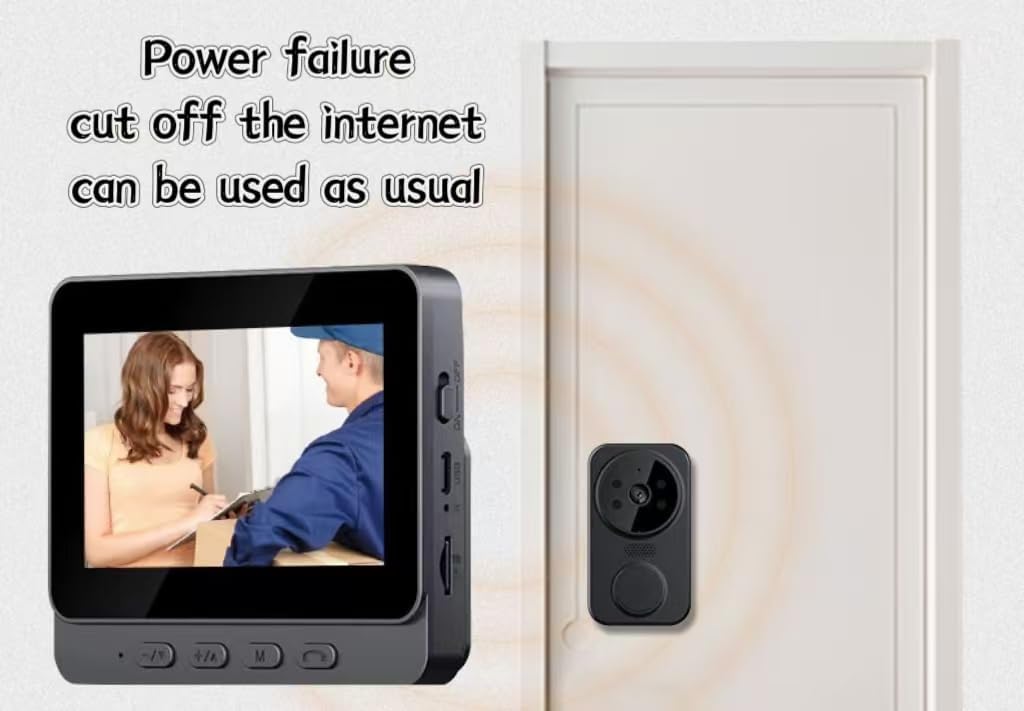
Rajah 3: The indoor monitor displaying a visitor at the door, demonstrating the system's functionality even without internet connection.
Interkom Dua Hala:
The system supports clear two-way audio communication between the outdoor unit and the indoor monitor, allowing for easy and fast communication with visitors.
Penglihatan Malam Inframerah:
The outdoor unit is equipped with infrared sensors, providing clear visibility and recording capabilities even in low-light conditions or complete darkness.
Rakaman dan Main Semula:
- The system automatically records video and captures images when the doorbell is pressed or motion is detected (if motion detection is enabled).
- Akses foo yang dirakamtage and images via the menu on the indoor monitor. Navigate using the control buttons.
Operasi Luar Talian:
This doorbell system operates on a 2.4 template and does not require internet networking. It functions normally even during power outages or if your home internet is down.
Penyelenggaraan
- Pembersihan: Gunakan kain lembut dan kering untuk membersihkan permukaan kedua-dua unit. Jangan gunakan pembersih atau pelarut yang kasar.
- Hayat Bateri: Monitor the battery indicator on the indoor monitor. Recharge the outdoor unit as needed. The indoor unit can remain plugged in.
- Kad Memori: Semula secara berkalaview and delete old recordings from the memory card to ensure sufficient storage space. Format the card if necessary (refer to the indoor monitor's menu for this option).
Menyelesaikan masalah
| Masalah | Kemungkinan Punca | Penyelesaian |
|---|---|---|
| Indoor monitor not displaying video. | Outdoor unit is off or out of range. Battery low on either unit. | Ensure both units are powered on and charged. Move units closer to each other. |
| No two-way audio. | Microphone or speaker muted. Volume too low. | Check volume settings on the indoor monitor. Ensure microphones/speakers are not obstructed. |
| Kualiti video yang lemah pada waktu malam. | Infrared sensors obstructed or dirty. | Clean the camera lens and infrared sensors on the outdoor unit. |
| Ralat kad memori. | Card not inserted correctly or corrupted. | Reinsert the memory card. If the issue persists, try formatting the card via the monitor's menu (this will erase all data). |
Spesifikasi
| Nama Model | M12/black/Standard/32G memory card (11308 doorbell) |
| Jenama | Generik |
| warna | Hitam |
| Dimensi Produk (L x W x H) | 6 x 2 x 5 inci |
| Berat Barang | 1 paun |
| Komponen yang Disertakan | Battery Pack, 32GB memory card |
| Ketersambungan | 2.4 Template (No Internet Networking Required) |
| Ciri-ciri | Two-way intercom, Wireless installation, One-touch pairing, HD camera, Noise cancelling infrared night vision, Offline operation |
Waranti dan Sokongan
For warranty information and technical support, please contact the manufacturer or your retailer. Keep your purchase receipt as proof of purchase.
Manufacturer: qita
Ask a question about this manual
Ask about setup, troubleshooting, compatibility, parts, safety, or missing instructions. Manuals+ will review the question and use this page’s manual context to help answer it.