
pengenalan
Experience your music in style with the Hello Kitty Bluetooth Wireless Earbuds! These adorable earbuds feature a cute Cinnamoroll design with a blue and white finish, perfect for fans of all ages. Whether you’re listening to your favorite playlist or taking an important call, these earbuds deliver high-quality sound while showcasing your love for Hello Kitty.
Apa yang ada dalam Kotak
- Hello Kitty Bluetooth Wireless Earbuds
- Cinnamoroll-themed Charging Case
- Kabel Pengecas USB
- Manual Pengguna (dokumen ini)
Produk Selesaiview

The Hello Kitty Cinnamoroll Bluetooth Wireless Earbuds, shown with their unique Cinnamoroll-themed charging case. The earbuds are white and designed for a comfortable in-ear fit.

The charging case is open, revealing the two white earbuds nestled inside their respective charging slots. The case features the Cinnamoroll design on the front.

Depan view pembungkusan produk, tunjukkanasing the Hello Kitty and Friends branding, the earbuds, and the Cinnamoroll charging case. Key features like "Built-in Mic" and "Easy Pairing" are highlighted.
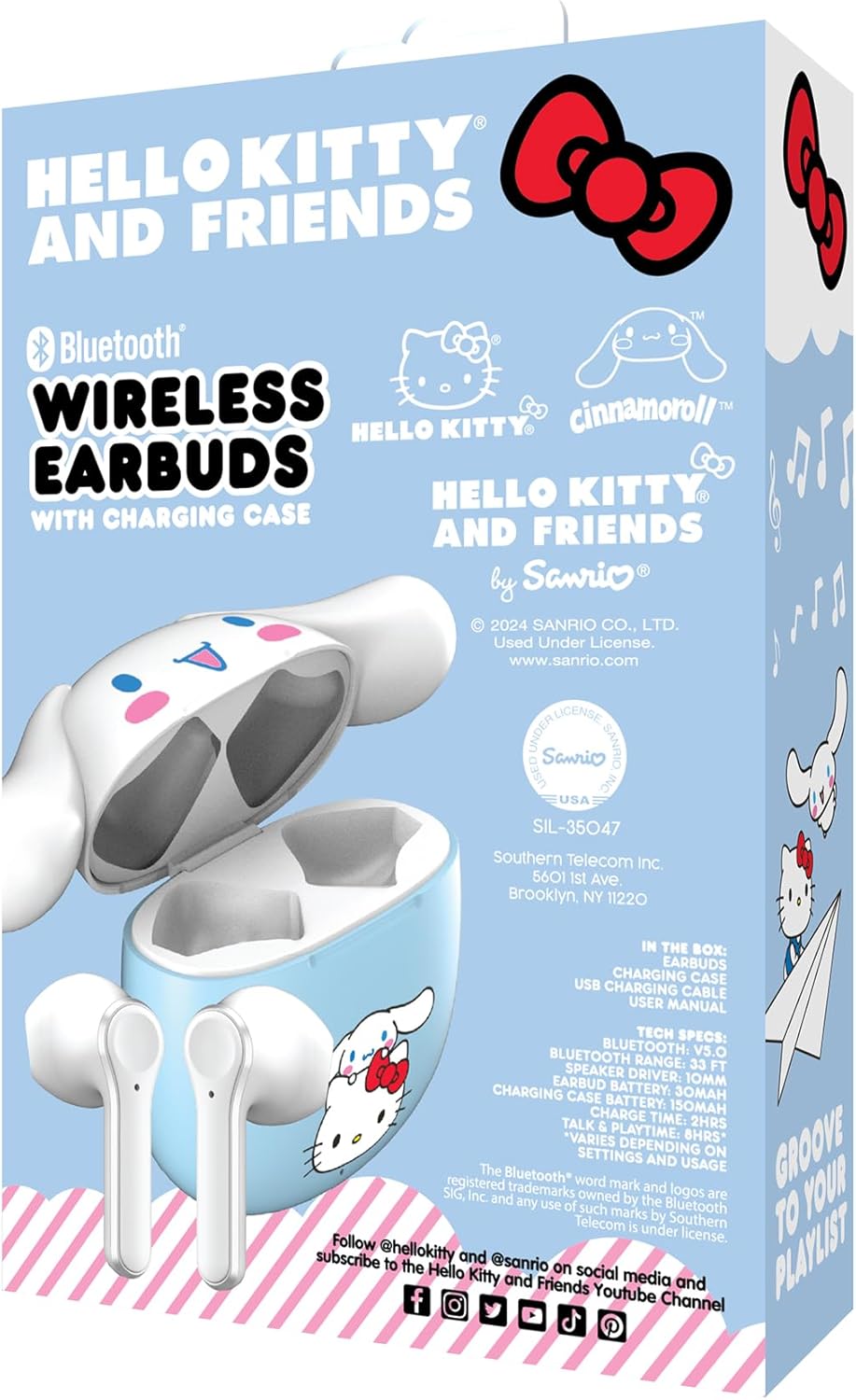
belakang view of the product packaging, displaying detailed technical specifications and contents of the box. It also shows licensing information and social media handles.
Persediaan
1. Pengecasan Awal
Before first use, fully charge the earbuds and the charging case. Connect the provided USB charging cable to the charging port on the case and plug the other end into a USB power source (e.g., computer, wall adapter). The indicator light on the case will show charging status and turn off when fully charged. The portable charging case provides up to 30 hours of playback.
2. Menghidupkan/Mematikan
- Hidupkan kuasa: Buka bekas pengecasan dan fon telinga akan dihidupkan secara automatik.
- Matikan: Letakkan fon telinga kembali ke dalam bekas pengecasan dan tutup penutupnya. Mereka akan dimatikan secara automatik dan mula mengecas.
Arahan Operasi
1. Berpasangan Bluetooth
- Pastikan fon telinga dicas sepenuhnya.
- Open the charging case. The earbuds will enter pairing mode, and an indicator light on the earbuds will flash.
- Pada peranti anda (telefon pintar, tablet, komputer), pergi ke tetapan Bluetooth.
- Cari untuk "Hello Kitty Earbuds" or a similar name in the list of available devices.
- Select the earbuds to connect. Once connected, the indicator light will stop flashing, and you may hear a confirmation tone.
- Fon telinga akan menyambung semula secara automatik ke peranti gandingan terakhir apabila dikeluarkan daripada sarung, jika Bluetooth didayakan pada peranti.
2. Pengendalian Panggilan
The earbuds feature a built-in microphone for hands-free calls.
- Jawab/Tamatkan Panggilan: Ketik mana-mana fon telinga sekali.
- Tolak Panggilan: Tekan dan tahan salah satu fon telinga selama 2 saat.
3. Main balik Muzik
- Main/Jeda: Ketik mana-mana fon telinga sekali.
- Lagu Seterusnya: Ketik dua kali pada fon telinga kanan.
- Trek Sebelumnya: Ketik dua kali pada fon telinga kiri.
- Kawalan Kelantangan: Kelantangan dikawal melalui peranti anda yang disambungkan.
Penyelenggaraan
- Pembersihan: Gunakan kain lembut dan kering untuk membersihkan fon telinga dan bekas pengecas. Jangan gunakan bahan kimia yang keras atau bahan yang kasar.
- Storan: Apabila tidak digunakan, simpan fon telinga dalam bekas pengecasnya untuk melindunginya dan memastikan ia dicas.
- Elakkan Air: Fon telinga ini bukan kalis air. Elakkan pendedahan kepada air atau kelembapan berlebihan.
Menyelesaikan masalah
| Masalah | Penyelesaian |
|---|---|
| Fon telinga tidak berpasangan. |
|
| Hanya satu fon telinga berfungsi. |
|
| Tiada bunyi atau kelantangan rendah. |
|
Spesifikasi
| Ciri | Perincian |
|---|---|
| Nama Model | Hello Kitty Bluetooth Wireless Earbuds with Charging Case - Built-in Mic, Easy Pairing, Cute Cinnamoroll Design, Blue and White, Perfect for Kids, Teens, and Hello Kitty Fans |
| Nombor Model | HKTWSMD-CR-MFN |
| Jenama | Hello Kitty |
| Teknologi Ketersambungan | Wayarles (Bluetooth) |
| Bentuk alat dengar | Bud |
| Penempatan Telinga | Di Telinga |
| Faktor Bentuk | Di Telinga |
| Kawalan Bunyi | tiada |
| Julat Kekerapan | 20 Hz - 20,000 Hz |
| Impedans | 32 Ohm |
| Berat Barang | 7.2 auns |
| Dimensi Pakej | 6 x 4 x 1.5 inci |
| Pengeluar | Telekom Selatan |
| UPC | 680079035372 |
| Tarikh Mula-mula Tersedia | 14 Oktober 2024 |
Waranti dan Sokongan
For warranty information and technical support, please refer to the documentation included with your product or contact the manufacturer, Southern Telecom, directly. Keep your proof of purchase for any warranty claims.
Untuk bantuan tambahan, anda boleh layari halaman produk di Amazon.