
1. Produk Lebihview
The ForeverPRO WJ01X23637 Accessory Assembly is a high-quality replacement component designed for compatibility with various GE Air Conditioner models. This assembly is crucial for the proper function of your air conditioning unit, ensuring efficient operation and maintaining the integrity of the system. It is manufactured to meet or exceed OEM specifications, providing a reliable solution for appliance repair.
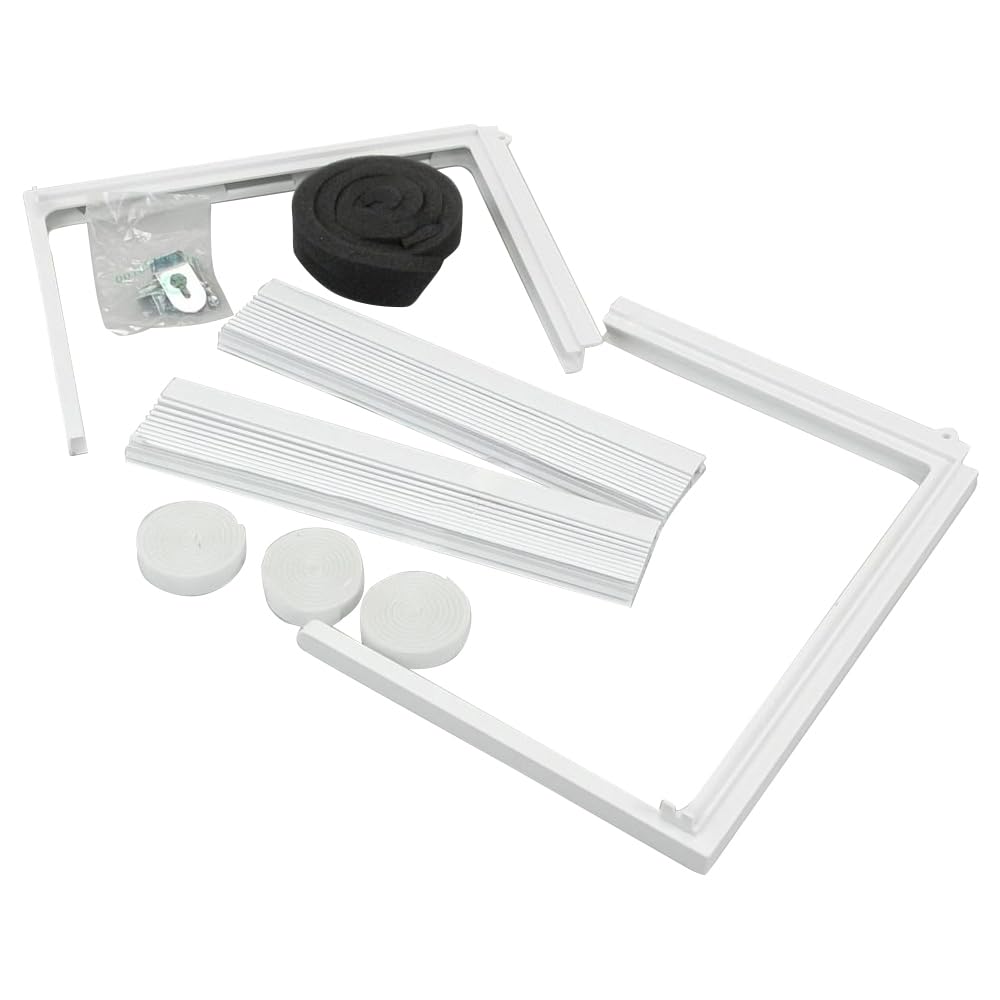
Image 1: ForeverPRO WJ01X23637 Accessory Assembly. This image displays the accessory assembly, showing its general shape and components.
2. Maklumat Keselamatan
Always prioritize safety when working with electrical appliances. Failure to follow these safety guidelines may result in personal injury or property damage.
- Putuskan Kuasa: Before attempting any installation, repair, or maintenance, ensure the air conditioner unit is completely disconnected from its power source. Turn off the circuit breaker supplying power to the unit.
- Pakai Alat Pelindung: Use appropriate personal protective equipment, such as gloves and safety glasses, to prevent injury.
- Bantuan Profesional: If you are unsure about any step or uncomfortable performing the repair, consult a qualified technician.
- Tangani dengan Berhati-hati: Components may have sharp edges or delicate parts. Handle the accessory assembly and surrounding parts with care.
3. Kandungan Pakej
Setelah membuka bungkusan, pastikan semua komponen ada dan tidak rosak.
- One (1) ForeverPRO WJ01X23637 Accessory Assembly
If any parts are missing or damaged, contact your retailer or ForeverPRO customer support immediately.
4. Arahan Pemasangan
These instructions provide a general guide for installing the accessory assembly. Specific steps may vary depending on your GE Air Conditioner model. Refer to your air conditioner's service manual for detailed model-specific instructions.
- Sediakan Unit: Ensure the air conditioner is unplugged or its circuit breaker is off. Allow the unit to cool down if it was recently in operation.
- Access the Area: Carefully remove any panels or covers necessary to access the existing accessory assembly. This may involve unscrewing fasteners or releasing klip.
- Keluarkan Perhimpunan Lama: Disconnect any wiring or tubing attached to the old accessory assembly. Note the orientation and connection points for reassembly. Carefully remove the old assembly from its mounting location.
- Pasang Perhimpunan Baharu: Position the new ForeverPRO WJ01X23637 Accessory Assembly in the same location as the old one. Secure it using the original fasteners or mounting points.
- Sambung semula Komponen: Reconnect all wiring and tubing to the new assembly, ensuring connections are secure and correctly oriented. Double-check all connections.
- Pasang semula Unit: Replace any removed panels or covers, ensuring they are properly secured.
- Pulihkan Kuasa: Once installation is complete and all components are secure, restore power to the air conditioner unit.
5. Semakan Selepas Pemasangan
After installing the accessory assembly, perform the following checks to ensure proper functionality:
- Kuasa Permulaan: Turn on the air conditioner and observe its initial operation. Listen for any unusual noises or indications of malfunction.
- Ujian Kefungsian: Allow the unit to run through a full cycle (e.g., cooling mode) to confirm that the accessory assembly is contributing to the expected performance of the air conditioner.
- Pemeriksaan Kebocoran: If the accessory assembly involves fluid lines, carefully check for any leaks around the connection points.
If the air conditioner does not operate correctly or exhibits new issues, refer to the Troubleshooting section.
6. Penyelenggaraan
The ForeverPRO WJ01X23637 Accessory Assembly is designed for durability. Regular maintenance of your air conditioner unit, including periodic inspection of its components, can help prolong the life of all parts.
- Pemeriksaan Visual: Periodically inspect the accessory assembly for any signs of wear, corrosion, or damage.
- Pembersihan: If accessible and safe to do so (with power disconnected), gently clean any dust or debris accumulation on the assembly using a soft brush or cloth.
- Perkhidmatan Profesional: Follow the manufacturer's recommendations for professional servicing of your GE Air Conditioner, which may include inspection of internal components.
7. Penyelesaian masalah
If your air conditioner experiences issues after installing the ForeverPRO WJ01X23637 Accessory Assembly, consider the following common troubleshooting steps:
- Tiada Kuasa:
- Check if the circuit breaker for the air conditioner is tripped.
- Ensure the unit is properly plugged in (if applicable).
- Unit Not Operating Correctly:
- Verify all electrical connections to the new accessory assembly are secure.
- Ensure the accessory assembly is correctly seated and mounted.
- Confirm that no wires are pinched or damaged during reassembly.
- Bunyi Luar Biasa:
- Power off the unit and inspect the accessory assembly and surrounding areas for any loose parts or obstructions.
If troubleshooting does not resolve the issue, it is recommended to contact a qualified appliance technician or ForeverPRO customer support for further assistance.
8. Spesifikasi
| Nombor Bahagian | WJ01X23637 |
| Berat Barang | 2 paun |
| Dimensi Produk | 9 x 6 x 4 inci |
| Komponen yang Disertakan | Accessory Asm |
| Bateri Diperlukan | Tidak |
| Pengeluar | ForeverPRO |
9. Waranti dan Sokongan
The ForeverPRO WJ01X23637 Accessory Assembly comes with a 90 Days Manufacturer Warranty. Waranti ini melindungi kecacatan pada bahan dan mutu kerja di bawah penggunaan biasa.
For warranty claims, technical support, or inquiries regarding product compatibility, please contact ForeverPRO customer service. Ensure you have your product model number (WJ01X23637) and purchase information available when contacting support.
Note: This is not a GE OEM product. Use of manufacturer's trade names and logos are for identification compatibility only and do not imply affiliation or endorsement by any manufacturer.