
1. Pengenalan
Thank you for choosing the Loddery 7 Inch Android 13 Car Stereo. This manual provides essential information for the proper installation, operation, and maintenance of your new car multimedia system. Please read this manual thoroughly before use to ensure optimal performance and to prevent damage.
This car stereo is specifically designed for the Saab 9-3 93 models from 2007 to 2011, offering an integrated multimedia and navigation experience.
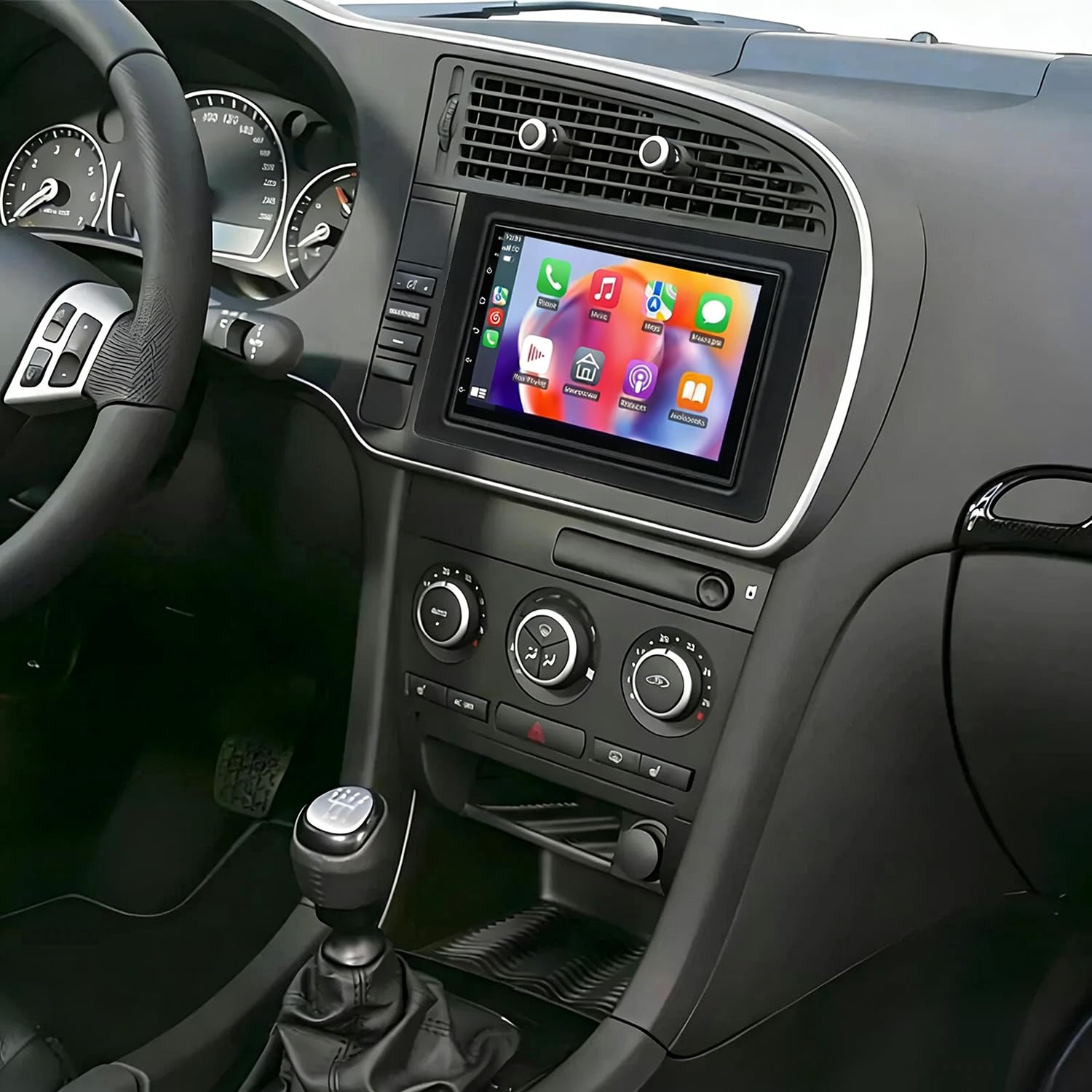
Imej 1.1: Depan view of the Loddery 7 Inch Android 13 Car Stereo. This image displays the main unit with its 7-inch touchscreen display, designed to integrate seamlessly into the dashboard of compatible Saab 9-3 models.
2. Kandungan Pakej
Sila sahkan bahawa semua item yang disenaraikan di bawah disertakan dalam pakej anda:
- 1 x Pemain MP5 Kereta (Unit Utama)
- 1 x Kabel Kuasa
- 1 x Antena GPS
- 1 x Kabel Input Kamera Belakang
- 1 x Kabel RCA
- 2 x Kabel USB
- 1 x Manual Arahan (dokumen ini)
- 1 x AHD Camera (Backup Camera)
3. Persediaan dan Pemasangan
This car stereo is designed for a plug-and-play installation in compatible Saab 9-3 93 models (2007-2011). While designed for ease of installation, professional installation is recommended to ensure correct wiring and functionality, especially for power connections and accessory integration.
3.1. Pemeriksaan Pra-Pemasangan
- Pastikan pencucuhan kenderaan dimatikan dan bateri diputuskan sambungannya sebelum memulakan pemasangan.
- Confirm all package contents are present.
- Review the wiring diagrams provided in the included physical instruction manual for specific vehicle connections.
3.2. Langkah Pemasangan (Umum)
- Keluarkan Unit Sedia Ada: Carefully remove the factory radio from your Saab 9-3 dashboard.
- Sambungkan Kabel Kuasa: Connect the provided power cable harness to the car stereo and the vehicle's wiring. Ensure all connections are secure.
- Sambungkan Antena GPS: Pasang antena GPS di lokasi yang jelas view of the sky (e.g., dashboard, under the windshield) and connect it to the stereo.
- Sambungkan Kabel USB: Route the USB cables to a convenient location (e.g., glove compartment) and connect them to the stereo.
- Sambungkan Kamera Belakang (Pilihan): If installing the AHD backup camera, route the camera cable from the rear of the vehicle to the stereo and connect it to the 'Rear Camera Input' port. Connect the camera's power to the vehicle's reverse light circuit.
- Sambungkan Kabel RCA (Pilihan): Jika menggunakan luaran amplifiers or other audio/video devices, connect the RCA cables as needed.
- Kefungsian Ujian: Before fully reassembling the dashboard, reconnect the vehicle battery and power on the unit to test basic functions (power, audio, touchscreen, GPS signal, camera input).
- Unit Selamat: Once tested, carefully slide the car stereo into the dashboard opening and secure it. Reassemble any removed trim pieces.
3.3. Kawalan Roda Stereng
The unit supports the vehicle's steering wheel control function. After installation, you may need to access the unit's settings to map the steering wheel buttons to the desired functions.
4. Arahan Operasi
This section details the primary functions and features of your Loddery Android 13 Car Stereo.
4.1. Operasi Am
- Hidupkan/Mati Kuasa: Press and hold the power button (if available) or turn the vehicle ignition on/off.
- Skrin sentuh: The 7-inch 2.5D Tempered Glass Mirror display is a full capacitance touchscreen. Navigate the interface by tapping, swiping, and pinching.
- Skrin Utama: Access various applications and settings from the customizable home screen.
- Tetapan Bahasa: The system supports multiple languages including English, Chinese, French, Italian, Korean, Japanese, Arabic, Spanish, Portuguese, Russian, Turkish, Vietnamese, Hebrew, Polish, and German. Adjust in system settings.
4.2. Ketersambungan
- Wi-Fi: Connect to available Wi-Fi networks or use your mobile phone's hotspot for internet access. Go to Settings > Network & Internet > Wi-Fi.
- Bluetooth 5.0: Pair your smartphone for hands-free calling, phone book synchronization, and audio streaming. Go to Settings > Connected devices > Bluetooth.
- USB: Use the double USB interfaces to connect USB drives for media playback or to charge compatible devices.
4.3. Navigasi
- Built-in Offline Maps: The unit comes with built-in offline map capabilities. An internet connection is required to download map data initially.
- Navigasi Dalam Talian: Once connected to Wi-Fi, you can use online navigation applications for real-time traffic and updated maps.
- GPS: The dedicated GPS antenna ensures accurate positioning for navigation.
4.4. CarPlay / Android Auto
- CarPlay Tanpa Wayar & Berwayar: For iOS devices, connect via Bluetooth for wireless CarPlay or use a USB cable for wired CarPlay. This integrates your iPhone's features like navigation, calls, messages, and music directly onto the car stereo display.
- Android Auto: Connect your Android smartphone via USB for Android Auto functionality, mirroring essential apps and features.
4.5. Main Balik Multimedia
- Format Audio: Supports APE, FLAC, WAV, MP3, WMA, and other audio formats.
- Format Video: Supports MKV, RMVB, AVI, MP4, MDV, and other video formats. Video output is supported for external displays.
- Format Gambar: Supports PNG, JPEG, JPG, GIF, WBMP, BNP, and other picture formats.
- Radio: Tune into FM radio stations. RDS (Radio Data System) is supported for displaying station information.
- Fungsi DSP: The integrated DSP (Digital Signal Processor) ensures high-fidelity audio reproduction, closely matching the original sound quality.
4.6. Fungsi Kamera Belakang
- The unit supports AHD (Analog High Definition) 1080P camera image input.
- When the vehicle is in reverse gear, the display will automatically switch to the rear camera view.
- You can switch between CVBS and AHD camera input types within the system settings if needed.
4.7. Skrin Pisah
The split-screen feature allows you to run two applications simultaneously on the display, such as navigation and music playback.
5. Penyelenggaraan
Penyelenggaraan yang betul memastikan jangka hayat dan prestasi optimum stereo kereta anda.
- Pembersihan Skrin: Gunakan kain lembut dan tidak berbulu sedikit dampened with water or a screen cleaner specifically designed for electronic displays. Avoid harsh chemicals or abrasive materials.
- Kemas Kini Perisian: Semak secara berkala untuk kemas kini perisian sistem melalui Wi-Fi untuk memastikan anda mempunyai ciri terkini dan pembetulan pepijat.
- Keadaan Persekitaran: Elakkan daripada mendedahkan unit kepada suhu yang melampau, cahaya matahari langsung untuk tempoh yang lama, atau kelembapan yang berlebihan.
- Sambungan: Pastikan semua kabel dan sambungan kekal selamat. Sambungan yang longgar boleh menyebabkan masalah terputus-putus.
6. Penyelesaian masalah
This section addresses common issues you might encounter. For more complex problems, please refer to the included physical manual or contact customer support.
- Tiada Kuasa:
- Periksa semua sambungan kabel kuasa.
- Sahkan fius kenderaan untuk radio adalah utuh.
- Pastikan bateri kenderaan disambungkan dan dicas dengan betul.
- Unit Does Not Turn Off with Car / Battery Drain:
- This indicates an incorrect wiring connection, specifically the ACC (accessory) wire. The unit's power should be cut when the ignition is off. Consult a professional installer to verify the ACC and constant power (B+) wires are correctly connected to the vehicle's harness.
- Check the unit's power settings for any 'always on' options, though this is typically a wiring issue.
- Tiada Bunyi atau Kualiti Bunyi Lemah:
- Periksa sambungan wayar pembesar suara.
- Verify volume levels and mute settings.
- Adjust equalizer and DSP settings in the audio menu.
- Ensure RCA cables (if used) are securely connected.
- GPS Signal Not Found:
- Pastikan antena GPS disambungkan dengan selamat dan dipasang di lokasi yang jelas view dari langit.
- Semak tetapan GPS dalam menu sistem.
- Skrin sentuh Tidak Responsif:
- Mulakan semula unit.
- Pastikan skrin bersih dan bebas daripada serpihan.
- CarPlay/Android Auto Tidak Bersambung:
- For wireless CarPlay, ensure Bluetooth is on and paired.
- Untuk sambungan berwayar, cuba kabel USB yang lain.
- Pastikan sistem pengendalian telefon anda dikemas kini.
- Semak tetapan telefon untuk mendapatkan kebenaran CarPlay/Android Auto.
- Kata Kunci Tetapan Kilang: If prompted for a factory setting password, use 000000.
7. Spesifikasi
| Ciri | Spesifikasi |
|---|---|
| Sistem | Android 13 |
| Chipset | 8227L-DEMO |
| Saiz Skrin | 7 inci |
| Resolusi Skrin | 1024x600 |
| Ingatan | 4GB RAM + 64GB ROM |
| Cip Radio | MT6625 |
| Output Kuasa | 4x45W |
| Suhu Kerja | -20 ℃ hingga 75 ℃ |
| kuasa Ampcip penguat | TDA7388 |
| Jalur Radio | FM/RDS |
| Output Video | Sokongan |
| Membalikkan Input | AHD/CVBS |
| Mikrofon Luaran | Sokongan |
| Skrin Pisah | Sokongan |
| Peta | Peta luar talian terbina dalam (memerlukan internet untuk memuat turun data) |
| Wi-Fi | Sokongan |
| USB | Antara muka USB berganda |
| Teknologi Ketersambungan | Bluetooth |
| Mod Keluaran Audio | Stereo |
| Jenis Pemasangan | Pemasangan Papan Pemuka |
| Berat Barang | 4.98 paun |
| Dimensi Pakej | 16.93 x 13.39 x 6.3 inci |
8. Waranti dan Sokongan
For warranty inquiries or technical support regarding your Loddery 7 Inch Android 13 Car Stereo, please contact the manufacturer or seller directly through your purchase platform. Please have your purchase details and product model number (fit for Saab 9-3 93 2007-2011) available when contacting support.