
pengenalan
Thank you for choosing the EverBrite Rechargeable Underhood Work Light. This manual provides essential information for the safe and efficient use of your new work light. Please read it thoroughly before operation and retain it for future reference.
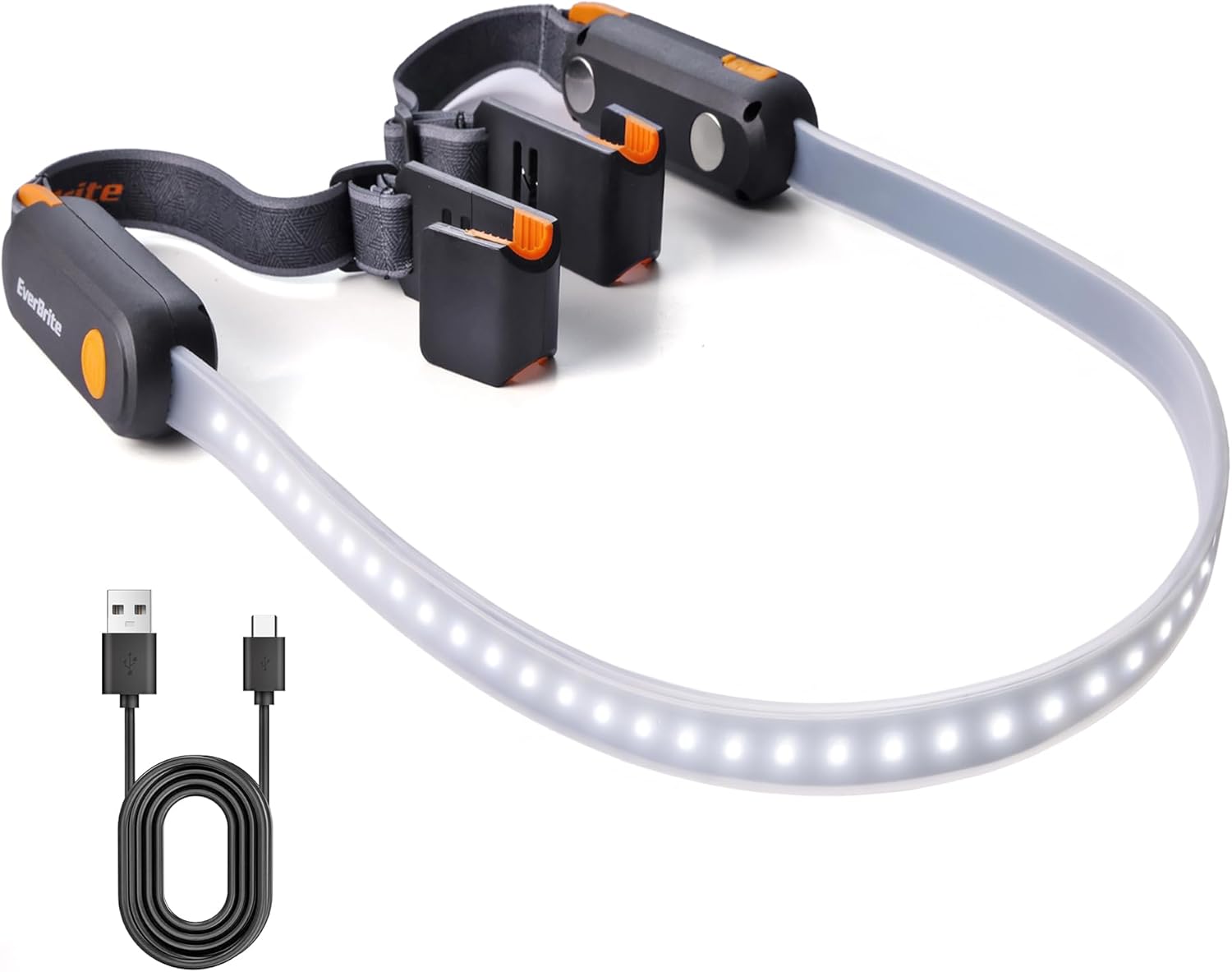
Image: The EverBrite Rechargeable Underhood Work Light, showing its flexible light strip and magnetic ends with adjustable straps.
Ciri-ciri Produk
- Tiga Mod Pencahayaan: High, Medium, and Low settings to adapt to various lighting requirements.
- Pengecasan Cepat USB-C: Equipped with two USB-C charging ports and LED indicators (red for charging, green for full charge).
- Reka Bentuk Pangkalan Magnetik: Integrated magnets allow secure attachment to metal surfaces for hands-free operation.
- Adjustable Elastic Strap: Durable nylon strap designed to fit vehicle hoods from 52 to 75 inches wide, providing a secure and flexible fit.
- Dual Hooks: Sturdy hooks on both ends offer additional stability and mounting options.
Apa yang ada dalam Kotak
- EverBrite Rechargeable Underhood Work Light (Model E111014AE)
- Kabel Pengecas USB-C
- Manual Arahan

Image: Diagram showing the light strip, switch button, magnetic base, charging port, charging indicator, adjustable strap, and hook components.
Persediaan dan Pemasangan
- Prepare the Light: Unfold the work light. Ensure the elastic straps are properly attached to the magnetic ends.
- Position on Hood: Open the vehicle's hood. Place the magnetic ends of the light onto the metal frame of the hood. The magnets will securely hold the light in place.
- Selamat dengan Tali: Extend the adjustable elastic straps over the hood. Hook the ends of the straps onto suitable points on the hood or vehicle frame to provide additional stability and prevent accidental dislodgement. Adjust the strap length to ensure a snug fit across the hood (compatible with hoods 52 to 75 inches wide).
- Laraskan Arah Cahaya: The flexible light strip can be bent and angled to direct illumination precisely where needed within the engine bay.

Image: The EverBrite work light installed under a car hood, illuminating the engine bay. The adjustable straps are visible.

Imej: Jarak dekat view of the hanging hooks on the EverBrite work light, designed for securing the fixture.

Image: The magnetic base of the EverBrite work light attached to a metal pegboard, demonstrating its hands-free capability.
Arahan Operasi
- Hidupkan/Mati Kuasa: Short press the switch button located on either end of the light to turn it ON.
- Mod Kitaran Melalui: Once ON, short press the switch button repeatedly to cycle through the three lighting modes: High, Medium, Low, and then OFF.
- Mode Sequence: High Brightness → Medium Brightness → Low Brightness → OFF.

Image: The EverBrite work light displaying its three distinct lighting modes: Low (200LM, 14H), Medium (400LM, 6H), and High (900LM, 3.5H).
Video: Tamatview of the EverBrite Rechargeable Underhood Work Light, demonstrating its features and operation.
Arahan Mengecas
- Sambungkan Pengecas: Locate the USB-C charging port on the side of the light. Open the protective cover and insert the provided USB-C cable.
- Status Pengecasan Pantau: An LED indicator will illuminate red to show that the device is charging.
- Petunjuk Caj Penuh: The LED indicator will turn green when the battery is fully charged. A full charge typically takes approximately 2 hours.
- Putuskan sambungan: Once fully charged, disconnect the USB-C cable and close the protective cover to maintain water resistance.
Awas: Do not operate the light while it is charging.

Image: Close-up of the EverBrite work light showing the USB-C charging port and the red/green LED charging indicators.
Penyelenggaraan
- Pembersihan: Lap cahaya dengan lembut, damp kain. Jangan gunakan pembersih atau pelarut yang melelas.
- Storan: Simpan lampu kerja di tempat yang sejuk dan kering, jauh daripada cahaya matahari langsung apabila tidak digunakan.
- Penjagaan Bateri: To prolong battery life, charge the device fully before long-term storage and recharge every 3-6 months.
Menyelesaikan masalah
- Lampu Tidak Dihidupkan:
- Pastikan bateri telah dicas. Sambungkan ke sumber kuasa dan periksa penunjuk pengecasan.
- Tekan butang kuasa dengan kuat.
- Light Not Holding Charge:
- Verify the charging cable and adapter are functioning correctly.
- Pastikan port pengecasan bersih dan bebas daripada serpihan.
- Magnets Not Holding Securely:
- Ensure the surface is clean and metallic.
- Use the adjustable straps and hooks for additional support, especially on uneven or painted surfaces.
Spesifikasi
| Parameter | Nilai |
|---|---|
| Sumber Kuasa | Bateri Litium Ion |
| Kapasiti Bateri | 2200mAh |
| Kecerahan Maks | 1000LM |
| Max Running Time (Low Mode) | Sehingga 14 jam |
| Max Running Time (High Mode) | Sehingga 3.5 jam |
| Berat badan | 10.9 auns (310g) |
| Dimensi | 8.66 x 4.72 x 2.05 inches (1400*40*32MM) |
| Jarak Pancaran Maks | 40M |
| Port Pengecasan | USB-C (2 port) |
| Hood Compatibility | 52 hingga 75 inci lebar |
Maklumat Keselamatan
- Do not look directly into the light source when operating on high brightness to avoid eye strain.
- Jauhkan daripada kanak-kanak.
- Jangan buka atau ubah suai produk.
- Avoid exposing the product to extreme temperatures or direct flame.
- Pastikan penutup port pengecasan ditutup rapat apabila tidak dicas untuk mengekalkan kalis air.
Waranti dan Sokongan
For warranty information or technical support, please refer to the contact details provided with your purchase or visit the official EverBrite webtapak.