
pengenalan
Thank you for choosing the AWEI T36 Bluetooth Earbuds. This manual provides detailed instructions on how to set up, operate, and maintain your new earbuds. Please read this manual carefully before use to ensure optimal performance and longevity of your device.
Kandungan Pakej
- Fon Telinga Tanpa Wayar AWEI T36 (Kiri dan Kanan)
- Kes Pengecasan
- Kabel Pengecas USB-C
- Telinga (pelbagai saiz)
- Manual Pengguna
Produk Selesaiview
Familiarize yourself with the components of your AWEI T36 earbuds and charging case.
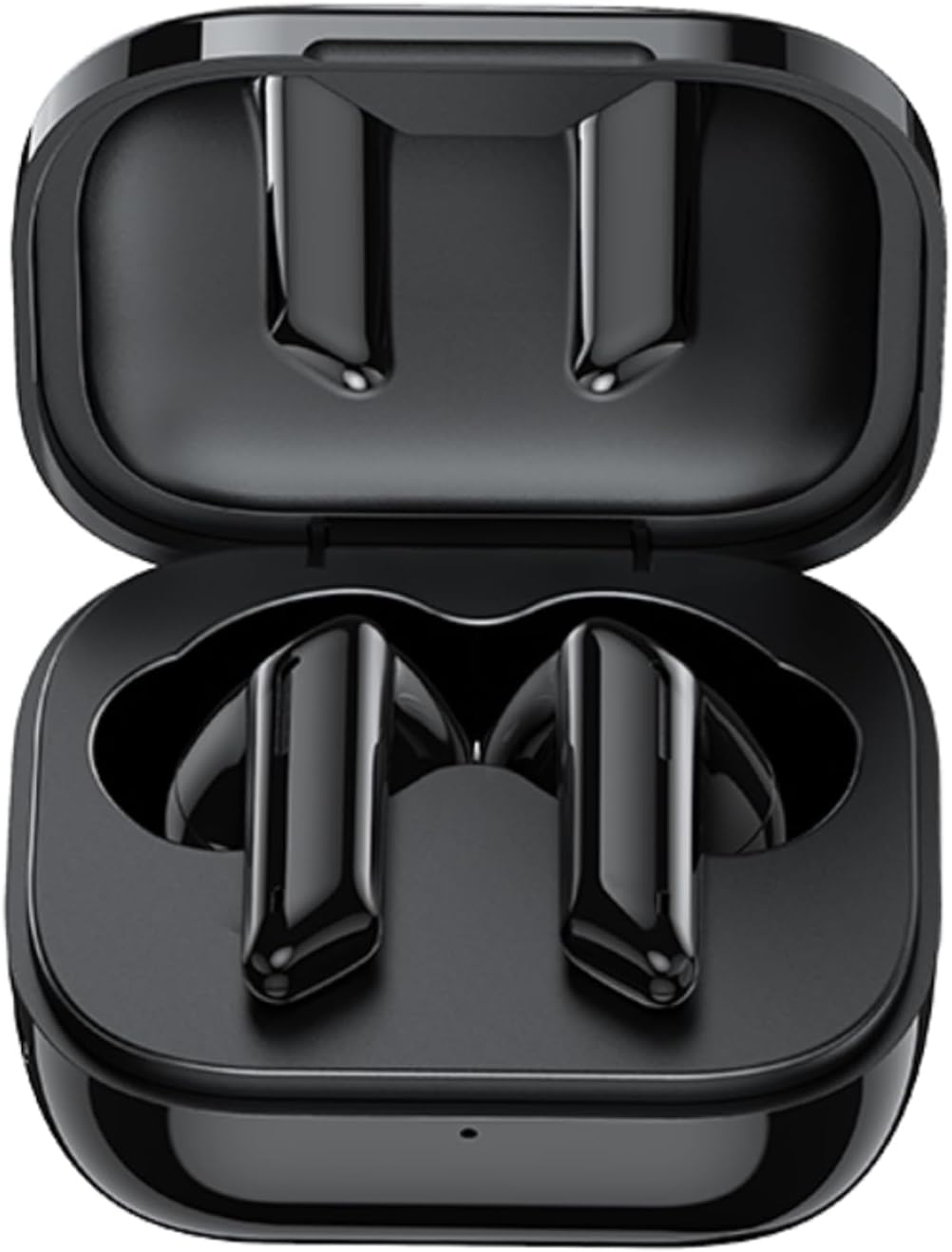
Image: AWEI T36 earbuds securely placed inside their open charging case, showcasing the sleek black design of both the earbuds and the case interior.
Komponen Fon Telinga
- Kawasan Kawalan Sentuh: Untuk mengurus main balik muzik, panggilan dan pembantu suara.
- mikrofon: For clear call performance.
- Mengecas Kenalan: Terletak di bahagian bawah setiap fon telinga.
- Penunjuk LED: Shows pairing status and battery level.
Charging Case Components
- Slot Pengecasan Earbud: Pegang dan cas fon telinga dengan selamat.
- Port Pengecasan USB-C: Untuk mengecas kes itu.
- Penunjuk LED: Displays charging status of the case.
Persediaan
1. Mengecas Fon Telinga dan Sarung
Sebelum penggunaan pertama, cas sepenuhnya kedua-dua fon telinga dan bekas pengecasan.
- Place the earbuds into the charging case, ensuring they are correctly seated. The earbuds' LED indicators will light up to show they are charging.
- Sambungkan kabel pengecas USB-C ke port pengecasan pada kes dan hujung satu lagi ke penyesuai kuasa USB (tidak disertakan) atau port USB komputer.
- The charging case LED indicator will show charging progress. A full charge takes approximately 1.5 hours for the case.

Image: AWEI T36 earbuds and their charging case resting on a circular charging pad, illustrating the product's battery life and charging capabilities. The image indicates a 320mAh charging case, 4-5 hours playtime, and 1.5 hours charging time.
Note: The product specifications indicate 7 hours of continuous use per charge for earbuds and 35 hours of playback with the charging case.
2. Berpasangan dengan Peranti Anda
The earbuds support Bluetooth 5.3 for a stable and fast connection.
- Berpasangan kali pertama:
- Buka bekas pengecas. Fon telinga akan dihidupkan secara automatik dan memasuki mod berpasangan.
- Pada peranti anda (telefon pintar, tablet, komputer riba), dayakan Bluetooth.
- Cari untuk "AWEI T36" dalam senarai peranti Bluetooth yang tersedia dan pilihnya untuk bersambung.
- Once connected, you will hear a confirmation tone, and the earbud LED indicators will turn off or flash slowly.
- Berpasangan Seterusnya:
- Once paired, the earbuds will automatically connect to the last paired device when taken out of the charging case, provided Bluetooth is enabled on the device.

Image: A smartphone displaying a game, with the AWEI T36 earbuds and their charging case in the foreground, illustrating the Bluetooth connection. The image highlights "Bluetooth 5.1 Faster & More Stable" (Note: Product specifications state Bluetooth 5.3 for this model, which offers improved performance.)

Image: Two AWEI T36 earbuds, one in its open charging case and one outside, demonstrating that both earbuds can function independently as "hosts" or "main engines" for flexible use.
Arahan Operasi
The AWEI T36 earbuds feature smart touch controls for easy operation.
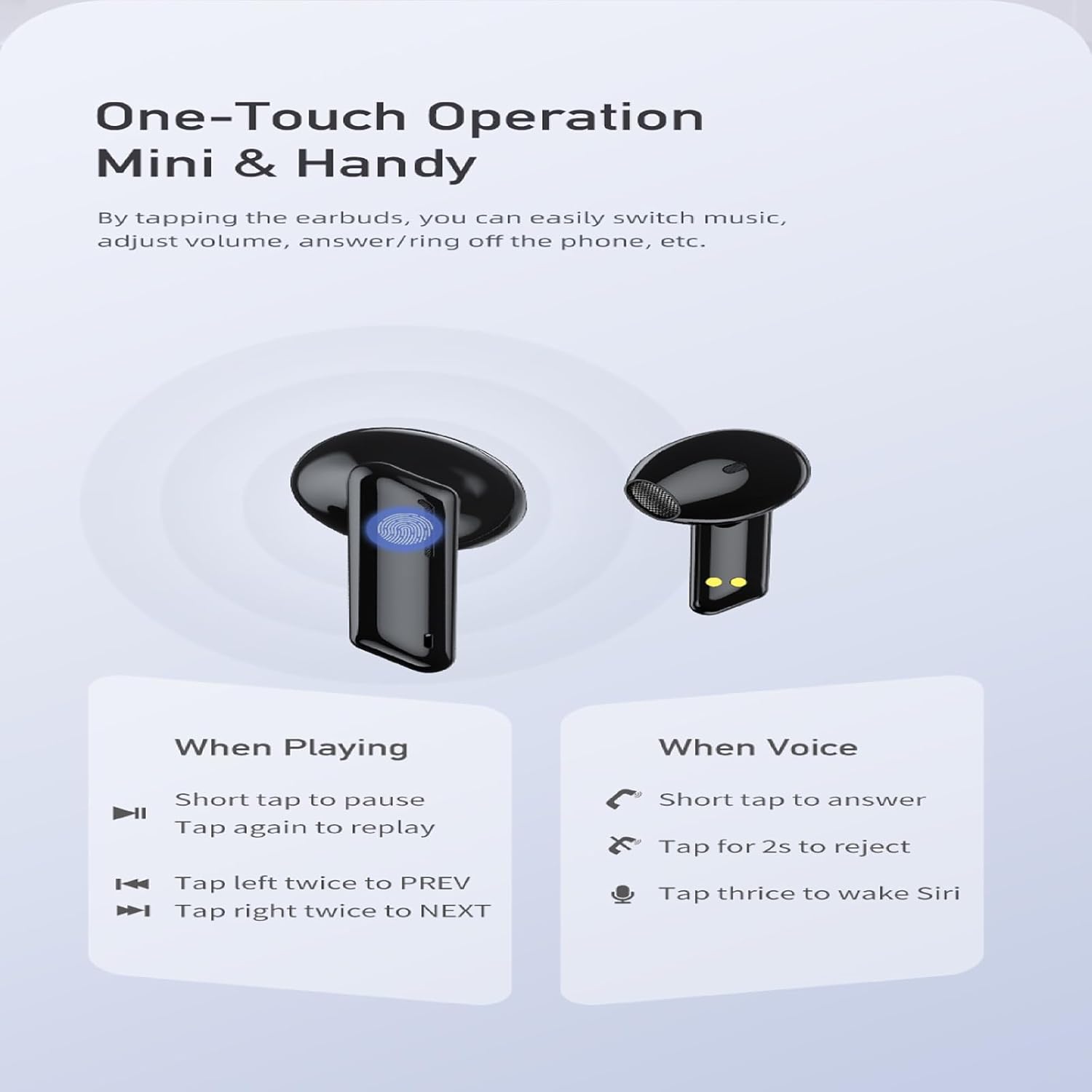
Image: A visual guide to the one-touch operation of the AWEI T36 earbuds, detailing touch commands for music playback (pause/play, previous/next song) and call management (answer/reject, activate voice assistant).
Main balik Muzik
- Main/Jeda: Short tap on either earbud.
- Lagu Seterusnya: Tap the right earbud twice.
- Lagu Sebelumnya: Tap the left earbud twice.
- Kawalan Kelantangan: (Specific gesture not detailed in image, typically long press or multiple taps. Refer to device settings if not working as expected.)
Pengurusan Panggilan
- Jawab Panggilan: Short tap on either earbud.
- Tolak Panggilan: Ketik dan tahan salah satu fon telinga selama 2 saat.
- Tamatkan Panggilan: Short tap on either earbud during a call.
Pembantu Suara
- Aktifkan Pembantu Suara (Siri/Google Assistant): Tap either earbud three times.
Hidupkan/Mati Kuasa
- Hidupkan kuasa: Earbuds automatically power on when removed from the charging case.
- Matikan: Earbuds automatically power off when placed back into the charging case and the lid is closed.
Penyelenggaraan
Pembersihan
- Bersihkan fon telinga dan bekas pengecas dengan kerap menggunakan kain yang lembut, kering dan tidak berbulu.
- Gunakan kapas dengan ringan dampened with isopropyl alcohol to clean the charging contacts on both the earbuds and inside the case.
- Jangan gunakan pembersih yang melelas atau rendam fon telinga atau bekas ke dalam air.
Penyimpanan
- Simpan fon telinga dalam bekas pengecasnya apabila tidak digunakan untuk melindunginya dan memastikan ia dicas.
- Elakkan menyimpan peranti dalam suhu yang melampau (panas atau sejuk) atau dalam persekitaran yang sangat lembap.
Penjagaan Bateri
- Untuk menjimatkan hayat bateri, cas fon telinga dan sarungnya secara berkala, walaupun tidak digunakan dengan kerap.
- Elakkan daripada menghabiskan bateri sepenuhnya sebelum mengecas semula.

Image: AWEI T36 earbuds and their charging case with water droplets on them, emphasizing their IPX4 waterproof rating, which protects against sweat and light rain during exercise.
Menyelesaikan masalah
Jika anda menghadapi sebarang masalah dengan fon telinga AWEI T36 anda, sila rujuk penyelesaian biasa berikut:
- Fon telinga tidak berpasangan dengan peranti:
- Pastikan fon telinga dicas sepenuhnya.
- Pastikan Bluetooth didayakan pada peranti anda dan fon telinga berada dalam julat (sehingga 10 meter).
- Lupakan "AWEI T36" daripada senarai Bluetooth peranti anda dan cuba pasangkan semula.
- Place both earbuds back into the charging case, close the lid, wait a few seconds, then open the lid to reset them.
- Hanya satu fon telinga berfungsi:
- Pastikan kedua-dua fon telinga dicas.
- Place both earbuds back into the charging case, close the lid, then open it again. This often re-syncs them.
- Bersihkan sesentuh pengecasan pada kedua-dua fon telinga dan di dalam sarung.
- Fon telinga tidak dicas:
- Periksa sama ada kabel pengecasan disambungkan dengan selamat ke kedua-dua bekas dan sumber kuasa.
- Pastikan sesentuh pengecasan pada fon telinga dan bahagian dalam kotak bersih dan bebas daripada serpihan.
- Cuba kabel USB-C atau penyesuai kuasa yang lain.
- Kelantangan rendah atau kualiti bunyi yang lemah:
- Laraskan kelantangan pada kedua-dua peranti anda dan fon telinga.
- Ensure the eartips are properly seated in your ears to create a good seal. Try different sized eartips.
- Clean any earwax or debris from the earbud speaker mesh.
Spesifikasi
| Ciri | Penerangan |
|---|---|
| Nama Model | T36 |
| Jenama | AWEI |
| Teknologi Ketersambungan | Wayarles (Bluetooth 5.3) |
| Julat Bluetooth | Sehingga 10 meter (33 kaki) |
| Hayat Bateri Earbud | Sehingga 7 jam (caj tunggal) |
| Jumlah Masa Main (dengan kes) | Sehingga 35 jam |
| Masa Pengecasan (Kes) | lebih kurang 1.5 jam |
| Tahan Air | IPX4 (Sweat and splash proof) |
| Jenis Kawalan | Kawalan Sentuh |
| Bentuk alat dengar | Dalam Telinga |
| bahan | Silicone (Eartips) |
| Komponen yang Disertakan | Earbuds, Charging Case, USB-C Cable, Eartips, User Manual |
Waranti dan Sokongan
AWEI products are manufactured to the highest quality standards. For information regarding warranty coverage, technical support, or customer service, please refer to the warranty card included in your package or visit the official AWEI webtapak.
For further assistance, please contact AWEI customer support with your product model number (T36) and purchase details.