
1. Pengenalan
Thank you for choosing the 5 Core 4-Channel Audio Mixer (Model MX 4CH ORG). This compact and versatile mixer is designed for various audio applications, including DJ setups, studio recording, karaoke, and live streaming. It features multiple input options, phantom power, Bluetooth connectivity, a USB audio interface, and built-in effects to enhance your sound. Please read this manual thoroughly to ensure proper setup, operation, and longevity of your device.
2. Arahan Keselamatan Penting
- Baca arahan ini dengan teliti sebelum mengendalikan peranti.
- Simpan manual ini untuk rujukan masa hadapan.
- Patuhi semua amaran pada produk dan dalam arahan pengendalian.
- Ikut semua arahan.
- Jangan gunakan alat ini berhampiran air.
- Bersihkan hanya dengan kain kering.
- Jangan sekat sebarang bukaan pengudaraan. Pasang mengikut arahan pengilang.
- Jangan pasang berhampiran mana-mana sumber haba seperti radiator, daftar haba, dapur, atau radas lain (termasuk amppenghidup) yang menghasilkan haba.
- Jangan kalahkan tujuan keselamatan plag terkutub atau jenis pembumian. Palam terkutub mempunyai dua bilah dengan satu lebih lebar daripada yang lain. Palam jenis pembumian mempunyai dua bilah dan serampang pembumian ketiga. Bilah lebar atau serampang ketiga disediakan untuk keselamatan anda. Jika palam yang disediakan tidak sesuai dengan alur keluar anda, rujuk juruelektrik untuk menggantikan alur keluar usang.
- Lindungi kord kuasa daripada berjalan atau tersepit, terutamanya pada palam, bekas kemudahan dan tempat keluar dari radas.
- Hanya gunakan lampiran/aksesori yang ditentukan oleh pengilang.
- Cabut plag radas ini semasa ribut petir atau apabila tidak digunakan untuk jangka masa yang lama.
- Rujuk semua servis kepada kakitangan perkhidmatan yang berkelayakan. Servis diperlukan apabila radas telah rosak dalam apa jua cara, seperti kord bekalan kuasa atau palam rosak, cecair telah tertumpah atau objek jatuh ke dalam radas, radas telah terdedah kepada hujan atau lembapan, tidak beroperasi seperti biasa. , atau telah digugurkan.
3. Produk Lebihview
The 5 Core 4-Channel Audio Mixer is a compact and powerful tool for audio enthusiasts. It features a user-friendly interface with clearly labeled controls for easy operation.
3.1 Ciri-ciri Utama
- Pencampuran 4 Saluran: Two mono channels and two stereo channels for versatile input options.
- XLR & 1/4" Inputs: Supports both balanced XLR and unbalanced 1/4" inputs.
- +48V Kuasa Hantu: Provides power for condenser microphones on mono channels.
- Kesambungan Bluetooth 5.4: Penstriman audio tanpa wayar yang lancar daripada peranti yang serasi.
- Antaramuka Audio USB: Connects to a computer for direct recording and playback.
- Penyama 2 Band: High and Low frequency controls on each channel for sound shaping.
- Delay Effects: Built-in delay and repeat effects to add depth to your mix.
- Reka Bentuk Padat & Mudah Alih: Lightweight and easy to transport for various setups.
3.2 Mixer Layout and Controls
Familiarize yourself with the various inputs, outputs, and controls on your mixer. Refer to the diagram below for a visual guide.
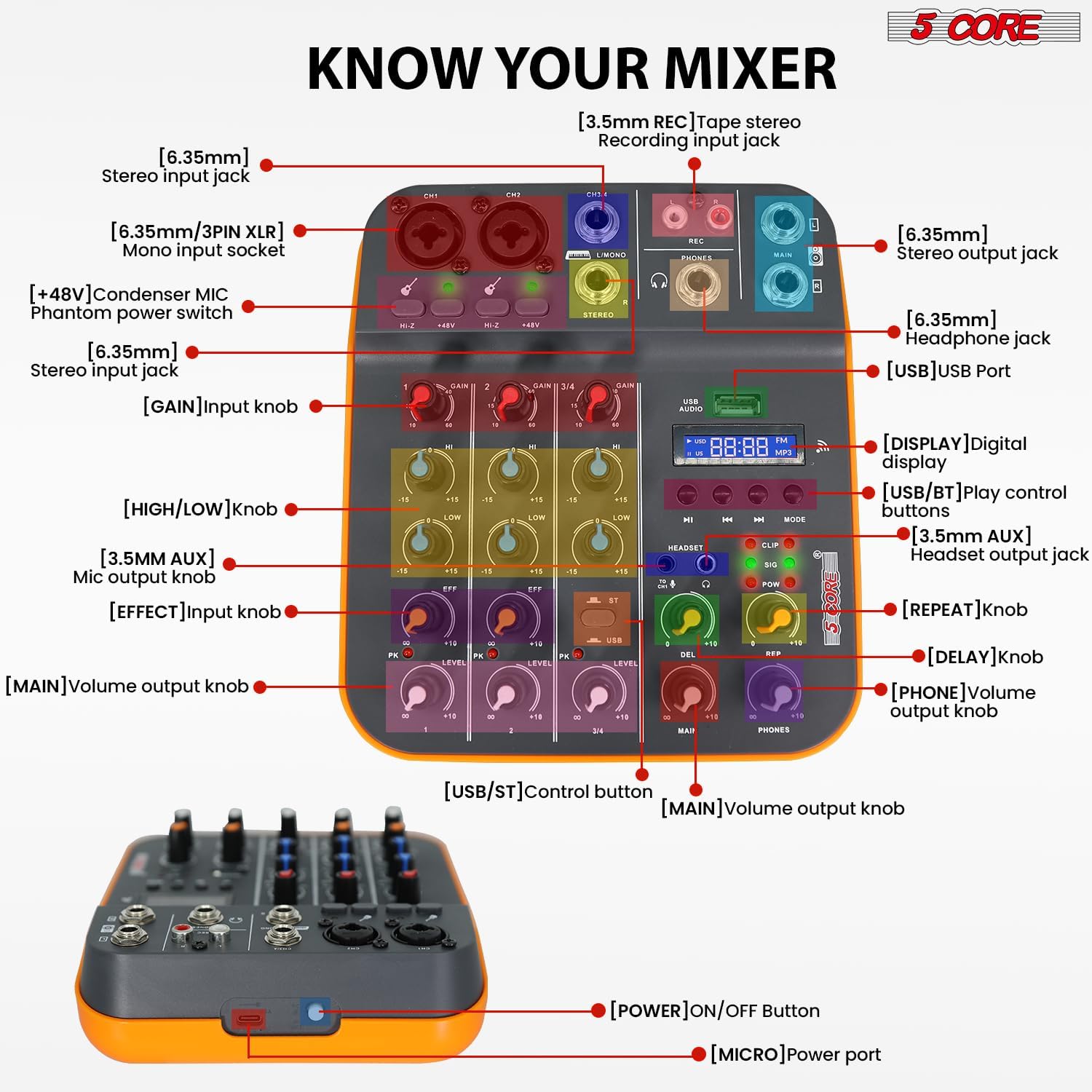
Figure 3.2.1: Front Panel Layout and Controls. This image displays the top view of the 5 Core 4-Channel Audio Mixer with various components labeled, including XLR/1/4" mono input sockets, stereo input jacks, REC output, MAIN output, PHONES output, USB port, digital display, and control knobs for GAIN, HIGH, LOW, EFF (Effect), LEVEL, DEL (Delay), REP (Repeat), MAIN, and PHONES volume. Also shown are the +48V phantom power switches and HI-Z switches.
- [6.35mm/3PIN XLR] Mono input socket: For connecting microphones or mono instruments.
- [HI-Z] Switch: For high impedance inputs, typically for guitars.
- [+48V] Condenser MIC Phantom power switch: Mengaktifkan kuasa hantu untuk mikrofon kondenser.
- [6.35mm] Stereo input jack: For connecting stereo line-level devices.
- [GAIN] Input knob: Melaraskan sensitiviti input untuk setiap saluran.
- [HIGH/LOW] knob: 2-band equalizer for adjusting high and low frequencies.
- [EFF] Effect knob: Mengawal jumlah kesan yang dikenakan pada saluran.
- [LEVEL] Main volume output knob: Adjusts the overall volume of each channel.
- [USB] USB Port: For connecting to a computer or USB drive.
- [DISPLAY] Digital display: Menunjukkan mod semasa dan maklumat trek.
- [USB/BT] Play control buttons: Controls for USB/Bluetooth playback (Play/Pause, Skip, Mode).
- [HEADSET] Headset output jack: Untuk menyambungkan fon kepala.
- [DEL] Delay knob: Adjusts the delay time of the effect.
- [REP] Repeat knob: Adjusts the number of repetitions for the delay effect.
- [MAIN] Volume output knob: Controls the overall main output volume.
- [PHONES] Volume output knob: Controls the headphone output volume.
- [POWER] ON/OFF Button: Located on the side/rear for turning the unit on/off.
- [MICRO] Power port: USB power input.
4. Panduan Persediaan
4.1 Powering the Mixer
The mixer can be powered in three ways:
- Komputer: Connect the mixer to a computer's USB port using a USB cable.
- Penyesuai Kuasa: Use a standard USB power adapter (not included) to connect to a wall outlet.
- Bank kuasa: For portable use, connect to a power bank (not included).
Ensure the power source provides sufficient voltage (5V/2A recommended). Once connected, press the [POWER] ON/OFF button to turn on the mixer.
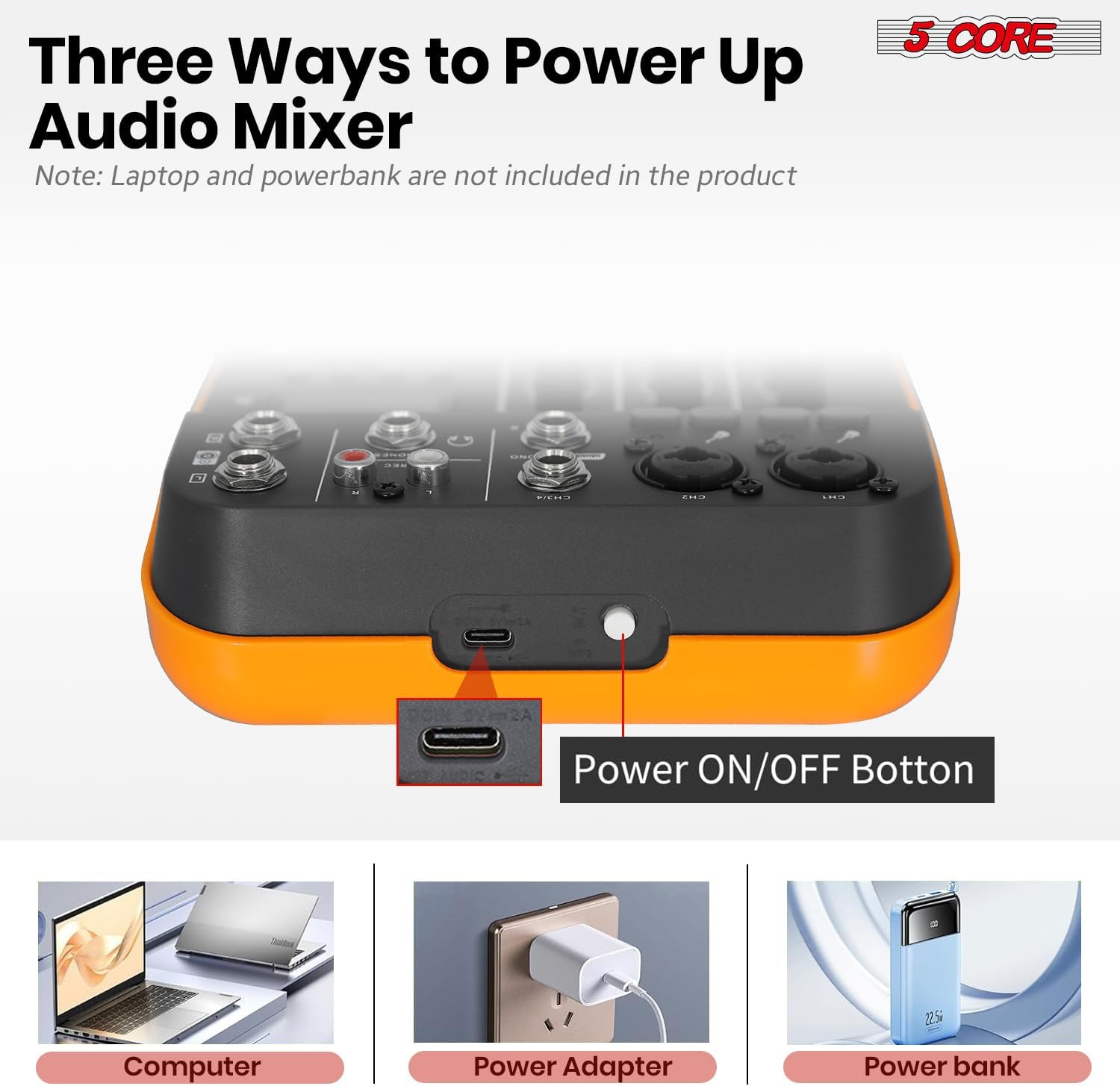
Figure 4.1.1: Powering Options for the Audio Mixer. This image illustrates connecting the mixer to a laptop, a wall adapter, and a power bank for power supply.
4.2 Menyambungkan Mikrofon dan Instrumen
- Mono Inputs (CH1, CH2): Use XLR or 1/4" cables to connect microphones or mono instruments.
- Kuasa Hantu: Untuk mikrofon kondenser, tekan butang +48V switch on the respective channel. The indicator light will illuminate. Caution: Do not activate +48V phantom power for dynamic microphones or ribbon microphones unless specified by the manufacturer, as it may cause damage.
- High Impedance (HI-Z): If connecting a guitar or bass directly, press the HI-Z switch for optimal signal.
- Stereo Inputs (CH3/4): Use 1/4" cables to connect stereo line-level devices such as keyboards, media players, or other mixers.

Figure 4.2.1: Phantom Power and Input Connections. This image highlights the +48V phantom power switch and the XLR/1/4" combo inputs for microphones and instruments.
4.3 Connecting to a Computer for Recording (USB Audio Interface)
The mixer features a built-in USB audio interface for direct connection to your computer, enabling recording and playback.
- Sambungkan port USB pengadun ke komputer anda menggunakan kabel USB.
- Your computer should automatically detect the mixer as an audio device. No special drivers are usually required for basic functionality.
- Open your preferred Digital Audio Workstation (DAW) software (e.g., Audacity, GarageBand, Ableton Live).
- In your DAW's audio settings, select the mixer as your input and output device.
- You can now record audio from the mixer into your computer and play back audio from your computer through the mixer.

Figure 4.3.1: USB Audio Interface for PC Recording. This image depicts the mixer connected to a laptop, demonstrating its use as an audio interface for music production.

Figure 4.3.2: Computer to Mixer Audio Signal Flow. This diagram shows how computer music signals can be sent to the audio mixer and how audio mixer signals can be recorded by a computer program, with an emphasis on switching to PC mode.
4.4 Kesambungan Bluetooth
The mixer supports Bluetooth 5.4 for wireless audio streaming from your smartphone, tablet, or other Bluetooth-enabled devices.
- Tekan ke MODE butang pada pengadun sehingga "BT" muncul pada paparan digital.
- On your Bluetooth device, search for available devices and select "5 CORE MIXER" (or similar name).
- Once paired, you can stream audio wirelessly to the mixer. Use the play control buttons (PLAY/PAUSE, SKIP) on the mixer to control playback.

Figure 4.4.1: Seamless Wireless Connectivity. This image illustrates the mixer's Bluetooth capability, showing it connected to a smartphone for wireless music streaming.
4.5 Sambungan Output
- Output Utama (UTAMA): Connect to your main speakers or amplifier using 1/4" cables.
- Output Fon Kepala (TELEFON): Connect your headphones to the 1/4" headphone jack for monitoring.
- REC Output (REC): Use for dedicated recording devices.

Figure 4.5.1: Versatile Compatibility. This image demonstrates the mixer's ability to connect with a wide range of audio equipment, including headphones, smartphones, power amppenghawa dingin dan mikrofon tanpa wayar.
5. Arahan Operasi
5.1 Pencampuran Asas
- Tetapkan GAIN: Laraskan DAPATKAN knob for each input channel to achieve an optimal input level. Avoid clipping (indicated by the PK/CLIP light).
- Laraskan EQ: Gunakan TINGGI dan RENDAH tombol untuk membentuk ton setiap saluran.
- Guna Kesan: Pusingkan EFF knob to send a portion of the channel's signal to the built-in effects processor.
- Set Channel Level: Laraskan TINGKAT knob for each channel to balance the mix.
- Jumlah Induk: Kawal jumlah output keseluruhan menggunakan UTAMA tombol kelantangan.
5.2 Using Delay Effects
The mixer includes built-in delay and repeat effects.
- DEL (Delay): Adjust this knob to control the delay time.
- REP (Ulang): Adjust this knob to control the number of repetitions for the delay effect.
- Memastikan EFF knob on the desired channel is turned up to send signal to the effects processor.
5.3 Main Semula USB/MP3
Masukkan pemacu USB yang mengandungi MP3 files into the USB port. Use the play control buttons (PLAY/PAUSE, SKIP, MODE) to navigate and play tracks. The digital display will show track information.
5.4 Pemantauan
Sambungkan fon kepala ke TELEFON jack and adjust the TELEFON volume knob to monitor your mix without affecting the main output.
6. Penyelenggaraan
- Pembersihan: Gunakan kain lembut dan kering untuk membersihkan permukaan pengadun. Jangan gunakan pembersih cecair atau pelarut.
- Storan: Simpan pengadun di tempat yang sejuk dan kering jauh dari cahaya matahari langsung dan suhu yang melampau.
- Pengendalian: Elakkan daripada menjatuhkan atau menundukkan pengadun kepada hentaman kuat.
- Pengudaraan: Pastikan bukaan pengudaraan tidak disekat untuk mengelakkan terlalu panas.
7. Penyelesaian masalah
7.1 Tiada Keluaran Bunyi
- Periksa sama ada pengadun telah dihidupkan.
- Ensure all cables are securely connected to the correct inputs and outputs.
- Sahkan bahawa UTAMA volume and individual channel TINGKAT tombol-tombol diputar ke atas.
- Check the volume levels on your connected speakers or amplebih hidup.
- If using headphones, ensure the TELEFON volume knob is turned up.
7.2 Microphone Not Working / Low Volume
- Ensure the microphone is connected to a mono input (CH1 or CH2).
- Laraskan DAPATKAN knob for the microphone channel.
- Jika menggunakan mikrofon kondenser, pastikan +48V phantom power is activated for that channel.
- Test the microphone with another device to confirm it is functional.
7.3 Isu Sambungan Bluetooth
- Ensure the mixer is in Bluetooth mode (display shows "BT").
- Make sure your Bluetooth device is within range and Bluetooth is enabled.
- Cuba nyahgandingkan dan pasangkan semula peranti.
- Pastikan tiada peranti lain yang disambungkan secara aktif ke pengadun melalui Bluetooth.
7.4 Recording Issues via USB
- Verify the USB cable is properly connected between the mixer and your computer.
- Check your computer's sound settings and your DAW's audio preferences to ensure the mixer is selected as the input device.
- Laraskan UTAMA output level on the mixer, as this often controls the signal sent to the USB output.
8. Spesifikasi
| Ciri | Perincian |
|---|---|
| Jenama | 5 CORE |
| Model | MX 4CH ORG |
| Saluran No. | 4 (2 Mono, 2 Stereo) |
| Jenis Bahan | plastik |
| Voltage | 100-240V (Input), 5V (Operating) |
| Versi Bluetooth | 5.4 |
| Rakaman PC | Ya (melalui USB) |
| Penyamaan | 2-Band EQ (High, Low) per channel |
| Kuasa Hantu | +48V |
| Kesambungan USB | Yes (Audio Interface, MP3 Playback) |
| Kesan | Lengahkan, Ulangi |
| Respons Kekerapan | 20Hz - 20KHz |
| Dimensi Produk | 3"D x 8"W x 9"H |
| UPC | 810144135113 |
9. Waranti & Sokongan
Produk ini disertakan dengan a Waranti 1 bulan from the date of purchase. For warranty claims or technical support, please contact 5 Core customer service through the retailer where the product was purchased or visit the official 5 Core webtapak untuk maklumat hubungan.
Sila simpan bukti pembelian anda untuk pengesahan waranti.
10. Video Produk
10.1 5 Core Audio Mixer 4 Channel DJ Soundboard Overview
Video ini memberikan gambaran ringkasview of the 5 Core 4-Channel Audio Mixer, highlighting its key features such as 2 mono and 2 stereo channels, Bluetooth 5.4, USB connectivity, MP3 playback, +48V phantom power, 2-band EQ, and delay effects. It demonstrates the mixer's suitability for recording, mixing, and performance.
10.2 Audio Mixer USB Interface XLR Mixing Console 4 Channel Features
This video showcases the 5 Core 4-Channel Audio Mixer, emphasizing its 2 mono and 2 stereo channels, Bluetooth 5.4, USB and MP3 capabilities, +48V phantom power for studio microphones, 20Hz to 20kHz frequency range, delay effects, and 2-band EQ. It highlights the mixer's lightweight and orange design, suitable for various audio production needs.