
1. Produk Lebihview
The DOOGEE V Pad 5G is a high-performance Android tablet designed for versatile use, from entertainment to productivity. It features a large 12-inch 2.4K IPS display, powerful MediaTek Dimensity 7050 5G Octa-Core processor, and an 8800mAh battery, ensuring a smooth and immersive user experience.
1.1 Kandungan Pakej
Upon unboxing your DOOGEE V Pad 5G tablet, please verify that all the following items are included:
- 1* DOOGEE V Pad Tablet
- 1* Kabel Jenis-C
- 1* 18W Charger
- 1* SIM Card Removal Needle
- 1 * Kotak Pembungkusan
- 1* Manual Pengguna

The package includes the DOOGEE V Pad Tablet, a Type-C Cable, an 18W Charger, a SIM Card Removal Needle, the Packing Box, and this User Manual.
1.2 Susun atur Peranti
Familiarize yourself with the physical components of your tablet:
- Kamera Depan: Located at the top center when held horizontally.
- paparan: The 12-inch 2.4K IPS screen.
- Butang Kuasa: Typically on the side, used to turn the device on/off or wake/sleep the screen.
- Butang Kelantangan: Bersebelahan dengan butang kuasa, untuk melaraskan tahap audio.
- Port USB Jenis-C: At the bottom edge, for charging and data transfer.
- Gril Pembesar Suara: Quad speakers located on the sides for immersive audio.
- Slot Kad SIM/TF: On the side, for inserting SIM cards and expandable storage.
- Modul Kamera Belakang: Located on the back, featuring the main camera.
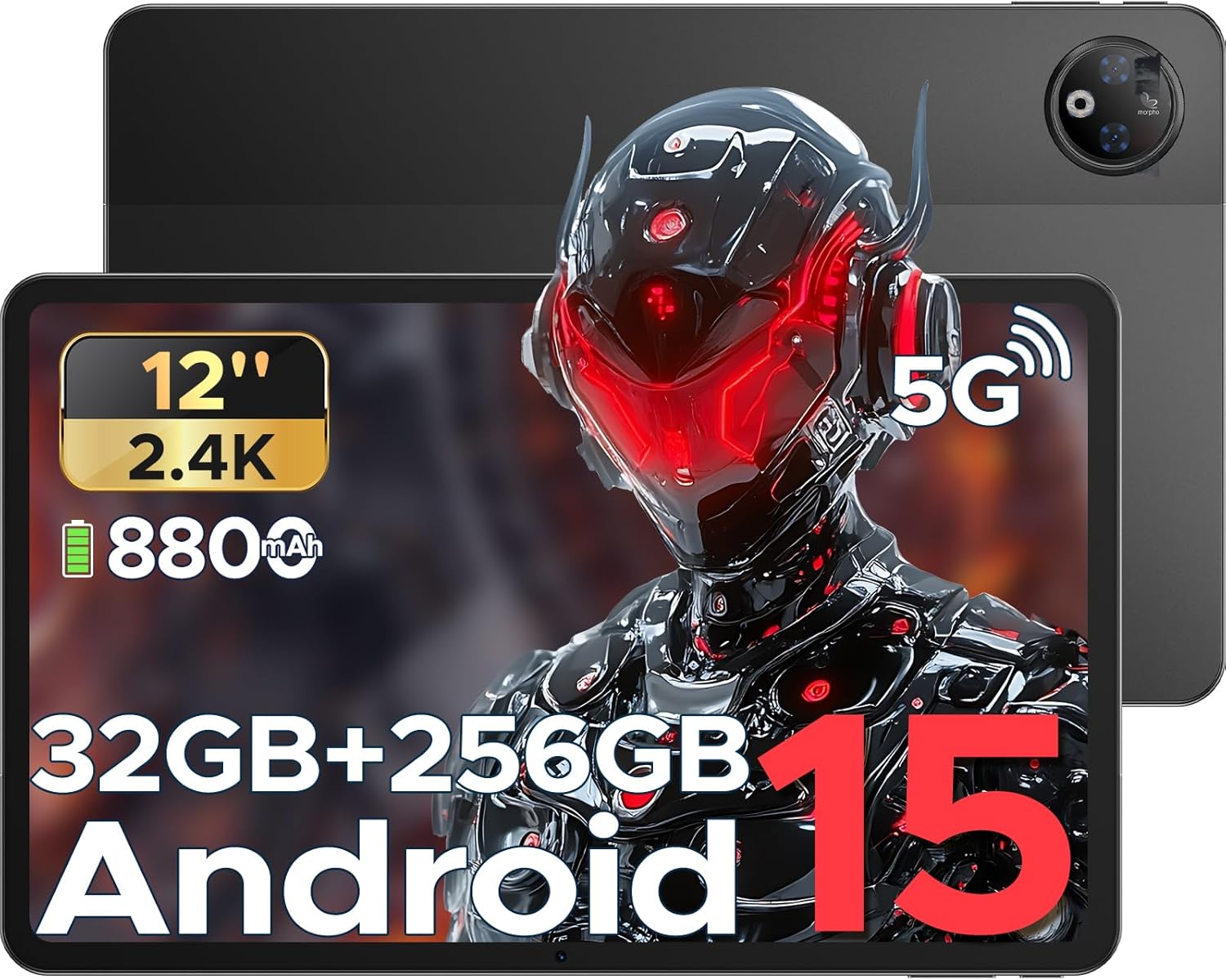
This image provides a general view of the DOOGEE V Pad 5G tablet, showing its front display and rear camera module.
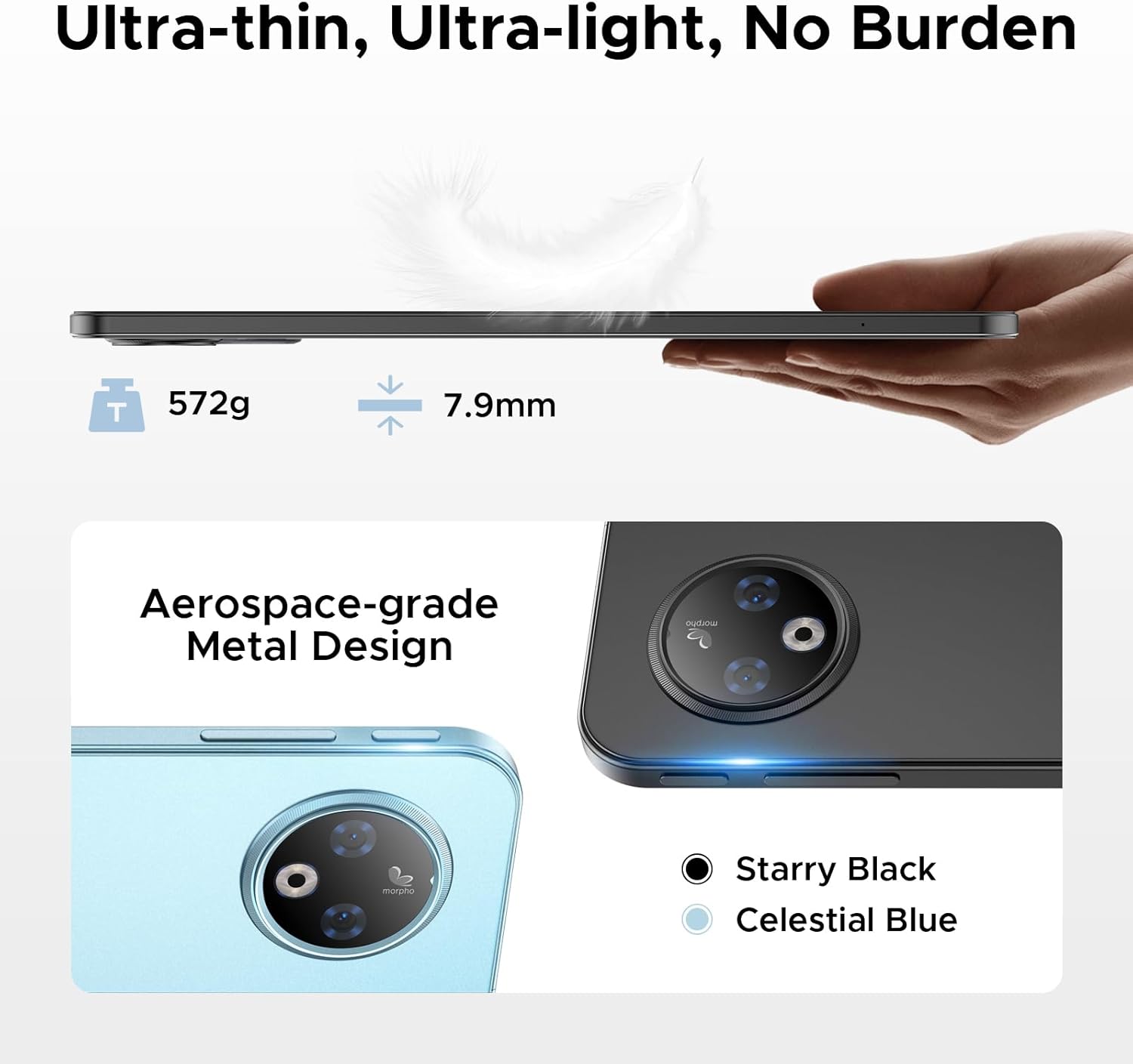
Bahagian view of the tablet illustrates its 7.9mm ultra-thin design and the placement of physical buttons and ports.
2. Bermula
2.1 Mengecas Tablet
Before first use, fully charge your tablet. Connect the provided Type-C cable to the tablet's charging port and the 18W charger to a power outlet. The tablet supports 18W fast charging and can also function as an emergency power bank for other devices via reverse charging.
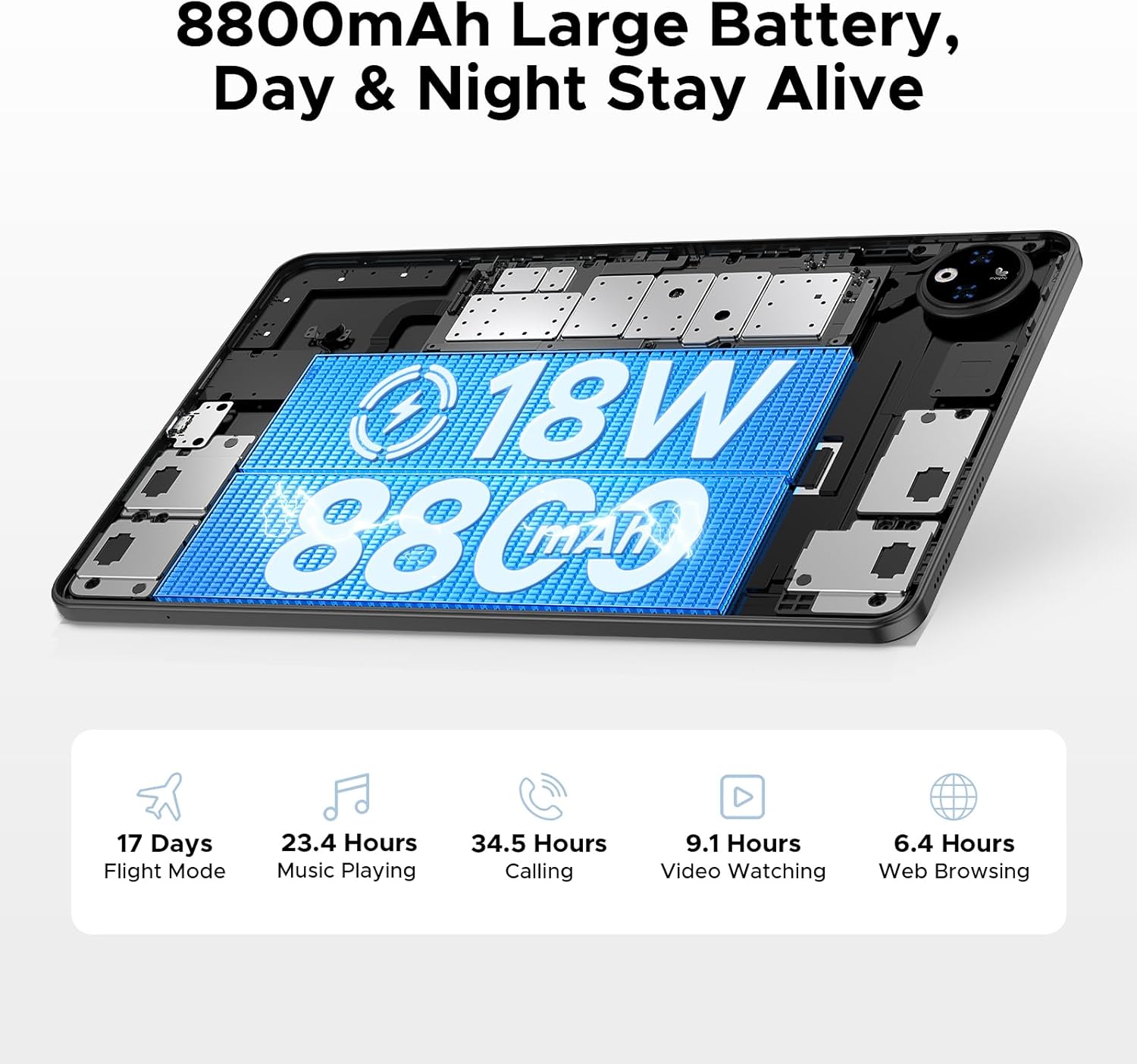
This image illustrates the tablet's large 8800mAh battery and its 18W fast charging feature, ensuring extended usage.
This video demonstrates the DOOGEE V Pad's powerful battery and its ability to support reverse charging, acting as an emergency power bank.
2.2 Hidupkan/Mati Kuasa
- Untuk Menghidupkan: Press and hold the Power button until the DOOGEE logo appears on the screen.
- Untuk Mematikan: Tekan dan tahan butang Kuasa sehingga menu pilihan kuasa muncul. Pilih 'Matikan' dan sahkan.
- Untuk Mulakan Semula: Daripada menu pilihan kuasa, pilih 'Mulakan Semula' dan sahkan.
2.3 Persediaan Awal
The first time you power on your tablet, you will be guided through an initial setup process. Follow the on-screen prompts to:
- Pilih bahasa anda.
- Sambung ke rangkaian Wi-Fi.
- Log masuk dengan akaun Google anda atau buat yang baharu.
- Sediakan kunci skrin (PIN, corak, kata laluan atau Buka Kunci Wajah).
- Review dan menerima terma dan syarat.

The Android 15 logo signifies the tablet's operating system, which offers a smarter, smoother, and safer user experience.
2.4 Memasukkan Kad SIM/TF
To insert a SIM card for cellular data or a TF (microSD) card for expanded storage:
- Cari dulang kad SIM/TF di sisi tablet.
- Use the provided SIM card removal needle to gently eject the tray.
- Place the Nano-SIM card(s) and/or TF card into the designated slots on the tray, ensuring correct orientation.
- Masukkan semula dulang ke dalam tablet dengan berhati-hati sehingga ia berbunyi klik pada tempatnya.

This diagram illustrates the tablet's dual SIM 5G NR connectivity, allowing for ultra-fast internet access and communication.
3. Mengendalikan Tablet Anda
3.1 Navigation and Gestures
The DOOGEE V Pad 5G utilizes intuitive touch gestures for navigation:
- Ketik: Untuk memilih item atau membuka aplikasi.
- Leret: To scroll through pages or menus.
- Cubit-untuk-Zum: Untuk mengezum masuk atau keluar pada imej dan web muka surat.
- Tekan lama: Untuk mengakses menu kontekstual atau mengalihkan ikon aplikasi.
- Pelbagai Tugas Skrin Terpisah: Utilize the smart split-screen feature to run two applications simultaneously, enhancing productivity.

This image shows the tablet's smart split-screen multitasking feature, allowing two applications to be viewed serentak.
3.2 Menyambung ke Wi-Fi
To connect your tablet to a Wi-Fi network:
- Pergi ke tetapan > Rangkaian & internet > Wi-Fi.
- Hidupkan Wi-Fi.
- Pilih rangkaian yang anda inginkan daripada senarai.
- Masukkan kata laluan jika digesa dan ketik Sambung.
The tablet supports Wi-Fi 6 for faster and more stable wireless connections.

This image highlights the benefits of WiFi 6 high-speed transmission on the tablet, ensuring faster and more stable wireless connectivity.
3.3 Menggunakan Kamera
The DOOGEE V Pad 5G is equipped with a 13MP rear camera and an 8MP front camera for capturing photos and videos. Open the Camera app to access various modes, including Portrait Mode, Beauty Mode, and Skew Correction for documents.

This image showcases the tablet's 13MP main camera and 8MP front camera capabilities, including various shooting modes for capturing lively moments.
3.4 Pengurusan Storan
Your tablet comes with 256GB of internal storage (ROM) and 32GB of RAM (8GB physical + 24GB extended virtual RAM). If you require more space, the tablet supports up to 2TB of expandable memory via a TF card (sold separately).

This image highlights the tablet's generous 256GB internal storage and 32GB RAM (8GB physical + 24GB virtual), along with the option to expand storage up to 2TB using a TF card.
3.5 Ciri-ciri AI Gemini
The DOOGEE V Pad 5G integrates Gemini AI, offering a range of intelligent functionalities to enhance your productivity and creativity:
- Penciptaan Kandungan: Assist in generating ideas and drafting content.
- Information Retrieval & Summarization: Quickly find and summarize information from various sources.
- Analisis Imej: Understand and interpret visual content.
- Pembangunan Kod: Provide assistance in programming tasks.
- Pembelajaran Bahasa: Support language acquisition and practice.
- Pembantu Pintar: Act as a personal assistant for daily tasks and queries.

This image illustrates the various functions of the built-in Gemini AI, including content creation, information retrieval, image analysis, code development, language learning, and smart assistant capabilities.

This image demonstrates Gemini Live, enabling real-time AI conversations for various tasks, offering helpful tips and information.

This image illustrates Gemini Deep Research's ability to process vast amounts of data and provide instant, summarized insights.
3.6 Ciri-ciri Lain
The tablet includes several other useful features:
- Buka Kunci Wajah: Buka kunci tablet anda dengan selamat menggunakan pengecaman wajah.
- Precise Navigation System: Supports GPS, Beidou, GLONASS, and Galileo for accurate location tracking and navigation.
- Fungsi Radio FM: Enjoy local radio broadcasts (requires headphones to be plugged in).
- Built-in PC-Level WPS Office: Pre-integrated WPS Office suite (Word, Excel, PPT) for productivity on the go.

This image highlights additional features such as facial recognition unlock, dual card slots, and Bluetooth 5.2 connectivity.

This image illustrates the tablet's precise navigation system, supporting GPS, Beidou, GLONASS, and Galileo for accurate location tracking.

This image shows the pre-integrated WPS Office suite (Word, Excel, PPT), allowing for PC-level productivity on the tablet.

This image explains the FM Radio function, noting that headphones must be plugged in to activate it.
4. Penyelenggaraan dan Penjagaan
Proper maintenance ensures the longevity and optimal performance of your DOOGEE V Pad 5G tablet.
4.1 Ketahanan Bateri
The tablet features an 8800mAh semi-solid state battery designed for extended life, with up to 800 charge and discharge cycles and an estimated 3-year lifetime. To maximize battery health:
- Avoid extreme temperatures. The tablet is designed to withstand cold conditions down to -10°C for up to 6 hours of video playback, but prolonged exposure to extreme heat or cold can degrade battery performance.
- Gunakan hanya pengecas dan kabel yang disediakan.
- Elakkan daripada mengalirkan bateri sepenuhnya dengan kerap.

This image details the tablet's advanced semi-solid state battery technology, which enhances low-temperature performance, offers 800 charge and discharge cycles, and has a 3-year lifetime.

This image demonstrates the tablet's durability in extreme cold, capable of operating at -10°C for 6 hours of video playback.
4.2 Eye Protection
The 12-inch 2.4K IPS display features eye-caring modes to reduce blue light and protect your eyes during prolonged use. You can switch between Warm Mode, Standard Mode, and Cool Mode in the display settings to find your preferred viewkeselesaan.

This image highlights the tablet's eye-caring mode, which reduces blue light emissions and offers Warm, Standard, and Cool display settings for user comfort.
5. Penyelesaian masalah
This section addresses common issues you might encounter with your DOOGEE V Pad 5G tablet.
5.1 Isu dan Penyelesaian Biasa
| Isu | Penyelesaian yang Mungkin |
|---|---|
| Tablet tidak dihidupkan | Pastikan bateri dicas. Tekan dan tahan butang Kuasa selama sekurang-kurangnya 10-15 saat untuk memaksa mulakan semula. |
| Isu sambungan Wi-Fi | Restart your Wi-Fi router. Forget the network on your tablet and reconnect. Ensure Wi-Fi is enabled. |
| Prestasi perlahan | Close unused apps. Clear cache of frequently used apps. Restart the tablet. Check for system updates. |
| Apl ranap atau beku | Clear the app's cache and data (Settings > Apps > [App Name] > Storage). Reinstall the app. Ensure the app is updated. |
| Skrin sentuh tidak bertindak balas | Restart the tablet. If the issue persists, consider a factory reset (data will be lost). |
5.2 Tetapan Semula Kilang
If your tablet experiences persistent software issues, a factory reset may resolve them. Amaran: A factory reset will erase all data from your tablet, including apps, photos, and settings. Back up important data before proceeding.
- Pergi ke tetapan > Sistem > Tetapkan semula pilihan.
- Ketik Padam semua data (set semula kilang).
- Sahkan keputusan anda dan masukkan PIN/corak/kata laluan anda jika digesa.
- Ketik Padamkan semua data to begin the reset process.
6. Spesifikasi
Detailed technical specifications for the DOOGEE V Pad 5G tablet:
| Ciri | Spesifikasi |
|---|---|
| Model | V Pad |
| Pemproses | MediaTek Dimensity 7050 5G Octa-Core (2.6GHz, 6nm) |
| Paparan | 12-inch 2.4K IPS (1200*2000 pixels), 90Hz Refresh Rate |
| RAM | 32GB (8GB fizikal + 24GB lanjutan) |
| Storan Dalaman | ROM 256GB |
| Storan Boleh Dikembangkan | Up to 2TB via TF card (sold separately) |
| Bateri | 8800mAh, 18W Fast Charging, Reverse Charging Support |
| Kamera Belakang | 13MP |
| Kamera Depan | 8MP |
| Sistem Operasi | Android 15 |
| Ketersambungan | 5G, Wi-Fi 6 (2.4/5GHz), Bluetooth 5.2 |
| Navigasi | GPS, Beidou, GLONASS, Galileo, AGPS |
| Dimensi (LxWxH) | 11 x 6.8 x 0.3 inci |
| Berat Barang | 14.7 auns |
7. Waranti dan Sokongan
DOOGEE products are manufactured to the highest quality standards. For specific warranty details and terms, please refer to the warranty card included in your product package or visit the official DOOGEE webtapak.
For technical support, troubleshooting assistance, or service inquiries, please contact DOOGEE customer support through their official channels. You can find more information and support resources by visiting the Kedai DOOGEE di Amazon.