
1. Pengenalan
Terima kasih kerana membeliasing the Philco Portable CD Player Boombox. This versatile audio system combines modern and classic audio playback options, including CD, cassette, FM radio, and Bluetooth connectivity. This manual provides essential information for safe and efficient use of your device.
2. Arahan Keselamatan Penting
- Baca semua arahan sebelum mengendalikan peranti.
- Simpan manual ini untuk rujukan masa hadapan.
- Jangan dedahkan unit kepada hujan atau lembapan untuk mengelakkan kebakaran atau kejutan elektrik.
- Pastikan pengudaraan yang betul; jangan sekat sebarang bukaan pengudaraan.
- Gunakan hanya lampiran/aksesori yang ditentukan oleh pengilang.
- Cabut palam unit semasa ribut petir atau apabila tidak digunakan untuk tempoh yang lama.
- Rujuk semua servis kepada kakitangan perkhidmatan yang berkelayakan.
- Jangan buka casing; tiada bahagian yang boleh diservis pengguna di dalamnya.
- Elakkan meletakkan unit berhampiran sumber haba seperti radiator, daftar haba, dapur, atau radas lain (termasuk amppenghidup) yang menghasilkan haba.
3. Komponen dan Kawalan Produk
Familiarize yourself with the various parts and controls of your Philco Portable CD Player Boombox.
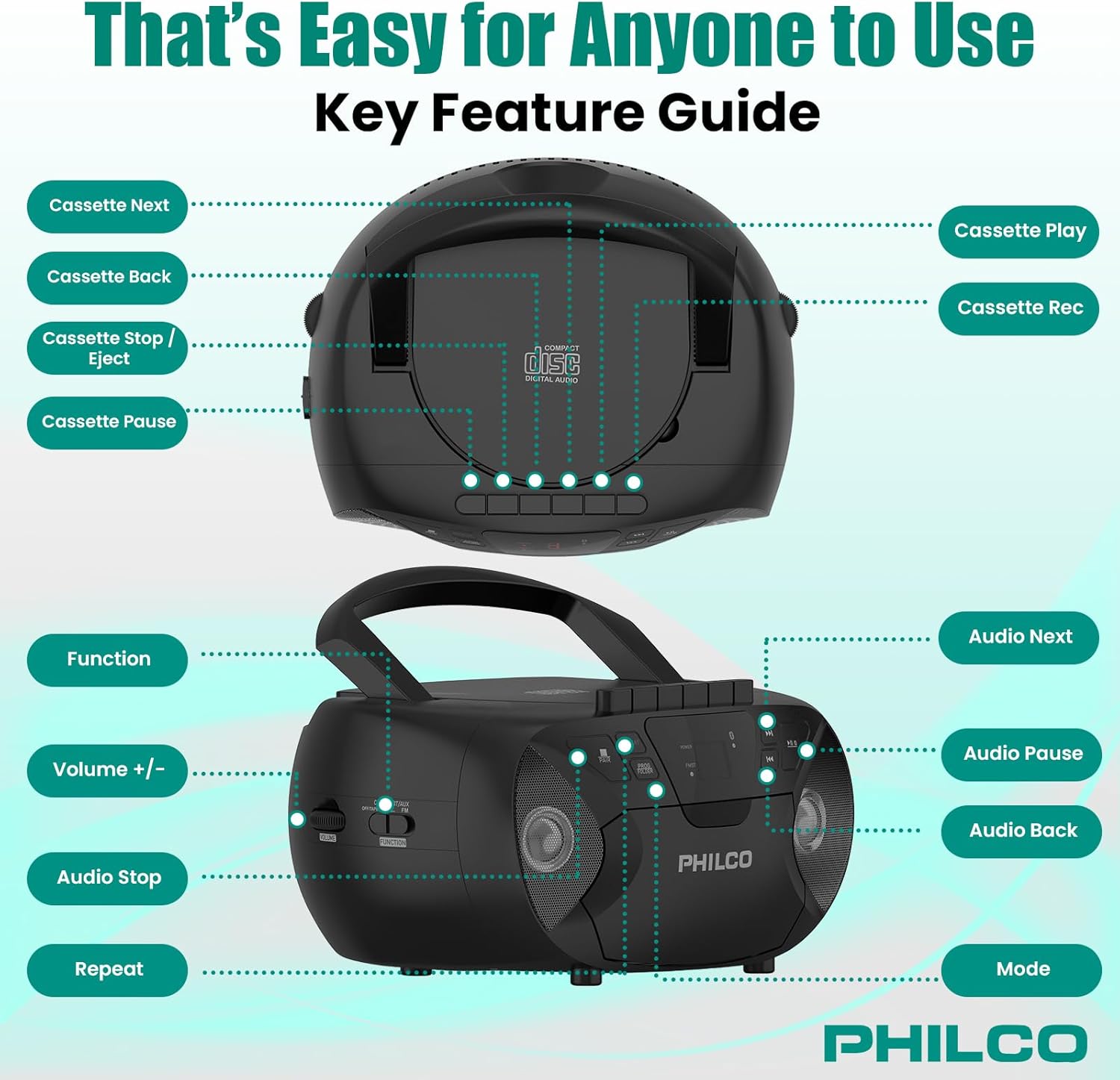
Imej 3.1: Atas dan sisi view of the Philco Boombox with key controls labeled. This image shows the layout of buttons for cassette functions (Next, Back, Stop/Eject, Pause, Play, Record) and audio controls (Next, Pause, Back, Mode, Volume, Function, Stop, Repeat).
Kawalan Panel Depan:
- Butang kuasa: Menghidupkan atau mematikan unit.
- Butang MOD: Switches between CD, Cassette, FM Radio, Bluetooth, and AUX modes.
- PLAY/PAUSE Button (CD/Bluetooth): Memulakan atau menjeda main balik.
- STOP Button (CD/Bluetooth): Menghentikan main balik.
- Butang SKIP/CARI (<< / >>): Melangkau trek atau maju pantas/putar balik.
- Kawalan VOLUME: Melaraskan tahap output audio.
- FM TUNER Dial: Selects FM radio stations.
Cassette Deck Controls:
- Butang PLAY: Memulakan main balik kaset.
- Butang REKOD: Initiates cassette recording (from CD, FM, or AUX).
- REWIND/FAST FORWARD Buttons: Rewinds or fast forwards the tape.
- Butang BERHENTI/KELUAR: Stops tape playback/recording and opens the cassette door.
- Butang JEDA: Temporarily pauses cassette playback/recording.
Rear/Side Panel Connections:
- Input Kuasa AC: Menyambungkan kord kuasa AC.
- Petak Bateri: Holds 6 x 'C' size batteries (not included) for portable use.
- Bicu AUX IN (3.5mm): Menyambung peranti audio luaran.
- HEADPHONE Jack (3.5mm): Untuk mendengar peribadi dengan fon kepala.
- Antena FM: Antena boleh dipanjangkan untuk penerimaan FM yang lebih baik.
4. Persediaan
4.1 Mengkuasakan Unit
Your Philco Boombox can be powered by either AC power or batteries.

Imej 4.1: Illustration of AC power connection and battery installation for the Philco Boombox.
Kuasa AC:
- Pastikan unit dimatikan.
- Connect the supplied AC power cord to the AC power input jack on the back of the unit.
- Plug the other end of the AC power cord into a standard wall outlet (AC 120V ~ 60Hz).
Kuasa Bateri:
- Pastikan unit dimatikan dan diputuskan sambungannya daripada kuasa AC.
- Open the battery compartment cover located on the bottom or rear of the unit.
- Insert 6 x 'C' size batteries (not included), observing the correct polarity (+/-) as indicated inside the compartment.
- Tutup penutup petak bateri dengan selamat.
Nota: Apabila menggunakan kuasa AC, bateri akan diputuskan sambungannya secara automatik. Tanggalkan bateri jika unit tidak akan digunakan untuk tempoh yang lama bagi mengelakkan kebocoran.
4.2 Kuasa Awal Hidup
Tekan ke KUASA button to turn on the unit. The unit will typically default to the last used mode or CD mode.
5. Operasi
5.1 Operasi Pemain CD
Imej 5.1: Demonstrating the top-loading CD compartment for disc insertion.
- Tekan ke MODE butang sehingga mod "CD" dipilih.
- Buka pintu petak CD dengan mengangkatnya perlahan-lahan.
- Place a CD (CD-R, CD-RW, MP3, WMA compatible) onto the spindle with the label side facing up.
- Close the CD compartment door securely.
- Tekan ke MAIN/JEDA butang untuk memulakan main balik.
- Gunakan Langkau / CARI buttons (<< / >>) to navigate between tracks.
- Tekan ke BERHENTI butang untuk menamatkan main balik.
- Tekan ke ULIKAN button to repeat the current track or all tracks.
5.2 Operasi Pemain/Perakam Kaset

Imej 5.2: View of the cassette deck with a tape loaded, ready for playback or recording.
Memainkan Kaset:
- Tekan ke MODE button until "TAPE" or "CASSETTE" mode is selected.
- Tekan ke BERHENTI/EJECT butang untuk membuka pintu kaset.
- Masukkan pita kaset dengan tepi terbuka menghadap ke atas dan sisi yang hendak dimainkan menghadap anda.
- Tutup pintu kaset.
- Tekan ke BERMAIN butang untuk memulakan main balik.
- guna REWIND/FAST FORWARD butang untuk menavigasi pita.
- Tekan ke BERHENTI/EJECT butang untuk menghentikan main balik dan mengeluarkan pita.
Rakaman ke Kaset:
- Insert a blank cassette tape into the cassette deck.
- Select the desired source (CD, FM Radio, or AUX) using the MODE butang.
- Start playback on the source (e.g., play a CD track, tune to an FM station).
- Tekan ke REKOD butang pada dek kaset. The BERMAIN butang juga akan terlibat.
- Untuk menjeda rakaman, tekan butang JEDA butang. Tekan sekali lagi untuk menyambung semula.
- Untuk berhenti merakam, tekan BERHENTI/EJECT butang.
5.3 Operasi Radio FM
- Tekan ke MODE butang sehingga mod "FM" dipilih.
- Extend the FM telescopic antenna for optimal reception.
- Putar TUNER FM dail untuk memilih stesen radio yang anda inginkan.
- Laraskan JILID control to your preferred listening level.
5.4 Penstriman Audio Bluetooth

Imej 5.3: The Philco Boombox wirelessly connected to a smartphone via Bluetooth for audio streaming.
- Tekan ke MODE button until "BT" or "BLUETOOTH" mode is selected. The unit will enter pairing mode, indicated by a flashing Bluetooth indicator.
- Pada peranti anda yang didayakan Bluetooth (cth., telefon pintar, tablet), dayakan Bluetooth dan cari peranti yang tersedia.
- Select "PHILCO BOOMBOX" (or similar name) from the list of devices to pair.
- Once paired, the Bluetooth indicator will stop flashing and remain solid.
- Start playing audio on your connected device. The sound will be streamed to the boombox.
- Laraskan kelantangan pada kedua-dua boombox dan peranti anda yang disambungkan.
Nota Penting: This boombox is designed to menerima audio via Bluetooth from other devices. It cannot menghantar audio to Bluetooth headphones, earbuds, or speakers.
5.5 Operasi Input AUX

Imej 5.4: The AUX input jack on the Philco Boombox, used for connecting external audio sources.
- Sambungkan satu hujung kabel audio 3.5mm (tidak disertakan) ke bicu AUX IN pada boombox.
- Sambungkan hujung kabel audio yang satu lagi ke bicu fon kepala atau output audio peranti luaran anda (cth., pemain MP3, telefon pintar).
- Tekan ke MODE butang sehingga mod "AUX" dipilih.
- Start playing audio on your external device.
- Adjust the volume on both the boombox and your external device.
5.6 Penggunaan Fon Kepala
For private listening, plug any standard 3.5mm headphones into the Fon kepala jack. The internal speakers will automatically mute.
6. Penyelenggaraan
6.1 Membersihkan Unit
- Lap bahagian luar unit dengan lembut, damp kain. Jangan gunakan pembersih atau pelarut yang melelas.
- For the CD lens, use a specialized CD lens cleaning kit.
- Untuk dek kaset, bersihkan kepala pita dan penggelek picit secara berkala dengan kapas yang dilap perlahan-lahan.ampditambah dengan isopropil alkohol.
6.2 Penjagaan Bateri
- Remove batteries if the unit will not be used for an extended period to prevent battery leakage and corrosion.
- Jangan campurkan bateri lama dan baharu, atau jenis bateri yang berlainan.
- Buang bateri terpakai secara bertanggungjawab mengikut peraturan tempatan.
7. Penyelesaian masalah
| Masalah | Kemungkinan Punca | Penyelesaian |
|---|---|---|
| Tiada kuasa | Kord AC tidak disambungkan; Bateri habis atau salah dimasukkan. | Periksa sambungan kord AC; Gantikan bateri atau pastikan polariti yang betul. |
| No sound from CD/Cassette/Radio/Bluetooth/AUX | Volume too low; Incorrect mode selected; Headphones connected; CD/Cassette inserted incorrectly or damaged; Bluetooth not paired. | Increase volume; Select correct mode; Disconnect headphones; Check/replace media; Re-pair Bluetooth device. |
| CD skips | CD dirty or scratched; Unit on an unstable surface. | Clean or replace CD; Place unit on a stable, flat surface. |
| Penerimaan FM yang lemah | Antena tidak dilanjutkan; Isyarat lemah. | Panjangkan dan laraskan sepenuhnya antena FM; Cuba alihkan unit ke lokasi lain. |
| Peranti Bluetooth tidak akan berpasangan | Boombox not in pairing mode; Device too far; Bluetooth already connected to another device. | Ensure boombox is in BT pairing mode; Move device closer; Disconnect from other devices and try again. |
| Cassette tape not playing/recording correctly | Tape damaged; Tape heads dirty; Buttons stuck (as per review). | Try a different tape; Clean tape heads; If buttons are stuck, gently try to free them or contact support if persistent. |
8. Spesifikasi
- Jenama: Philco
- model: B0DHYKCWYN
- Teknologi Ketersambungan: Bluetooth
- warna: Hitam
- Jenis pembesar suara: Stereo
- Dimensi Item (L x W x H): 10.08 x 5.71 x 10.75 inci
- Sumber Kuasa: AC 120V ~ 60Hz or 6 x 'C' Batteries (not included)
- Peranti Serasi: MP3 Player (via AUX)
- Format Audio yang Disokong: CD, CD-R, CD-RW, MP3, WMA (from CD)
- Bilangan Penceramah: 2
- Mod Output Audio: Stereo
- Sokongan Bluetooth: Yes (receive only)
- Media Terbina Dalam: CD, Cassette, FM Radio
9. Waranti dan Sokongan
9.1 Maklumat Waranti
For specific warranty details, please refer to the warranty card included with your product or visit the official Philco webtapak. Terma dan syarat waranti mungkin berbeza mengikut wilayah dan peruncit.
9.2 Sokongan Pelanggan
If you encounter any issues or have questions not covered in this manual, please visit the official Philco website for support resources, FAQs, and contact information. You can typically find support links on the product page where you purchased the item or by searching for "Philco customer support" online.