
1. Produk Lebihview
The Awei Y525 is a portable Bluetooth 5.3 speaker designed for wireless audio playback. It features True Wireless Stereo (TWS) functionality for pairing two speakers, Hifi sound, and integrated RGB lighting effects. The speaker supports multiple input methods including Bluetooth, USB, and TF card, making it suitable for various outdoor and indoor listening environments.
2. Kandungan Pakej
Sila semak pakej untuk item berikut:
- Awei Y525 Bluetooth Speaker
- Kabel Pengecasan (USB-C)
- Manual Pengguna
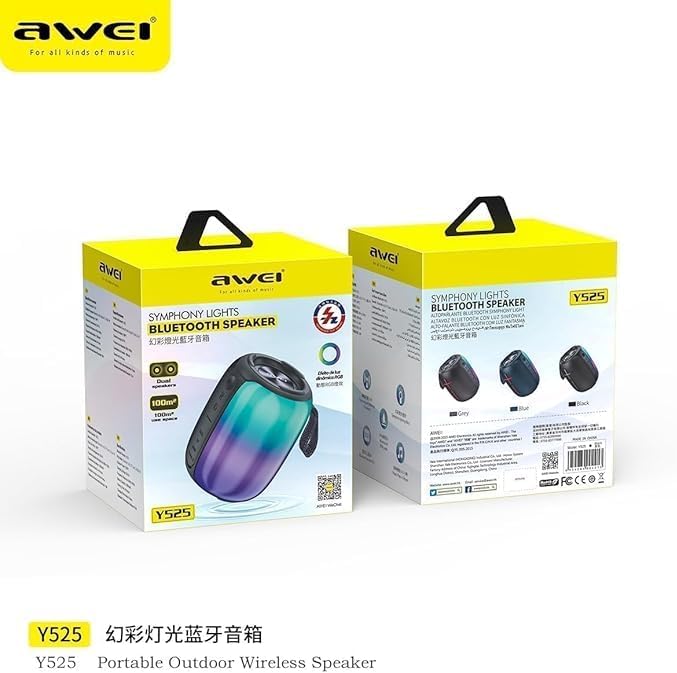
Image: Awei Y525 speaker packaging. The image displays two Awei Y525 speakers in their retail boxes, highlighting the product's branding and model number.
3. Kawalan dan Petunjuk
Biasakan diri anda dengan kawalan dan penunjuk pembesar suara:
- Butang Kuasa: Tekan dan tahan untuk hidup/mati. Tekan sebentar untuk main/jeda.
- Kelantangan Naik (+): Tekan pendek untuk meningkatkan kelantangan. Tekan lama untuk trek seterusnya.
- Perlahankan suara (-): Tekan pendek untuk mengurangkan kelantangan. Tekan lama untuk trek sebelumnya.
- Butang Mod (M): Short press to switch between Bluetooth, USB, TF card, and AUX modes.
- Butang Lampu RGB: Short press to cycle through light modes or turn off lights.
- Port Pengecasan: Port USB-C untuk mengecas.
- Penunjuk LED: Shows charging status and Bluetooth connection status.

Image: Awei Y525 speaker controls. This image displays several Awei Y525 speakers in various colors, providing a clear view of the control buttons and input ports on the side of the device.
4. Mengisi Speaker
Sebelum penggunaan pertama, cas sepenuhnya pembesar suara.
- Sambungkan kabel pengecas USB-C yang disediakan ke port pengecasan pembesar suara.
- Sambungkan hujung kabel yang satu lagi ke penyesuai kuasa USB (tidak disertakan) atau port USB komputer.
- Penunjuk LED akan menyala semasa pengecasan dan padam apabila dicas sepenuhnya.
5. Persediaan dan Berpasangan
5.1 Berpasangan Bluetooth
- Pastikan pembesar suara dicas dan dihidupkan.
- Pembesar suara akan memasuki mod pasangan Bluetooth secara automatik, yang ditunjukkan oleh lampu LED yang berkelip.
- Pada peranti anda (telefon pintar, tablet, dll.), dayakan Bluetooth dan cari peranti yang tersedia.
- Pilih "Awei Y525" daripada senarai peranti.
- Setelah dipasangkan, penunjuk LED akan berhenti berkelip dan kekal pekat, dan anda akan mendengar nada pengesahan.
5.2 True Wireless Stereo (TWS) Interconnection
To achieve a stereo sound experience, you can pair two Awei Y525 speakers together.
- Ensure both Awei Y525 speakers are powered on and not connected to any other Bluetooth device.
- On one of the speakers (this will be the primary speaker), double-press the Power button or a dedicated TWS button (if available, refer to specific model instructions if different).
- The speakers will search for each other and automatically pair. You will hear a confirmation tone when TWS pairing is successful.
- Once TWS paired, connect your device to the primary speaker via Bluetooth as described in section 5.1.

Image: TWS Interconnection. This image illustrates two Awei Y525 speakers positioned to demonstrate their True Wireless Stereo (TWS) interconnection capability for enhanced sound.
6. Mengendalikan Speaker
6.1 Main Balik Audio Asas
- Main/Jeda: Tekan pendek butang Kuasa.
- Kawalan Kelantangan: Short press '+' to increase volume, short press '-' to decrease volume.
- Trek Seterusnya / Sebelumnya: Long press '+' for the next track, long press '-' for the previous track.
6.2 Mod Cahaya RGB
The speaker features dynamic RGB lighting effects.
- Short press the RGB Light button to cycle through different light modes.
- Continue pressing to turn off the lights.
6.3 Panggilan Bebas Tangan
Apabila disambungkan melalui Bluetooth, pembesar suara boleh digunakan untuk panggilan bebas tangan.
- Jawab Panggilan: Tekan pendek butang Kuasa.
- Tamatkan Panggilan: Tekan butang Kuasa sebentar semasa panggilan.
- Tolak Panggilan: Tekan lama butang Kuasa.
6.4 Other Playback Modes (USB, TF Card, AUX)
Insert a USB drive or TF card into the respective port, or connect an audio device via an AUX cable. The speaker will automatically switch to the corresponding mode or you can manually switch using the Mode button.
7. Penyelenggaraan dan Penjagaan
- Keep the speaker away from water and excessive moisture. The product is not waterproof.
- Elakkan daripada mendedahkan pembesar suara kepada suhu yang melampau.
- Bersihkan pembesar suara dengan kain lembut dan kering. Jangan gunakan pembersih atau pelarut yang melelas.
- Simpan pembesar suara di tempat yang sejuk dan kering apabila tidak digunakan untuk tempoh yang lama.
8. Penyelesaian masalah
| Masalah | Penyelesaian |
|---|---|
| Speaker tidak dihidupkan. | Ensure the speaker is fully charged. Press and hold the Power button for a few seconds. |
| Tidak boleh berpasangan melalui Bluetooth. | Make sure the speaker is in pairing mode (flashing LED). Disable and re-enable Bluetooth on your device. Ensure no other devices are connected to the speaker. |
| Tiada bunyi atau kelantangan rendah. | Check the volume levels on both the speaker and your connected device. Ensure the correct input mode is selected. |
| Gandingan TWS gagal. | Ensure both speakers are charged and not connected to any other Bluetooth device. Try resetting both speakers and repeating the TWS pairing steps. |
| Lampu RGB tidak berfungsi. | Press the RGB Light button to cycle through modes or turn them on. |
9. Spesifikasi
| Ciri | Perincian |
|---|---|
| Nama Model | Y525 |
| Versi Bluetooth | 5.3 |
| Teknologi Komunikasi Tanpa Wayar | Bluetooth |
| Jenis Pembesar Suara | Luaran, Mudah Alih |
| Mod Keluaran Audio | Stereo (dengan TWS) |
| Sumber Kuasa | Dikuasakan Bateri |
| Kaedah Kawalan | Sentuh |
| Berat Barang | 500 Gram |
| Saiz Pembesar Suara | 17 Sentimeter |
| Ciri Khas | Anti-shocking, Lightweight, Volume Control, RGB Light Effects, TWS Function |
| Peranti Serasi | Komputer riba, Telefon Pintar, Tablet, Televisyen |
| Adakah Kalis Air | Tidak |
10. Maklumat Keselamatan
- Jangan buka, baiki atau ubah suai pembesar suara.
- Jauhkan daripada kanak-kanak.
- Buang produk secara bertanggungjawab mengikut peraturan tempatan.
- Elakkan mendengar pada volum yang tinggi untuk tempoh yang lama untuk mengelakkan kerosakan pendengaran.
11. Waranti dan Sokongan
Specific warranty information and customer support details are typically provided with your purchase documentation or on the manufacturer's official website. Please refer to those resources for assistance.