
1. Pengenalan
This manual provides essential instructions for the proper setup, operation, and maintenance of your RayNeo HDMI-C to AR Glasses Charging Adapter (Model HC 2.0). This adapter allows for simultaneous video transmission to your AR glasses and charging of your source device, ensuring an uninterrupted experience.
2. Kandungan Pakej
Sila sahkan bahawa semua item yang disenaraikan di bawah disertakan dalam pakej anda:
- 1 x RayNeo HDMI-C to AR Glasses Charging Adapter
- 1 x Kabel Pengecasan USB-A ke USB-C
- 1 x Kabel HDMI
- 1 x Panduan Mula Pantas

Imej: Semua komponen disertakan dalam pakej produk.
3. Ciri-ciri Utama
- Operasi serentak: Connect your AR glasses and charge your source device concurrently.
- Pengecasan Berkelajuan Tinggi: Delivers up to 50W of power to your AR glasses. Actual charging speed depends on the connected device's specifications.
- Keserasian Peranti Luas: Compatible with devices adhering to the USB-C standard protocol, including Steam Deck, ROG Ally, and Legion Go.
- Sokongan Resolusi Tinggi: Supports resolutions up to 8K for crisp, lossless image quality. Features are dependent on source device and display capabilities.
- Pembinaan Tahan Lama: Made from aluminum alloy for enhanced durability.
- Smart Hardware Protection: Safeguards against overvoltage kerosakan.
- Mesra pengguna: Supports hot-swapping, plug-and-play functionality, and requires no software installation.
4. Arahan Persediaan
Follow these steps to connect your RayNeo HDMI-C to AR Glasses Charging Adapter:
- Connect AR Glasses: Plug your AR glasses into the USB-C output port on the adapter.
- Sambungkan Peranti Sumber: Use the provided HDMI cable to connect your source device (e.g., gaming console, PC, laptop) to the HDMI-IN port on the adapter.
- Sambungkan Kuasa: Connect the USB-A to USB-C charging cable to a power adapter (not included) and then to the DC 5V or Type-C charging input port on the adapter. This will provide power to both your AR glasses and charge your source device.

Image: Connection diagram for the adapter with AR glasses, a gaming console, and a power source.
5. Arahan Operasi
Once connected, the adapter operates on a plug-and-play basis. Your AR glasses should automatically display content from your source device, and your source device will begin charging.
- Gaming/Streaming: Enjoy uninterrupted gaming or streaming sessions as the adapter ensures continuous power supply to your AR glasses while simultaneously charging your connected device.
- Resolusi: The adapter will automatically adapt to the highest supported resolution up to 8K, based on the capabilities of your source device and AR glasses.

Image: Adapter connected to a laptop, AR glasses, and power for simultaneous use and charging.
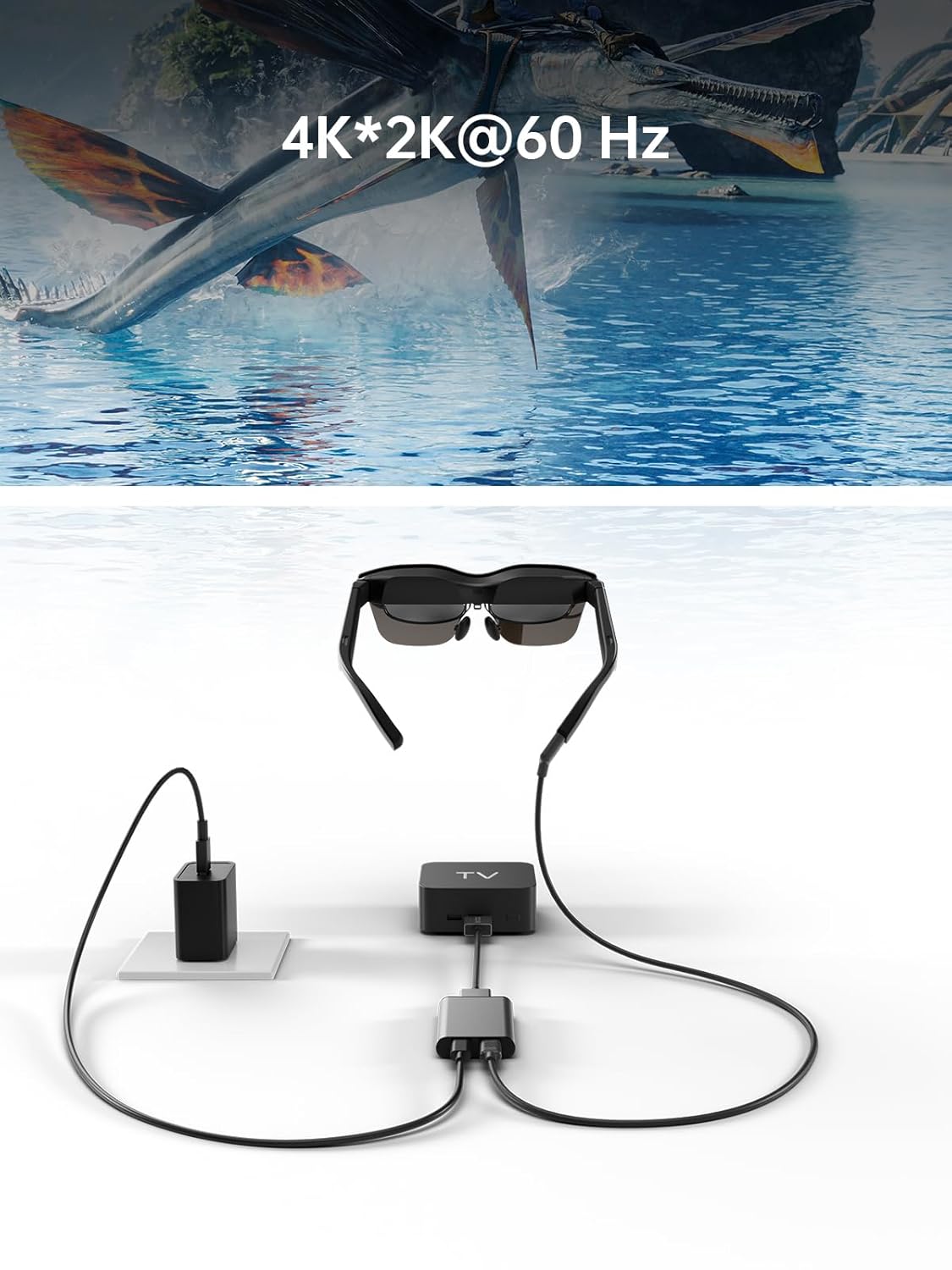
Image: Adapter facilitating 4K*2K@60Hz video output from a TV box to AR glasses.
6. Keserasian
The RayNeo HDMI-C to AR Glasses Charging Adapter is designed for broad compatibility. Ensure your devices meet the following criteria:
6.1. Source Devices (HDMI-IN)
Compatible with any device that outputs video via HDMI, including but not limited to:
- Gaming Consoles (e.g., PlayStation 5/4, Xbox Series X/S, Nintendo Switch, Steam Deck, ROG Ally, Legion Go)
- Personal Computers (PC)
- Komputer riba
- Streaming Devices (e.g., Apple TV)
6.2. AR Glasses (USB-C OUT)
Compatible with AR glasses that accept video input via USB-C, such as:
- RayNeo Air 2s
- RayNeo Air 2
- TCL NXTWEAR S
Nota: Your source device must adhere to the USB-C standard protocol for charging and data transmission to function correctly with this adapter.

Image: Visual representation of the adapter's wide compatibility with various input devices and AR glasses.
7. Penyelesaian masalah
Jika anda menghadapi masalah, sila rujuk penyelesaian biasa berikut:
- No Display on AR Glasses:
- Ensure all cables (HDMI, USB-C to AR glasses) are securely connected.
- Verify that your source device is powered on and outputting video.
- Check if your AR glasses are powered on and functioning correctly.
- Test with different HDMI or USB-C cables if available.
- Peranti Sumber Tidak Mengecas:
- Confirm the power adapter is connected to the adapter's charging port and to a working power outlet.
- Pastikan penyesuai kuasa membekalkan kuasa yang mencukupitage (up to 50W supported).
- Verify that your source device supports charging via its USB-C port when connected to an external adapter.
- Low Resolution or Poor Image Quality:
- Semak tetapan resolusi pada peranti sumber anda.
- Ensure your HDMI and USB-C cables are high-quality and support the desired resolution.
- The maximum resolution is dependent on both the source device and the AR glasses.
- Penyesuai Tidak Dikenali:
- Putuskan dan sambungkan semula semua kabel.
- Mulakan semula peranti sumber anda.
8. Penyelenggaraan
Untuk memastikan jangka hayat dan prestasi optimum penyesuai anda, ikuti garis panduan penyelenggaraan ini:
- Pembersihan: Gunakan kain lembut dan kering untuk membersihkan penyesuai. Elakkan pembersih cecair atau bahan kasar.
- Storan: Simpan penyesuai di tempat yang sejuk dan kering jauh dari cahaya matahari langsung dan suhu yang melampau.
- Pengendalian: Avoid dropping the adapter or subjecting it to strong impacts. Do not attempt to disassemble the device.
- Penjagaan Kabel: Do not bend cables excessively or pull them forcefully from the ports.
9. Spesifikasi
| Ciri | Spesifikasi |
|---|---|
| Nombor Model | HC 2.0 |
| Jenama | RayNeo |
| Jenis Penyambung | USB Type C (Output), HDMI (Input) |
| Input Pengecasan | DC 5V / USB Type C |
| Max Power Delivery | Sehingga 50W |
| Sokongan Resolusi Maks | 8K |
| bahan | Aloi Aluminium |
| warna | Perak |
| Berat Barang | 2.89 auns |
| Dimensi Pakej | 5.39 x 2.64 x 0.94 inci |

Image: Dimensional drawing of the adapter.
10. Waranti dan Sokongan
For warranty information and customer support, please refer to the documentation included with your product or visit the official RayNeo webtapak. Simpan resit pembelian anda untuk tuntutan waranti.