
1. Pengenalan
Terima kasih kerana membeliasing the Bewinner Portable Bluetooth Speaker. This manual provides essential information for setting up, operating, and maintaining your speaker. Please read it carefully before use to ensure optimal performance and longevity of your device.
Ciri-ciri Utama:
- Classic Wooden Case Structure: Features a walnut wood grain shell with a black net design for an elegant aesthetic.
- Dual Speakers with Independent Bass Guide Hole: Enhances sound quality with strong bass and clear tones.
- Intelligent Sound Processing Technology: Improves clarity, layering, and power for a dynamic audio experience.
- Kesambungan Bluetooth 5.0: Supports wireless connection up to 10 meters with mobile phones, tablets, and computers.
- Pelbagai Pilihan Main Semula: Includes AUX sound cable, USB disk, and small memory card (up to 32GB) playback.
- Radio FM terbina dalam: Enhances radio sensitivity for stable signal reception.
2. Kandungan Pakej
Sila semak pakej untuk item berikut:
- 1 x Bewinner Portable Bluetooth Speaker
- 1 x Manual Arahan
- 1 x Kabel Pengecas USB
- 1 x 3.5mm AUX Sound Cable
3. Produk Lebihview dan Kawalan
Familiarize yourself with the speaker's ports and controls:
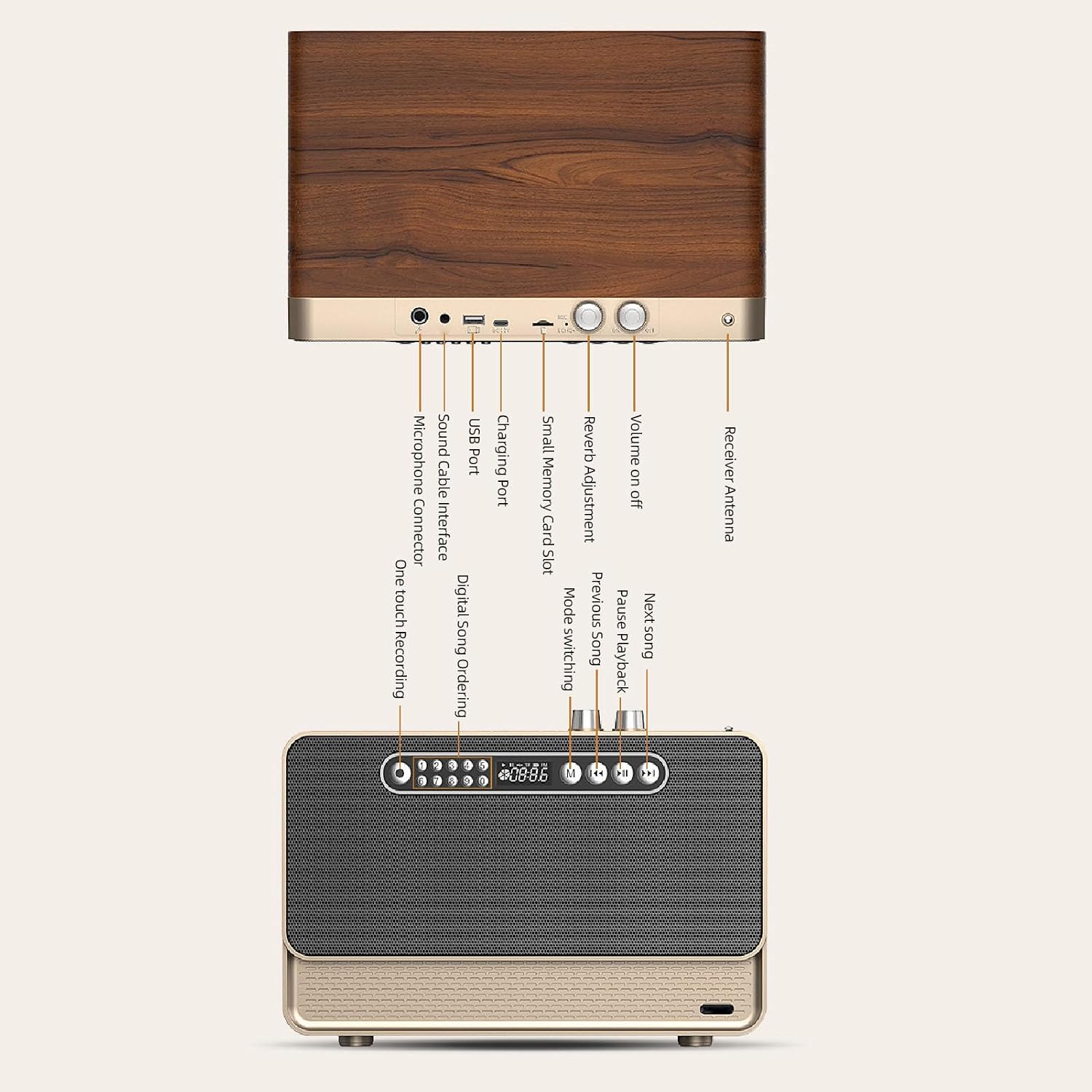
Image: Detailed diagram showing the various ports and control buttons on the Bewinner Portable Bluetooth Speaker, including the volume knob, charging port, USB port, small memory card slot, sound cable interface, microphone connector, and receiver antenna.
- Kelantangan Hidup/Mati: Rotary knob to power the speaker on/off and adjust volume.
- Reverb Adjustment: Knob for adjusting sound reverb effect.
- Antena Penerima: Extend for improved FM radio reception.
- Port Pengecasan: Connect the USB charging cable here.
- Port USB: For USB disk playback.
- Small Memory Card Slot: Insert a small memory card (up to 32GB) for playback.
- Sound Cable Interface (AUX): Connect the 3.5mm AUX cable for wired audio input.
- Penyambung Mikrofon: For external microphone input (if supported).
- Rakaman satu sentuhan: Button for recording functions.
- Digital Song Ordering: Buttons for direct song selection.
- Mode Switching (M): Button to switch between Bluetooth, AUX, FM, USB, and Memory Card modes.
- Previous Song / Next Song: Buttons for track navigation.
- Pause/Playback: Butang untuk memainkan atau menjeda audio.
4. Persediaan
4.1 Mengecas Speaker
Before first use, fully charge the speaker. Connect the provided USB charging cable to the speaker's charging port and the other end to a 5V USB power adapter (not included) or a computer's USB port. The charging indicator will show the charging status and turn off when fully charged.
4.2 Menghidupkan/Mematikan
Putar Kelantangan Hidup / Mati knob clockwise to power on the speaker. Rotate it counter-clockwise until it clicks to power off the speaker.
5. Arahan Operasi
5.1 Sambungan Bluetooth
- Power on the speaker. The speaker will automatically enter Bluetooth pairing mode, indicated by a flashing light or an audible prompt.
- On your mobile phone, tablet, or computer, enable Bluetooth and search for available devices.
- Select "Bewinner Speaker" (or similar name) from the list of devices to pair.
- Once paired, the speaker will confirm with an audible prompt, and the indicator light will become solid.
- You can now play audio from your device through the speaker. The connection distance is up to 10 meters.
5.2 AUX Sound Cable Playback
For wired audio connection:

Image: The Bewinner Portable Bluetooth Speaker connected to a laptop using the 3.5mm AUX sound cable, demonstrating wired audio playback.
- Connect one end of the provided 3.5mm AUX sound cable to the speaker's Sound Cable Interface.
- Connect the other end to the audio output jack of your computer, phone, or other audio device.
- Tekan ke Mode Switching (M) button on the speaker until it enters AUX mode.
- Mainkan audio daripada peranti anda yang disambungkan.
5.3 USB Disk and Small Memory Card Playback
The speaker supports playback from USB disks and small memory cards (up to 32GB) with MP3, WAV, and WMA formats.

Image: A close-up of the Bewinner Portable Bluetooth Speaker with a USB flash drive inserted into its USB port, illustrating USB disk playback capability.
- Insert a USB disk into the Port USB or a small memory card into the Slot Kad Memori Kecil.
- Pembesar suara akan mengesan peranti storan secara automatik dan mula memainkan audio files. Jika tidak, tekan Mode Switching (M) button to select the correct mode.
- Gunakan Lagu Sebelumnya, Lagu Seterusnya, dan Jeda/Main semula buttons to control music playback.
5.4 Fungsi Radio FM
Untuk menggunakan radio FM terbina dalam:

Image: The Bewinner Portable Bluetooth Speaker with its telescopic antenna extended, highlighting its FM radio functionality and ability to receive stable signals.
- Panjangkan penerima Antenna untuk penerimaan isyarat yang lebih baik.
- Tekan ke Mode Switching (M) button until the speaker enters FM radio mode.
- The speaker will automatically scan and save available FM stations.
- Gunakan Lagu Sebelumnya dan Lagu Seterusnya butang untuk menavigasi antara stesen yang disimpan.
5.5 Sound Enhancement

Image: A stylized depiction of a microchip with the word 'BASS' prominently displayed, symbolizing the speaker's intelligent sound processing technology that enhances bass and overall audio quality.
The speaker features intelligent sound processing technology to improve audio clarity, layering, and power. The dual speakers with independent bass guide holes contribute to a powerful and dynamic bass response.

Imej: Meletup view of the Bewinner Portable Bluetooth Speaker, revealing its internal dual speakers and independent bass guide holes, illustrating the design for enhanced sound quality and powerful bass.
6. Penyelenggaraan
- Jauhkan pembesar suara daripada air, kelembapan dan suhu yang melampau.
- Bersihkan pembesar suara dengan kain lembut dan kering. Jangan gunakan pembersih atau pelarut yang melelas.
- Elakkan daripada menjatuhkan atau menundukkan pembesar suara kepada impak yang kuat.
- Apabila tidak digunakan untuk tempoh yang lama, simpan pembesar suara di tempat yang sejuk dan kering dan casnya secara berkala untuk mengekalkan kesihatan bateri.
7. Penyelesaian masalah
- Tiada Kuasa: Ensure the speaker is charged. Check the power knob is turned on.
- Tiada Bunyi: Check the volume level on both the speaker and the connected device. Ensure the correct input mode (Bluetooth, AUX, USB, Memory Card, FM) is selected.
- Isu Berpasangan Bluetooth: Make sure the speaker is in pairing mode. Disable and re-enable Bluetooth on your device. Move closer to the speaker to ensure it's within the 10-meter range.
- Penerimaan FM yang lemah: Extend the receiver antenna fully. Try repositioning the speaker for better signal.
- USB/Memory Card Not Playing: Pastikan audio files are in supported formats (MP3, WAV, WMA). Check that the storage device is properly inserted and not corrupted.
8. Spesifikasi
| Ciri | Spesifikasi |
|---|---|
| Nombor Model | Bewinner25s87k4n0e |
| Jenama | Bewinner |
| bahan | Kayu Serat Sintetik |
| Versi Bluetooth | 5.0 |
| Kapasiti Bateri | 3000mAh Li Polymer (Built-in) |
| Mengecas Voltage | 5V |
| Small Memory Card Support | Maximum 32GB (Excluded) |
| Music Media Support | MP3, WAV, WMA |
| Dimensi Produk | 13.78 x 10.63 x 10.24 inci |
| Berat Barang | 6.75 paun |
| Teknologi Ketersambungan | Bluetooth, AUX, USB, Memory Card, FM Radio |
| Sumber Kuasa | Dikuasakan Bateri |
| Penggunaan yang Disyorkan | Dalaman/Luar |
9. Waranti dan Sokongan
This product comes with a standard manufacturer's warranty. Please refer to the warranty card included in your package for specific terms and conditions. For technical support, troubleshooting assistance, or warranty claims, please contact Bewinner customer service through the retailer where the product was purchased.