
pengenalan
Thank you for choosing the Vieta Pro Silence 3 Bluetooth 5.4 Active Noise Cancelling Headphones. These headphones are designed to provide a superior audio experience with advanced features for comfort and convenience. Please read this manual carefully before using your headphones to ensure proper operation and to maximize their lifespan.
Kandungan Pakej
- Vieta Pro Silence 3 Headphones
- Kabel Pengecas USB-C
- Kabel Audio 3.5mm
- Manual Pengguna
Produk Selesaiview
Familiarize yourself with the various parts and controls of your Vieta Pro Silence 3 headphones.
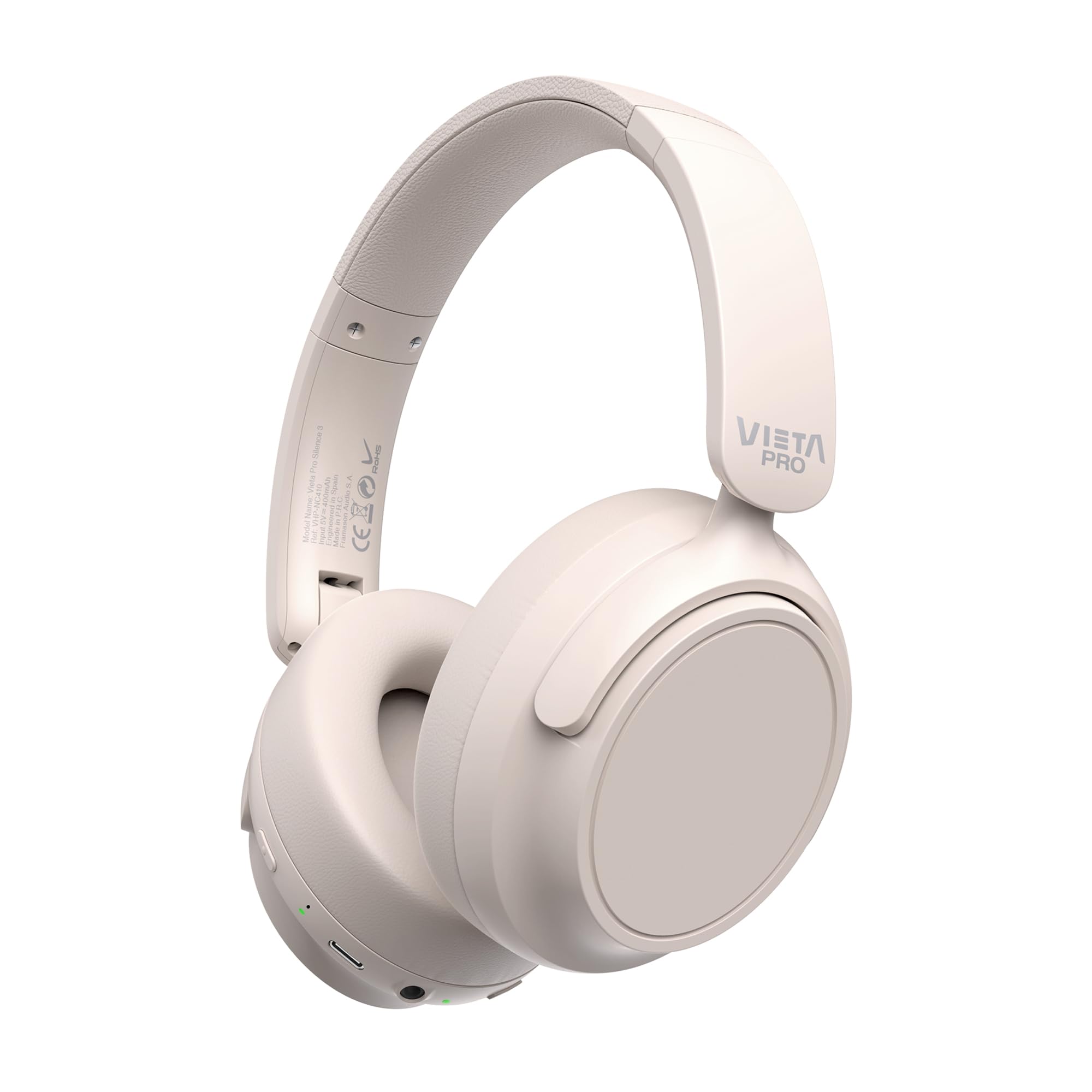
Imej: Depan view of the Vieta Pro Silence 3 headphones, showcasing their overall design.

Imej: Sisi view of the Vieta Pro Silence 3 headphones, highlighting the earcups and adjustable headband.

Image: Close-up of a Vieta Pro Silence 3 earcup, illustrating the control buttons, charging port, and 3.5mm audio jack.
The headphones feature a foldable design for easy portability.

Image: Vieta Pro Silence 3 headphones in their folded state, demonstrating their compact design for travel and storage.
Persediaan
1. Mengecas Fon Kepala
Before first use, fully charge your headphones. Connect the supplied USB-C cable to the charging port on the headphones and the other end to a USB power source (e.g., wall adapter, computer USB port).
- Penunjuk LED akan menunjukkan status pengecasan (cth, merah untuk mengecas, biru/mati untuk dicas penuh).
- Caj penuh menyediakan sehingga 50 jam main balik.
- Fast charging via USB-C allows for quick power-ups.
2. Menghidupkan/Mematikan
- Untuk Menghidupkan: Press and hold the Power button for approximately 3 seconds until the LED indicator lights up and you hear an audible prompt.
- Untuk Mematikan: Press and hold the Power button for approximately 3 seconds until the LED indicator turns off and you hear an audible prompt.
3. Berpasangan Bluetooth
- Pastikan fon kepala dimatikan.
- Tekan dan tahan butang Kuasa selama 5-7 saat sehingga penunjuk LED berkelip biru dan merah secara berselang-seli, menunjukkan mod berpasangan.
- Pada peranti anda (telefon pintar, tablet, komputer), dayakan Bluetooth dan cari peranti yang tersedia.
- Select "Vieta Pro Silence 3" from the list of found devices.
- Once paired, the LED indicator will flash blue slowly, and you will hear a confirmation tone.
Fon kepala akan cuba menyambung semula secara automatik ke peranti pasangan terakhir apabila dihidupkan.
4. Sambungan Berwayar (Input Bantu)
You can use the headphones with a wired connection when Bluetooth is not available or preferred. Connect one end of the 3.5mm audio cable to the auxiliary input port on the headphones and the other end to your audio source's 3.5mm jack.
- When using the wired connection, Bluetooth functionality is disabled.
- Active Noise Cancellation (ANC) can still be used in wired mode.
Arahan Operasi
1. Main balik Muzik
- Main/Jeda: Tekan butang Pelbagai fungsi sekali.
- Lagu Seterusnya: Tekan dan tahan butang Naik Kelantangan.
- Trek Sebelumnya: Tekan dan tahan butang Kurangkan Kelantangan.
- Kelantangan: Tekan pendek butang Kelantangan Naik.
- Perlahankan suara: Tekan pendek butang Kurangkan Kelantangan.
2. Pengurusan Panggilan
- Jawab/Tamatkan Panggilan: Tekan butang Pelbagai fungsi sekali.
- Tolak Panggilan: Tekan dan tahan butang Berbilang fungsi selama 2 saat.
- Pembantu Suara: Double-press the Multi-function button to activate your device's voice assistant (Siri, Google Assistant, etc.).
3. Pembatalan Bunyi Aktif (ANC)
Ciri ANC mengurangkan bunyi ambien, membolehkan pengalaman mendengar yang lebih mengasyikkan.
- Aktifkan/Nyahaktifkan ANC: Press the dedicated ANC button once. The LED indicator for ANC will light up (e.g., green) when active.
- ANC can be used independently or with Bluetooth/wired audio.
4. Dual Pairing Function
The Dual Pairing feature allows you to connect your headphones to two Bluetooth devices simultaneously.
- Pasangkan fon kepala dengan peranti pertama seperti yang diterangkan dalam bahagian "Pasangan Bluetooth".
- Lumpuhkan Bluetooth pada peranti pertama.
- Letakkan fon kepala kembali ke mod berpasangan dan pasangkannya dengan peranti kedua.
- Enable Bluetooth on the first device. The headphones should now be connected to both devices.
- Audio will play from the device that is actively transmitting.
Penyelenggaraan
- Bersihkan fon kepala dengan kain lembut dan kering. Jangan gunakan pembersih atau pelarut yang kasar.
- Elakkan dedahkan fon kepala kepada suhu yang melampau, kelembapan atau cahaya matahari langsung.
- Store the headphones in a cool, dry place when not in use, preferably in their folded state to protect them.
- Jangan cuba membuka atau mengubah suai fon kepala, kerana ini akan membatalkan jaminan.
Menyelesaikan masalah
| Masalah | Penyelesaian yang Mungkin |
|---|---|
| Fon kepala tidak dihidupkan. | Pastikan fon kepala dicas. Sambungkannya ke sumber kuasa menggunakan kabel USB-C. |
| Tidak boleh berpasangan melalui Bluetooth. |
|
| Tiada bunyi atau kelantangan rendah. |
|
| ANC tidak berfungsi dengan berkesan. |
|
Spesifikasi
| Ciri | Perincian |
|---|---|
| Nama Model | Senyap 3 |
| Nombor Model | RM |
| Teknologi Ketersambungan | Bluetooth 5.4, Berwayar (Bicu 3.5mm) |
| Pembatalan Bunyi | Pembatalan Bising Aktif (ANC) |
| Hayat Bateri | Sehingga 50 jam |
| Port Pengecasan | USB-C (Pengecasan Pantas) |
| Mikrofon | Integrated for hands-free calls |
| Faktor Bentuk | Circum-Auricular (Over-Ear) |
| Impedans | 32 ohm |
| Ciri Khas | Dual Pairing, Foldable Design, Low Latency Mode |
Maklumat Keselamatan
- Jangan gunakan fon kepala pada kelantangan tinggi untuk tempoh yang lama untuk mengelakkan kerosakan pendengaran.
- Jangan gunakan fon kepala dalam situasi di mana ketidakupayaan untuk mendengar bunyi ambien boleh membahayakan (contohnya, memandu, berbasikal, berjalan kaki dalam lalu lintas).
- Jauhkan daripada kanak-kanak.
- Buang produk secara bertanggungjawab mengikut peraturan tempatan.
Waranti dan Sokongan
For warranty information and technical support, please refer to the documentation provided with your purchase or visit the official Vieta Pro webtapak. Sila simpan bukti pembelian anda untuk tuntutan waranti.
Note: Information regarding specific warranty duration or direct support contacts was not available in the provided product data.