
pengenalan
This manual provides detailed instructions for the proper use and maintenance of your Casio G-Shock GA010-1A analog-digital watch. Please read this manual thoroughly to ensure correct operation and to maximize the lifespan of your timepiece. The GA010-1A is designed for durability and functionality, featuring a 10-year battery and robust construction.
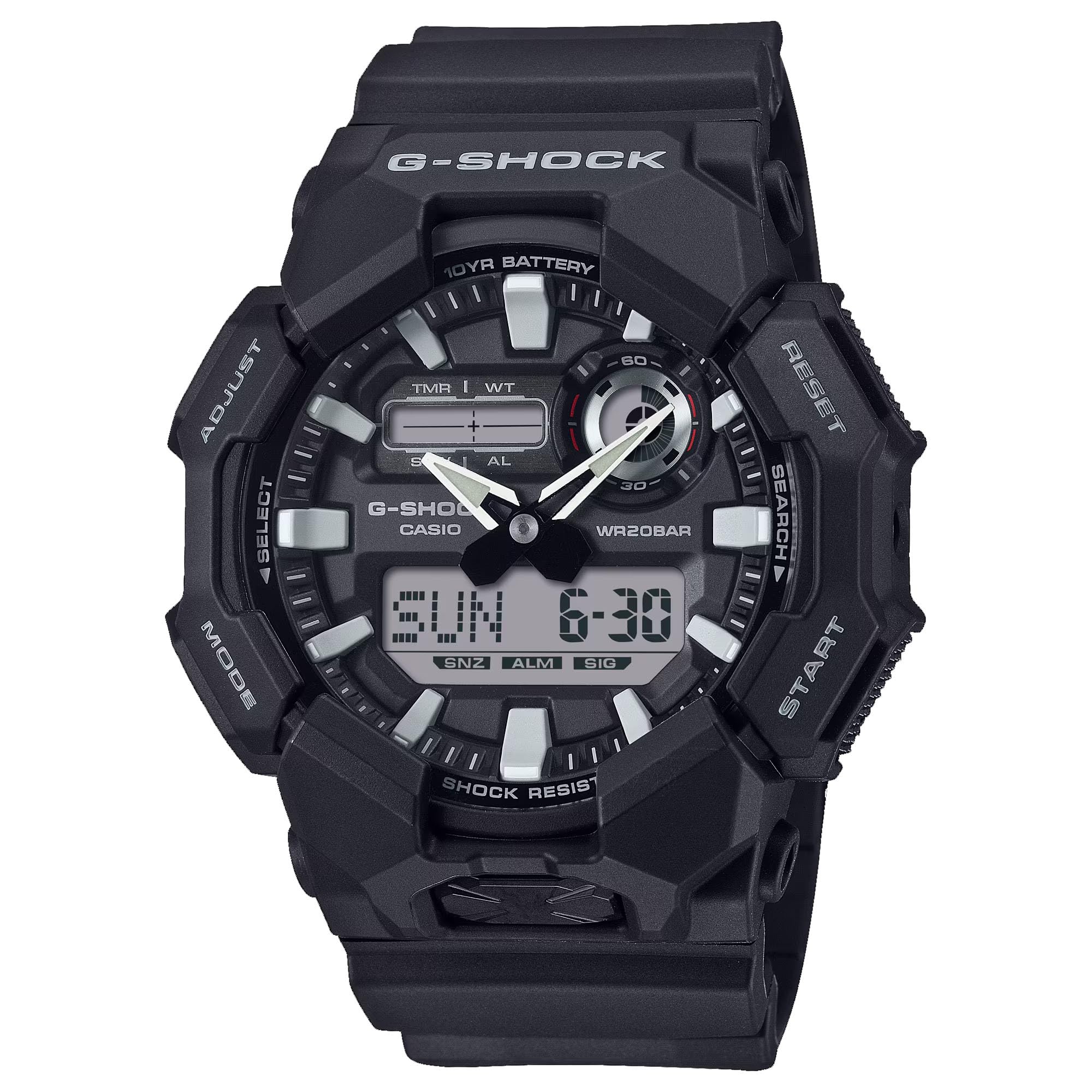
Imej: Depan view of the Casio G-Shock GA010-1A watch, showcasing its analog and digital display.
Ciri-ciri
- Tahan Kejutan: Designed to withstand impacts and vibrations.
- LED Light (Super Illuminator): Provides illumination for the display in low-light conditions. Selectable illumination duration (1.5 seconds or 3 seconds).
- Masa Dunia: Displays the current time in 31 time zones (48 cities + Coordinated Universal Time). Includes daylight saving on/off and home city/world time city swapping.
- Jam randik 1/100 Kedua: Mengukur masa berlalu, masa pecahan dan masa tempat pertama-kedua.
- 5 Daily Alarms: Independent daily alarms.
- Ciri Anjakan Tangan: Hands move out of the way to provide an unobstructed view of digital display contents.
- Button Operation Tone On/Off: Allows muting of button operation tones.
- Hayat Bateri 10 Tahun: Powered by a CR2025 lithium metal battery.
- Tahan Air: 200 meters (20 bar). Suitable for recreational scuba diving.
- Paparan Analog-Digital: Combines traditional analog hands with a digital display for versatile timekeeping.

Imej: Sisi view of the Casio G-Shock GA010-1A watch, highlighting its robust case design.
Persediaan
Tetapan Masa dan Tarikh Permulaan
- Enter Timekeeping Mode: Ensure the watch is in the Timekeeping Mode. Press the MODE button (usually bottom left) to cycle through modes until the current time and date are displayed.
- Masukkan Mod Tetapan: Tekan dan tahan butang SESUAIKAN button (usually top left) until the city code starts flashing on the digital display. This indicates the setting mode.
- Select City Code: Gunakan KE HADAPAN (top right) and TERBALIK (bottom right) buttons to select your home city code.
- Configure Daylight Saving Time (DST): Tekan ke MODE button to move to the DST setting. Use the KE HADAPAN button to toggle DST on or off.
- Tetapkan Masa dan Tarikh: Tekan ke MODE button to cycle through settings: 12/24-hour format, seconds, hour, minute, year, month, day. Use the KE HADAPAN dan TERBALIK butang untuk melaraskan setiap nilai.
- Keluar dari Mod Tetapan: Tekan ke SESUAIKAN button to exit the setting mode. The digital display will stop flashing, and the analog hands will automatically adjust to the set digital time.
Maklumat Bateri
The GA010-1A is equipped with a CR2025 lithium metal battery, providing an approximate 10-year battery life under normal usage conditions. When the battery power is low, the display may become dim or functions may become unstable. Battery replacement should be performed by a qualified technician to ensure water resistance and proper function are maintained.
Arahan Operasi
Navigasi Mod
Tekan ke MODE button (bottom left) to cycle through the different modes: Timekeeping Mode, World Time Mode, Stopwatch Mode, Timer Mode, and Alarm Mode.
Mod Waktu Dunia
Dalam Mod Waktu Dunia, anda boleh view the current time in 48 cities (31 time zones) around the globe. Use the KE HADAPAN (top right) and TERBALIK (bottom right) buttons to scroll through city codes. To swap your Home City time with the World Time City time, press and hold the SESUAIKAN button (top left) for approximately three seconds.
Mod Jam Randik
The stopwatch measures elapsed time up to 23 hours, 59 minutes, 59.99 seconds.
- Tekan ke KE HADAPAN butang untuk memulakan dan menghentikan jam randik.
- Semasa jam randik dihentikan, tekan butang SESUAIKAN button to reset it to zero.
- Untuk merakam masa pembahagian, tekan SESUAIKAN button while the stopwatch is running. Press SESUAIKAN sekali lagi untuk melepaskan pemisahan dan meneruskan pemasaan.
Mod Penggera
The watch features 5 independent daily alarms. In Alarm Mode:
- Gunakan KE HADAPAN button to scroll through the alarms (AL1 to AL5) and the hourlisyarat masa y (SIG).
- To set an alarm, select the desired alarm (e.g., AL1), then press and hold the SESUAIKAN butang sehingga masa penggera mula berkelip.
- Gunakan MODE button to move between hour and minute settings, and the KE HADAPAN dan TERBALIK butang untuk menyesuaikan nilai.
- Tekan ke SESUAIKAN button to confirm the alarm setting.
- To turn an alarm on/off, select the alarm and press the KE HADAPAN button. An indicator will show if the alarm is active.
LED Light (Super Illuminator)
Press the large button located at the 6 o'clock position on the front of the case to activate the LED light. The illumination duration can be set to 1.5 seconds or 3 seconds in the Timekeeping Mode settings.
Hand Shift Feature
If the analog hands obstruct the digital display, press the MODE dan KE HADAPAN buttons simultaneously. The hands will temporarily move to a position that allows clear viewing of the digital display. Press any button to return the hands to their normal timekeeping position.
Button Operation Tone On/Off
To toggle the button operation tone on or off, navigate to the Timekeeping Mode. Press and hold the MODE button for approximately three seconds. The "MUTE" indicator will appear or disappear on the digital display, indicating the tone status.
Penyelenggaraan
Membersihkan Jam Tangan Anda
Regularly wipe the watch case and band with a soft, dry cloth to remove dirt and moisture. For resin bands, you can use a mild soap solution and rinse thoroughly with water, then dry completely. Avoid using harsh chemicals or abrasive cleaners, as these can damage the watch's materials.
Tahan Air
The GA010-1A is water resistant to 200 meters (20 bar). This means it is suitable for everyday use, showering, swimming, and recreational scuba diving. Jangan kendalikan butang semasa jam tangan basah atau tenggelam. Selepas terdedah kepada air masin, bilas jam tangan dengan teliti menggunakan air tawar dan keringkan dengan kain lembut.
Penggantian Bateri
The watch uses a CR2025 battery. While it has a 10-year life, eventual replacement will be necessary. It is highly recommended to have the battery replaced by an authorized Casio service center or a qualified watch technician. This ensures that the watch's water resistance and shock resistance are maintained after the case back is opened.

Imej: Belakang view of the Casio G-Shock GA010-1A watch, showing the stainless steel case back and resin band attachment.
Menyelesaikan masalah
- Paparan Digital Kosong atau Malap: Bateri mungkin lemah. Pertimbangkan untuk menggantikan bateri secara profesional.
- Jarum Analog Tidak Padan dengan Masa Digital: Perform a hand alignment correction. Refer to the full Casio module manual for detailed steps, or try re-setting the time as described in the "Initial Time and Date Setting" section. The hands should automatically synchronize.
- Butang Tidak Responsif: Ensure the watch is not in a locked mode (if applicable, though GA010-1A typically does not have a button lock). If submerged, ensure it is dry before operating buttons. If the issue persists, a reset or professional inspection may be required.
- Watch Stops Functioning: This could indicate a battery issue or internal malfunction. Seek professional service.
Spesifikasi
| Nombor Model | GA010-1A |
| Jenis Paparan | Analog-Digital |
| Pergerakan | Kuarza Jepun |
| Bahan Kes | damar |
| Bahan Band | damar |
| Tahan Air | 200 Meters (20 Bar) |
| Jenis Bateri | CR2025 (Logam Litium) |
| Hayat Bateri | lebih kurang 10 tahun |
| Dimensi Sarung (H x W x D) | 55.1 × 51.9 × 17.5 mm |
| Berat badan | 4 Auns (lebih kurang 113g) |
| Kristal | Kaca Mineral |
Waranti dan Sokongan
Your Casio G-Shock GA010-1A watch is covered by a manufacturer's warranty. Please refer to the warranty card included with your purchase for specific terms, conditions, and duration. For technical support, service, or warranty claims, please contact Casio customer service or visit their official webtapak. Simpan bukti pembelian anda untuk pengesahan waranti.
For further assistance, you may visit the official Casio webtapak: www.casio.com