
1. Pengenalan
The LAUNCH Creader Elite 2.0 is a professional OBD2 diagnostic tool designed for BMW, Mercedes-Benz, and Audi group vehicles. It offers comprehensive system diagnostics, advanced reset services, bi-directional control (active tests), and ECU coding capabilities. This manual provides essential information for operating and maintaining your device.
2. Maklumat Keselamatan
- Sentiasa lakukan ujian automotif di kawasan yang mempunyai pengudaraan yang baik.
- Wear eye protection and safety gloves when working on vehicles.
- Keep the device dry and clean. Avoid exposure to extreme temperatures or humidity.
- Do not attempt to disassemble or modify the device. Refer to qualified personnel for repairs.
- Pastikan penyalaan kenderaan dimatikan sebelum menyambungkan atau memutuskan sambungan alat diagnostik.
3. Peranti Lebihview
The LAUNCH Creader Elite 2.0 features a 4-inch Android 8.0 touchscreen display, providing an intuitive interface for diagnostics. It is equipped with a 3000 mAh battery and 2x16GB memory for efficient operation and data storage.

Imej: Depan view of the LAUNCH Creader Elite 2.0 diagnostic tool, showing its touchscreen interface and control buttons.
4. Persediaan dan Konfigurasi Awal
- Hidupkan kuasa: Tekan dan tahan butang kuasa untuk menghidupkan peranti.
- Pemilihan Bahasa: Follow the on-screen prompts to select your preferred language. The device supports 10 languages.
- Sambungan Wi-Fi: Navigate to 'Settings' and connect to a stable Wi-Fi network. This is crucial for software updates and online features.
- Kemas Kini Perisian: After connecting to Wi-Fi, check for available updates in the 'Upgrade' section. Perform a one-click update to ensure you have the latest software and vehicle coverage.
5. Arahan Operasi
5.1. Menyambung ke Kenderaan
- Cari port OBD2 kenderaan (biasanya di bawah papan pemuka).
- Connect the diagnostic cable from the Creader Elite 2.0 to the vehicle's OBD2 port.
- Putarkan penyalaan kenderaan ke kedudukan 'ON' (enjin dimatikan).
- The device will automatically power on or prompt you to select 'Diagnose'.
5.2. Diagnostik Sistem Penuh
This function allows you to scan all available electronic control systems in the vehicle, including Engine (ENG), Anti-lock Braking System (ABS), Supplemental Restraint System (SRS), Transmission, Tire Pressure Monitoring System (TPMS), Electronic Parking Brake (EPB), Battery Management System (BMS), and Fuel systems. The device supports Auto VIN for quick vehicle identification.

Image: Diagram illustrating the comprehensive system diagnostic capabilities, showing various vehicle systems like engine, ABS, SRS, and TPMS, and the device performing a scan.
5.3. Fungsi OBDII
The device provides standard OBDII functions for all OBDII/EOBD compliant vehicles (1994-2000 for EOBD/OBDII global vehicles, 1996-2025 for BBA group vehicles). These include:
- Read/Clear Diagnostic Trouble Codes (DTCs)
- View Live Data Stream (text and graph format)
- Retrieve Freeze Frame Data
- Status Kesediaan I/M
- Ujian Sensor O2
- Ujian Monitor Dalam Talian
- Ujian Komponen
- Vehicle Information Retrieval (VIN, CIN, CVN)
5.4. Fungsi Khas (Tetapkan Semula Perkhidmatan)
The Creader Elite 2.0 offers over 100 reset functions specifically for Benz, BMW, and Audi group vehicles. These services assist in maintenance and repair tasks.

Image: A collage of icons representing various reset functions such as Oil Reset, ABS Bleeding, DPF Regeneration, Injector Coding, and TPMS Reset, available on the diagnostic tool.
Examples of supported reset functions include:
- Set Semula Minyak
- Pendarahan ABS
- Penentukuran Pendikit
- Tetapan Semula EPB
- Penjanaan Semula DPF
- Pengekodan Penyuntik
- Penentukuran SAS
- Tetapan Semula BMS
- Tetapan Semula TPMS
- Tetapan Semula AdBlue
- Set Semula Kotak Gear
- Tetapan Semula Sunroof
- Penentukuran Tempat Duduk
Note: Specific reset functions may vary by vehicle model and year.
5.5. Bi-directional Control (Active Test)
This feature allows the diagnostic tool to send commands to vehicle components and modules to test their functionality directly, without using the vehicle's controls. This helps in quickly pinpointing faulty parts.
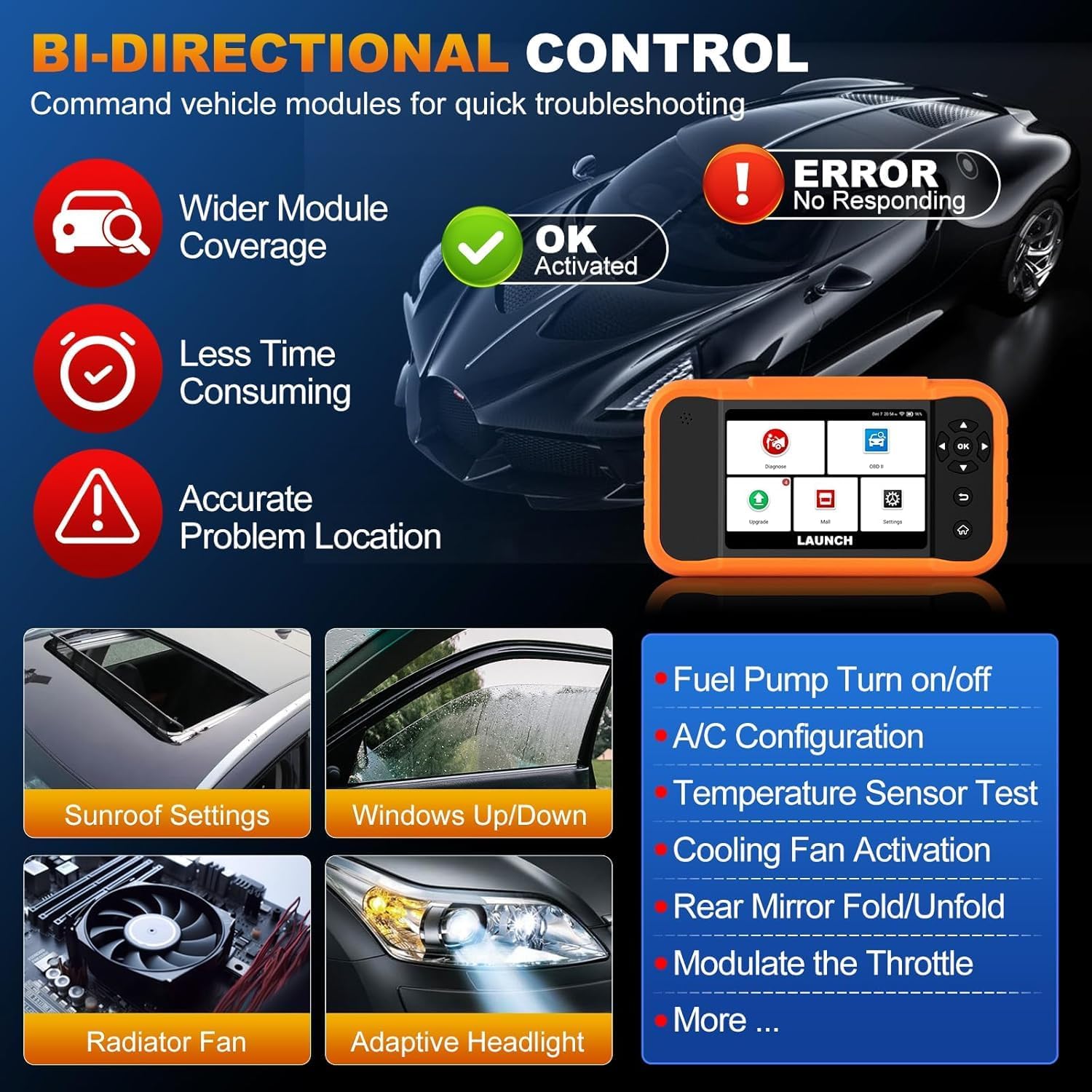
Image: Illustration of bi-directional control, showing the diagnostic tool sending commands to a car to test components like fuel pump, A/C, windows, and radiator fan, indicating successful activation or errors.
ExampKurang daripada ujian aktif termasuk:
- Fuel Pump Turn on/off
- A/C Configuration
- Temperature Sensor Test
- Pengaktifan Kipas Penyejuk
- Windows Up/Down
- Sunroof Settings
5.6. Pengekodan ECU
ECU Coding allows for customization of vehicle settings, re-flashing hidden functions, restoring data, and opening/closing comfort functions. It also supports adaptive data for replacement and complex ECU issue repair.
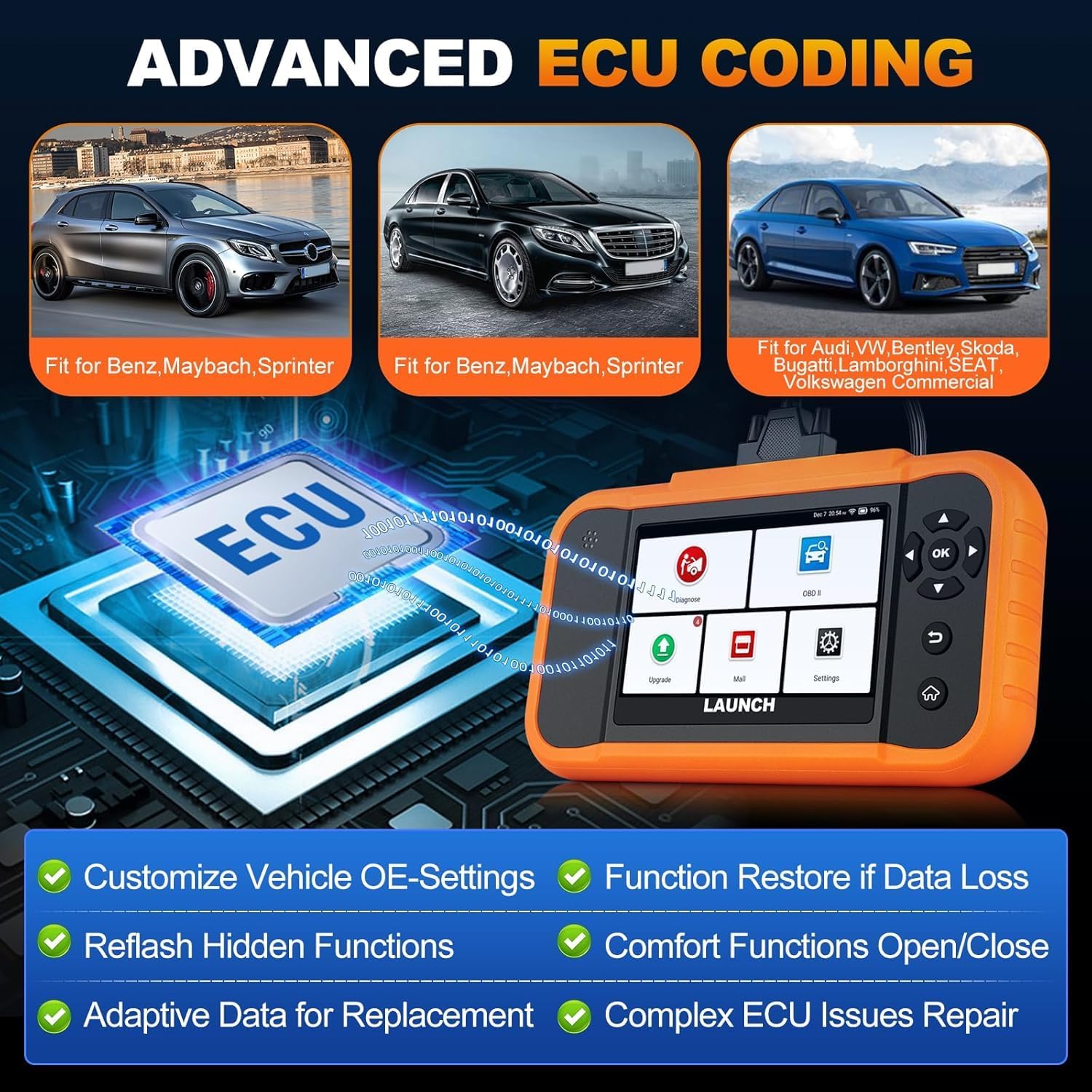
Image: A visual representation of ECU coding, showing a circuit board with 'ECU' text and the diagnostic tool, highlighting features like customizing OE-settings, re-flashing hidden functions, and restoring data.
5.7. Pengurusan dan Pelaporan Data
The device facilitates efficient data handling:
- Imbasan VIN Auto: Mengenal pasti maklumat kenderaan secara automatik untuk diagnostik pantas.
- Carian DTC: Menyediakan definisi untuk kod masalah diagnostik.
- 4-in-1 Live Data Stream: Displays multiple data parameters simultaneously for detailed analysis.
- Pendaftaran Bateri: Supports battery registration functions.
- Laporan Diagnostik: Generates comprehensive health reports that can be shared or printed.
- Diagnostic History/Feedback: Stores diagnostic records and allows users to submit feedback to LAUNCH.

Image: A grid displaying various features of the diagnostic tool, including Auto VIN Scan, DTC Lookup, 4-in-1 Live Data Stream, Battery Registration, Online Diagnostic Feedback, and Diagnostic Report sharing.
6. Penyelenggaraan
- Pembersihan: Gunakan yang lembut, damp kain untuk membersihkan peranti. Elakkan pembersih atau pelarut yang melelas.
- Storan: Simpan peranti di tempat yang kering dan sejuk, jauh daripada cahaya matahari langsung dan suhu yang melampau.
- Penjagaan Bateri: Untuk jangka hayat bateri yang optimum, elakkan daripada kerap mencas sepenuhnya bateri. Cas peranti secara berkala.
7. Penyelesaian masalah
- Peranti tidak dihidupkan: Ensure the battery is charged or connect the device to the vehicle's OBD2 port for power.
- Masalah sambungan dengan kenderaan: Verify the OBD2 cable is securely connected to both the device and the vehicle. Ensure the vehicle's ignition is on.
- Software update problems: Check your Wi-Fi connection. If issues persist, try restarting the device and attempting the update again.
- Inaccurate readings or functions not working: Ensure the software is up to date. Verify the vehicle model and year are correctly selected.
8. Spesifikasi
| Ciri | Spesifikasi |
|---|---|
| Model | YZB23-1 |
| Berat Barang | 900 g |
| Dimensi Pakej | 25 x 18 x 8 cm |
| Bateri | 1 AAA (included), 3000 mAh capacity |
| Ingatan | 2 x 16 GB |
| Sistem Operasi | Android 8.0 |
| Skrin | Skrin sentuh 4 inci |
| Bahasa | 10 bahasa disokong |
| Ketersambungan | Wi-Fi |
9. Waranti dan Sokongan
This product comes with a manufacturer's warranty. For warranty details, technical support, or any operational questions, please refer to the official LAUNCH website or contact your authorized dealer. Ensure you have your product model number (YZB23-1) and purchase information ready when seeking support.