
1. Pengenalan
This document provides essential instructions for the XHGTJK Replacement Remote Control. This remote is designed as a functional replacement for specific Pioneer AV Receiver models. It operates using infrared (IR) technology.
Nota Keserasian Penting: This is not a universal remote control. Ensure that your AV receiver model is listed in the compatible models section of this manual or on the product packaging. Compatibility is crucial for proper functionality. While this replacement remote aims to replicate main functions, it may not operate all features available on your original remote control.
2. Persediaan
The XHGTJK Replacement Remote Control is designed for immediate use with compatible Pioneer AV receivers. No complex programming or pairing procedures are required.
2.1 Pemasangan Bateri
- Cari petak bateri di belakang alat kawalan jauh.
- Geser buka penutup petak bateri.
- Masukkan dua (2) bateri AAA, pastikan terminal positif (+) dan negatif (-) sejajar dengan tanda di dalam petak.
- Tutup penutup petak bateri dengan selamat.
Once batteries are installed, the remote control is ready for operation.
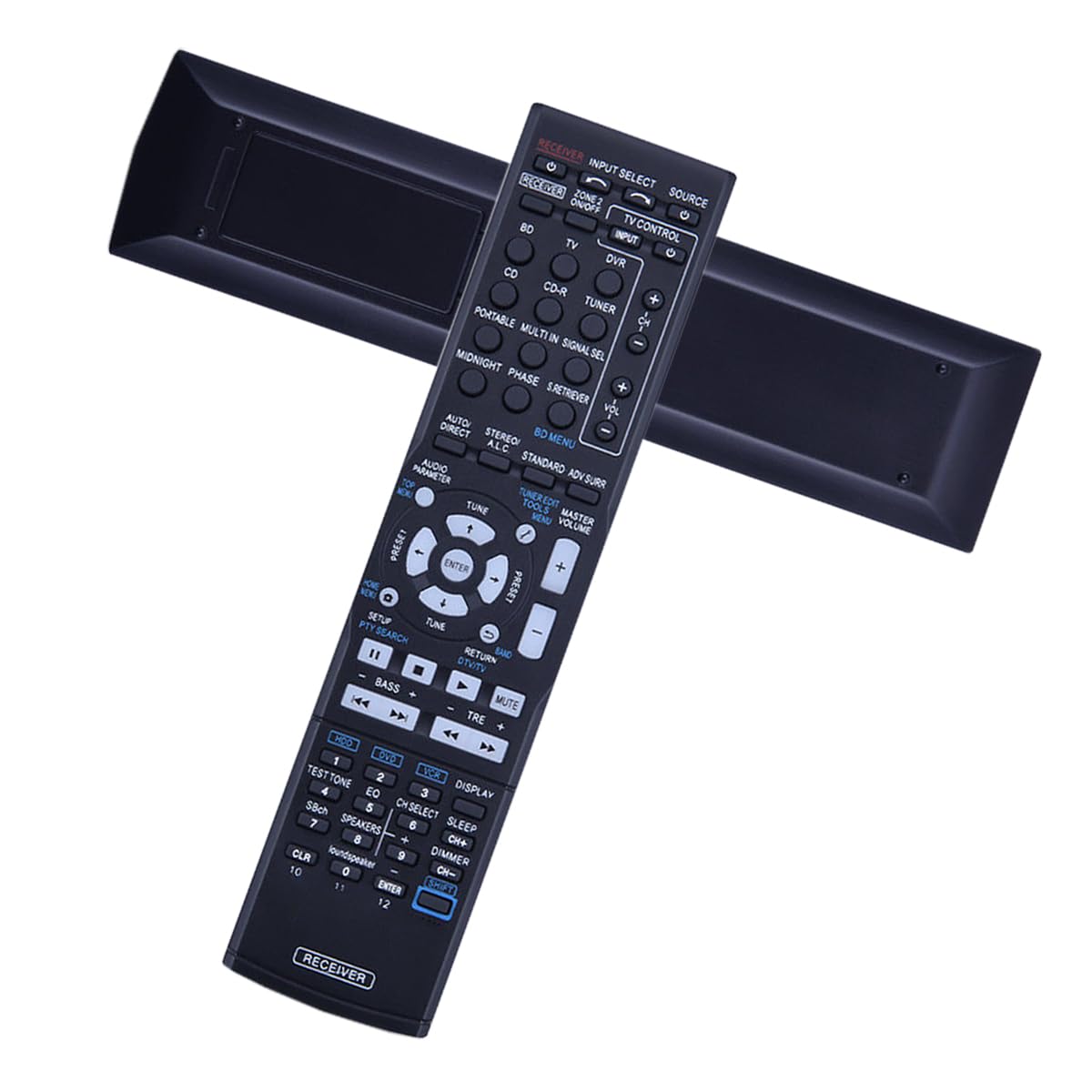
Rajah 1: Depan view of the XHGTJK Replacement Remote Control. This image displays the layout of the buttons, including power, volume, channel, and input selection, designed for intuitive operation of compatible Pioneer AV receivers.
3. Arahan Operasi
This remote control operates via infrared (IR) signals. Ensure a clear line of sight between the remote control and the IR receiver on your Pioneer AV receiver for optimal performance.
3.1 Fungsi Asas
- Hidupkan/Mati Kuasa: Tekan ke KUASA button to turn your AV receiver on or off.
- Kawalan Kelantangan: Gunakan VOL+ dan VOL - butang untuk melaraskan kelantangan audio.
- Pemilihan Input: Gunakan INPUT or dedicated input buttons (e.g., HDMI 1, DVD) to switch between different audio/video sources.
- Redam: Tekan ke HILANGKAN butang untuk menyenyapkan audio buat sementara waktu. Tekan sekali lagi untuk menyahbisu.
- Navigasi: Use the directional arrow buttons (ATAS BAWAH KIRI KANAN) dan MASUK button for menu navigation on your AV receiver, if supported.
Refer to your Pioneer AV receiver's original manual for detailed information on specific functions and menu operations.
4. Penyelenggaraan
Proper care will extend the life of your remote control.
- Pembersihan: Lap alat kawalan jauh dengan kain lembut dan kering. Jangan gunakan pembersih atau pelarut yang melelas.
- Penggantian Bateri: Gantikan bateri apabila tindak balas alat kawalan jauh menjadi lembap atau berhenti berfungsi. Sentiasa gantikan kedua-dua bateri pada masa yang sama dengan yang baharu.
- Storan: Simpan alat kawalan jauh di tempat yang sejuk dan kering jauh dari cahaya matahari langsung dan suhu yang melampau.
- Elakkan Titisan: Lindungi alat kawalan jauh daripada kesan fizikal, kerana titisan boleh merosakkan komponen dalaman.
5. Penyelesaian masalah
If you experience issues with your remote control, please follow these troubleshooting steps:
- Semak Bateri: Ensure batteries are inserted correctly with the correct polarity (+/-). Replace old batteries with new AAA batteries.
- Garis penglihatan: Verify there is a clear path between the remote control and the IR sensor on your AV receiver. Obstructions can block the signal.
- Jarak jauh: The maximum effective range for this remote is approximately 8 feet (2.4 meters). Ensure you are within this range.
- Keserasian: Double-check that your Pioneer AV receiver model is listed as compatible with this replacement remote.
- Gangguan: Strong light sources or other infrared devices can sometimes interfere with the remote's signal. Try operating the remote in a different environment if possible.
If the remote control still does not function after following these steps, please refer to the Warranty and Support section for further assistance.
6. Spesifikasi
| Ciri | Spesifikasi |
|---|---|
| Jenama | XHGTJK |
| Teknologi Ketersambungan | Inframerah (IR) |
| Peranti Serasi | Pioneer AV A/V Receivers (Specific models listed in Introduction) |
| Bilangan Maks Peranti yang Disokong | 1 (One AV Receiver) |
| Sumber Kuasa | 2 x Bateri AAA (tidak termasuk) |
| Julat Maksimum | 8 Kaki (lebih kurang 2.4 meter) |
| warna | Hitam |
| Ciri Khas | Reka Bentuk Ergonomik |
| Dimensi Item (L x W x H) | 4.12" x 1.16" x 9.57" (lebih kurang 10.46 sm x 2.95 sm x 24.31 sm) |
7. Waranti dan Sokongan
Your XHGTJK Replacement Remote Control comes with a commitment to quality and customer satisfaction.
7.1 Maklumat Waranti
Produk ini merangkumi Waranti kualiti 30 hari from the date of purchase. This warranty covers manufacturing defects and ensures the remote control functions as described. It does not cover damage caused by misuse, accidents, or unauthorized modifications.
7.2 Sokongan Pelanggan
If you have any questions, encounter issues, or require assistance with your remote control, please do not hesitate to contact our customer support team. We are dedicated to providing a satisfactory solution to any concerns you may have.
Please have your product model (B0DHFXDV69) and purchase details ready when contacting support to facilitate a quicker resolution.