
BT4
Pro 4 TWS Wireless Headphones User Manual
Model: BT4 | Brand: Generic
Produk Selesaiview
The Pro 4 TWS Wireless Headphones are designed to provide a high-quality audio experience with the convenience of wireless technology. These earbuds feature Bluetooth 5.0 for stable connectivity, an IPX7 waterproof rating for durability, and a built-in microphone for clear calls. The ergonomic design ensures a comfortable and secure fit for extended use.

Image: The black protective storage case included with the Pro 4 TWS Wireless Headphones. This compact case helps protect your earbuds when not in use.

Image: The Pro 4 TWS Wireless Earbuds resting inside their open charging case. The earbuds are white with black tips, and the case is also white.
Apa yang Termasuk
- Pro 4 TWS Wireless Earbuds (Left and Right)
- Kes Pengecasan
- Protective Case (Black, as shown in product images)
- Manual Pengguna (dokumen ini)
- Charging Cable (not explicitly mentioned but standard for earbuds)
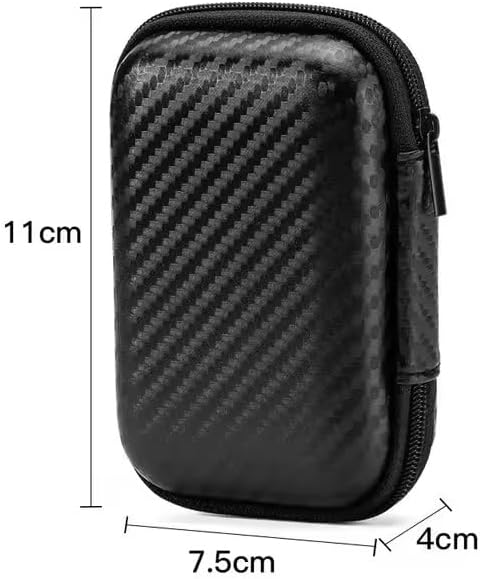
Image: A visual representation of the protective storage case with its dimensions: approximately 11cm in height, 7.5cm in width, and 4cm in depth. This illustrates the compact size of the included accessory.
Panduan Persediaan
1. Pengecasan Awal
Before first use, ensure both the earbuds and the charging case are fully charged. Place the earbuds into the charging case and connect the charging case to a power source using the provided charging cable. The indicator light on the case will show charging status.
2. Berpasangan dengan Peranti
- Buka bekas pengecas. Fon telinga akan memasuki mod berpasangan secara automatik.
- Pada peranti anda (telefon pintar, tablet, komputer riba), pergi ke tetapan Bluetooth.
- Cari untuk available devices and select "Pro 4 TWS" (or similar name) from the list.
- Setelah disambungkan, gesaan suara akan mengesahkan gandingan yang berjaya.
Note: If pairing fails, ensure the earbuds are charged and within range of your device. You may need to "forget" previous pairings on your device and try again.

Image: The Pro 4 TWS earbuds shown with a smartphone, illustrating the touch control feature for connection. A blue light effect indicates active connection or touch interaction.
Arahan Operasi
Kawalan Sentuh
The Pro 4 TWS headphones feature intuitive touch controls on each earbud. Specific functions may vary slightly, but common controls include:
- Ketuk tunggal: Main/Jeda muzik, Jawab/Tamatkan panggilan.
- Dwiketik (Earbud Kiri): Lagu sebelumnya.
- Ketik Dua Kali (Earbud Kanan): Trek seterusnya.
- Ketuk Tiga Kali: Aktifkan pembantu suara (Siri, Google Assistant).
- Tekan lama: Tolak panggilan.
Memakai Earbud
Gently insert each earbud into your ear canal. Rotate slightly until you achieve a comfortable and secure fit. The ergonomic design is intended to keep them stable during various activities.

Image: A woman wearing the Pro 4 TWS earbuds, highlighting their ergonomic design and comfortable fit within the ear. The image emphasizes that the earbuds are designed to stay securely in place.
Penyelenggaraan dan Penjagaan
- Pembersihan: Gunakan kain lembut, kering, bebas serabut untuk membersihkan fon telinga dan bekas pengecas. Jangan gunakan bahan kimia yang keras atau bahan yang melelas.
- Tahan Air: The earbuds have an IPX7 waterproof rating, meaning they are resistant to sweat and rain. Do not submerge them in water or expose them to strong jets of water. Ensure they are dry before placing them back in the charging case.
- Storan: When not in use, store the earbuds in their charging case, preferably within the included protective case, to prevent damage and keep them clean.
- Penjagaan Bateri: Untuk memanjangkan hayat bateri, elakkan daripada menyahcas sepenuhnya fon telinga dan bekas pengecasan dengan kerap. Mengecasnya dengan kerap, walaupun tidak digunakan secara berterusan.
Menyelesaikan masalah
| Masalah | Penyelesaian yang Mungkin |
|---|---|
| Fon telinga tidak berpasangan |
|
| Tiada bunyi dari satu fon telinga |
|
| Kualiti bunyi yang lemah |
|
| Isu pengecasan |
|
Spesifikasi
| Ciri | Perincian |
|---|---|
| Nombor Model | BT4 |
| Teknologi Ketersambungan | Tanpa Wayar, Bluetooth |
| Versi Bluetooth | 5.0 |
| Julat Tanpa Wayar | Sehingga 33 kaki (lebih kurang 10 meter) |
| Tahan Air | IPX7 (Resistant to sweat and rain) |
| Mikrofon | Built-in, High-Quality |
| Kaedah Kawalan | Jauh (Kawalan Sentuh) |
| Penempatan Telinga | Di Telinga |
| bahan | Silikon, Plastik |
| Komponen yang Disertakan | Kes Pelindung |
| Peranti Serasi | Smartphones, Tablets, Laptops, Desktops, Smart Speakers, Cars (with Bluetooth capabilities) |

Image: A diagram highlighting the upgraded Bluetooth 5.0 chip, emphasizing features like HD Voice, Quick Connect, and Stable Reception, which contribute to high-fidelity sound quality and anti-interference.

Imej: Meletup view of the earbud's internal components, specifically showcasing the high-quality dynamic unit and balanced adjustment technology designed to deliver rich sound effects.
Waranti dan Sokongan
For warranty information and customer support, please refer to the documentation provided at the time of purchase or contact the seller directly. The product is manufactured by "wireless earphone".
For further assistance, you may also visit the product page on Amazon: Pro 4 TWS Wireless Headphones on Amazon.
Ask a question about this manual
Ask about setup, troubleshooting, compatibility, parts, safety, or missing instructions. Manuals+ will review the question and use this page’s manual context to help answer it.