
c312033b-b33d-489d-95d0-232af0d42a9c
Global Walkie Talkie User Manual
Model: c312033b-b33d-489d-95d0-232af0d42a9c
pengenalan
This manual provides comprehensive instructions for the safe and effective use of your Global Walkie Talkie. Designed for unlimited communication, this device offers unparalleled connectivity for various professional and recreational scenarios. Please read this manual thoroughly before operating the device.
The Global Walkie Talkie includes a SIM card for clear, fee-free calls for one year. With 200 channels and a limitless range, it offers unparalleled connectivity for individual or group calls, ensuring seamless communication among team members. It is ideal for use in law enforcement, firefighting, construction, logistics, outdoor event planning, international collaboration, and hunting. The device features powerful LED lighting, making it perfect for camping, hiking, hunting, or working in low-light environments.
Apa yang ada dalam Kotak
Sila sahkan bahawa semua komponen berikut disertakan dalam pakej anda:
- Host (Walkie Talkie Unit)
- Pengecas
- Lanyard
- Klip Belakang
- SIM Card (pre-installed or included separately)
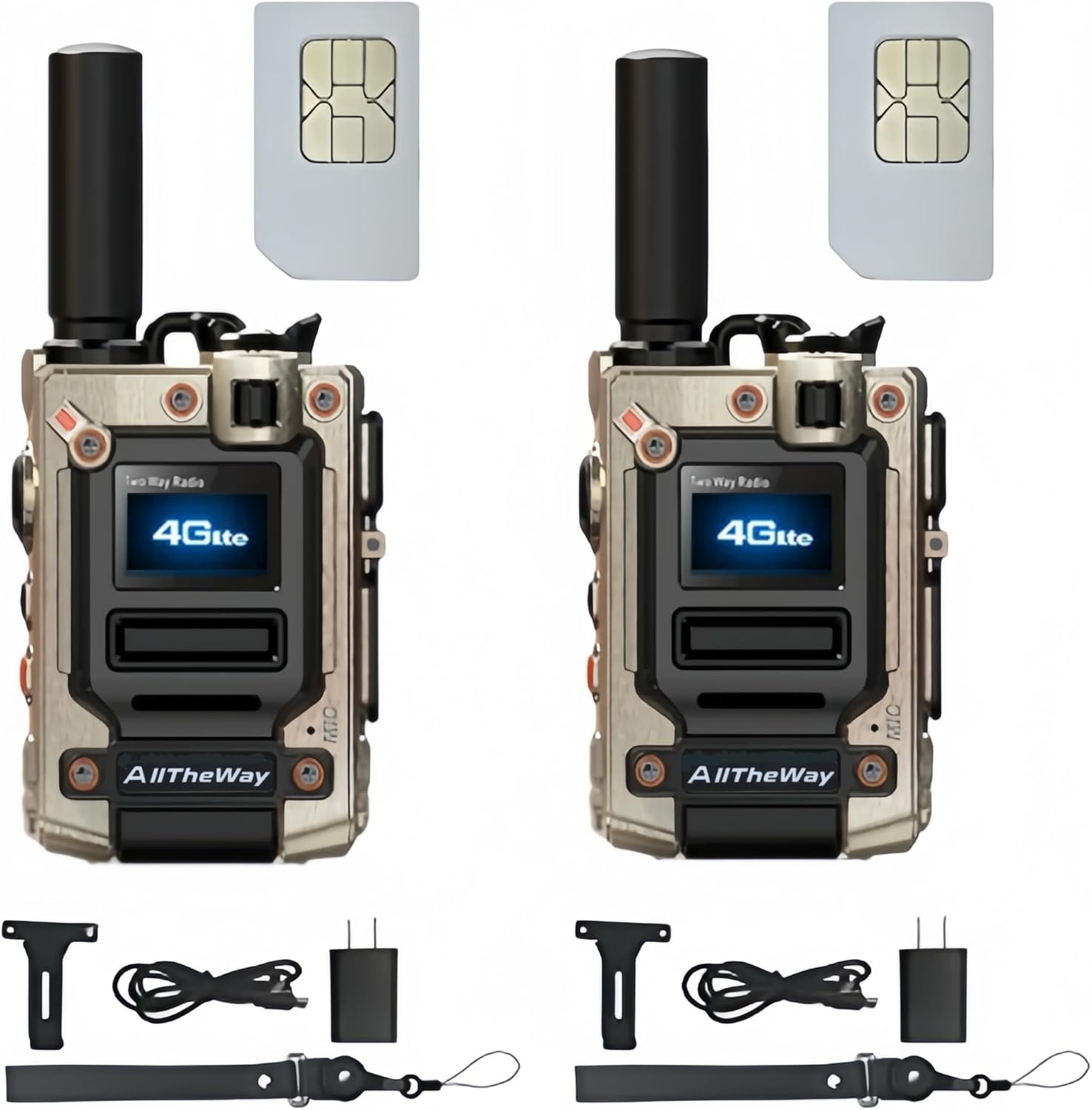
Image: Contents of the Global Walkie Talkie package, showing two walkie-talkie units, two SIM cards, two chargers, two lanyards, and two back clips.
Persediaan
1. Memasukkan Kad SIM
Your Global Walkie Talkie requires a SIM card for network connectivity. The SIM card may be pre-installed or included separately. If separate, locate the SIM card insertion machine slot on the side of the device. Carefully insert the SIM card into the designated slot until it clicks into place.

Image: A detailed diagram of the walkie-talkie, pointing out key components such as the antenna, PTT button, menu keys, on/off button, speaker, flashlight/volume/menu keys, Type-C charging port, screen, SIM card insertion machine, and microphone. The SIM card slot is clearly labeled.
2. Mengecas Peranti
Before first use, fully charge the walkie-talkie. Connect the provided Type-C charging cable to the Type-C charging port on the device and plug the other end into a compatible USB power source (e.g., wall adapter, computer, power bank, car charger). The charging indicator will show the charging status.

Image: The walkie-talkie being charged via its Type-C port, illustrating various charging methods including USB direct, computer, car, and power bank charging.
3. Memasang Aksesori
Attach the back clip to the rear of the device for easy carrying on a belt or pocket. The lanyard can be attached to the designated loop for secure handling.
Arahan Operasi
1. Hidupkan/Mati Kuasa
To power on the device, press and hold the On/Off button located on the side of the walkie-talkie until the screen illuminates. To power off, press and hold the same button until the device shuts down.
2. Making Calls (Single and Group)
The Global Walkie Talkie supports both single and group calls. To initiate a call, press the Push-To-Talk (PTT) button. For group calls, ensure your device is configured for the desired group. Contact the seller to set up specific groups if needed.

Image: The walkie-talkie screen indicating its capability for both single and group calls, emphasizing its versatile communication modes.
3. Melaraskan Kelantangan
Use the Volume Up/Down keys (often combined with flashlight/menu keys) to adjust the listening volume during calls or standby.
4. Menggunakan Lampu Suluh
The device features a powerful LED flashlight. Press the designated Flashlight button (often combined with volume/menu keys) to turn the flashlight on or off. This feature is useful in low-light conditions.

Image: The walkie-talkie's integrated flashlight in operation, showing a strong beam of light, highlighting its utility in dark environments.
5. Enhanced Noise Reduction
The Global Walkie Talkie incorporates advanced wind and background noise suppression technology. High-performance digital microphones and audio signal processing ensure clear voice transmission even in noisy or extreme conditions.

Image: A graphic illustrating the key features of the walkie-talkie, such as unlimited distance communication, single and group call capabilities, large battery capacity (6000mAh), fast Type-C charging, a powerful flashlight, and an ergonomic design for comfortable handling.
Penyelenggaraan
1. Pembersihan
Wipe the device with a soft, dry cloth. Do not use harsh chemicals or abrasive cleaners. Ensure the charging port and other openings are free from dust and debris.
2. Penjagaan Bateri
To prolong battery life, avoid fully discharging the battery frequently. Charge the device regularly, especially if it will not be used for an extended period. Store the device in a cool, dry place.
3. Tahan Air
The device is water resistant. However, avoid submerging it in water or exposing it to heavy rain for prolonged periods. Ensure all port covers are securely closed to maintain water resistance.
Menyelesaikan masalah
- Peranti tidak dihidupkan: Pastikan bateri dicas. Sambungkan pengecas dan cuba lagi. Jika masalah berterusan, hubungi sokongan.
- No signal or poor connection: Check if the SIM card is properly inserted. Ensure you are within network coverage. Move to an area with better signal.
- Unclear audio: Verify that the microphone and speaker are not obstructed. Ensure the volume is adjusted appropriately. The device features enhanced noise reduction, but extreme environments may still affect clarity.
- Bateri cepat habis: Reduce screen brightness. Limit continuous use of the flashlight. Ensure no background applications are consuming excessive power.
Spesifikasi
| Ciri | Perincian |
|---|---|
| Jenama | Generik |
| Pengeluar | Alltheway |
| Nombor Model | c312033b-b33d-489d-95d0-232af0d42a9c |
| Bilangan Saluran | 200 |
| Julat Percakapan Maksimum | 20000 Kilometer |
| Ciri Khas | Long Range, Rechargeable, Lightweight, LED Lighting, Noise Suppression |
| Teknologi Penala | VHF |
| Tahap Ketahanan Air | Tahan Air |
| Protokol Ketersambungan | LTE (4G) |
| Kapasiti Bateri | 3000mAh |
| Port Pengecasan | Jenis-C |
| Dimensi | 2.83 inci x 2.08 inci x 1.22 inci |
| Peranti Serasi | Smartphone (for app-based features, if applicable) |
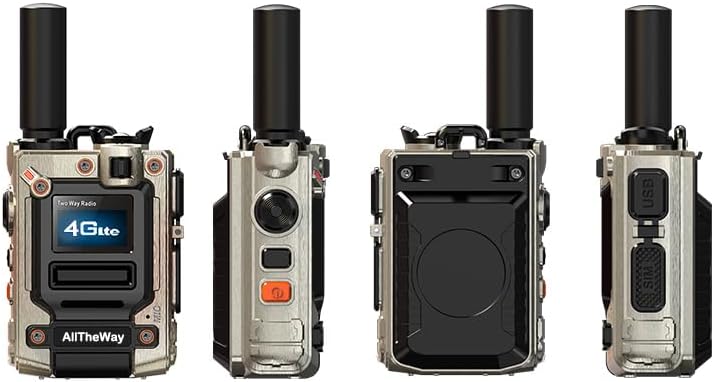
Image: Various perspectives of the walkie-talkie, showcasing its compact design and different sides.
Waranti dan Sokongan
Maklumat Waranti
This product comes with a 3-month warranty from the date of purchase. Please retain your proof of purchase for warranty claims. The warranty covers manufacturing defects but does not cover damage caused by misuse, accidents, or unauthorized modifications.
Sokongan Pelanggan
If you have any questions, encounter issues, or require assistance with your Global Walkie Talkie, please contact the seller or manufacturer for support. Refer to your purchase documentation for specific contact details.
Ask a question about this manual
Ask about setup, troubleshooting, compatibility, parts, safety, or missing instructions. Manuals+ will review the question and use this page’s manual context to help answer it.