
1. Pengenalan
This manual provides essential information for the safe and efficient use of your Engel LE3286SM 32-inch HD Smart TV. Please read these instructions thoroughly before operating the device and retain them for future reference. This television integrates a VIDAA operating system, offering access to various streaming services and smart functionalities.

Imej 1.1: Depan view of the Engel LE3286SM Smart TV, highlighting its key features and branding.
2. Maklumat Keselamatan
Sentiasa patuhi langkah keselamatan berikut untuk mengelakkan kejutan elektrik, kebakaran atau kerosakan pada televisyen:
- Jangan dedahkan TV kepada hujan atau lembapan.
- Jangan buka TV casing; merujuk semua perkhidmatan kepada kakitangan yang berkelayakan.
- Pastikan pengudaraan yang betul di sekeliling TV.
- Cabut palam TV semasa ribut petir atau apabila tidak digunakan untuk tempoh yang lama.
- Jauhkan TV daripada sumber haba dan cahaya matahari langsung.
3. Kandungan Pakej
Sahkan bahawa semua item terdapat dalam kotak:
- Engel LE3286SM 32-inch HD Smart TV
- Alat Kawalan Jauh
- Kabel Kuasa
- Stand TV (2 keping)
- Skru untuk Kaki TV
- Manual Pengguna
4. Produk Lebihview
The Engel LE3286SM is a 32-inch HD Smart TV featuring the VIDAA operating system. It includes multiple connectivity options and supports Dolby Audio for an enhanced sound experience.
4.1. Dimensi
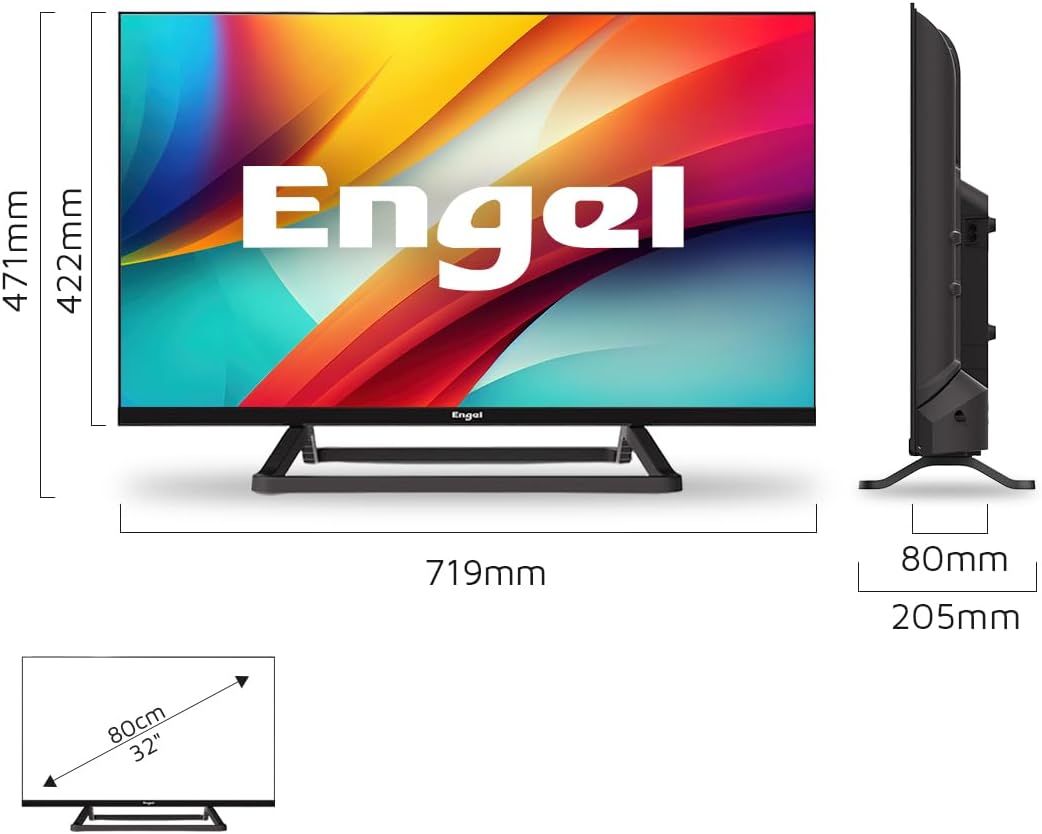
Image 4.1: Detailed dimensions of the Engel LE3286SM television, including measurements with and without the stand.
4.2. Pelabuhan Ketersambungan
The TV offers a range of ports for connecting external devices:

Imej 4.2: Selesaiview of the Engel LE3286SM TV's input and output ports, including HDMI, USB, and network connections.
- HDMI (x3): Untuk menyambungkan peranti definisi tinggi seperti pemain Blu-ray, konsol permainan atau kotak set atas.
- USB (x2): For connecting USB storage devices to play media or use PVR/Time-Shift functions.
- Ethernet (LAN): Untuk sambungan internet berwayar.
- Satellite Input (SAT): Untuk menyambung hidangan satelit.
- AV mini: For connecting older analog devices using an adapter (not included).
- Jack fon kepala: Untuk menyambungkan fon kepala.
- SPDIF (Optical Digital Audio Out): Untuk menyambung ke sistem audio luaran.
- Slot CI: For inserting a Conditional Access Module (CAM) for encrypted digital TV services.
5. Persediaan
5.1. Pemasangan Fizikal
You can install your TV using the included stand or mount it on a wall (wall mount kit sold separately).
5.1.1. Memasang Pendirian
- Letakkan TV menghadap ke bawah dengan berhati-hati pada permukaan yang lembut dan rata untuk mengelakkan kerosakan skrin.
- Jajarkan kepingan dirian dengan slot yang sepadan di bahagian bawah TV.
- Selamatkan dirian menggunakan skru yang disediakan. Pastikan ia diketatkan dengan kuat.
- Letakkan TV di atas permukaan yang stabil dan rata.
5.1.2. Pemasangan Dinding
If wall mounting, remove the stand first. Refer to the wall mount kit's instructions for proper installation. Ensure the wall mount is compatible with the TV's VESA mounting pattern.
5.2. Menyambung Peranti
- Kuasa: Sambungkan kabel kuasa ke input kuasa TV dan kemudian ke saluran keluar dinding.
- Antena/Satelit: Connect your antenna or satellite cable to the respective input on the TV.
- Peranti HDMI: Connect external devices (e.g., game console, Blu-ray player) to the HDMI ports.
- Peranti USB: Insert USB storage devices into the USB ports for media playback or recording.
- Internet: For a wired connection, connect an Ethernet cable to the LAN port. For Wi-Fi, you will configure it during the initial setup.
5.3. Kuasa Awal Hidup dan Persediaan Kali Pertama
- Palamkan TV dan tekan butang kuasa pada alat kawalan jauh atau TV.
- Ikut arahan pada skrin untuk memilih bahasa, negara dan zon waktu anda.
- Persediaan Rangkaian: Select your Wi-Fi network and enter the password, or confirm the wired connection.
- Imbasan Saluran: The TV will automatically scan for available digital and analog channels. This may take several minutes.
- VIDAA Account: You may be prompted to create or log in to a VIDAA account to access all smart features.
6. Beroperasi
6.1. Fungsi Alat Kawalan Jauh
The remote control allows you to navigate the TV's features. Familiarize yourself with the buttons:

Image 6.1: The remote control for the Engel LE3286SM TV, used for navigating menus and controlling playback.
- Kuasa: Menghidupkan/mematikan TV.
- Sumber: Selects input sources (HDMI, AV, TV, SAT).
- Butang Navigasi (Atas/Bawah/Kiri/Kanan/OK): Untuk navigasi dan pemilihan menu.
- Belakang/Keluar: Returns to the previous menu or exits the current application.
- Jilid +/-: Melaraskan kelantangan.
- Saluran +/-: Menukar saluran TV.
- Butang Aplikasi Pintar: Dedicated buttons for Netflix, Prime Video, Disney+, etc.
- Menu: Mengakses menu tetapan utama.
6.2. Navigating the VIDAA Smart TV Interface
The VIDAA operating system provides a user-friendly interface for accessing live TV, streaming apps, and settings. Use the navigation buttons on your remote to browse the home screen, app launcher, and various menus.
6.3. Menggunakan Ciri Pintar
Your Engel Smart TV comes with pre-installed applications and supports casting:
- Perkhidmatan Penstriman: Directly access Netflix, Amazon Prime Video, Disney+, and other services via their dedicated buttons or the app launcher. Ensure you have an active subscription for these services.
- Cast Function: Use the built-in cast feature to mirror content from your compatible smartphone or tablet to the TV screen.
6.4. PVR and Time-Shift Functions
To use PVR (Personal Video Recorder) and Time-Shift, connect a USB storage device (e.g., USB hard drive or flash drive) to one of the TV's USB ports. The TV will prompt you to format the device if it's not already compatible.
- PVR: Allows you to record live TV programs. Consult the on-screen guide for recording options.
- Time-Shift: Enables you to pause, rewind, and fast-forward live TV.
6.5. Mod Hotel
The Hotel Mode feature is designed for use in hospitality environments, allowing for restricted access to certain TV functions and automatic resetting of app data.

Image 6.2: Illustration of the Hotel Mode feature, which automatically resets app data upon TV shutdown.
In Hotel Mode, when the TV is powered off, data from installed applications is automatically reset. This ensures privacy and a consistent user experience for each new guest. Access to Hotel Mode settings is typically password-protected and intended for administrators.
6.6. Tetapan Audio (Dolby Audio)
Your TV supports Dolby Audio, providing enhanced sound quality. You can adjust audio settings in the TV's sound menu to optimize your listening experience.

Image 6.3: Visual representation of the Dolby Audio feature, indicating immersive sound experience.
Navigasi ke Tetapan > Bunyi to access options such as Sound Mode (Standard, Music, Movie, Sport, User), Equalizer, and Surround Sound settings.
7. Penyelenggaraan
7.1. Pembersihan
- Sentiasa cabut plag TV sebelum membersihkan.
- Gunakan kain lembut dan kering untuk mengelap skrin dan casing.
- Untuk tanda degil, ringankan dampen kain dengan air atau pembersih skrin yang lembut dan tidak melelas.
- Jangan sekali-kali menyembur pembersih terus ke skrin.
7.2. Kemas Kini Perisian
Periodically check for software updates to ensure optimal performance and access to the latest features. Navigate to Tetapan > Sistem > Kemas Kini Perisian to check for and install updates via the internet or USB.
8. Penyelesaian masalah
Jika anda menghadapi masalah, cuba penyelesaian berikut sebelum menghubungi sokongan:
| Masalah | Penyelesaian yang Mungkin |
|---|---|
| Tiada kuasa | Check if the power cable is securely connected and the wall outlet is working. Try a different outlet. |
| Tiada gambar, tetapi bunyi hadir | Pastikan sumber input yang betul dipilih. Semak sambungan kabel ke peranti luaran. |
| Tiada bunyi, tetapi ada gambar | Check volume level and mute status. Verify audio output settings. |
| Alat kawalan jauh tidak berfungsi | Gantikan bateri. Pastikan tiada halangan antara alat kawalan jauh dan TV. |
| Tidak dapat menyambung ke Wi-Fi | Check Wi-Fi password. Restart your router. Ensure TV is within range. |
| Aplikasi pintar tidak dimuatkan | Check internet connection. Restart the TV. Clear app cache if available in settings. |
9. Spesifikasi
| Ciri | Perincian |
|---|---|
| Jenama | Engel |
| Model | LE3286SM |
| Saiz Skrin | 32 inci |
| Product Dimensions (TV only) | 71.9 x 8 x 42.2 cm (W x D x H) |
| Dimensi Produk (dengan pendirian) | 71.9 x 20.5 x 47.1 cm (W x D x H) |
| Antara Muka Perkakasan | Ethernet, HDMI (x3), USB (x2) |
| Viewsudut | 178 Darjah |
| Nisbah Kontras | 3000:1 |
| Nisbah Aspek | 16:9 |
| Input Audio | HDMI |
| Konfigurasi Bunyi Keliling Pembesar Suara | 2.1 |
| Voltage | 230 Volt |
| Keserasian Pemasangan | Lekap di dinding |
| Perkhidmatan Internet yang Serasi | Netflix, Amazon Prime Video, Disney+ |
| Maximum Screen Brightness | 180 NIT |
10. Waranti dan Sokongan
Your Engel LE3286SM Smart TV comes with a 3-year warranty in Spain. Waranti ini meliputi kecacatan pembuatan di bawah penggunaan biasa. Sila simpan bukti pembelian anda untuk tuntutan waranti.

Image 10.1: Warranty information for Engel products, highlighting 3 years of warranty in Spain and specialized technical service.
For technical support or warranty service, please contact Engel's specialized technical service. Refer to the contact information provided in your product packaging or on the official Engel webtapak.