
myGEKOgear D111
myGEKOgear Orbit D111 Dash Cam User Manual
Model: D111
1. Pengenalan
This manual provides detailed instructions for the installation, operation, and maintenance of your myGEKOgear Orbit D111 Full HD Dash Cam. Please read this manual thoroughly before using the device to ensure proper functionality and to maximize your user experience.
2. Apa yang ada di dalam Kotak
Sahkan bahawa semua item terdapat dalam pakej:
- Orbit D111 Dashcam
- Kabel Kuasa (Pengecas Kereta)
- Mount Piala Sedutan
- Kad Micro SD 32GB
- Manual Pengguna (dokumen ini)
3. Produk Lebihview
The myGEKOgear Orbit D111 is a compact dash camera designed to record your driving in Full HD 1080P resolution. It features a 3-inch display, a 140-degree wide-angle lens, G-Sensor for emergency recording, and supports loop recording.
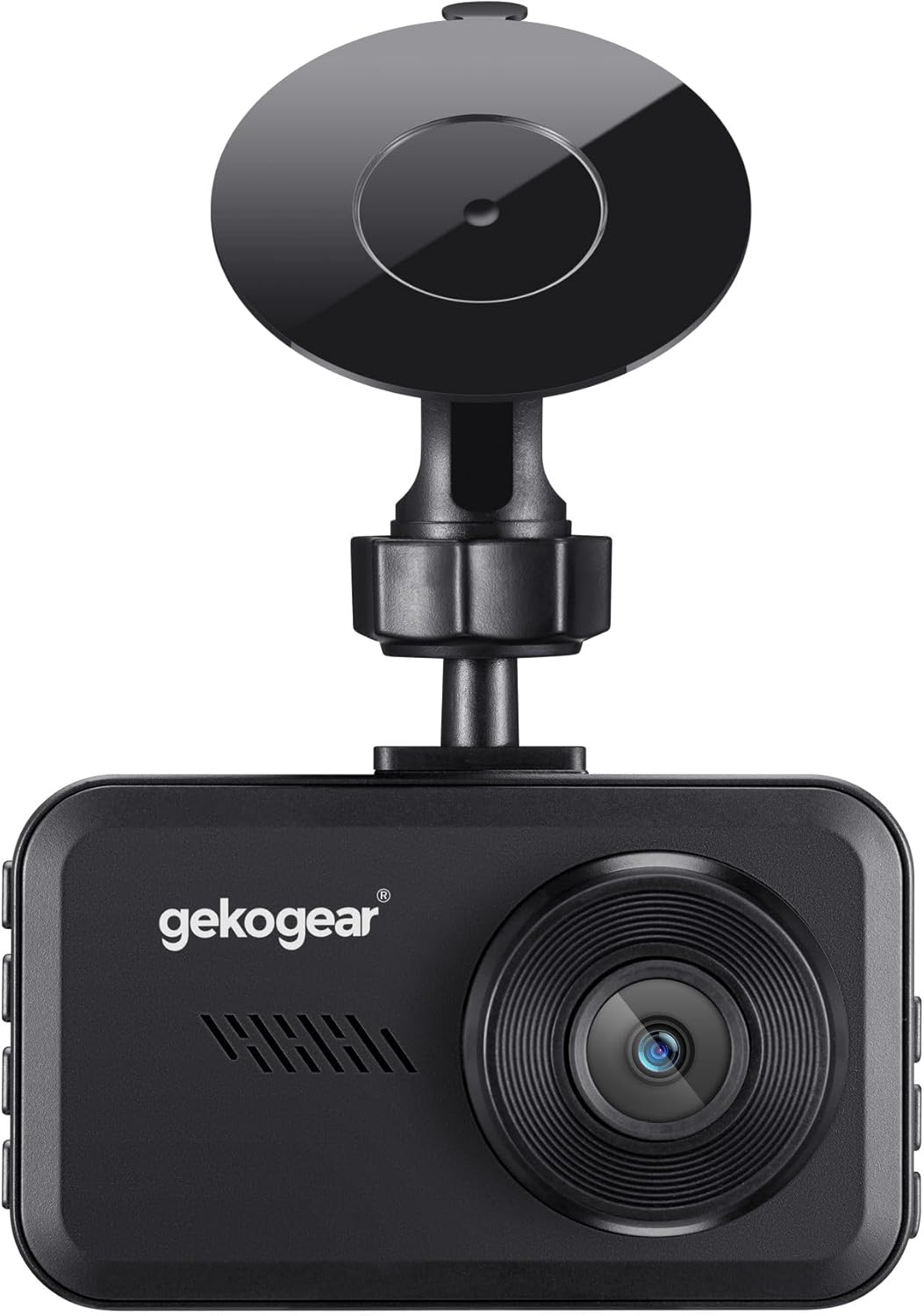
Rajah 3.1: Depan view of the Orbit D111 Dash Cam with its suction cup mount.
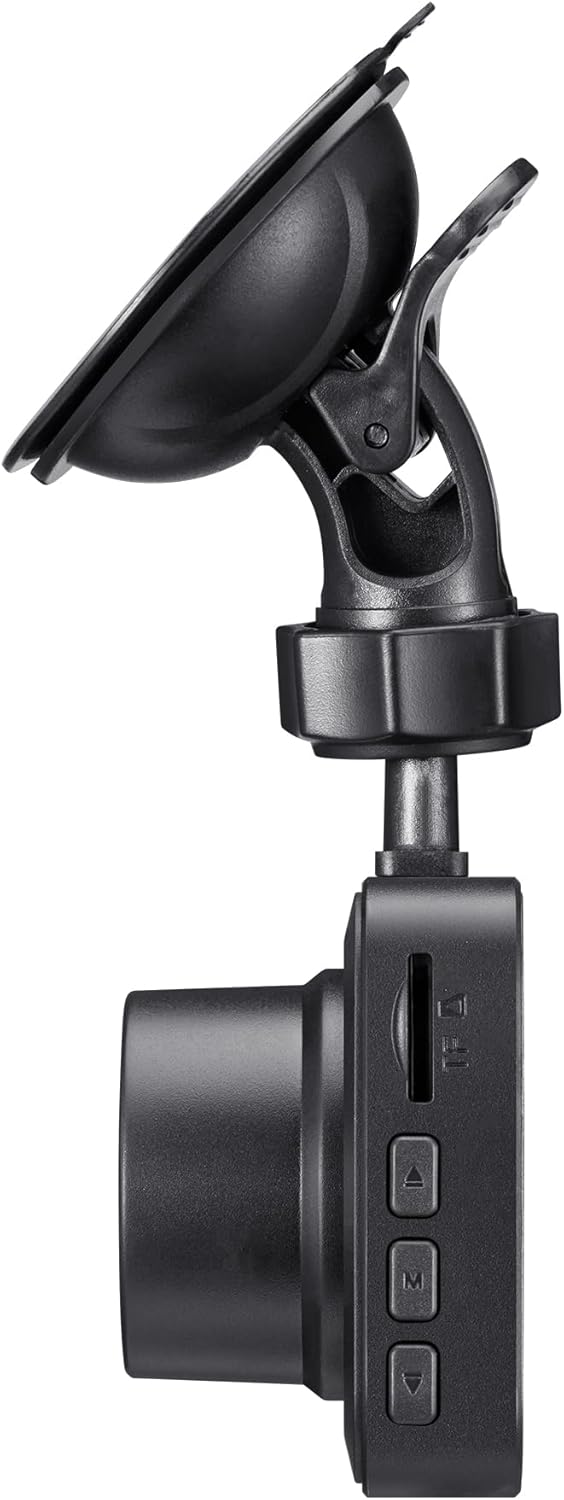
Rajah 3.2: sebelah view illustrating the control buttons and ports on the Orbit D111 Dash Cam.
4. Persediaan
4.1. Pemasangan Kad MicroSD
The Orbit D111 supports MicroSD cards up to 64GB. A 32GB MicroSD card is included. Ensure the card is inserted correctly before use.
- Locate the MicroSD card slot on the side of the dash cam.
- Masukkan kad MicroSD dengan kenalan emas menghadap bahagian belakang kamera sehingga ia klik pada tempatnya.
- Untuk mengalih keluar, tolak kad masuk perlahan-lahan sehingga ia keluar.

Rajah 4.1: MicroSD card and adapter, illustrating the type of storage supported.
4.2. Memasang Dash Cam
Use the provided suction cup mount to secure the dash cam to your vehicle's windshield.
- Bersihkan kawasan pada cermin depan anda di mana anda ingin memasang kamera papan pemuka.
- Pasang pelekap cawan sedutan pada sesondol pemuka.
- Tekan cawan sedutan dengan kuat pada cermin depan dan putarkan tuil untuk memastikannya kukuh.
- Laraskan sudut kamera untuk memastikan gambar yang jelas view jalan di hadapan.

Rajah 4.2: The Orbit D111 Dash Cam securely mounted on a vehicle's windshield, displaying its live recording view.
4.3. Sambungan Kuasa
Connect the dash cam to your vehicle's power source using the included power cable.
- Plug the small end of the power cable into the dash cam's power port.
- Plug the other end (car charger) into your vehicle's 12V power outlet (cigarette lighter socket).
- The dash cam will typically power on and begin recording automatically when the vehicle's ignition is turned on.
5. Arahan Operasi
5.1. Hidupkan/Mati Kuasa
The dash cam is designed to power on and off automatically with your vehicle's ignition. You can also manually power it on or off by pressing and holding the power button.
5.2. Mod Rakaman
The Orbit D111 features continuous loop recording and emergency recording via its G-Sensor.
- Rakaman Gelung: The camera records video in segments (e.g., 1, 3, or 5 minutes). When the MicroSD card is full, the oldest unlocked files are overwritten to make space for new recordings.
- G-Sensor (Rakaman Kecemasan): The built-in G-Sensor detects sudden impacts or rapid deceleration. When triggered, it automatically locks the current video segment, preventing it from being overwritten by loop recording.

Rajah 5.1: Visual representation of the G-Sensor feature, which automatically saves critical footage during incidents.
5.3. Display and Menu Navigation
The 3-inch IPS display provides a live view of the recording and allows access to settings.

Rajah 5.2: A jelas view of the 3-inch display, showing the live feed and recording indicators.
Use the physical buttons on the side of the dash cam to navigate through the menu options and adjust settings such as video resolution, loop recording duration, G-Sensor sensitivity, and date/time.
5.4. Wide-Angle Lens
The 140-degree wide-angle lens captures a broad view of the road, covering multiple lanes and reducing blind spots.

Rajah 5.3: Illustration of the 140-degree wide-angle lens coverage, showing an expansive view jalan raya.
6. Penyelenggaraan
- Pembersihan: Use a soft, dry cloth to clean the camera lens and display. Avoid abrasive cleaners or solvents.
- Kad MicroSD: Periodically format the MicroSD card (at least once a month) within the camera's settings to ensure optimal performance and prevent data corruption. Back up any important files sebelum memformat.
- Kemas kini Firmware: Check the myGEKOgear website for available firmware updates. Keeping your dash cam's firmware updated can improve performance and add new features.

Rajah 6.1: A laptop screen displaying a firmware update interface, indicating the availability of ongoing software support.
7. Penyelesaian masalah
- Kamera tidak dihidupkan:
- Ensure the power cable is securely connected to both the dash cam and the vehicle's 12V outlet.
- Check if the vehicle's 12V outlet is functioning (e.g., by testing with another device).
- The dash cam may have a low battery; charge it for a few minutes. - Rakaman berhenti atau terhenti:
- The MicroSD card may be full. Format the card (after backing up important files).
- The MicroSD card may be faulty or too slow. Use a high-speed (Class 10 or U1/U3) MicroSD card.
- Ensure the card is properly inserted. - Kualiti video yang lemah:
- Clean the camera lens.
- Ensure the protective film has been removed from the lens.
- Check the video resolution settings in the camera menu. - G-Sensor terlalu sensitif/tidak cukup sensitif:
- Adjust the G-Sensor sensitivity setting in the camera menu. - Date/Time is incorrect:
- Set the correct date and time in the camera's settings menu.
8. Spesifikasi
| Ciri | Spesifikasi |
|---|---|
| Nama Model | D111 |
| Resolusi Tangkapan Video | 1080p HD Penuh |
| Paparan | Skrin IPS 3 inci |
| Bidang Dari View | 140 Darjah |
| Ciri Khas | Built-In Display, Compact Design, G-Sensor, Loop Recording |
| Sokongan Storan | Sehingga 64GB MicroSD (32GB disertakan) |
| Teknologi Ketersambungan | USB |
| Jenis Pemasangan | Pemasangan Cermin Depan (Cawan Sedutan) |
| Dimensi Produk | 3.5 x 2 x 2 inci |
| Berat Barang | 9.6 auns |
| Pengeluar | Adesso |
9. Waranti dan Sokongan
For warranty information and technical support, please refer to the official myGEKOgear webtapak atau hubungi perkhidmatan pelanggan mereka secara langsung. Simpan resit pembelian anda sebagai bukti pembelian.