
1. Pengenalan
This manual provides essential information for the proper use and maintenance of your EBTOOLS 8-Inch 2-in-1 Pocket PC Computer. Please read this guide thoroughly before operating the device to ensure optimal performance and longevity. This compact and versatile device features an 8-inch touchscreen, a 360-degree rotating design, and runs on Windows 11 Pro.

Image: The EBTOOLS 8-Inch 2-in-1 Pocket PC shown in its tablet configuration, with a scenic road displayed on the screen.
2. Kandungan Pakej
Sahkan bahawa semua item yang disenaraikan di bawah disertakan dalam pakej produk anda:
- 1 x EBTOOLS 8-Inch 2-in-1 Laptop
- 1 x Kord Bekalan Kuasa
- 1 x Penyesuai Kuasa (Palam AS)
- 2 x User Manuals (this document is one of them)

Image: The EBTOOLS 8-Inch 2-in-1 Pocket PC, its power supply cord, and the US plug adapter, laid out as they would appear in the package.
3. Produk Lebihview
The EBTOOLS 8-Inch 2-in-1 Pocket PC is designed for portability and versatility. It features a compact form factor and a 360-degree rotating display, allowing it to function as both a laptop and a tablet.
Ciri-ciri Utama:
- Pemproses: N100 CPU, capable of up to 3.4GHz frequency.
- Ingatan: RAM LPDDR5 12GB.
- Storan: 512GB M.2 SSD, expandable up to 2TB.
- paparan: 8-inch touchscreen with 360-degree rotation.
- Ketersambungan: WiFi6 (2.4G/5G band) and Bluetooth 5.2.
- kamera: 2MP 30 Frame HD built-in front camera for video calls.
- papan kekunci: Edge-less full-size QWERTY keyboard with integrated touchpad.
- Bateri: Built-in 5000mAh polymer lithium battery, providing 4-6 hours of use.
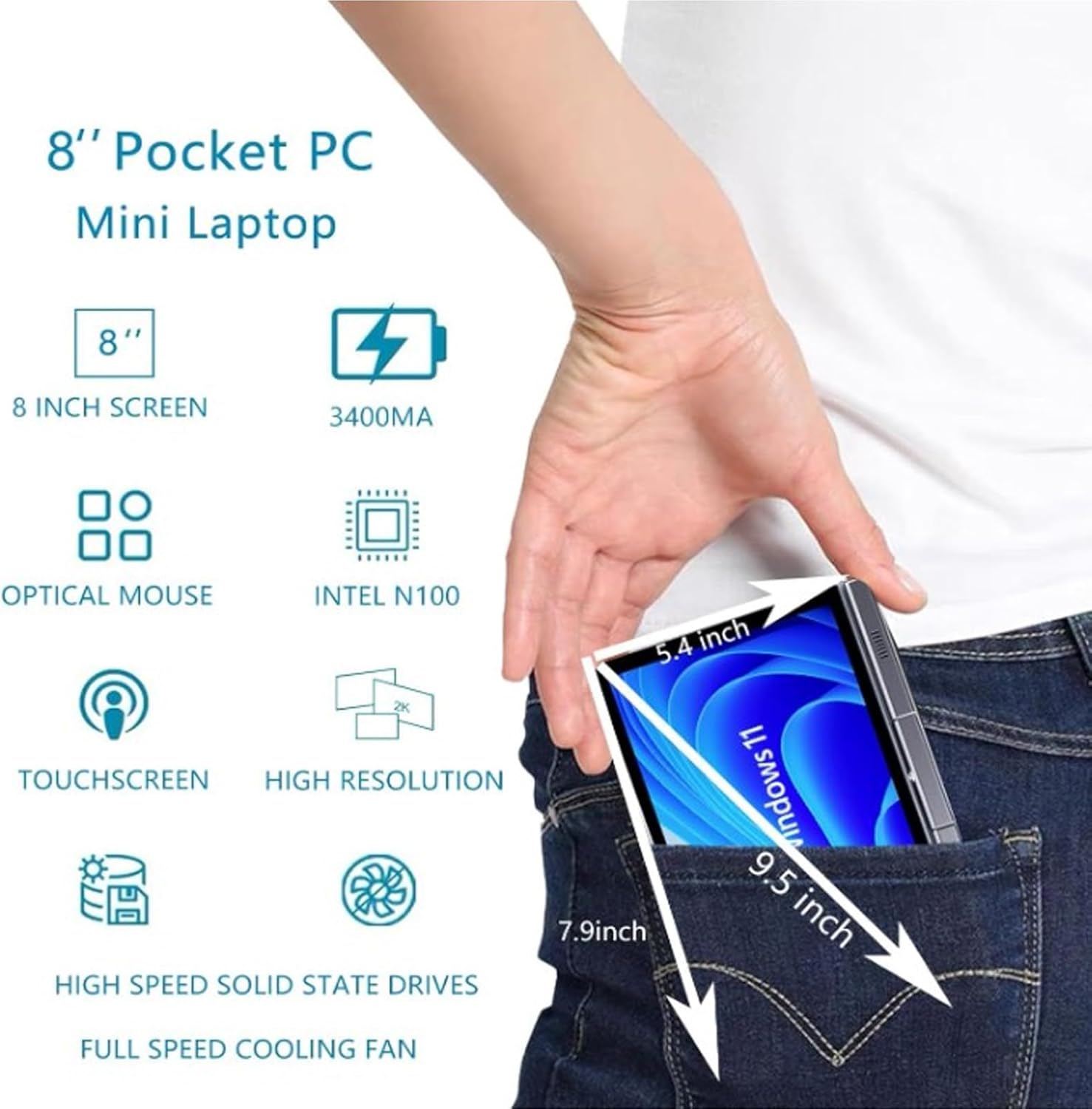
Image: A visual representation of the 8-inch Pocket PC's compact dimensions, demonstrating its portability by showing it fitting into a standard pocket.

Image: A labeled diagram highlighting the various ports (USB 3.0, Type-C, Audio, RJ45) and keyboard components (Front Camera, Speaker, Power Light, Power Button, Left/Right/Middle Mouse Buttons) of the EBTOOLS 8-Inch 2-in-1 Pocket PC.
4. Persediaan
4.1 Penghidupan dan Pengecasan Awal
- Cas Peranti: Before first use, connect the power adapter to the Type-C port on the device and plug it into a power outlet. Allow the device to charge fully. The power light indicator will show charging status.
- Hidupkan kuasa: Press and hold the Power Button located on the keyboard deck until the screen illuminates.
- Persediaan Awal: Follow the on-screen instructions to complete the Windows 11 Pro setup process, including language selection, network connection, and user account creation.
The device is designed for immediate use upon completion of the initial Windows setup.
5. Arahan Operasi
5.1 Papan Kekunci dan Pad Sentuh
- The device features an edge-less full-size QWERTY keyboard for typing.
- The integrated touchpad supports standard mouse functions, including moving the pointer, scrolling, and left/right clicks. The left, right, and middle mouse buttons are clearly indicated on the diagram.
5.2 Operasi skrin sentuh
- The 8-inch display is a multi-touch screen. Use gestures such as tap, swipe, pinch-to-zoom, and rotate for navigation and interaction with applications.
5.3 360-Degree Rotation
- The display can be rotated 360 degrees to switch between laptop mode (traditional clamshell) and tablet mode (screen folded back against the base).
- When in tablet mode, the keyboard is automatically disabled to prevent accidental input.
5.4 Menyambung Peranti
- USB 3.0: Connect external devices such as USB drives, mice, or keyboards to the USB 3.0 port.
- Jenis-C: Digunakan untuk pengecasan dan pemindahan data.
- High Definition Multimedia Interface (HDMI): Connect an external monitor or projector using an HDMI cable for extended display.
- 3.5mm Standard Headphone Jack: Sambungkan fon kepala atau pembesar suara luaran.
- Port Rangkaian RJ45: Sambungkan kabel Ethernet untuk sambungan internet berwayar.
5.5 Kesambungan Wayarles
- WiFi6: Access wireless networks (2.4G and 5G bands) for internet connectivity. Enable Wi-Fi through Windows settings.
- Bluetooth 5.2: Pair with Bluetooth-enabled devices such as headphones, speakers, or other peripherals. Enable Bluetooth through Windows settings.
6. Penyelenggaraan
6.1 Pembersihan
- Gunakan kain lembut dan tidak berbulu untuk membersihkan skrin dan permukaan luar. Untuk kesan degil, gosok sedikitampen kain dengan air atau larutan pembersih skrin.
- Avoid using harsh chemicals, abrasive cleaners, or aerosol sprays directly on the device.
- Pastikan peranti dimatikan dan dicabut plag sebelum dibersihkan.
6.2 Penyimpanan
- Simpan peranti di tempat yang sejuk dan kering jauh dari cahaya matahari langsung dan suhu yang melampau.
- If storing for an extended period, ensure the battery is charged to approximately 50% to preserve battery health.
7. Penyelesaian masalah
This section addresses common issues you might encounter with your EBTOOLS 8-Inch 2-in-1 Pocket PC.
7.1 Peranti Tidak Menghidupkan
- Ensure the device is fully charged. Connect the power adapter and wait a few minutes before attempting to power on again.
- Verify the power adapter and cable are securely connected and the power outlet is functional.
- Cuba tahan butang kuasa selama 10-15 saat untuk melakukan tetapan semula keras.
7.2 Wi-Fi or Bluetooth Connectivity Issues
- Semak sama ada Wi-Fi atau Bluetooth didayakan dalam tetapan Windows.
- Restart the device and your wireless router/Bluetooth device.
- Ensure you are within range of the Wi-Fi network or Bluetooth device.
- Update wireless drivers if available.
7.3 Skrin Sentuh Tidak Bertindak Balas
- Mulakan semula peranti.
- Pastikan skrin bersih dan bebas daripada serpihan.
- Check for any system updates that might include touchscreen driver fixes.
7.4 Hayat Bateri Pendek
- Adjust power settings in Windows to optimize battery usage.
- Tutup aplikasi yang tidak perlu berjalan di latar belakang.
- Kurangkan kecerahan skrin.
- Ensure the device is not running resource-intensive tasks continuously.
8. Spesifikasi
| Ciri | Spesifikasi |
|---|---|
| Sistem Operasi | Windows 11 Pro |
| Saiz Paparan | 8 inci |
| Pemproses | N100 CPU (up to 3.4GHz) |
| RAM | 12GB LPDDR5 |
| Penyimpanan | 512GB M.2 SSD (supports up to 2TB) |
| Kamera Depan | 2MP 30 Frame HD Built-In Camera |
| Bluetooth | BT 5.2 |
| Wireless Fidelity Type | 2.4G / 5G Band (WiFi6) |
| Antara muka | 1 x USB3.0, 1 x 3.5mm Standard Headphone Jack, 1 x High Definition Multimedia Interface Port, 1 x Type-C, 1 x RJ45 Network Port |
| Jenis Bateri | Bateri Litium Polimer 5000mAh terbina dalam |
| Hayat Bateri | 4-6 hours (typical use) |
| Berat Barang | 2.68 paun (lebih kurang 1.22 kg) |
| Dimensi Pakej | 9.45 x 7.09 x 2.36 inci |
9. Waranti dan Sokongan
9.1 Waranti Produk
Specific warranty details for your EBTOOLS 8-Inch 2-in-1 Pocket PC are typically provided with your purchase documentation or on the manufacturer's official weblaman web. Sila rujuk sumber ini untuk maklumat mengenai perlindungan, tempoh dan terma jaminan.
9.2 Sokongan Pelanggan
For technical assistance, troubleshooting beyond this manual, or warranty claims, please contact EBTOOLS customer support. Contact information can usually be found on the product packaging, the manufacturer's webtapak, atau melalui peruncit anda.
When contacting support, please have your product model number (EBTOOLS9pxf4058ch-12) and purchase information readily available.