
1. Pengenalan
This manual provides detailed instructions for the XINDADA Hello Plum H15 Pro SmartWatch. It covers setup, operation, maintenance, and troubleshooting to ensure optimal use of your device. The H15 Pro features an AMOLED display, 1GB of internal storage, and advanced functionalities including health monitoring, communication, and smart assistant integration.
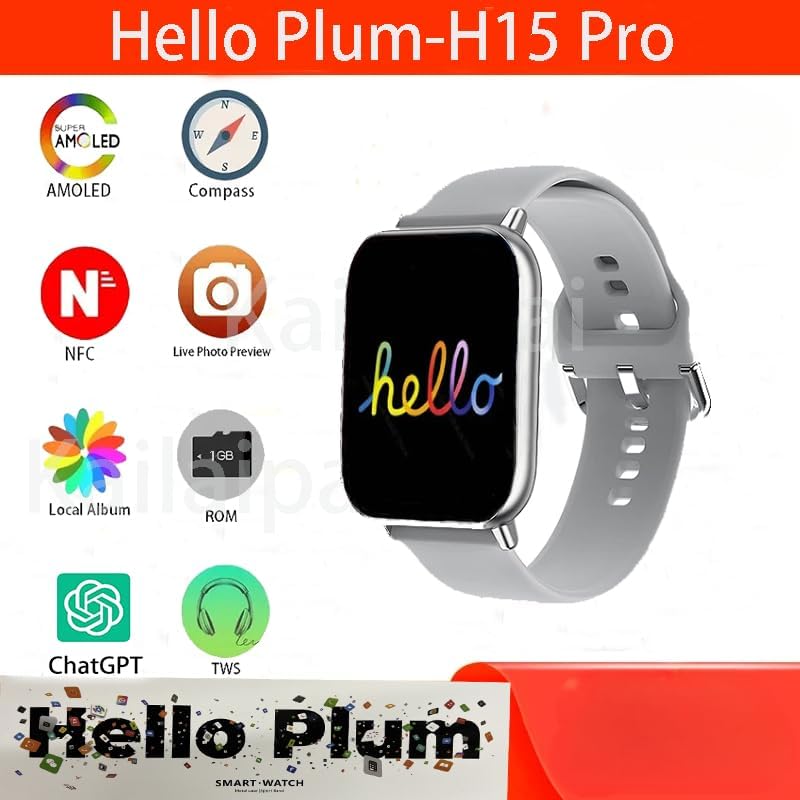
Imej 1.1: Selesaiview of the Hello Plum H15 Pro SmartWatch highlighting key features like AMOLED display, compass, NFC, live photo preview, local album, 1GB ROM, ChatGPT, and TWS support.
2. Maklumat Keselamatan
- Do not attempt to disassemble, repair, or modify the device. This may cause damage, fire, or electric shock.
- Jauhkan peranti daripada suhu ekstrem, cahaya matahari langsung dan kelembapan yang tinggi.
- Elakkan mendedahkan peranti kepada hentaman atau getaran yang kuat.
- Consult a medical professional before starting any new exercise regimen or if you have a medical condition that could be affected by using the smartwatch.
- The device is IP67 water-resistant, meaning it can withstand immersion in up to 1 meter of water for 30 minutes. It is not suitable for swimming or showering with hot water.
3. Kandungan Pakej
Sahkan bahawa semua item terdapat dalam pakej:
- 1 x XINDADA Hello Plum H15 Pro SmartWatch
- 1 x Kabel Pengecasan Tanpa Wayar
- 1 x Manual Pengguna (dokumen ini)
4. Persediaan
4.1. Charging the SmartWatch
Before first use, fully charge your smartwatch. Place the watch on the provided wireless charging cable. The watch display will indicate charging status. A full charge typically takes approximately 2 hours.
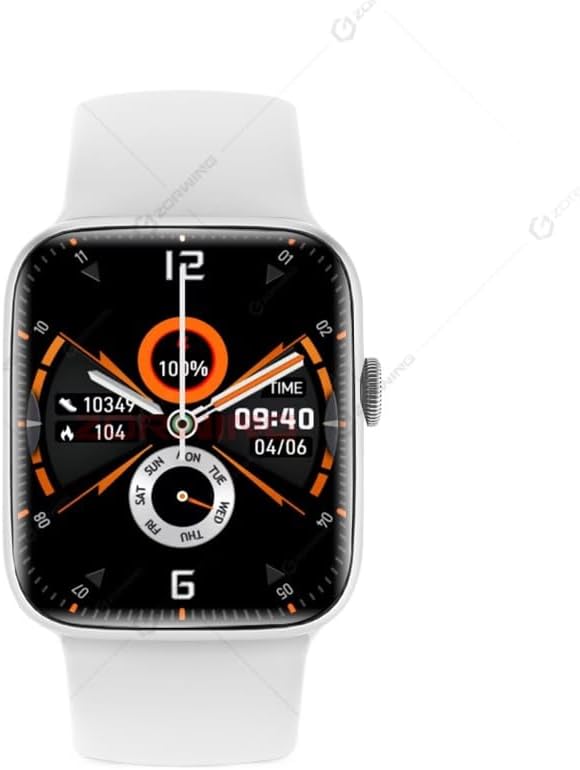
Image 4.1: The Hello Plum H15 Pro SmartWatch displaying its watch face, indicating battery level and current time.
4.2. Hidupkan/Mati Kuasa
- Untuk Menghidupkan: Tekan dan tahan butang sisi sehingga skrin menyala.
- Untuk Mematikan: Tekan dan tahan butang sisi, kemudian pilih "Matikan Kuasa" pada skrin.
4.3. Pemasangan Apl dan Berpasangan
To unlock the full functionality of your H15 Pro SmartWatch, download and install the "LEWEAR" application on your smartphone (Android or iOS).
- Scan the QR code in the watch's settings or search for "LEWEAR" in your smartphone's app store.
- Install and open the LEWEAR app.
- Dayakan Bluetooth pada telefon pintar anda.
- In the LEWEAR app, navigate to "Device" or "Add Device" and select the H15 Pro from the list of available devices.
- Sahkan permintaan berpasangan pada telefon pintar anda dan jam tangan pintar.
Once paired, the watch will synchronize data with your phone, and you can customize settings through the app.
5. Arahan Operasi
5.1. Navigasi Asas
- Skrin sentuh: Leret ke atas, bawah, kiri atau kanan untuk menavigasi menu dan pemberitahuan. Ketik untuk memilih item.
- Side Button (Digital Crown): Press to return to the home screen or wake the display. Rotate to scroll through lists or zoom in/out (where applicable).

Image 5.1: The smartwatch interface showcasing a new user interface design for an enhanced experience.

Image 5.2: The smartwatch demonstrating its "Waterfall Menu" with new animations and visuals, providing a dynamic and smooth interactive experience.
5.2. Ciri-ciri Utama
- Panggilan & Mesej Bluetooth: Once paired, make and receive calls directly from your watch. Receive notifications for SMS, WhatsApp, WeChat, and email.
- Pemantauan Kesihatan:
- Kadar Jantung: Automatic 24-hour heart rate monitoring.
- Pedometer: Daily step counting and calorie tracking.
- Monitor Tidur: Records and analyzes sleep conditions from 9 PM to 9 AM.
- Mod Berbilang Sukan: Track various physical activities.

Image 5.3: The smartwatch showing a physical training view, allowing users to monitor metrics like heart rate intervals and fitness logs by rotating the digital crown.
- Local Music & Photo Album: With 1GB ROM, store music directly on the watch for offline playback. Upload photos to create a local album via the LEWEAR app.
- Memo Suara: Support for HD recording and local playback.
- NFC: Supports NFC functionality for various applications (e.g., offline payments like Alipay).
- Integrasi ChatGPT: Access AI assistant features directly from your wrist.
- Pembaca e-buku: Supports reading e-books directly on the watch.
- Kompas: Kompas terbina dalam untuk navigasi.
- Penyesuaian: Customize watch faces and shortcut action bars. Supports always-on display in low brightness.

Image 5.4: The smartwatch interface indicating support for 24-hour voice memos, including HD recording and local playback.
6. Penyelenggaraan
- Pembersihan: Lap jam tangan dan tali dengan kerap menggunakan kain lembut dan kering. Untuk kotoran degil, gunakan sedikit pembersihamp kain dan kemudian keringkan dengan teliti. Elakkan bahan kimia yang keras.
- Rintangan Air (IP67): The H15 Pro is resistant to splashes and brief immersion. Do not use it for swimming, diving, or showering with hot water, as steam and high pressure can compromise the seals.
- Storan: When not in use for extended periods, store the watch in a cool, dry place and ensure it has at least a 50% charge to preserve battery health.
7. Penyelesaian masalah
- Tonton tidak dihidupkan: Pastikan jam tangan dicas sepenuhnya. Sambungkannya ke pengecas tanpa wayar selama sekurang-kurangnya 30 minit.
- Tidak boleh berpasangan dengan telefon pintar:
- Pastikan Bluetooth didayakan pada kedua-dua peranti.
- Pastikan jam tangan berada dalam julat telefon anda.
- Mulakan semula kedua-dua jam tangan dan telefon pintar.
- Clear Bluetooth cache on your phone or try pairing with another device to rule out phone issues.
- Data kesihatan tidak tepat: Ensure the watch is worn snugly on your wrist, not too tight or too loose. Clean the sensor regularly.
- Pemberitahuan tidak diterima: Check app permissions on your smartphone to ensure the LEWEAR app has access to notifications. Verify that notification settings are enabled in both the LEWEAR app and on the watch.
- Skrin tidak bertindak balas: Try restarting the watch by holding the side button. If the issue persists, contact customer support.
8. Spesifikasi
| Ciri | Spesifikasi |
|---|---|
| Jenama | XINDADA |
| Nombor Model | H15 Pro |
| Paparan | 2.04-inch AMOLED, 368 x 448 resolution |
| Pemproses | JL701X (Dual-core, high performance, low power) |
| Ingatan | RAM: 128MB; ROM: 128MB + 1GB |
| Ketersambungan | Bluetooth 3.0 + BLE5.3, NFC |
| Kapasiti Bateri | Polimer Litium-ion 300 mAh |
| Tahan Air | IP67 |
| Bahan Kes | aluminium |
| tali | Standard Sport Strap |
| Kaedah Pengecasan | Pengecas Tanpa Wayar |
| OS yang serasi | Android, iOS |
| Permohonan | LEWEAR |
| Bahasa yang Disokong | Chinese, English, Traditional, French, German, Italian, Spanish, Portuguese, Russian, Turkish, Japanese, Arabic, Thai, Vietnamese, Ukrainian, Farsi |
9. Waranti dan Sokongan
The XINDADA Hello Plum H15 Pro SmartWatch comes with a standard manufacturer's warranty. For specific warranty terms and conditions, please refer to the warranty card included in your product packaging or contact XINDADA customer support directly.
For technical assistance, troubleshooting beyond this manual, or warranty claims, please contact the retailer or XINDADA customer service through their official webtapak atau saluran kenalan.