
pengenalan
Thank you for choosing the Membrane Solutions MSB5 Air Purifier. This device is designed to improve indoor air quality by filtering out various airborne particles. Please read this manual thoroughly before operating the unit and retain it for future reference.

Image: Membrane Solutions MSB5 Air Purifier with key features highlighted.
Arahan Persediaan
- Buka Pek Penulen Udara: Tanggalkan penulen udara dan semua aksesori daripada pembungkusan dengan berhati-hati.
- Sediakan Penapis: Before first use, open the bottom cover of the air purifier and remove the plastic packaging from the HEPA filter. Reinsert the filter and secure the bottom cover.
- Sambungan Kuasa: Connect the provided USB-C cable to the air purifier and a compatible 5V 1A USB power adapter (not included).
- penempatan: Place the air purifier on a flat, stable surface, ensuring adequate space around the unit for optimal airflow.

Image: Visual guide demonstrating how to remove the bottom cover, unwrap the filter, and reinsert it before use.
Arahan Operasi
The MSB5 Air Purifier features a touch control panel for easy operation.

Imej: Terperinci view of the air purifier's touch control panel, indicating Power Button, Light Button, Auto Mode, Sleep Mode, Turbo Mode, Fan Speed, Air Quality Display, and Filter Lifespan.
Fungsi Panel Kawalan:
- Butang Kuasa: Tap to turn the unit On/Off.
- Mode Button (A/Moon/Heart): Press and hold for 2 seconds to cycle through Auto Mode (A), Sleep Mode (Moon), and Turbo Mode (Heart).
- Butang Cahaya: Tap to cycle through RGB color-changing light, fixed color light, or turn the light off.
Paparan Kualiti Udara:
The air purifier features an air quality indicator that changes color based on the detected air quality:
- hijau: Kualiti udara yang baik.
- Kuning: Kualiti udara sederhana.
- merah: Bad air quality.
Ciri Lampu Malam:
The MSB5 includes a colorful night light that can be adjusted to suit your preference. It offers a dynamic RGB color-changing mode or the option to select a fixed color. The light can also be turned off completely for an undisturbed sleep environment.

Image: The air purifier showcasing its various night light settings, including a dynamic RGB mode, a static colorful light, and the light turned off.
Mod tidur:
In Sleep Mode, the air purifier operates at a low decibel level (20dB), ensuring a quiet environment ideal for sleeping or working without disturbance. The display lights are also dimmed or turned off in this mode.

Image: The air purifier in a bedroom setting, illustrating its quiet operation in sleep mode, designed for light sleepers.
Penyelenggaraan
Penggantian Penapis:
The MSB5 air purifier is equipped with a 99-day filter lifespan reminder. When the filter usage life is less than 10 days, the LED data on the control panel will flash every 2 seconds, indicating that the filter needs to be replaced.
For optimal performance, it is recommended to replace the filter cartridge once every 3 months. Genuine MSB5 Air Filters can be found by searching for B0CTH16HBF or B0CTH31KNB on Amazon.
Pembersihan Penapis:
To extend the life of your filter, you may gently vacuum the exterior of the filter every couple of weeks to remove accumulated dust and debris. Do not wash the filter with water or any liquids.
Menyelesaikan masalah
- Unit tidak dihidupkan: Ensure the USB-C cable is securely connected to both the air purifier and a functional 5V 1A power adapter.
- No airflow or weak airflow: Check if the filter's plastic packaging has been removed. Ensure the filter is correctly installed and the bottom cover is securely fastened.
- Air quality indicator consistently red/yellow: This indicates poor or moderate air quality. Ensure the unit is running in an appropriate mode (e.g., Turbo Mode for faster purification) and consider replacing the filter if it's nearing the end of its lifespan.
- Filter replacement reminder flashing: Replace the filter as indicated. After replacing, the filter timer will automatically reset.
- Bunyi luar biasa: Ensure the unit is placed on a stable, flat surface. Check if the filter is properly seated. If the issue persists, contact customer support.
Spesifikasi
| Dimensi Produk | 6.5 x 6.5 x 8 inci |
| Berat Barang | 1.76 paun |
| Nombor Model | MSB5 |
| Sumber Kuasa | USB-C (5V 1A) |
| Kaedah Kawalan | Sentuh |
| Jenis Penapis | H13 HEPA Sebenar (3-stage filtration: Pre-Filter, H13 TRUE HEPA Filter, Activated Carbon Filter) |
| Liputan Keluasan Lantai | Sehingga 215 Kaki Persegi |
| Tahap Kebisingan | 20 Desibel (dalam Mod Tidur) |
| Saiz Pengekalan Zarah | 0.3 Mikron |
| Wattage | 4.5 watt |
| Ciri Khas | 3-stage HEPA filter, Ultra-quiet sleep mode, Air Quality Display, Colorful Night Light |
| Pensijilan | FCC diperakui |
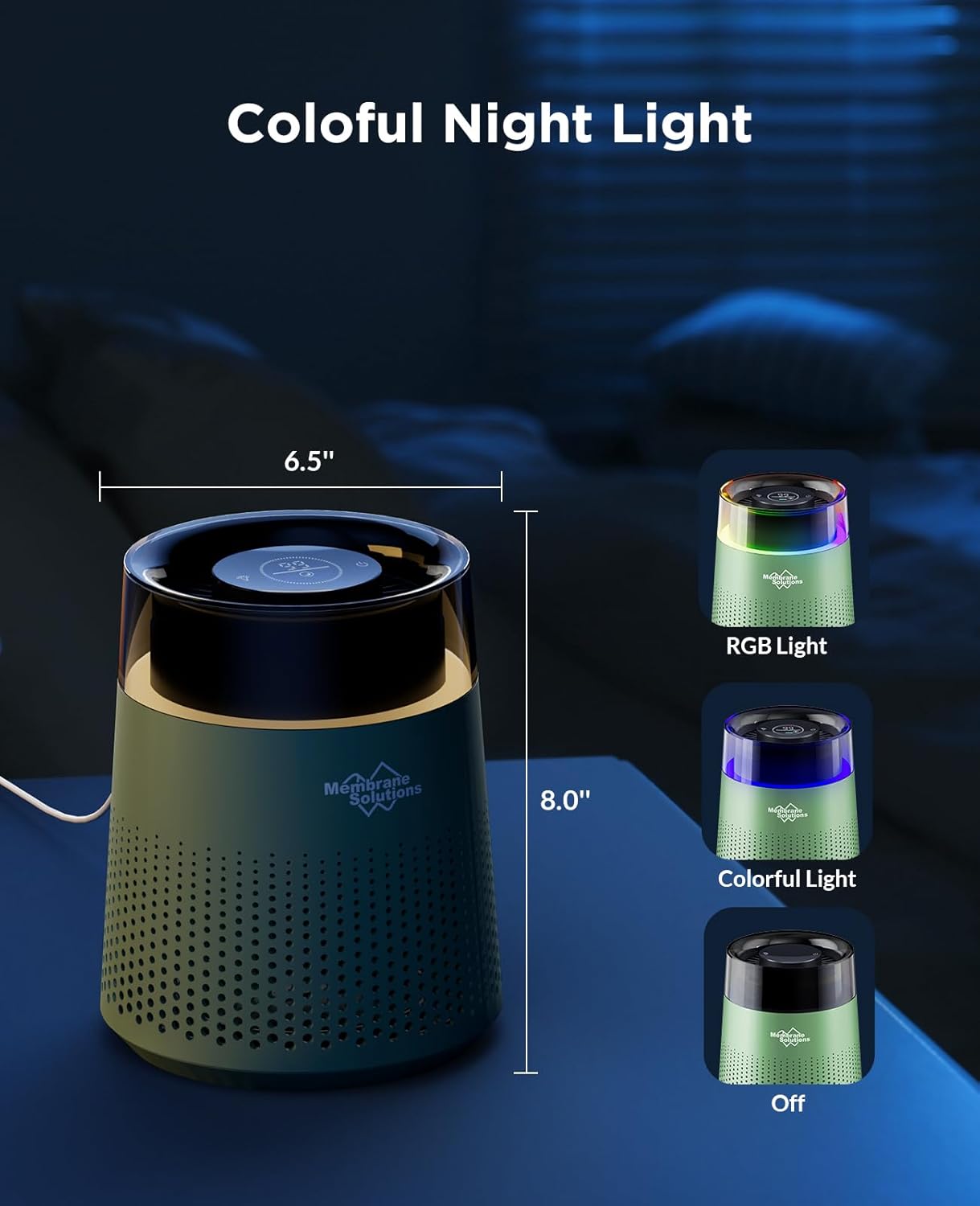
Image: The MSB5 Air Purifier with its key dimensions (6.5 inches width, 8.0 inches height) indicated.
Waranti dan Sokongan
For any questions, technical assistance, or warranty claims, please contact Membrane Solutions customer support. Refer to the product packaging or the official Membrane Solutions webtapak untuk maklumat hubungan.