
pengenalan
This manual provides comprehensive instructions for the setup, operation, and maintenance of your G-MARK G2000 IEM UHF In Ear Monitor System. Please read this manual thoroughly before using the product to ensure proper functionality and to maximize its performance and longevity. This system is designed for professional audio monitoring applications, offering reliable wireless performance for stage, studio, and band environments.
Produk Selesaiview
Komponen
The G-MARK G2000 IEM system includes the following components:
- 1 x Unit Pemancar Tanpa Wayar
- 1 x UHF Receiver (Bodypack)
- 1 x Fon Kepala Dalam Telinga
- Kabel Audio 1 x 6.35mm
- 1 x Penyesuai Kuasa
- 1 x Antena
- 1 x Manual Arahan (dokumen ini)

Rajah 1: Berakhirview of the G-MARK G2000 IEM system, showing the transmitter unit, bodypack receiver, and included in-ear headphones.
Ciri-ciri Utama
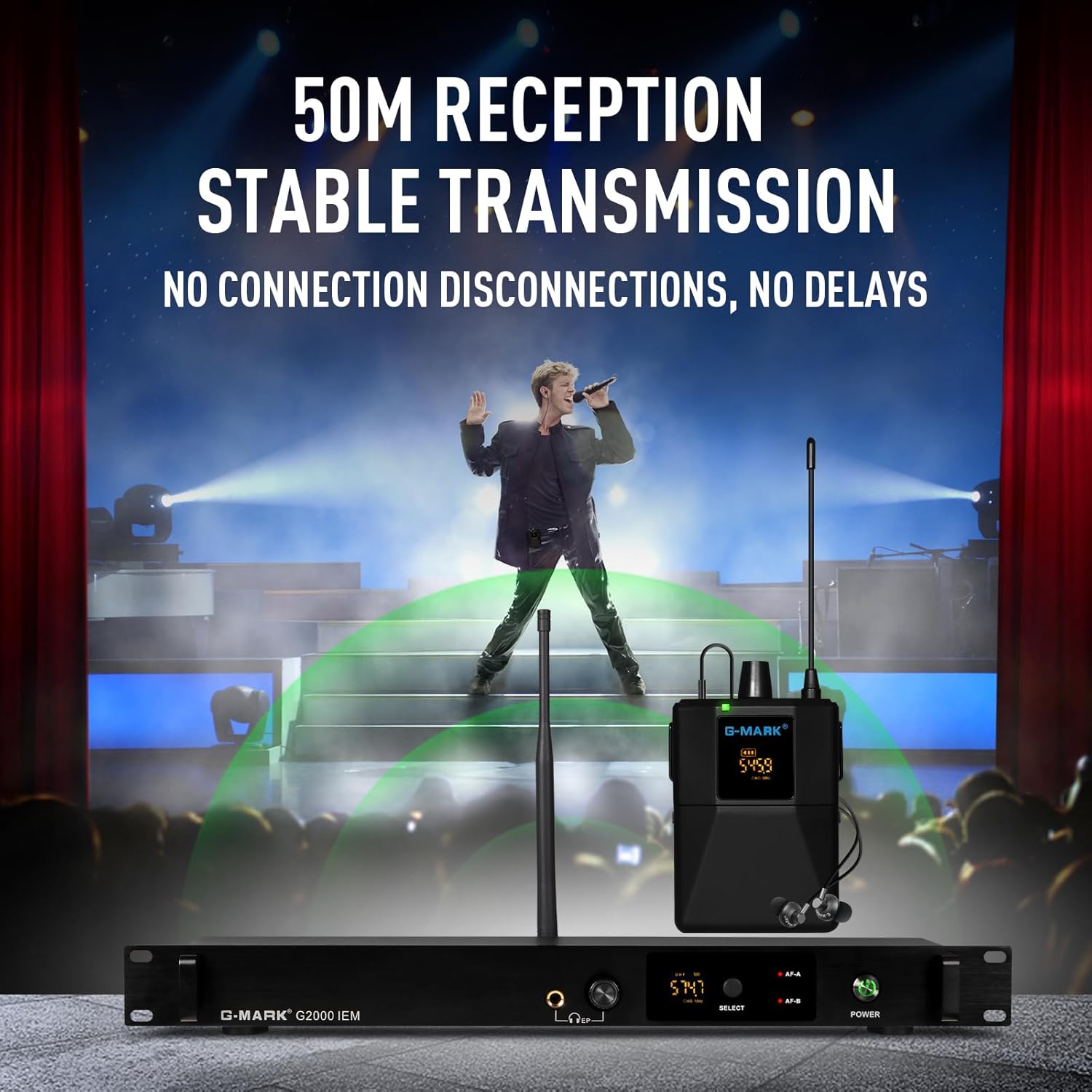
- Julat Tanpa Wayar: Up to 160 feet (50 meters) in open space, utilizing antenna diversity and digital signal processing for stable transmission.
- Sistem Boleh Diperkembangkan: Supports an unlimited number of bodypack receivers for multi-user monitoring.
- Teknologi Tanpa Wayar UHF: Operates within the 500-590MHz frequency band with 100 selectable channels.
- Kualiti Audio: Wide frequency response of 20Hz-25KHz, dynamic range of 107dB, uncompressed wireless signal transmission, low noise, and low delay.
- Antara Muka Pengguna: Both transmitter and receiver feature LCD displays for frequency, AF, and battery status.
- Pembinaan Tahan Lama: Transmitter unit is constructed from metal for robustness.
- Ketersambungan Serbaguna: 6.35mm mixed input for compatibility with various audio equipment.
Arahan Persediaan
1. Transmitter Placement and Connection
- Place the transmitter unit on a stable surface or install it into a standard rack unit. Ensure adequate ventilation.
- Connect the included antenna to the antenna port on the rear of the transmitter.
- Connect the power adapter to the transmitter's power input and then to a suitable power outlet.
- Connect your audio source (e.g., mixing console, audio interface) to the 6.35mm audio input jacks on the rear of the transmitter using the provided 6.35mm audio cable.

Rajah 2: The G-MARK G2000 IEM transmitter can be integrated into standard rack cabinets, demonstrating compatibility with various audio devices.
2. Receiver (Bodypack) Setup
- Open the battery compartment on the bodypack receiver and insert two AA batteries (not included), observing correct polarity.
- Connect the in-ear headphones to the 3.5mm headphone jack on the receiver.
- Attach the bodypack receiver to your belt or clothing using the integrated clip.
Rajah 3: The wireless bodypack receiver is designed for easy wear, allowing freedom of movement during performance.
3. Frequency Matching (FlashMatch)
To establish a wireless connection, the transmitter and receiver must be tuned to the same frequency channel.
- Power on both the transmitter and the receiver.
- On the transmitter, use the function setting keys to select a desired channel. The LCD display will show the current frequency.
- On the receiver, access the frequency matching function (refer to the receiver's specific controls, often a "SET" or "SYNC" button).
- Align the infrared ports (if available) or follow the on-screen prompts to synchronize the receiver with the transmitter's selected frequency. The receiver's LCD will confirm successful synchronization.

Rajah 4: The "FlashMatch" feature simplifies the process of synchronizing the receiver's frequency with the transmitter.
Operasi
Hidupkan/Mati Kuasa
- Pemancar: Press the power button on the front panel. The LCD will illuminate.
- Penerima: Press and hold the power button on the bodypack until the LCD illuminates.
- To power off, press and hold the respective power buttons until the displays turn off.
Pelarasan Kelantangan
- Pemancar: Adjust the left and right channel volume adjustment knobs on the front panel to control the input level.
- Penerima: Use the volume keys on the bodypack to adjust the listening level through the in-ear headphones.
Pemilihan Saluran
The system offers 100 selectable UHF channels to avoid interference. If you experience signal drops or interference, try changing the channel on the transmitter and re-synchronizing the receiver.
- On the transmitter, use the function setting keys to cycle through available channels.
- After selecting a new channel on the transmitter, repeat the frequency matching process (FlashMatch) with the receiver.
Monitoring with Multiple Receivers
The G2000 system supports an unlimited number of bodypack receivers operating on the same frequency as a single transmitter. This allows an entire band or team to monitor the same audio feed.
- Ensure all additional receivers are powered on and have fresh batteries.
- Synchronize each additional receiver to the transmitter's active channel using the FlashMatch function.
- Each receiver can then independently adjust its own headphone volume.
Rajah 5: The system supports multiple receivers, enabling an entire group to monitor audio from a single transmitter.
Using External Headphones
The transmitter unit features a 6.35mm headphone output with an adjustable volume potentiometer. This allows for real-time monitoring of the audio signal being sent to the wireless receivers.
- Connect standard 6.35mm headphones to the headphone output jack on the front of the transmitter.
- Adjust the headphone volume potentiometer to your desired listening level.

Rajah 6: The transmitter's headphone output allows for direct monitoring of the audio signal.
Penyelenggaraan
Battery Replacement (Receiver)
When the battery indicator on the receiver's LCD shows low power, replace the batteries promptly to avoid interruption during use. Always use fresh AA batteries.
- Matikan penerima.
- Buka petak bateri.
- Remove the old batteries and insert new AA batteries, ensuring correct polarity (+/-).
- Tutup petak bateri dengan selamat.
Pembersihan
- Wipe the exterior surfaces of the transmitter and receiver with a soft, dry cloth.
- Jangan gunakan pembersih, pelarut atau semburan kimia yang kasar, kerana ini boleh merosakkan kemasan atau komponen dalaman.
- For in-ear headphones, gently clean ear tips with a damp cloth and allow to dry completely before reattaching.
Penyimpanan
When not in use for extended periods, store the system in a cool, dry place away from direct sunlight and extreme temperatures. Remove batteries from the receiver to prevent leakage.
Menyelesaikan masalah
| Masalah | Kemungkinan Punca | Penyelesaian |
|---|---|---|
| Tiada bunyi dari penerima |
|
|
| Interference or signal drops |
|
|
| Low audio quality / distortion |
|
|
Spesifikasi
Spesifikasi Umum Produk
| Jenama | G-MARK |
| Nombor Model | G2000 |
| Teknologi Ketersambungan | Tanpa wayar |
| Jenis Penyambung | Aux (6.35mm) |
| bahan | Logam (Pemancar) |
| Bilangan Saluran | 1 (Transmitter, supports multiple receivers) |
| Input Audio | 6.35mm In-Ear Headphones (for monitoring) |
| Sumber Kuasa | Corded Electric (Transmitter), Battery (Receiver) |
| Berat Barang | 3.96 paun (jumlah pakej) |
| UPC | 748743241082 |
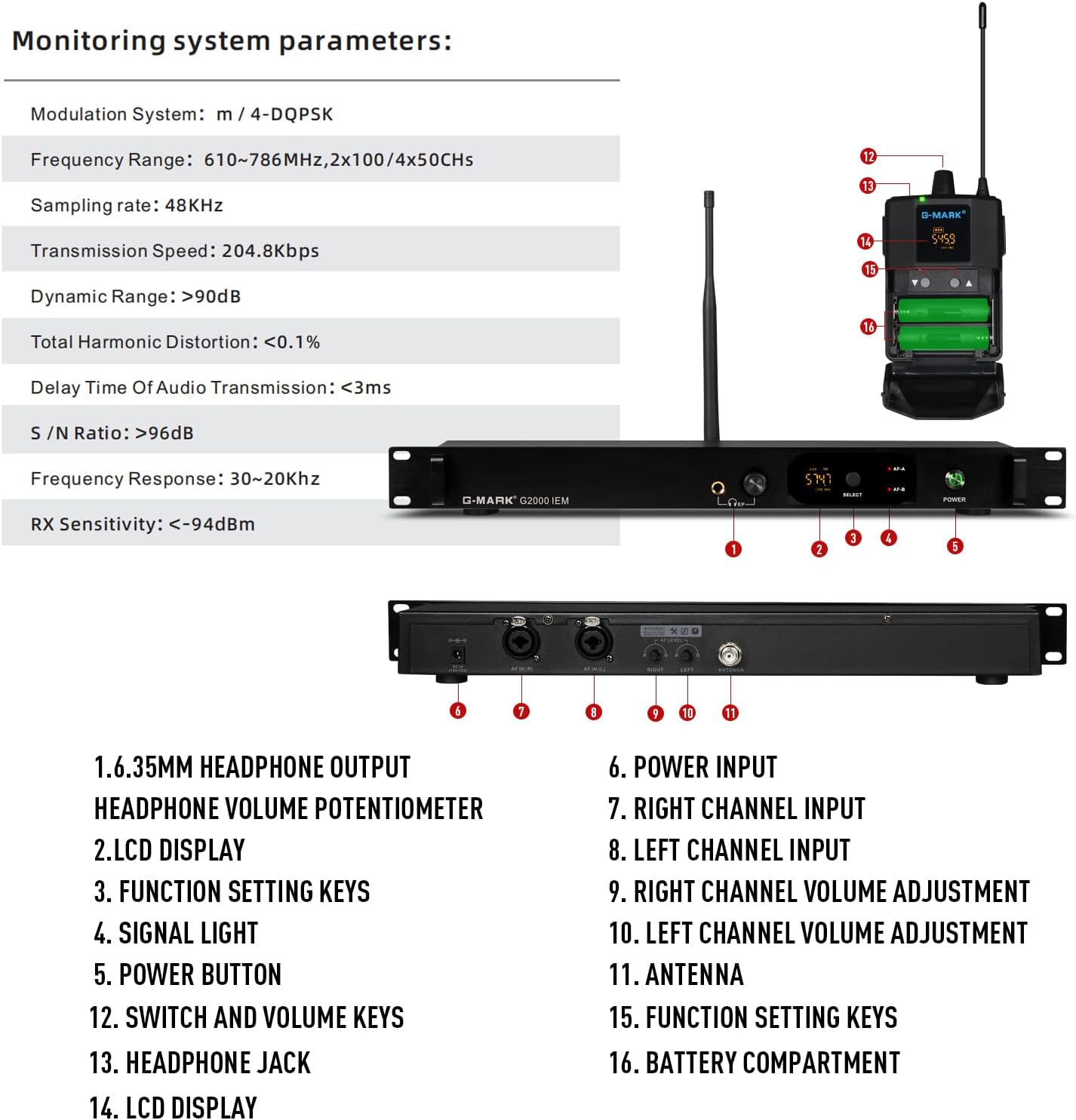
Monitoring System Parameters

Rajah 7: Detailed diagram of the G-MARK G2000 IEM system, highlighting key components and their functions, alongside technical specifications.
| Sistem Modulasi | m / 4-DQPSK |
| Julat Kekerapan | 610-786MHz, 2x100/4x50Chs |
| SampKadar ling | 48KHz |
| Kelajuan Penghantaran | 204.8kbps |
| Julat Dinamik | >90dB |
| Herotan Harmonik Keseluruhan | <0.1% |
| Delay Time Of Audio Transmission | <3ms |
| Nisbah S/N | >96dB |
| Respons Kekerapan | 30~20KHz |
| Sensitiviti RX | <-94dBm |
Waranti dan Sokongan
For warranty information, technical support, or service inquiries, please contact G-MARK customer support directly. Refer to the product packaging or the official G-MARK webtapak untuk butiran hubungan terkini.
You can also visit the official G-MARK store on Amazon for additional product information and support: G-MARK Store