
1. Pengenalan
This manual provides essential information for the installation, operation, and maintenance of your ANTEC GSK750 ATX3.1 80PLUS GOLD Power Supply Unit (PSU). Please read this manual thoroughly before installing and using the product to ensure proper function and safety. The ANTEC GSK750 is a high-efficiency, durable power supply designed for modern PC systems.
2. Ciri-ciri
- 80PLUS GOLD certification for high efficiency.
- Full modular design for improved cable management.
- Compact design with a depth of 140 mm.
- Active PFC and universal AC input support.
3. Persediaan dan Pemasangan
3.1. Kandungan Pakej
Sahkan bahawa semua komponen terdapat dalam pakej:
- ANTEC GSK750 ATX3.1 80PLUS GOLD PSU
- Set kabel modular
- Kord kuasa AC
- Memasang skru
- Manual pengguna (dokumen ini)
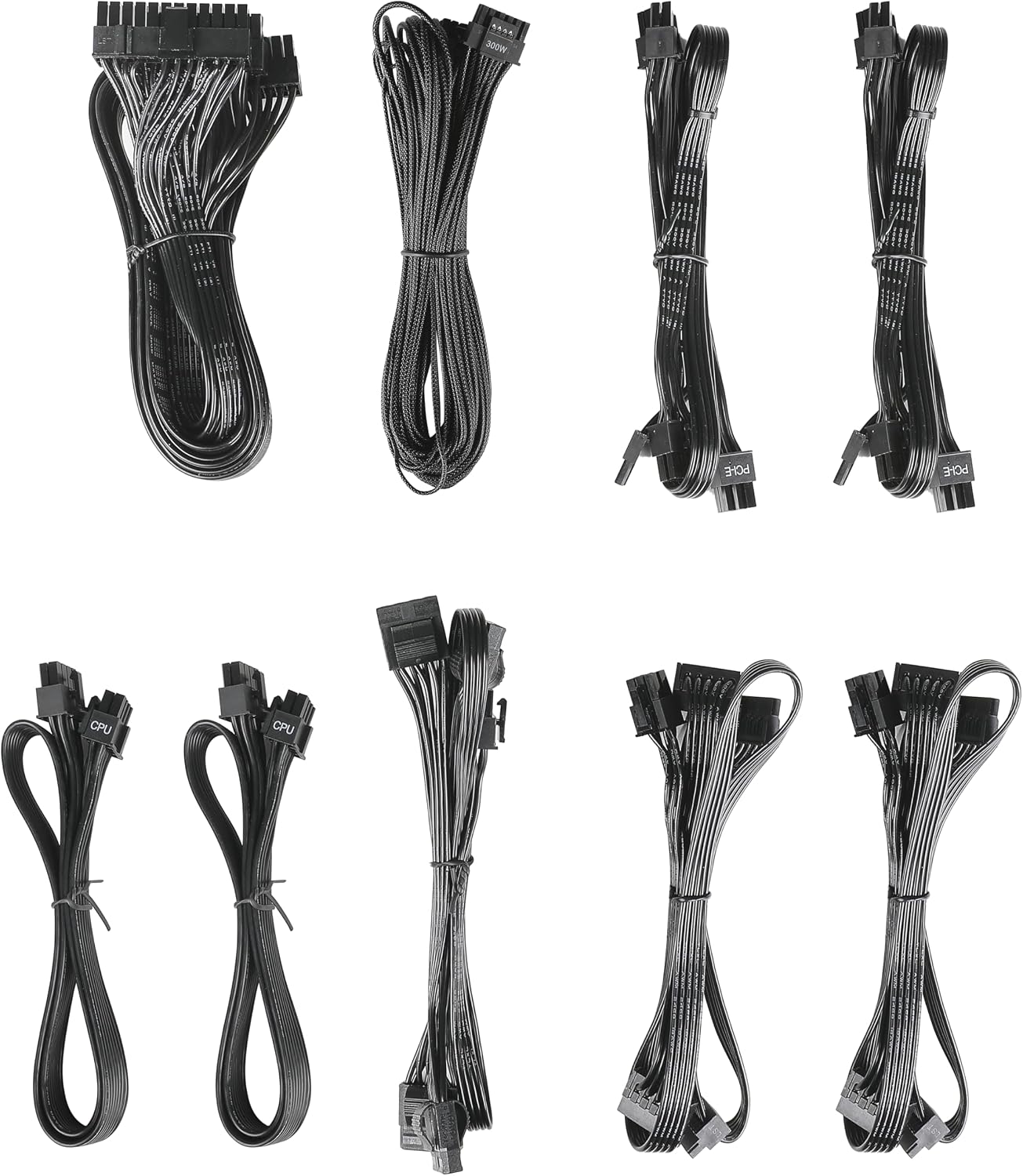
Image: The modular cable set included with the ANTEC GSK750 power supply unit. This includes various cables for motherboard, CPU, PCIe, SATA, and Molex connections.
3.2. Pemasangan Fizikal
- Pastikan komputer anda dimatikan dan dicabut daripada soket dinding.
- Mount the PSU into the designated PSU bay in your computer case using the provided screws. Ensure the fan is oriented correctly for optimal airflow (typically facing downwards if there's a bottom vent, or upwards if not).

Imej: Atas ke bawah view of the ANTEC GSK750 power supply unit, showing the fan grille and overall compact form factor.
3.3. Sambungan Kabel
Connect the necessary modular cables to the PSU and your system components. The full modular design allows you to connect only the cables you need, reducing clutter.
- 24-Pin Main Power: Connect to your motherboard.
- 8-Pin (4+4) CPU Power: Connect to your motherboard's CPU power connector.
- PCI-E (6+2 Pin): Sambungkan ke kad grafik anda.
- Kuasa SATA: Connect to SSDs, HDDs, and optical drives.
- Molex Power: Sambungkan ke peranti persisian atau kipas bekas yang lama.

Image: The modular connector panel on the side of the ANTEC GSK750 power supply, clearly labeled for PCI-E, CPU, SATA/Molex, and M/B (motherboard) connections.
3.4. Hidupkan Kuasa Awal
After all connections are secure, plug the AC power cord into the PSU and then into a wall outlet. Flip the main power switch on the back of the PSU to the 'ON' position. You can then power on your computer.
4. Arahan Operasi
4.1. Hybrid Mode
The ANTEC GSK750 features a Hybrid Mode switch located on the rear of the unit. When Hybrid Mode is enabled, the PSU fan will remain off under low load conditions, providing silent operation. The fan will automatically activate when the load increases to maintain optimal temperatures. When Hybrid Mode is disabled, the fan will operate continuously.

Image: The rear panel of the ANTEC GSK750 power supply, featuring the main power switch, AC input, and the 'Hybrid Mode' toggle switch.
5. Penyelenggaraan
To ensure the longevity and optimal performance of your PSU, follow these maintenance guidelines:
- Pembersihan: Periodically clean the exterior of the PSU and the fan grille to prevent dust buildup. Use compressed air to gently clear dust from the fan and internal components. Ensure the PSU is unplugged before cleaning.
- Aliran udara: Ensure that the PSU has adequate airflow within your computer case. Avoid blocking the intake or exhaust vents.
6. Penyelesaian masalah
If you encounter issues with your ANTEC GSK750 PSU, consider the following:
- Tiada Kuasa: Check all cable connections, especially the 24-pin motherboard connector and the CPU power connector. Ensure the AC power cord is securely plugged into both the PSU and the wall outlet. Verify the main power switch on the PSU is in the 'ON' position.
- Ketidakstabilan/Ranap Sistem: Pastikan wat PSU andatage is sufficient for all your components. Overloading the PSU can lead to instability. Check for loose connections.
- Bunyi Kipas: If the fan is excessively noisy and Hybrid Mode is off, ensure there is no obstruction. If Hybrid Mode is on, the fan will spin up under load, which is normal.
If problems persist, consult the ANTEC support webtapak atau hubungi perkhidmatan pelanggan.
7. Spesifikasi
Detailed specifications for the ANTEC GSK750 ATX3.1 80PLUS GOLD PSU:

Image: The specification label of the ANTEC GSK750 power supply, detailing output voltages, currents, and total wattage.
| Spesifikasi | Nilai |
|---|---|
| Jenama | ANTEC |
| Nombor Model | GSK750 ATX3.1 |
| Output Wattage | 750 W |
| Faktor Bentuk | ATX |
| Pensijilan Kecekapan | EMAS 80PLUS |
| Dimensi Produk (LxWxH) | 14 x 15 x 8.6 cm |
| Berat Produk | 2.5 kg |
| Input Minimum Voltage | 100 Volt (AC) |
| System Bus Connector Type | 24 Pin |
| Bilangan Peminat | 2 |
| UPC | 761345200547 |
| Negara Asal | China |
8. Waranti dan Sokongan
8.1. Maklumat Waranti
The ANTEC GSK750 ATX3.1 80PLUS GOLD Power Supply Unit comes with a Waranti 7 tahun dari tarikh pembelian. Waranti ini melindungi kecacatan pada bahan dan mutu kerja di bawah penggunaan biasa. Sila simpan bukti pembelian anda untuk tuntutan waranti.
8.2. Sokongan Pelanggan
For technical assistance, troubleshooting, or warranty inquiries, please visit the official ANTEC website or contact their customer support department. Contact information can typically be found on the ANTEC webtapak atau pembungkusan produk.