
pengenalan
This manual provides instructions for the ZPSHYD Handheld Vacuum, Model JJ-107. This versatile 3-in-1 device functions as a vacuum cleaner, an air duster, and an inflator/vacuum sealer. Please read this manual thoroughly before operating the device to ensure safe and efficient use.
Arahan Keselamatan
- Baca semua arahan sebelum menggunakan perkakas.
- Do not immerse the device, charging cable, or plug in water or other liquids.
- Jangan vakum cecair mudah terbakar atau mudah terbakar, abu panas atau objek tajam.
- Jauhkan peranti daripada capaian kanak-kanak.
- Gunakan hanya kabel pengecasan yang disediakan oleh pengilang.
- Do not operate the device if the charging cable or plug is damaged.
- Ensure the HEPA filter is properly installed before each use to prevent damage to the motor.
- Avoid blocking the air inlet or outlet during operation.
- Simpan peranti di tempat yang kering apabila tidak digunakan.
Produk Selesaiview
Familiarize yourself with the components of your ZPSHYD Handheld Vacuum.
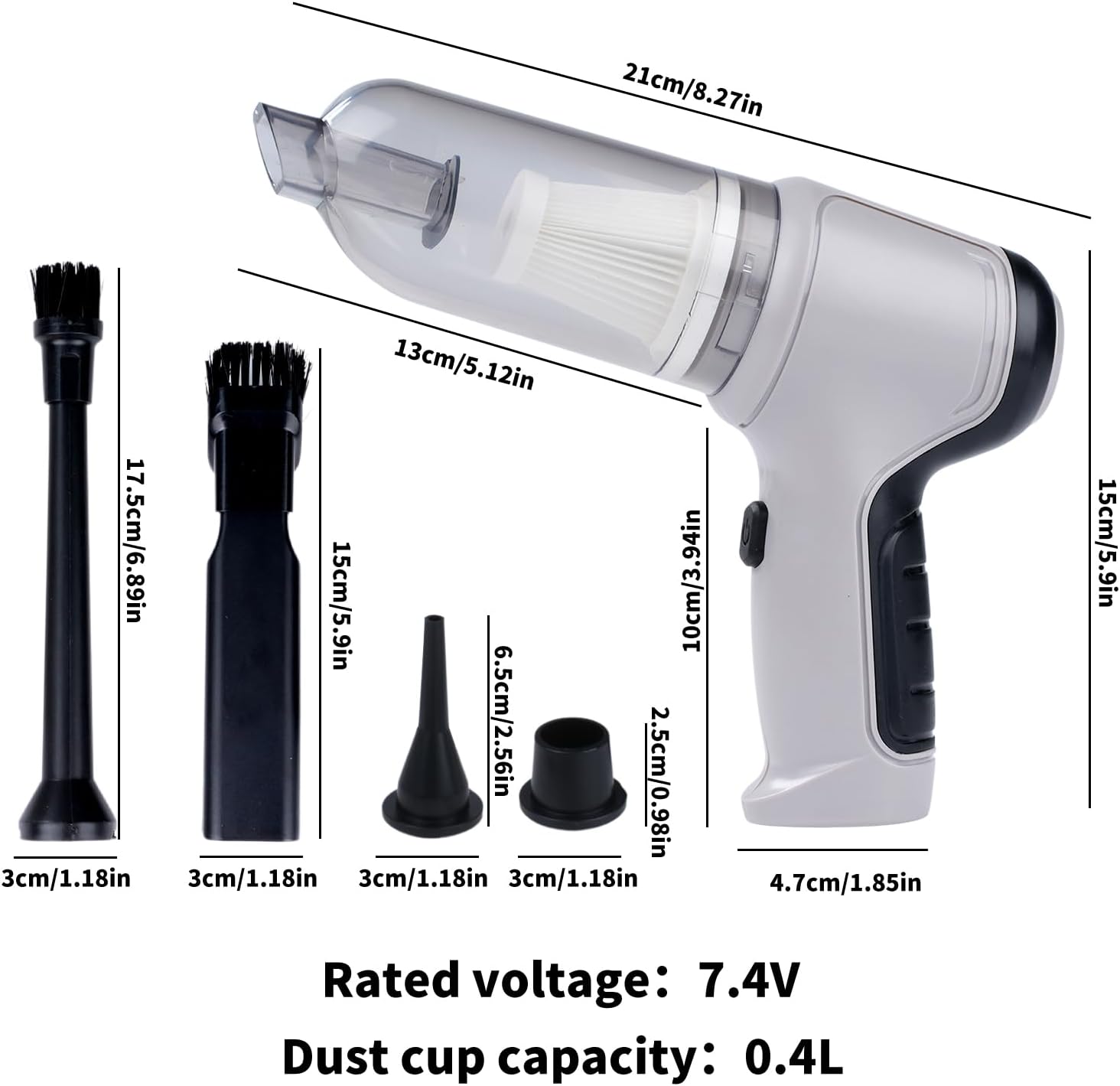
Rajah 1: Main components of the ZPSHYD Handheld Vacuum.

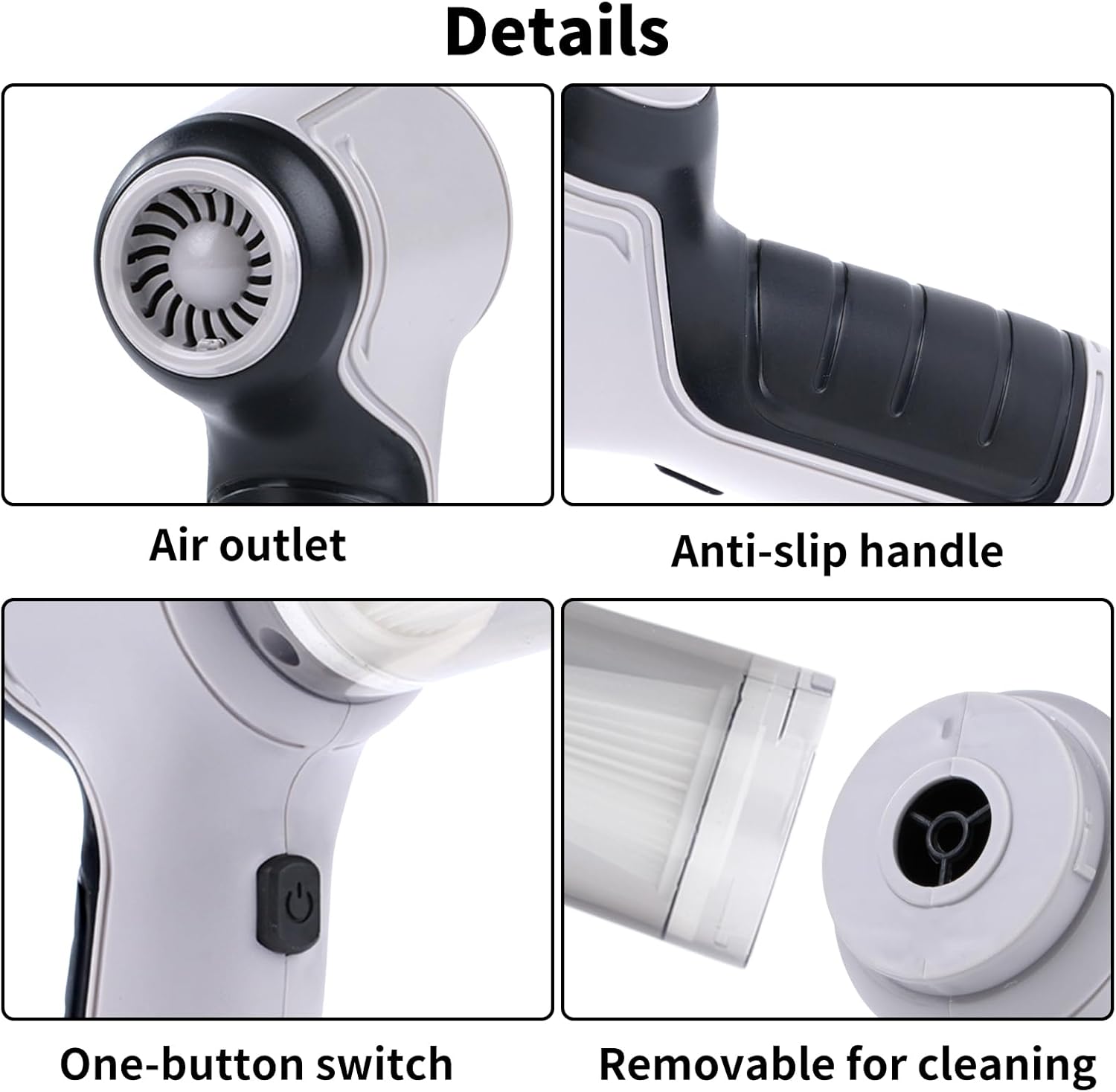
Rajah 2: Terperinci view of key features including air outlet, handle, switch, and removable dustbin.
Komponen yang Disertakan:
- 1 x Handheld Vacuum Cleaner Unit
- 1 x Dust Collector Cover
- 1 x Penapis HEPA
- 2 x Inflation Nozzles (various sizes)
- 2 x Suction Nozzles (one with removable brush)
- 1 x Kabel Pengecas USB
Persediaan
1. Mengecas Peranti
Before first use, fully charge the vacuum cleaner. Connect the provided USB charging cable to the charging port on the device and plug the other end into a compatible USB power adapter (not included) or a USB port. The indicator light will show charging status (refer to device for specific light behavior, typically red for charging, green for full).
2. Memasang Aksesori
Depending on the desired function, select the appropriate nozzle and firmly attach it to the device's inlet (for vacuuming) or outlet (for blowing/inflating).
Arahan Operasi
1. Fungsi Penyedutan Habuk
- Ensure the dust collection bin and HEPA filter are securely in place.
- Attach the desired suction nozzle to the vacuum inlet. For car interiors or tight spaces, use the narrow nozzle. For surfaces requiring agitation, use the brush nozzle.
- Press the power button (one-button switch) to turn on the vacuum.
- Arahkan muncung ke arah kawasan yang hendak dibersihkan.
- After cleaning, press the power button again to turn off the device.

Rajah 3: Using the vacuum for car interior cleaning.
Rajah 4: Demonstrating strong suction power for various debris.
2. Air Duster Function
- Attach a suitable nozzle to the air outlet of the device.
- Press the power button to activate the blowing function.
- Use the directed airflow to remove dust from keyboards, electronics, or other delicate surfaces.
- Tekan butang kuasa untuk mematikan.

Rajah 5: Using the air duster for keyboard cleaning.
3. Inflator Function
- Select the appropriate inflation nozzle and attach it firmly to the air outlet.
- Insert the nozzle into the inflation valve of the item (e.g., swimming ring, small inflatable).
- Tekan butang kuasa untuk memulakan inflasi.
- Monitor the inflation and turn off the device once the item is adequately inflated.

Rajah 6: Inflating a swimming ring with the device.
4. Vacuum Sealer Function
- Attach the vacuum sealing nozzle to the air outlet.
- Place the nozzle over the air valve of a compatible vacuum storage bag.
- Press the power button to start extracting air from the bag.
- Turn off the device once the desired vacuum level is achieved.

Rajah 7: Using the device for vacuum sealing.
Penyelenggaraan
1. Emptying the Dust Collection Bin
The transparent dust collection bin allows for easy monitoring of its fill level. When full, detach the bin from the main unit and empty its contents into a waste receptacle. Reattach the bin securely.
2. Membersihkan Penapis HEPA
The HEPA filter should be cleaned regularly to maintain optimal suction power. Remove the filter from the dust collection bin. Tap it gently to dislodge dust or rinse it under running water. Ensure the filter is completely dry before reinserting it into the device. Do not use the vacuum without a dry filter.
3. Pembersihan Am
Lap bahagian luar pembersih vakum dengan lembut, damp cloth. Do not use harsh chemicals or abrasive cleaners. Ensure the device is turned off and unplugged before cleaning.
Menyelesaikan masalah
| Masalah | Kemungkinan Punca | Penyelesaian |
|---|---|---|
| Peranti tidak dihidupkan | Bateri habis | Cas peranti sepenuhnya. |
| Butang kuasa tidak ditekan dengan betul | Ensure a firm press on the power button. | |
| Kuasa sedutan yang lemah | Dust collection bin is full | Empty the dust collection bin. |
| HEPA filter is clogged | Bersihkan atau gantikan penapis HEPA. | |
| Nozzle attachment is loose or blocked | Check and secure the nozzle; clear any blockages. | |
| Peranti tidak dicas | USB cable or power adapter faulty | Cuba kabel USB atau penyesuai kuasa yang lain. |
| Port pengecasan kotor atau rosak | Clean the charging port carefully or contact support. |
Spesifikasi
Rajah 8: Dimensi produk dan spesifikasi utama.
- Jenama: ZPSHYD
- Nombor Model: JJ-107
- Sumber Kuasa: Dikuasakan Bateri (Lithium-Ion)
- Voltage: 5 Volts (Rated voltage: 7.4V from image)
- Wattage: 50 watt
- Kuasa sedutan: 6000 Pa
- Jenis Penapis: Penapis HEPA
- Kapasiti Cawan Habuk: 0.4 Liter
- Berat Barang: 1.1 paun
- Dimensi Item (L x W x H): 8.6" x 6.3" x 2.6" (21cm x 16cm x 6.6cm)
- Teknologi Ketersambungan: USB
- Ciri Khas: Cordless, 3-in-1 (Vacuum, Blower, Inflator/Vacuum Sealer)
- Penggunaan yang Disyorkan: Car, Home
Waranti dan Sokongan
For warranty information, product registration, or customer support, please refer to the documentation included with your purchase or contact ZPSHYD customer service directly through their official website or the retailer where the product was purchased. Please have your model number (JJ-107) and purchase date available when contacting support.