
Hiicam Speed 60
Manual Pengguna Kamera Tindakan Hiicam Speed 60
Model: Speed 60 | Brand: Hiicam
pengenalan
The Hiicam Speed 60 is a high-performance action camera designed to capture your adventures in stunning 4K resolution. Featuring a 48MP photo sensor, dual screens including a 2.35-inch HDR touch screen, advanced EIS 2.0 stabilization, and built-in 5G Wi-Fi, this camera is built for dynamic environments. It is natively waterproof up to 10 meters (33 feet) and can be used with an external waterproof housing for depths up to 40 meters (131 feet).

Figure 1: Hiicam Speed 60 Action Camera and included batteries.
Apa yang ada dalam Kotak
Sahkan bahawa semua item terdapat dalam pakej anda:
- 1 x Hiicam Speed 60 Action Camera
- 2 x 2150 mAh Batteries
- 1 x Pengecas Bateri
- 1 x Kabel USB
- 1 x Sarung Kalis Air
- 1 x Wireless Mic & Remote
- Various Mounts and Accessories (Buckle Mount, AE Mount, C Mount, D Mount, F Mount, H Mount, Helmet Mount)
- Double-Sided Adhesive Pads
- Tali Kawat
- pembalut
- 1 x Manual Pengguna
- 1 x Kain Lensa
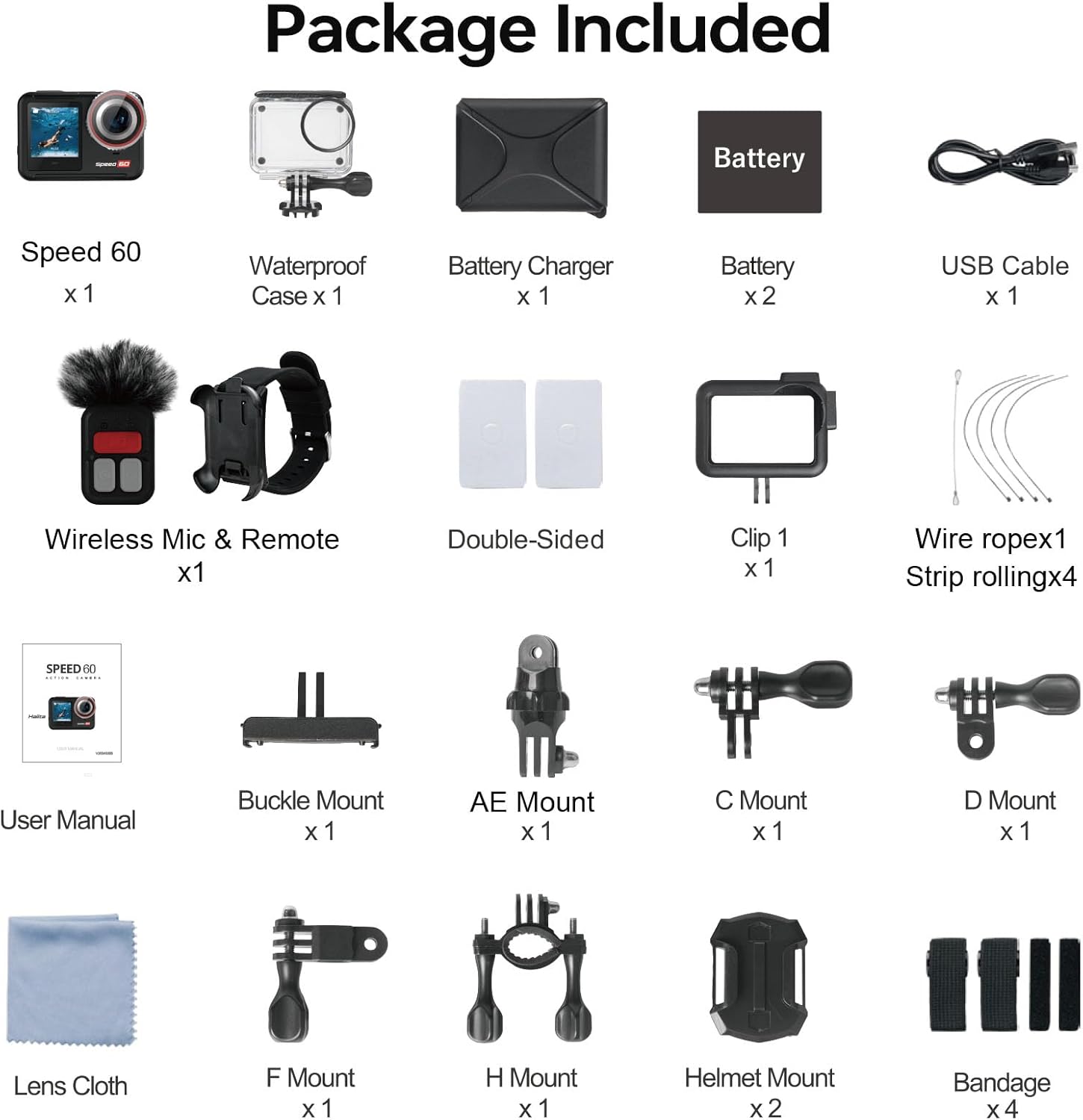
Figure 2: Complete package contents of the Hiicam Speed 60.
Persediaan
1. Pemasangan dan Pengecasan Bateri
The Speed 60 comes with two 2150 mAh lithium-ion batteries. For optimal performance, fully charge both batteries before first use.
- Buka penutup petak bateri pada kamera.
- Insert a charged battery, ensuring the contacts align correctly.
- Tutup penutup petak bateri dengan selamat.
- To charge batteries, use the included battery charger and USB-C cable. The charger supports sequential charging of both batteries.

Figure 3: Battery charging and capacity.
2. Memasukkan Kad Memori
The camera supports SD flash memory cards. A high-speed (U3 or V30 recommended) microSD card is required for 4K video recording.
- Locate the microSD card slot on the side of the camera.
- Insert the microSD card with the contacts facing the front of the camera until it clicks into place.
- Untuk mengalih keluar, tolak kad perlahan-lahan sehingga ia keluar.
Arahan Operasi
Kawalan Asas
- Butang Kuasa: Press and hold to turn the camera on/off. Short press to switch modes (Video, Photo, Playback).
- Butang Pengatup: Tekan untuk mula/hentikan rakaman video atau ambil foto.
- Skrin Sentuh: Navigate menus and settings by swiping and tapping on the 2.35-inch rear touch screen.

Figure 4: Touch screen operation for intuitive control.
Video Recording (4K60FPS, EIS 2.0, HDR)
The Speed 60 captures video at up to 4K resolution at 60 frames per second (FPS). Ensure EIS 2.0 (Electronic Image Stabilization) is enabled for smooth footage, especially during dynamic activities.
- Navigate to Video mode using the Power button or touch screen.
- Access video settings to select resolution (e.g., 4K/60FPS), enable EIS 2.0, and activate HDR for improved dynamic range.
- Press the Shutter button to start recording. Press again to stop.

Figure 5: EIS 2.0 for stable video recording.

Figure 6: HDR function for vivid and detailed images.
Photo Capture (48MP)
Capture high-resolution still images up to 48 megapixels.
- Tukar kepada mod Foto.
- Adjust photo settings as needed (e.g., resolution, wide-angle).
- Tekan butang Pengatup untuk mengambil foto.

Figure 7: High-resolution video and photo capabilities.
Penggunaan Kalis Air
The Speed 60 is natively waterproof to 10 meters (33 feet) without an additional case. For deeper dives up to 40 meters (131 feet), use the included waterproof housing.
- Before using underwater, ensure all port covers are securely closed.
- When using the waterproof housing, ensure the seal is clean and free of debris, and the latch is fully secured.

Figure 8: Waterproof camera for underwater adventures.
Wi-Fi Connectivity and App
Connect your Speed 60 to your smartphone via built-in 5G Wi-Fi for easy file pemindahan dan alat kawalan jauh.
- Download the official Hiicam app from your device's app store.
- On the camera, enable Wi-Fi from the settings menu.
- On your smartphone, connect to the camera's Wi-Fi network.
- Open the Hiicam app to view hidup footage, control recording, and download photos/videos.

Figure 9: Seamless sharing via 5G Wi-Fi.
Zum Digital
The camera features a 5X digital zoom to get closer to your subject.
- While in video or photo mode, use the zoom controls on the touch screen to adjust the magnification.

Figure 10: 5X Digital Zoom capability.
Alat Kawalan Jauh
Use the included wireless remote control for convenient operation from a distance.
- Ensure the remote control is paired with the camera (refer to the full user manual for pairing instructions).
- Gunakan alat kawalan jauh untuk mula/hentikan rakaman atau ambil foto tanpa menyentuh kamera.
Penyelenggaraan
Membersihkan Kamera dan Lensa
- Use the provided lens cloth to gently clean the camera lens and screens.
- Untuk calitan degil, sedikit dampen kain dengan air. Elakkan bahan kimia yang keras.
- The camera features a removable anti-fog lens protector for easy cleaning and replacement.

Figure 11: Removable lens protector and other features for maintenance.
Penjagaan Bateri
- Simpan bateri di tempat yang sejuk dan kering apabila tidak digunakan.
- Elakkan menyahcas sepenuhnya bateri dengan kerap untuk memanjangkan jangka hayatnya.
- Use only the original Hiicam charger and batteries.
Waterproof Seal Care
- After each use in water, rinse the camera (if bare) or waterproof housing with fresh water.
- Allow to air dry completely before opening any compartments.
- Regularly inspect the rubber seals for any dirt, sand, or damage. Clean them gently if necessary.
Menyelesaikan masalah
Kamera Tidak Dihidupkan
- Pastikan bateri dicas sepenuhnya dan dimasukkan dengan betul.
- Try a different charged battery if available.
- Tekan dan tahan butang kuasa selama sekurang-kurangnya 5 saat.
Kualiti Video/Foto yang Buruk
- Clean the camera lens and lens protector.
- Ensure sufficient lighting conditions.
- Check if EIS 2.0 is enabled for video stabilization.
- Verify that the correct resolution and frame rate settings are selected.
- Use a high-speed microSD card (U3 or V30).
Isu Sambungan Wi-Fi
- Ensure Wi-Fi is enabled on the camera.
- Mulakan semula kamera dan telefon pintar anda.
- Make sure you are within range of the camera's Wi-Fi signal.
- Try forgetting the network on your phone and reconnecting.
Spesifikasi
| Ciri | Perincian |
|---|---|
| Nombor Model | Kelajuan 60 |
| Resolusi Tangkapan Video | 4K (up to 60FPS) |
| Resolusi Foto | 48 MP |
| Penstabilan Imej | EIS 2.0 (Electronic Image Stabilization) |
| Waterproof Depth (Bare) | 10 meter (33 kaki) |
| Waterproof Depth (with Housing) | 40 meter (131 kaki) |
| Paparan | 2.35-inch HDR Touch Screen (rear), 1.4-inch Front Screen |
| Ketersambungan | Wi-Fi 5G |
| Kapasiti Bateri | 2 x 2150 mAh Lithium Ion |
| Zum Digital | 5X |
| Dimensi | 2.9 x 6.99 x 3.51 cm |
| Berat badan | 890 g |
| Jenis Memori Denyar | SD (MicroSD recommended) |
Waranti dan Sokongan
Hiicam provides a warranty for its products. To activate your extended warranty and access online service, please scan the QR code provided on the battery packaging or visit the official Hiicam support page.
For further assistance, troubleshooting, or to contact customer support, please refer to the full user manual or visit the Hiicam official webtapak.

Figure 12: Scan QR code on battery for extended warranty and service.
Relevant Link: Activate Extended Warranty / Online Service
Ask a question about this manual
Ask about setup, troubleshooting, compatibility, parts, safety, or missing instructions. Manuals+ will review the question and use this page’s manual context to help answer it.