
pengenalan
This manual provides comprehensive instructions for the setup, operation, and maintenance of your T3 Wireless Charging Keyboard and Mouse Set. This high-quality unit offers a seamless wireless experience for various computing needs, featuring an ergonomic design and backlighting system.
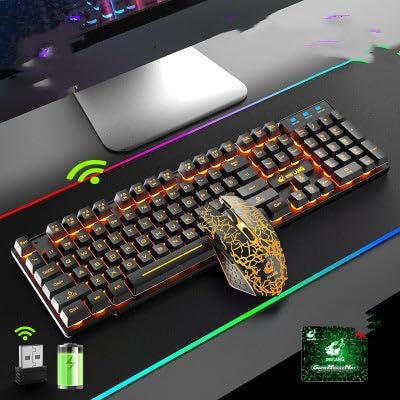
This image displays the T3 Wireless Charging Keyboard and Mouse Set. The keyboard features orange backlighting on its keys, and the mouse has a distinctive black and orange pattern. Below the keyboard, icons indicate wireless connectivity via a USB receiver and a rechargeable battery.
Persediaan
1. Unboxing dan Komponen
Keluarkan semua komponen dari pembungkusan dengan berhati-hati. Pastikan anda mempunyai item berikut:
- Papan Kekunci Wayarles T3
- Tetikus Tanpa Wayar T3
- Penerima Wayarles USB
- Kabel Pengecas USB (untuk papan kekunci dan tetikus)
- Manual Pengguna (dokumen ini)
2. Pengecasan Awal
Before first use, it is recommended to fully charge both the keyboard and the mouse.
- Locate the charging port on the keyboard and mouse.
- Connect the provided USB charging cable to the charging port on each device.
- Pasangkan hujung kabel USB yang satu lagi ke dalam port USB berkuasa (cth., komputer, penyesuai dinding USB).
- The charging indicator light will illuminate during charging and typically turn off or change color when fully charged.
Biarkan kira-kira 2-3 jam untuk cas penuh.
3. Menyambungkan Penerima Tanpa Wayar
The T3 set uses a single USB receiver for both the keyboard and mouse.
- Turn on the keyboard and mouse using their respective power switches (usually located on the underside of the devices).
- Masukkan penerima wayarles USB ke dalam port USB yang tersedia pada komputer anda.
- Your operating system should automatically detect and install the necessary drivers. This is a plug-and-play device, requiring no manual driver installation.
- Sebaik sahaja pemacu dipasang, papan kekunci dan tetikus sepatutnya sedia untuk digunakan.
Arahan Operasi
Fungsi Papan Kekunci
- Pencahayaan latar: The keyboard features a backlighting system. Use the dedicated backlight key (often indicated by a sun or light bulb icon) to cycle through different lighting modes or to turn the backlighting on/off.
- Kekunci Fungsi Multimedia: The keyboard includes multimedia function keys (F1-F12, often combined with the 'Fn' key). These keys allow quick access to functions like volume control, media playback, and web browsing. Refer to the keycap legends for specific functions.
- Reka bentuk ergonomik: The keyboard is designed for ergonomic comfort during extended use.
Fungsi Tetikus
- Resolusi Optik: The mouse operates with an optical resolution of 1600dpi, providing precise tracking.
- Butang: Standard left-click, right-click, and scroll wheel functions are available. Additional side buttons may be present for forward/back navigation or other customizable functions depending on your operating system settings.
- Penjimatan Kuasa: The mouse may enter a sleep mode after a period of inactivity to conserve battery. Move the mouse or click a button to wake it up.
Penyelenggaraan
Pembersihan
- Turn off both the keyboard and mouse before cleaning.
- Gunakan kain lembut dan tidak berbulu sedikit dampdisapu dengan air atau larutan pembersih yang lembut dan tidak melelas.
- Elakkan menyembur cecair terus ke atas peranti.
- For keyboard keys, use compressed air to remove dust and debris from between the keys.
Penjagaan Bateri
- Recharge the devices when the battery indicator is low or when performance degrades.
- Elakkan daripada kerap kehabisan bateri sepenuhnya, kerana ini boleh mengurangkan jangka hayatnya.
- If storing the devices for an extended period, charge them to about 50% before storage and recharge every few months.
- Jangan dedahkan peranti kepada suhu yang melampau.
Menyelesaikan masalah
| Masalah | Kemungkinan Punca | Penyelesaian |
|---|---|---|
| Papan kekunci/Tetikus tidak bertindak balas | Low battery; Receiver not connected; Device turned off; Interference. | Charge devices; Ensure USB receiver is firmly plugged in; Turn on devices; Move receiver closer or away from other wireless devices. |
| Sambungan ketinggalan atau terputus-putus | Distance from receiver; Interference; Low battery. | Reduce distance to receiver; Remove sources of interference (e.g., other wireless devices, large metal objects); Recharge devices. |
| Lampu latar tidak berfungsi | Lampu latar dimatikan; Bateri lemah. | Press the backlight key to cycle modes; Recharge keyboard. |
| Mouse cursor erratic | Dirty optical sensor; Uneven surface. | Clean the optical sensor on the mouse's underside; Use on a clean, flat, opaque surface. |
Spesifikasi
- model: T3
- Ketersambungan: Wayarles (Penerima USB)
- Mouse Optical Resolution: 1600dpi
- Ciri Khas: Wireless charging, Ergonomic design, Backlit keyboard, Multimedia function keys
- Peranti Serasi: Laptop, Office PC, Gaming PC, Home PC
- Berat Barang: Kira-kira 1.7 paun (untuk set)
- warna: Black Orange (as per this variant)
Waranti dan Sokongan
This product comes with a standard manufacturer's warranty. For specific warranty terms, conditions, and duration, please refer to the documentation provided at the time of purchase or contact your retailer.
For technical support or inquiries, please contact the product manufacturer or your point of purchase. Keep your purchase receipt as proof of purchase for warranty claims.