
pengenalan
This manual provides essential instructions for the setup, operation, and maintenance of your SLuB ZW60 Smartwatch. Please read this guide thoroughly before using your device to ensure proper function and longevity. The SLuB ZW60 features a 1.43-inch touchscreen, Bluetooth 5.3 connectivity, music player capabilities, various sports modes, IP67 dust and water resistance, and comprehensive health monitoring functions.
Nota Penting: The health management functions of this smartwatch are for reference only and cannot be used for medical purposes. This product is not a medical device.
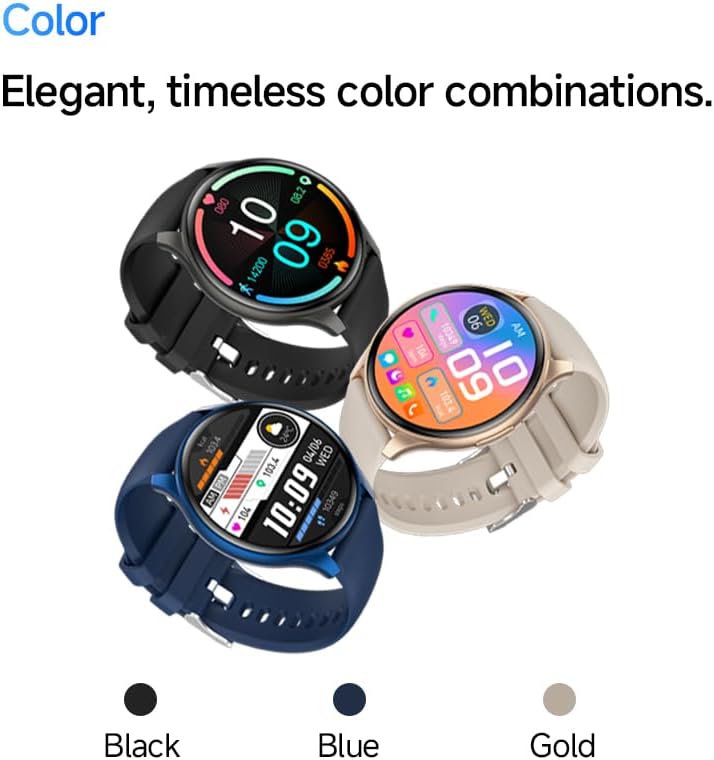
Image: The SLuB ZW60 Smartwatch in various color options (Black, Blue, Gold), highlighting its round display and overall design.
Apa yang ada dalam Kotak
Setelah membuka bungkusan, pastikan semua item berikut ada:
- SLuB ZW60 Smartwatch
- Kabel Pengecasan Magnetik
- Manual Pengguna (dokumen ini)

Image: Contents of the SLuB ZW60 Smartwatch package, showing the smartwatch, its magnetic charging cable, and the printed user manual.
Persediaan
1. Mengecas Jam Pintar
Before initial use, fully charge your SLuB ZW60 Smartwatch. Connect the magnetic charging cable to the charging contacts on the back of the watch and plug the USB end into a standard USB power adapter (not included) or a computer's USB port. The watch display will indicate charging status. A full charge typically takes approximately 2 hours.
2. App Installation: H Band
To unlock the full functionality of your smartwatch, download and install the dedicated "H Band" application on your smartphone. Cari untuk "H Band" in your device's app store (Google Play Store for Android or Apple App Store for iOS).

Image: The smartwatch screen showing a grid of colorful application icons, illustrating the "H Band" app integration and multi-menu screen options.
3. Berpasangan Bluetooth
- Pastikan jam tangan pintar anda dicas dan dihidupkan.
- Dayakan Bluetooth pada telefon pintar anda.
- Open the "H Band" app.
- Follow the in-app instructions to search for and connect to your SLuB ZW60 Smartwatch. The app will guide you through the pairing process.
- Sahkan permintaan pasangan pada telefon pintar dan jam tangan pintar anda jika digesa.
Once paired, the smartwatch will synchronize data with the app and enable features like call notifications and message alerts.
Arahan Operasi
Navigasi Asas
- Skrin sentuh: Swipe left, right, up, or down to navigate through menus and screens. Tap to select an item.
- Butang Sisi: Typically used to wake the screen, return to the home screen, or access the app menu. Refer to the on-screen prompts for specific functions.
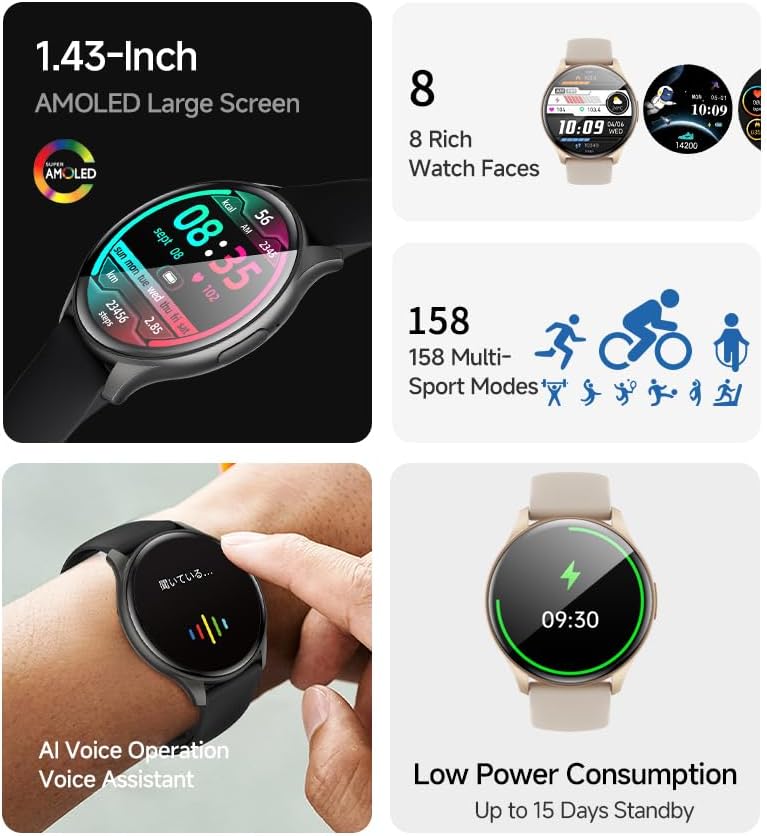
Imej: Rancangan jam tangan pintarcasing its 1.43-inch AMOLED display with a customizable watch face, and visual cues for its 158 multi-sport modes, AI voice operation, and low power consumption.
Fungsi Memanggil
With the smartwatch connected to your smartphone via Bluetooth, you can make and receive calls directly from your wrist. The built-in speaker and microphone allow for hands-free communication.
- Membuat Panggilan: Access the dial pad or contacts list on your smartwatch to initiate a call.
- Menerima Panggilan: When a call comes in, the smartwatch will display the caller ID. Tap the green icon to answer or the red icon to reject.
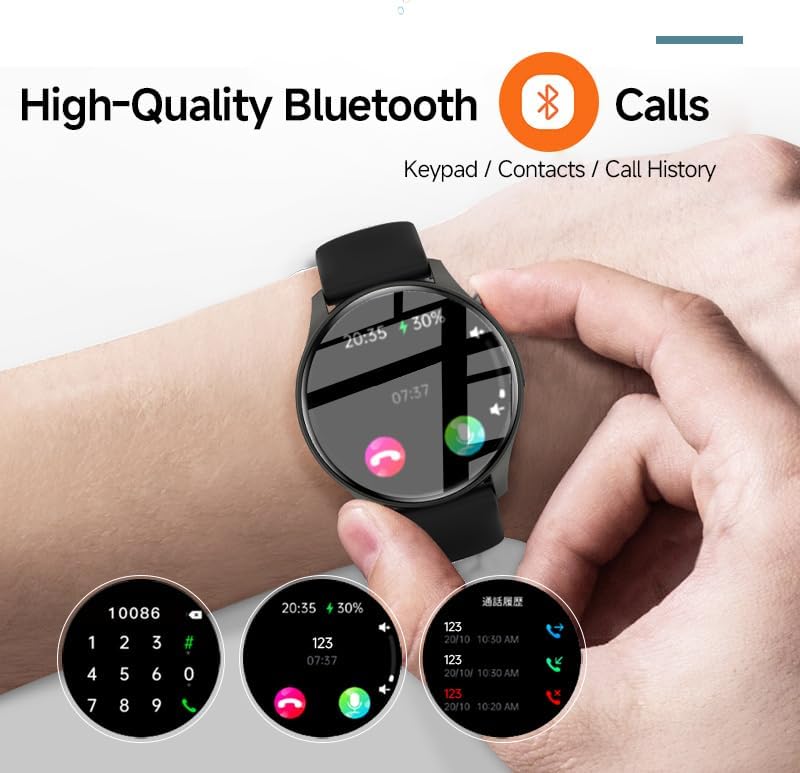
Image: The smartwatch screen showing the Bluetooth calling feature, including a numeric keypad for dialing, recent call history, and contact access.
Pemberitahuan Mesej
Once paired with your smartphone, the smartwatch can display notifications from various apps, including emails, social media, and messaging services. This allows you to stay informed without needing to check your phone constantly.
- Ensure app notifications are enabled in your smartphone's settings and within the "H Band" app.
- Leret ke bawah pada muka jam ke view pemberitahuan terkini.

Image: The smartwatch showing a message notification, indicating its ability to sync alerts from popular communication applications like WeChat, LINE, and others.
Health Management Functions
The SLuB ZW60 Smartwatch is equipped with multiple sensors to monitor various health metrics. Access these features through the watch menu or the "H Band" app.
- Pemantauan Denyut Jantung: Continuously or periodically measures your heart rate.
- Pemantauan Tidur: Tracks your sleep patterns, including deep sleep, light sleep, and wake times.
- Penggunaan Kalori: Estimates calories burned based on activity levels.
- Data Latihan: Records steps, distance, and other activity metrics.
Disclaimer: The data provided by these functions is for general wellness and fitness purposes only and should not be used for medical diagnosis or treatment.

Image: The smartwatch illustrating its 24-hour health management capabilities, including heart rate, body temperature, and sleep quality monitoring.
Mod Sukan
The smartwatch supports over 150 sports modes, allowing you to accurately track your workouts. Common modes include running, cycling, badminton, basketball, and football.
- Select your desired sport from the watch's sports menu.
- The watch will record duration, calories burned, and other relevant metrics for your activity.
- Review detailed statistics in the "H Band" app after your workout.
Kawalan Pemain Muzik
Control music playback on your connected smartphone directly from your smartwatch. You can play, pause, skip tracks, and adjust volume.
Pembantu Suara AI
Utilize the integrated AI Voice Assistant for quick commands and information retrieval. Activate the assistant via the watch interface and speak your commands.
Muka Jam yang boleh disesuaikan
Choose from a variety of pre-installed watch faces or customize your own through the "H Band" app to match your style and display preferred information.
Penyelenggaraan
Membersihkan Jam Pintar Anda
Pembersihan berkala membantu mengekalkan penampilan dan fungsi peranti anda.
- Lap skrin dan badan dengan kain lembut dan tidak berbulu.
- Untuk kotoran degil, sedikit dampen kain dengan air. Elakkan menggunakan bahan kimia yang keras atau bahan yang melelas.
- Pastikan sesentuh pengecasan bersih dan kering sebelum mengecas.
Rintangan Air (IP67)
The SLuB ZW60 Smartwatch is rated IP67, meaning it is dust-tight and can withstand immersion in water up to 1 meter (3.3 feet) for up to 30 minutes. This makes it suitable for daily use, such as washing hands or light rain exposure.
- JANGAN use the watch for swimming, diving, or showering with hot water.
- elakkan exposing the watch to high-pressure water or steam.
- Jika jam tangan basah, keringkan dengan teliti sebelum mengecas atau mengendalikannya.
Petua Hayat Bateri
- Kurangkan kecerahan skrin.
- Lumpuhkan pemberitahuan yang tidak perlu.
- Hadkan pemantauan kadar denyutan jantung berterusan jika tidak diperlukan.
- Ensure the "H Band" app is running efficiently in the background on your phone.
Menyelesaikan masalah
| Masalah | Penyelesaian yang Mungkin |
|---|---|
| Jam tangan tidak menyala. | Pastikan jam tangan dicas sepenuhnya. Sambungkannya ke pengecas selama sekurang-kurangnya 30 minit. |
| Tidak boleh berpasangan dengan telefon pintar. |
|
| Pemberitahuan tidak diterima. |
|
| Data kesihatan yang tidak tepat. |
|
| Skrin tidak bertindak balas. | Cuba mulakan semula jam tangan dengan menekan dan menahan butang sisi sehingga ia dimatikan, kemudian hidupkannya semula. |
Spesifikasi
| Ciri | Perincian |
|---|---|
| Nama Model | ZW60 |
| Jenama | SLuB |
| Saiz Skrin | 1.43 Inci |
| Jenis Paparan | AMOLED |
| Ketersambungan | Bluetooth 5.3 |
| Tahan Air | IP67 (Tahan Habuk dan Air) |
| Dimensi Produk | 1.77 x 0.43 x 1.97 inci |
| Berat Barang | 3.23 auns (91.5 Gram) |
| Hayat Bateri | Up to 15 Days Standby |
| Apl yang Serasi | H Band |
| Pengeluar | SLuB |
Waranti dan Sokongan
For warranty information and technical support, please refer to the documentation included with your purchase or contact SLuB customer service. Contact details can typically be found on the manufacturer's official website or within the "H Band" application.
Sumber Dalam Talian: For the latest updates, FAQs, and additional support, visit the official SLuB webtapak.