
pengenalan
This manual provides detailed instructions for the Cillso H97 Wireless Earbuds. Please read this manual carefully before using the product to ensure proper operation and to maximize your user experience. Keep this manual for future reference.

Image: The Cillso H97 Wireless Earbuds in their charging case, displaying the digital battery indicator.
Kandungan Pakej
- Cillso H97 Wireless Earbuds (Left and Right)
- Kes Pengecasan
- Kabel Pengecas USB-C
- Manual Pengguna
Persediaan
1. Mengecas Fon Telinga dan Sarung
Before first use, fully charge the earbuds and the charging case. Connect the provided USB-C cable to the charging port on the case and to a 5V/1A or 5V/2A power adapter. The digital display on the case will indicate the charging status.
- Masa Pengecasan: Kira-kira 1.5 jam untuk cas penuh.
- Hayat Bateri: Up to 8 hours of playback per charge, and up to 40 hours total with the charging case.
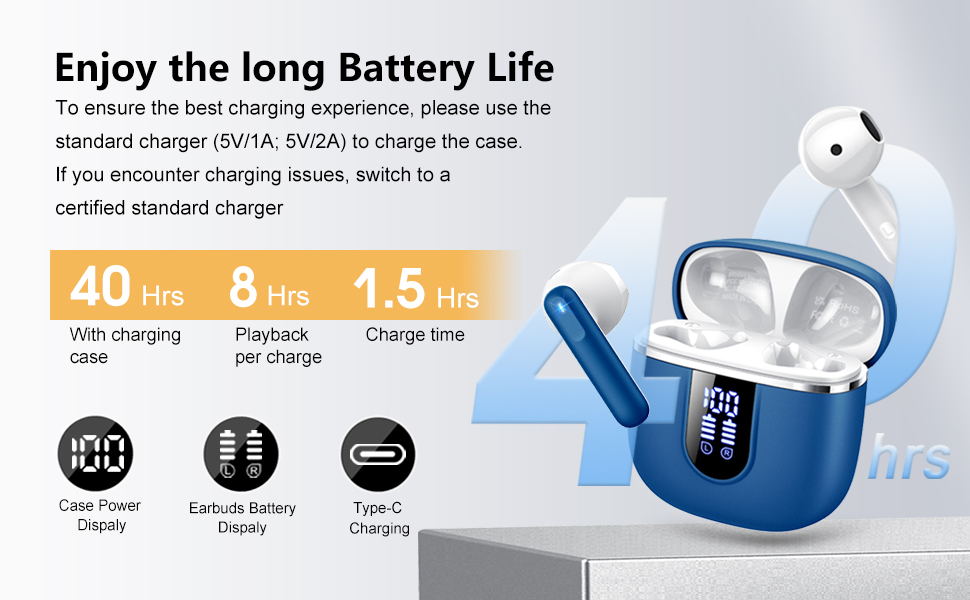
Image: Diagram illustrating the 40-hour total battery life, 8-hour single playback, and 1.5-hour charge time, along with the USB-C charging port and digital display.
The charging case is equipped with Over Current Protection (OCP) technology to prevent damage from prolonged high current. If the current exceeds the power limit, the power source will be cut off to protect the circuitry and device.

Image: Illustration explaining Over Current Protection (OCP) technology in the charging case.
2. Berpasangan dengan Peranti Bluetooth
- Buka bekas pengecas. Fon telinga akan memasuki mod berpasangan secara automatik.
- Pada peranti anda (telefon pintar, tablet, komputer riba), dayakan Bluetooth.
- Cari untuk "H97" in the list of available Bluetooth devices and select it to connect.
- Setelah disambungkan, anda akan mendengar pengesahan yang boleh didengar, dan fon telinga akan sedia untuk digunakan.
The H97 earbuds feature Bluetooth 5.4 for a more stable connection, longer transmission range, lower power consumption, and reduced latency.

Image: Visual representation of Bluetooth 5.4 technology, highlighting benefits like stable connection, longer range, lower power consumption, and lower latency.
3. Memakai Earbud
Gently insert the earbuds into your ears, ensuring a comfortable and secure fit. The rounded tips are designed for in-ear comfort. Adjust them until the sound quality is optimal and they feel stable.

Image: Diagram showing the recommended angle for inserting the earbud into the ear for a secure fit.
Arahan Operasi
Kawalan Sentuh
The H97 earbuds feature sensitive touch sensors for easy control of various functions:
| Tindakan | Fungsi |
|---|---|
| Double tap the left/right MFB button | Main/Jeda muzik |
| One tap the left/right MFB button | Jawab/Tamatkan panggilan |
| Long press the right/left MFB button for 2s | Trek Seterusnya/Sebelumnya |
| One tap the left/right MFB button (during call) | Volume Up/Down (specific mapping not detailed, typical for single tap) |
| Triple tap MFB button | Activate Voice Assistant (common function) |

Image: Visual guide to the smart touch controls on the earbuds for playback and call management.
Ciri Audio
The H97 earbuds deliver a high-quality audio experience:
- Bunyi Stereo Hi-Fi: Featuring 13mm diameter speakers with crystal clear treble, vibrant mid-range, and powerful bass.
- 3D Bass Stereo: Enhanced bass for an immersive listening experience.
- Panggilan Jelas: Equipped with 4 ENC (Environmental Noise Cancelling) microphones to filter out background noise and suppress wind noise, ensuring clear communication.

Image: Diagram illustrating the 13mm speaker driver and triple-layer composite diaphragm for enhanced bass and sound quality.

Image: Illustration detailing the 4-microphone design for crystal-clear calls, including feedback and talk mics, and anti-wind noise features.
Keserasian
The Cillso H97 Wireless Earbuds are compatible with a wide range of Bluetooth-enabled devices, including:
- Telefon Pintar (Android, iOS)
- Tablet
- Komputer riba
- Desktop Computers (with Bluetooth adapter)

Image: Icons representing compatibility with phones, tablets, laptops, and desktops, shown alongside the earbuds and a smartphone playing music.
Penyelenggaraan
Pembersihan dan Penjagaan
The H97 earbuds are IP7 waterproof, offering protection against water, sweat, and rain. However, proper care is still recommended:
- Wipe the earbuds and charging case with a soft, dry cloth after each use, especially after workouts.
- Elakkan menggunakan pembersih atau pelarut yang kasar.
- Pastikan port pengecasan kering sebelum menyambungkan kabel pengecasan.
- Simpan fon telinga dalam bekas pengecasnya apabila tidak digunakan untuk melindunginya dan memastikan ia dicas.

Image: A person wearing the earbuds with water splashing, illustrating the IPX7 waterproof feature, along with icons for dust prevention, sweatproof, and nano material.
Amalan Terbaik Mengecas
- Always use the provided USB-C cable or a certified standard charger (5V/1A or 5V/2A) to charge the case.
- If you encounter charging issues, try switching to a different certified standard charger.
- Do not expose the charging case or earbuds to extreme temperatures.
Menyelesaikan masalah
Isu dan Penyelesaian Biasa
| Masalah | Penyelesaian yang Mungkin |
|---|---|
| Fon telinga tidak berpasangan atau bersambung |
|
| Hanya satu fon telinga berfungsi |
|
| Kelantangan rendah atau kualiti bunyi yang lemah |
|
| Kes pengecas tidak dicas |
|
Spesifikasi
| Ciri | Perincian |
|---|---|
| Nombor Model | H97 |
| Jenama | Cillso |
| Versi Bluetooth | 5.4 |
| Teknologi Audio | 3D Bass Stereo, Hi-Fi Stereo Sound |
| Saiz Pembesar Suara | diameter 13mm |
| Mikrofon | 4 Mikrofon Pembatal Bunyi ENC |
| Hayat Bateri (Earbud) | Sehingga 8 jam (caj tunggal) |
| Jumlah Masa Main | Hingga 40 jam (dengan cas pengecasan) |
| Port Pengecasan | USB-C |
| Input Pengecasan | 5V/1A or 5V/2A recommended |
| Penilaian Kalis Air | IP7 |
| Peranti Serasi | Smartphones, Tablets, Laptops, Bluetooth Devices |
| Julat Kekerapan | 20 Hz - 20,000 Hz |
| Bentuk alat dengar | Petua bulat |
| Dimensi Produk | 0.79 x 0.79 x 0.79 inches (earbud dimensions, case dimensions are 48.9mm x 53.4mm) |
| Berat Barang | 0.352 auns |

Image: Visual representation of the earbuds and charging case dimensions, emphasizing their lightweight and pocket-sized design.
Waranti dan Sokongan
Maklumat mengenai jaminan produk dan sokongan pelanggan tidak tersedia dalam data yang diberikan. Sila rujuk kepada pembungkusan produk atau rasmi pengilang weblaman web untuk butiran lanjut tentang perlindungan jaminan dan cara menghubungi khidmat pelanggan.
Maklumat Keselamatan
- Jangan buka atau ubah suai fon telinga atau bekas pengecas.
- Keep the product away from extreme temperatures, direct sunlight, and moisture.
- Elakkan daripada menjatuhkan atau meletakkan produk kepada kesan yang kuat.
- Jauhkan daripada kanak-kanak dan haiwan peliharaan.
- Buang produk secara bertanggungjawab mengikut peraturan tempatan.