
1. Pengenalan
Welcome to the user manual for your DOOGEE V Max Pro 5G Rugged Smartphone. This guide provides essential information to help you set up, operate, and maintain your device. Designed for durability and high performance, the V Max Pro is built to withstand challenging environments while offering advanced features for everyday use.

Rajah 1: Depan dan belakang view of the DOOGEE V Max Pro 5G Rugged Smartphone, highlighting its robust design and key features like the 22000mAh battery and 108MP camera.
2. Kandungan Pakej
Sila sahkan bahawa semua item terdapat dalam bungkusan produk anda:
- 1 x V MAX Pro 5G Rugged Phone
- 1 x Kabel USB Jenis-C
- 1 x Pengecas
- 1 x Filem anti-letupan (sudah disapu terlebih dahulu)
- 1 x Additional Anti-explosion film
- 1 x Kotak Pembungkusan
- 1 x Manual
3. Persediaan
3.1 Pemasangan Kad SIM dan Storan
The DOOGEE V Max Pro supports dual SIM cards and expandable storage. Locate the SIM card tray on the side of the device. Use the provided SIM ejector tool to open the tray. Insert your Nano-SIM cards and/or a microSD card (up to 2TB, sold separately) into the designated slots. Ensure the tray is securely reinserted to maintain water and dust resistance.
3.2 Pengecasan Awal
Before first use, fully charge your DOOGEE V Max Pro. Connect the provided Type-C USB cable to the phone's charging port and the other end to the 33W fast charger. Plug the charger into a power outlet. The device features a massive 22000mAh battery, designed for extended usage. The OTG (On-The-Go) function allows your phone to act as a power bank to charge other compatible devices.
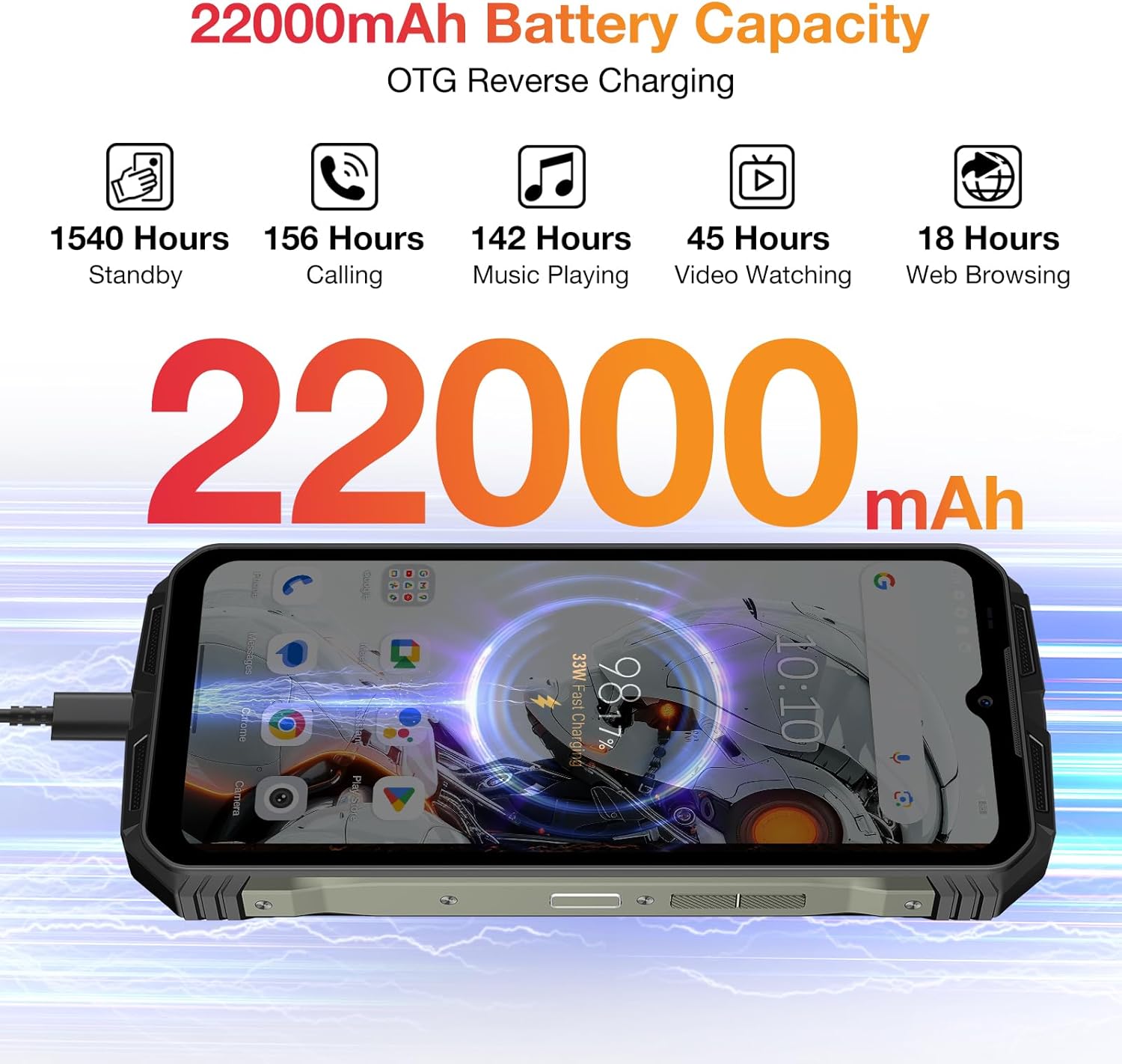
Figure 2: Visual representation of the DOOGEE V Max Pro's 22000mAh battery capacity and its OTG reverse charging capability.
4. Arahan Operasi
4.1 Hidupkan/Mati Kuasa
Untuk menghidupkan peranti anda, tekan dan tahan butang Kuasa yang terletak di sisi sehingga logo DOOGEE muncul. Untuk mematikan peranti, tekan dan tahan butang Kuasa, kemudian pilih 'Matikan' daripada pilihan yang dipaparkan pada skrin.
4.2 Paparan dan Pengalaman Visual
The DOOGEE V Max Pro features a 6.58-inch FHD+ IPS Waterdrop Display with a 120Hz refresh rate. This provides a smooth and immersive visual experience for all your content, from browsing to gaming and video playback.

Figure 3: The 6.58-inch FHD+ 120Hz IPS Waterdrop Display offers vibrant colors and smooth visuals.
4.3 Prestasi dan Penyimpanan
Powered by the Dimensity 7050 5G Octa-core processor and equipped with 32GB RAM (12GB + up to 20GB Extended RAM) and 512GB ROM, expandable up to 2TB via TF card, the V Max Pro ensures smooth multitasking and ample storage for all your applications, photos, and videos. It runs on the latest Android 14 system for enhanced user experience and security.

Figure 4: The Dimensity 7050 5G Octa-core Processor provides robust performance for demanding tasks.

Figure 5: The phone offers 32GB RAM and 512GB ROM for smooth operation and extensive storage.

Figure 6: The DOOGEE V Max Pro runs on the latest Android 14 system, offering enhanced features and security.
4.4 Sistem Kamera
Capture stunning photos and videos with the V Max Pro's versatile camera setup:
- Kamera Utama AI 108MP: For high-resolution, detailed shots.
- Kamera Penglihatan Malam 20MP: Allows for clear photography in low-light or dark conditions.
- 8MP Wide-angle & Macro Camera: Capture expansive landscapes or intricate close-ups.
- Kamera Depan 16MP: Untuk swafoto dan panggilan video berkualiti tinggi.

Gambar 7: Lebihview of the DOOGEE V Max Pro's triple camera system, including the 108MP main camera, 20MP night vision, and 8MP wide-angle/macro lenses.
4.5 Smart Interaction Lights
The V Max Pro features intelligent interaction lights on the back, which can be customized to provide visual notifications for incoming calls, SMS messages, music playback, and charging status. These lights enhance user interaction and provide quick visual cues.

Figure 8: The smart interaction lights on the back of the DOOGEE V Max Pro provide visual feedback for various notifications.
4.6 Ciri Keselamatan
For enhanced security and convenience, the DOOGEE V Max Pro supports multiple unlock methods, including facial recognition and fingerprint unlock. The fingerprint sensor is conveniently located for quick and secure access to your device.
4.7 Ketersambungan
The device supports 5G cellular technology for fast network speeds, Wi-Fi 6 for reliable wireless connectivity, and NFC for convenient mobile payments and data exchange.
5. Integrasi Media
5.1 Produk Selesaiview Video
Video 1: Tayangan video produk rasmicasing the DOOGEE V Max Pro's overall features, including its ruggedness, large battery, and performance.
5.2 Battery and Charging Demonstration
Video 2: A short video demonstrating the DOOGEE V Max Pro's 22000mAh battery and its OTG reverse charging capability, allowing it to charge other devices.
5.3 Security Features Overview
Video 3: This video highlights the various security features of the DOOGEE V Max Pro, including NFC, Face ID, and fingerprint unlock for convenient and secure access.
5.4 Ruggedness Demonstration
Video 4: A brief demonstration of the DOOGEE V Max Pro's IP68/IP69K waterproof and dustproof capabilities, showcasing its resilience in challenging environments.
6. Spesifikasi Teknikal
| Ciri | Spesifikasi |
|---|---|
| Dimensi Produk | 7.02 x 3.27 x 1.03 inci |
| Berat Barang | 1.56 paun |
| Nombor Model Item | VMAXPRO |
| Bateri | 1 bateri Lithium Ion diperlukan (termasuk) |
| Sistem Operasi | Android 14 |
| Teknologi Ketersambungan | WIFi 6, Fingerprint, OTG, Face ID, NFC |
| Ciri Khas | NFC/Face ID/Fingerprint/OTG/WIFi 6 |
| Resolusi Pengimbas | 1080 x 2408 |
| Ciri Kamera Lain | Belakang, Depan |
| Bicu Audio | 3.5 mm |
| warna | Kelabu |
| Penilaian Kuasa Bateri | 22000 Miliamp jam |
| Masa Bual Telefon | 156 Jam |
| Pengeluar | DOOGEE |
| Kapasiti Penyimpanan Memori | 512 GB |
| Saiz Paparan Skrin Berdiri | 6.58 Inci |
| Kadar Segar Semula | 120 Hz |
| Pembawa Tanpa Wayar | Tidak dikunci untuk Semua Pengangkut |
7. Penyelenggaraan dan Penjagaan
To ensure the longevity and optimal performance of your DOOGEE V Max Pro, follow these maintenance guidelines:
- Pembersihan: Lap peranti dengan kerap menggunakan kain lembutamp kain. Elakkan menggunakan bahan kimia yang keras atau bahan yang melelas.
- Suhu: Do not expose the phone to extreme temperatures (hot or cold) for prolonged periods.
- Tahan Air dan Debu: While the phone is IP68/IP69K rated, ensure all ports and covers are securely closed before exposing it to water or dust. Avoid intentional submersion in corrosive liquids.
- Perlindungan Kesan: Despite its rugged design, avoid unnecessary drops or impacts to prevent potential damage to internal components.
- Kemas Kini Perisian: Semak dan pasang kemas kini perisian secara berkala untuk memastikan peranti anda mempunyai ciri dan tampalan keselamatan terkini.

Figure 9: The DOOGEE V Max Pro is built to IP68/IP69K and MIL-STD-810H standards for superior ruggedness.
8. Menyelesaikan masalah Isu Biasa
If you encounter any issues with your DOOGEE V Max Pro, please refer to the following common troubleshooting steps:
- Peranti Tidak Dihidupkan: Pastikan bateri telah dicas. Sambungkan pengecas dan tunggu beberapa minit sebelum cuba menghidupkannya semula. Jika tidak responsif, cuba mulakan semula secara paksa dengan menekan butang Kuasa selama 10-15 saat.
- Isu Pengecasan: Check if the charging cable and adapter are securely connected and undamaged. Try using a different power outlet. Ensure the charging port is clean and free of debris.
- App Crashes/Freezing: Close the problematic app and reopen it. Clear the app's cache and data in Settings > Apps. If the issue persists, uninstall and reinstall the app.
- Isyarat Rangkaian Lemah: Check your SIM card installation. Restart the device. Ensure you are within network coverage. If issues persist, contact your service provider.
- Cap Jari/Buka Kunci Wajah Tidak Berfungsi: Ensure your fingers are clean and dry for fingerprint recognition. For face unlock, ensure adequate lighting and that your face is clearly visible to the front camera. Re-register your fingerprint or face ID if necessary.
- Terlalu panas: Avoid using the phone while charging for extended periods or running multiple demanding applications simultaneously. Close background apps and reduce screen brightness if the device feels excessively warm.
- Tetapan semula kilang: As a last resort for persistent software issues, you may perform a factory reset. Amaran: Ini akan memadamkan semua data pada telefon anda. Sandarkan data penting sebelum meneruskan. Pergi ke Tetapan > Sistem > Tetapkan semula pilihan > Padam semua data (tetapan semula kilang).
9. Waranti dan Sokongan Pelanggan
Terima kasih kerana membeliasing your DOOGEE V Max Pro 5G Rugged Phone. We value your experience and are committed to providing excellent customer service.
- Waranti: Your device comes with a 2-Year Limited Warranty. Please refer to the warranty card included in your package for detailed terms and conditions.
- Jaminan Wang Dikembalikan: We offer a 30-Days Money Back Guarantee and Free Return policy.
- Perkhidmatan Pelanggan: If you encounter any issues or have questions regarding your product, please do not hesitate to contact us. You can reach our official customer support through Amazon's messaging system. We promise to respond within 24 hours and assist in resolving any issues you may have.
- Sokongan dalam talian: 24/7 One-on-One Online Support is available for your convenience.