
AW12
AW12 Multifunction Stainless Steel Smart Watch User Manual
Model: AW12 | Brand: Generic
1. Produk Lebihview
The AW12 Multifunction Stainless Steel Smart Watch is a sophisticated and functional timepiece designed to seamlessly integrate into your daily life. It combines durable construction with advanced features to keep you connected and informed.
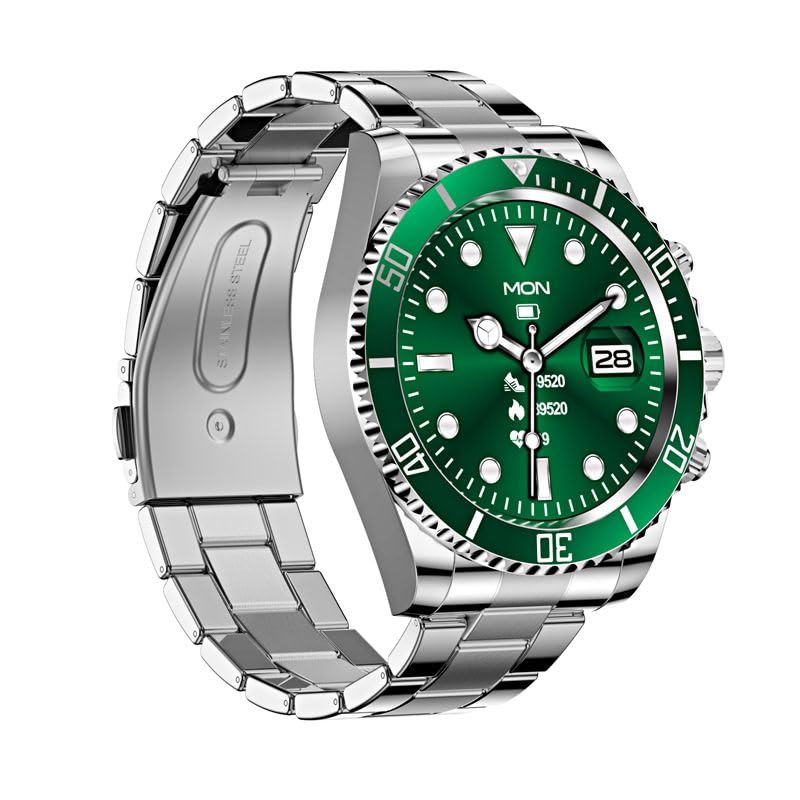
Figure 1: AW12 Multifunction Stainless Steel Smart Watch. The watch features a robust stainless steel case and bracelet, complemented by a vibrant green dial with luminous markers.
Ciri-ciri Utama:
- Precision Timekeeping: Robust stainless steel case and bracelet design for exceptional durability.
- Paparan Cergas: 1.28-inch Full-Touch IPS Screen with 240x240 resolution.
- Penanda Bercahaya: Green dial boasts luminous hour markers and hands for easy reading in low-light conditions.
- Penjejakan Aktiviti: Sleep Monitor, Cycle Tracking, Activity Tracker, Alarm Clock.
- Ketersambungan: Bluetooth for phone calls and notifications.
- Tahan Air: IP68 rating, water-resistant up to 200 meters.
- Unidirectional Bezel: For precise timekeeping and tracking of elapsed time.
2. Apa yang ada di dalam Kotak
Upon opening your AW12 Smart Watch package, you will find the following items:
- Jam Tangan Pintar AW12
- Kabel Pengecasan
- Manual Pengguna (dokumen ini)
Video 1: AW12 Stainless Steel Smartwatch Overview. This video provides a comprehensive overview of the AW12 Stainless Steel Smartwatch, highlighting its design, features, and what's included in the box.
3. Panduan Persediaan
3.1 Pengecasan Awal
- Connect the provided charging cable to the charging port on the back of your AW12 Smart Watch.
- Plug the USB end of the charging cable into a compatible USB power adapter (not included) or a computer's USB port.
- Allow the watch to charge fully before first use. A full charge typically takes approximately 2 hours. The battery indicator on the screen will show charging progress.
3.2 Menghidupkan/Mematikan
- Untuk Menghidupkan: Tekan dan tahan butang sisi sehingga skrin menyala.
- Untuk Mematikan: Tekan dan tahan butang sisi, kemudian pilih 'Matikan' pada skrin.
3.3 Berpasangan dengan Telefon Pintar Anda
To unlock the full potential of your AW12 Smart Watch, pair it with your smartphone via Bluetooth.
- Pastikan Bluetooth didayakan pada telefon pintar anda.
- On your AW12 Smart Watch, navigate to the Bluetooth settings.
- On your smartphone, search for available Bluetooth devices and select 'AW12' from the list.
- Follow the on-screen prompts on both devices to complete the pairing process. A confirmation message will appear once successfully connected.
4. Arahan Operasi
4.1 Menavigasi Antara Muka
- Skrin sentuh: Swipe left, right, up, or down to navigate through menus and screens. Tap to select an option.
- Butang Sisi: Tekan untuk kembali ke skrin utama atau mengaktifkan peranti. Tekan lama untuk pilihan kuasa.
- Bezel berputar: The unidirectional rotating bezel can be used for timing events or tracking elapsed time. Rotate it counter-clockwise to align the zero marker with the minute hand for timing.
4.2 Fungsi Teras
- Masa dan Tarikh: The watch automatically synchronizes time and date with your paired smartphone.
- Panggilan Telefon: Once paired, you can make and receive calls directly from your watch. Access the call log or dial pad from the phone icon on the watch.
- Pemberitahuan: Receive alerts for messages, calls, and app notifications directly on your wrist.
4.3 Ciri-ciri Gaya Hidup
- Penjejak Aktiviti: Monitors steps taken, distance covered, and calories burned. View your daily progress in the activity app.
- Monitor Tidur: Tracks your sleep patterns, including deep sleep, light sleep, and awake times. Access sleep data in the dedicated sleep app.
- Penjejakan Kitaran: Helps track and predict menstrual cycles. Input relevant data into the cycle tracking feature.
- Jam loceng: Set multiple alarms directly from your watch.
5. Penyelenggaraan dan Penjagaan
5.1 Tahan Air
The AW12 Smart Watch has an IP68 water resistance rating and is water-resistant up to 200 meters. This means it is suitable for swimming, showering, and shallow diving. However, it is not recommended for high-pressure water activities or prolonged submersion at extreme depths. Avoid exposing the watch to hot water or steam, as this can compromise the seals.
5.2 Membersihkan Jam Tangan Anda
- Lap bekas jam tangan dan tali dengan kerap menggunakan kain lembut, damp kain.
- Untuk kotoran degil, gunakan larutan sabun lembut dan bilas dengan teliti menggunakan air bersih.
- Ensure the watch is completely dry before charging or prolonged storage.
5.3 Penjagaan Bateri
- Untuk memanjangkan hayat bateri, elakkan daripada kerap mencas sepenuhnya jam tangan.
- Simpan jam tangan di tempat yang sejuk dan kering apabila tidak digunakan untuk tempoh yang lama.
- Gunakan hanya kabel pengecasan yang disediakan.
6. Penyelesaian masalah
If you encounter any issues with your AW12 Smart Watch, please refer to the following common troubleshooting steps:
| Masalah | Kemungkinan Punca | Penyelesaian |
|---|---|---|
| Jam tangan tidak dihidupkan | Bateri lemah | Cas jam tangan selama sekurang-kurangnya 30 minit. |
| Tidak boleh berpasangan dengan telefon pintar | Bluetooth off, watch not in pairing mode, or interference | Ensure Bluetooth is on for both devices. Restart both devices. Try pairing again. |
| Display is unresponsive | Gangguan perisian atau bateri lemah | Restart the watch. Ensure it is charged. |
| Penjejakan aktiviti yang tidak tepat | Improper fit or software calibration needed | Ensure the watch is worn snugly. Check for software updates or recalibrate if available in settings. |
If the issue persists after trying these steps, please contact customer support for further assistance.
7. Spesifikasi
| Ciri | Perincian |
|---|---|
| Model | AW12 |
| Paparan | 1.28-inch Full-Touch IPS LCD Screen |
| Resolusi | 240 x 240 piksel |
| Berat badan | 300 g |
| Kapasiti Penyimpanan Memori | 16 MB |
| Sistem Operasi | AsteroidOS |
| Ketersambungan | Bluetooth |
| Penilaian Ketahanan Air | IP68, up to 200 meters |
| Kapasiti Bateri | 12 Amp jam |
| Jenis Genggam | Tang Buckle |
| Ciri Khas | Sleep Monitor, Cycle Tracking, Activity Tracker, Alarm Clock, Phone Call |
8. Waranti dan Sokongan
For information regarding warranty coverage and terms, please refer to the product packaging or the official product page on Amazon.in. For technical support, troubleshooting assistance beyond this manual, or to inquire about repairs, please contact the seller or manufacturer directly through the Amazon platform.
You can find more detailed information and contact options by visiting the product's detail page: AW12 Smart Watch on Amazon.in
Ask a question about this manual
Ask about setup, troubleshooting, compatibility, parts, safety, or missing instructions. Manuals+ will review the question and use this page’s manual context to help answer it.