1. Pengenalan
Thank you for choosing the FITFIU Fitness MC-140 Treadmill. This manual provides essential information for the safe assembly, operation, and maintenance of your new fitness equipment. Please read this manual thoroughly before using the treadmill to ensure proper function and to prevent injury.
2. Maklumat Keselamatan
Keselamatan anda adalah yang paling utama. Sila patuhi langkah berjaga-jaga berikut:
- Sentiasa berunding dengan doktor sebelum memulakan sebarang program senaman baharu.
- Pastikan treadmill diletakkan di atas permukaan yang rata dan stabil dengan kelegaan yang mencukupi di sekelilingnya.
- Jauhkan kanak-kanak dan haiwan peliharaan dari treadmill semasa operasi.
- Use the magnetic safety key at all times. Attach the clip to your clothing. In case of an emergency, the treadmill will stop immediately if the safety key is dislodged.
- Jangan melebihi berat pengguna maksimum 120 kg.
- Pakai kasut dan pakaian sukan yang sesuai.
- Jangan kendalikan treadmill jika ia rosak atau tidak berfungsi.
- Cabut palam treadmill daripada soket kuasa apabila tidak digunakan atau sebelum pembersihan dan penyelenggaraan.
3. Kandungan Pakej
Selepas membongkar, sila sahkan bahawa semua komponen ada:
- FITFIU Fitness MC-140 Treadmill unit
- Manual Pengguna (dokumen ini)
- Tool Kit for assembly
- Kunci Keselamatan Magnet
4. Produk Lebihview
The FITFIU Fitness MC-140 is a versatile 2-in-1 foldable treadmill designed for both walking and running. It features a powerful motor, adjustable incline, and smart connectivity options.

Image 4.1: The FITFIU Fitness MC-140 Treadmill, shown in both its unfolded operational state and its compact folded storage position.
Ciri-ciri Utama:
- Motor: 1500W quiet motor for smooth operation.
- Julat Kelajuan: Adjustable from 1 km/h up to 12 km/h.
- Condong: 2 manual incline levels (approximately 1.6° and 5°).
- Permukaan Larian: Spacious 42 x 100 cm non-slip belt.
- Program: 12 pre-defined training programs.
- Ketersambungan: Bluetooth for app integration (Zwift, Kinomap, ASP) and music playback through integrated speakers.
- Kemudahan: Foldable design for compact storage, transport wheels, and a built-in PC/tablet holder.
- Keselamatan: Magnetic emergency stop system.

Imej 4.2: Jarak dekat view of the treadmill's non-slip running surface, highlighting its dimensions of 42 cm width and 100 cm length.

Image 4.3: Diagram illustrating the 7-layer shock absorption system (VCS - Variable Cushioning System) of the treadmill, designed for comfort and safety during exercise.

Image 4.4: The treadmill's console area featuring a built-in support designed to hold a laptop or tablet, allowing users to work or enjoy entertainment while exercising.
5. Arahan Persediaan
The FITFIU Fitness MC-140 Treadmill is designed for easy assembly. Follow these steps to set up your treadmill:
- Bongkar: Keluarkan semua komponen dari pembungkusan dengan berhati-hati.
- jawatan: Place the main treadmill unit on a flat, stable surface in your desired exercise area. Ensure there is sufficient space around the unit for safe operation and access.
- Terbuka: Gently lift the console and handlebars into the upright position. Secure them according to the specific locking mechanism (refer to the included quick-start guide for visual instructions if available).
- Sambung: Palamkan kord kuasa ke salur keluar elektrik yang dibumikan.
- Kunci Keselamatan: Attach the magnetic safety key to the designated spot on the console. The treadmill will not operate without it.
- Semakan Awal: Before first use, ensure all bolts and connections are secure.
6. Arahan Operasi
6.1 Operasi Asas
- Hidupkan kuasa: Ensure the safety key is in place and the treadmill is plugged in. Press the 'Start' button on the console.
- Laraskan Kelajuan: Use the '+' and '-' buttons to increase or decrease the running speed. The speed can be adjusted up to 12 km/h.
- Berhenti: Press the 'Stop' button to gradually slow down and stop the treadmill. In an emergency, pull the magnetic safety key to stop the treadmill immediately.

Image 6.1: Illustration of the treadmill's speed capabilities, indicating a range of 1-5 km/h for walking and 5-12 km/h for running.
6.2 Training Programs
The MC-140 includes 12 pre-defined training programs (P01-P12) to vary your workout intensity.
- Pilih Program: While the treadmill is stopped or in standby mode, press the 'Program' button to cycle through the available programs.
- Mulakan Program: Once your desired program is displayed, press 'Start' to begin the workout. The treadmill will automatically adjust speed according to the program's profile.
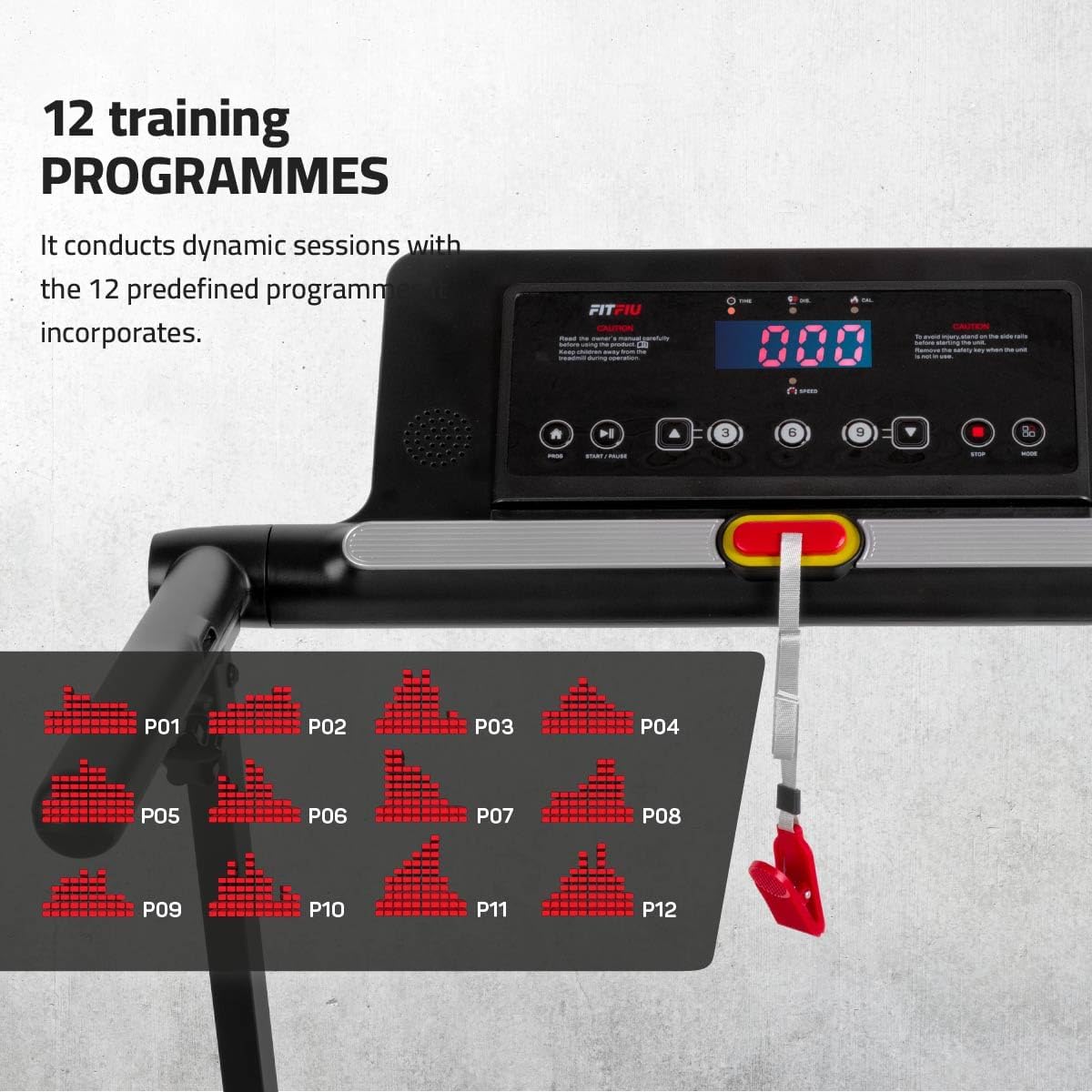
Image 6.2: The treadmill's control panel, showing the digital display and buttons, with an overlay illustrating the 12 predefined training programs (P01-P12) available for varied workouts.
6.3 Pelarasan Kecondongan
The MC-140 features 2 manual incline levels to increase workout intensity.
- Laraskan Kecondongan: To change the incline, you must manually adjust the support feet at the rear of the treadmill. Ensure the treadmill is stopped and unplugged before making adjustments.
- peringkat: The two levels provide approximately 1.6° and 5° of incline.

Image 6.3: A visual representation of the treadmill's manual incline feature, showing how the running surface can be set to two different angles (1.6° and 5°) to increase workout difficulty.
6.4 Kesambungan Apl (Bluetooth)
Enhance your training experience by connecting your treadmill to compatible fitness applications via Bluetooth.
- Dayakan Bluetooth: Pastikan Bluetooth didayakan pada telefon pintar atau tablet anda.
- Muat turun Aplikasi: Download and install a compatible app such as Zwift, Kinomap, or ASP from your device's app store.
- Pasangkan Peranti: Follow the instructions within the chosen app to pair it with your MC-140 treadmill.
- Main Balik Muzik: You can also connect your device via Bluetooth to play music through the treadmill's integrated speakers.
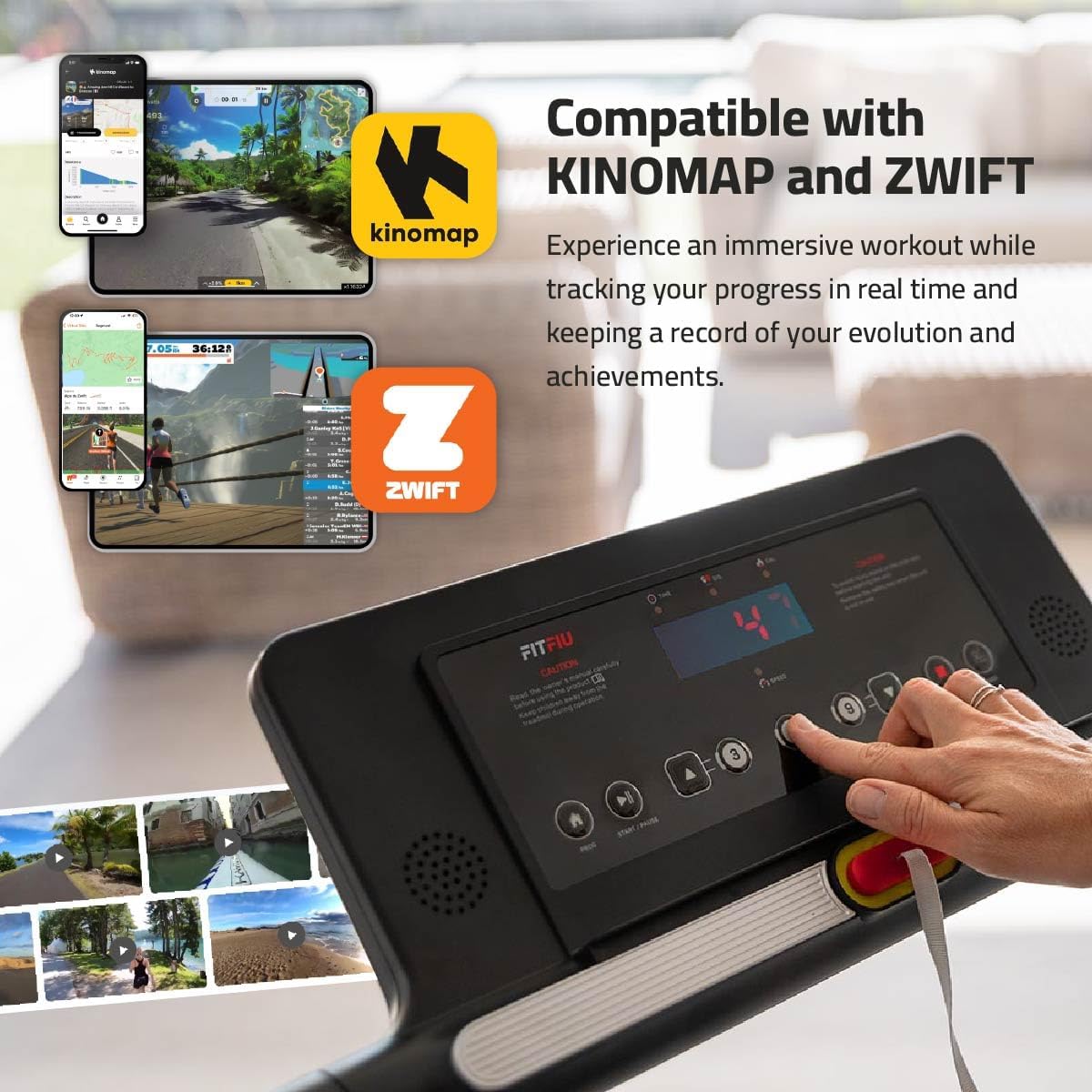
Image 6.4: The treadmill's control panel alongside graphics indicating compatibility with popular fitness applications like Kinomap and Zwift, allowing for interactive and immersive workouts.
7. Penyelenggaraan
Penyelenggaraan tetap memastikan umur panjang dan prestasi optimum treadmill anda.
- Pembersihan: Lap treadmill selepas setiap penggunaan dengan iklanamp kain untuk mengeluarkan peluh dan habuk. Jangan gunakan pembersih yang kasar.
- Pelinciran: Periodically check the running belt for proper lubrication. If the belt feels dry or sticky, apply silicone lubricant as per the instructions in the quick-start guide (usually every 3-6 months depending on usage).
- Ketegangan Tali Pinggang: Check the running belt tension and alignment regularly. Adjust if necessary using the provided tools, following the instructions in the quick-start guide.
- Storan: When not in use, the treadmill can be folded for compact storage. Use the transport wheels to move it easily.

Image 7.1: The treadmill in its folded, compact state, demonstrating its space-saving design and ease of storage, with dimensions of 108 x 59 x 11 cm.
8. Penyelesaian masalah
If you encounter issues with your MC-140 treadmill, refer to the following common problems and solutions:
| Masalah | Kemungkinan Punca | Penyelesaian |
|---|---|---|
| Treadmill tidak bermula | Safety key not in place; Power cord unplugged; Power switch off | Ensure safety key is correctly placed; Check power cord connection; Turn on power switch |
| Tali pinggang larian tergelincir atau teragak-agak | Belt tension too loose; Lack of lubrication | Adjust belt tension (refer to manual); Apply silicone lubricant |
| Bunyi luar biasa semasa operasi | Loose components; Belt misalignment; Motor issue | Check and tighten all bolts; Adjust belt alignment; If noise persists, contact customer support |
| Console display not working | Loose cable connection; Power issue | Check console cable connections; Verify power supply |
If the problem persists after attempting these solutions, please contact FITFIU Fitness customer support.
9. Spesifikasi
Detailed technical specifications for the FITFIU Fitness MC-140 Treadmill:
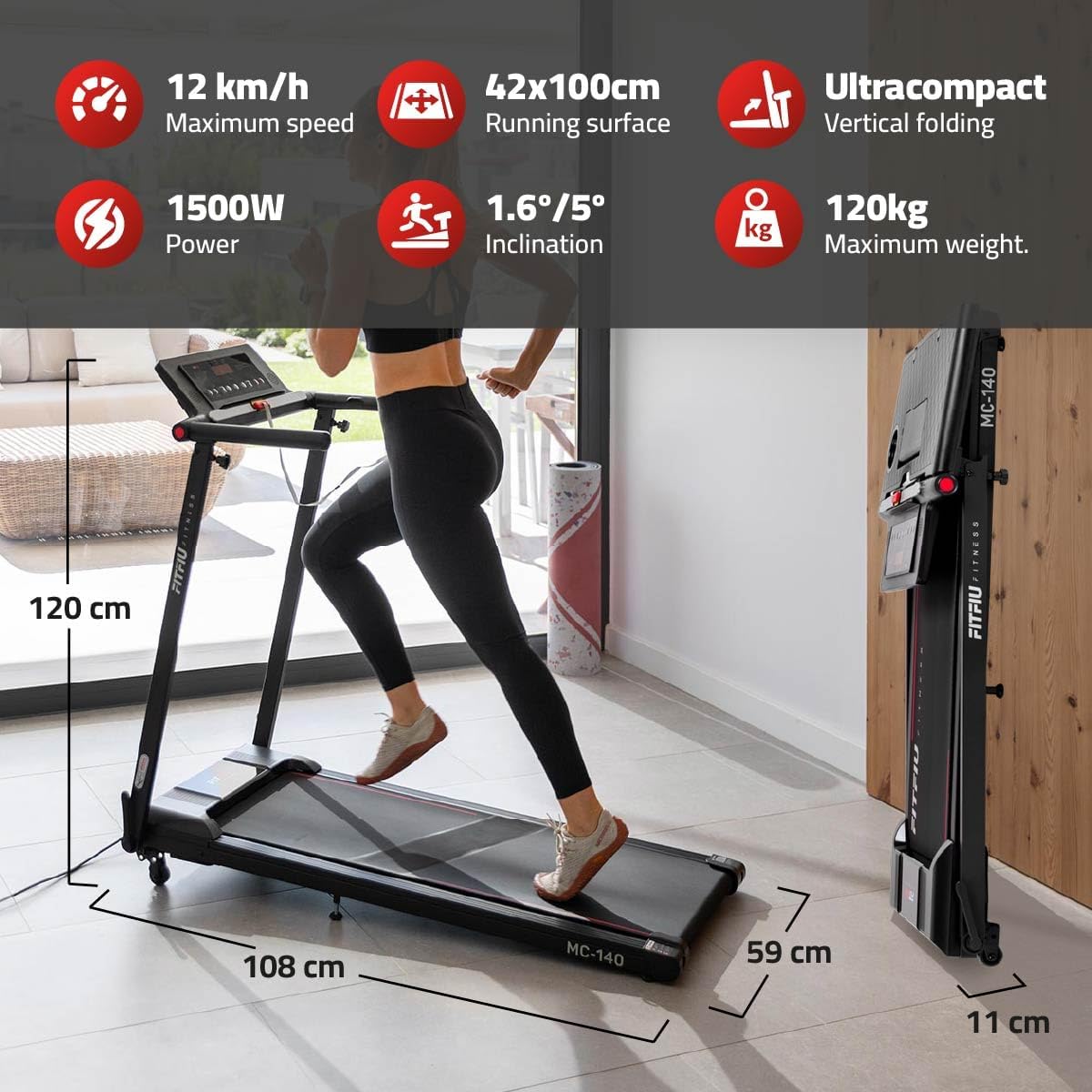
Image 9.1: A summary graphic detailing the key specifications of the FITFIU Fitness MC-140 Treadmill, including maximum speed, running surface, power, incline, and maximum user weight.
- Jenama: Fitfiu Fitness
- Nombor Model: 1100058
- Dimensi Produk (Tidak dilipat): 108 cm (panjang) x 59 cm (lebar) x 120 cm (tinggi)
- Dimensi Produk (Dilipat): 108 cm (panjang) x 59 cm (lebar) x 11 cm (tinggi)
- Berat produk: 22 kg
- Bahan: Keluli Tahan Karat
- Kelajuan Maksimum: 12 Kilometer sejam
- Kuasa Motor: 1500W
- Permukaan Larian: 42 x 100 cm
- Tahap Kecondongan: 2 manual levels (approx. 1.6° and 5°)
- Berat Pengguna Maksimum: 120 kg
- Ciri Khas: Foldable, Manual Incline, Transport Wheels, Bluetooth Connectivity, App Compatibility (Zwift, Kinomap, ASP), PC/Tablet Holder
- Penggunaan yang Disyorkan: Running, Walking, Home and Office Exercise, Fitness, Rehabilitation, Daily Exercise, Weight Loss, Training, Cardiovascular Exercise, Indoor Use
- Sasaran Khalayak: Dewasa
- Negara Asal: China
10. Waranti dan Sokongan
For warranty information, product support, or to purchase replacement parts, please refer to the warranty card included with your product or visit the official FITFIU Fitness webtapak. Simpan resit pembelian anda sebagai bukti pembelian untuk tuntutan waranti.