
pengenalan
The RadioShack Dual-Mode Wireless Bluetooth Mouse offers versatile connectivity and ergonomic comfort for various computing needs. This manual provides instructions for setting up, operating, and maintaining your mouse to ensure optimal performance.

Rajah 1: Bahagian hadapan view of the RadioShack Dual-Mode Wireless Bluetooth Mouse.
Kandungan Pakej
- RadioShack Dual-Mode Wireless Bluetooth Mouse
- USB Receiver (stored in the mouse)
- Kabel Pengecas USB
- Manual Pengguna (dokumen ini)
Persediaan
1. Mengecas Tetikus
The mouse features a built-in rechargeable battery. Before first use, or when the battery is low, connect the mouse to a USB power source using the provided USB charging cable. The charging port is located on the front side of the mouse.

Rajah 2: Sisi view of the mouse highlighting the USB charging port.

Figure 3: The mouse being charged via a USB connection to a laptop.
2. Menyambung Tetikus
The mouse supports dual-mode connectivity: 2.4G Wireless (via USB receiver) and Bluetooth 3.0. You can switch between these modes using the switch on the bottom of the mouse.
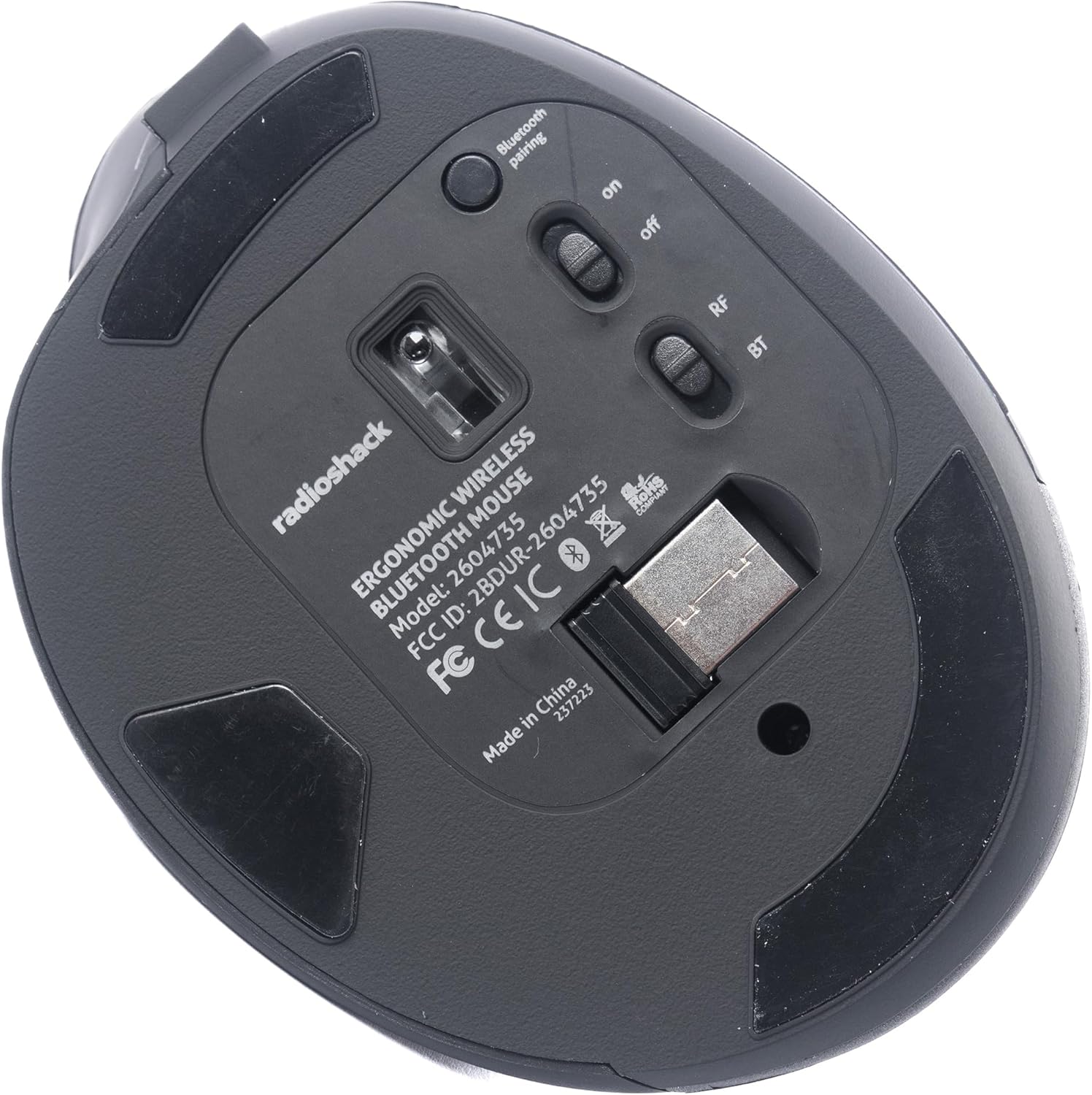
Rajah 4: Bawah view of the mouse, indicating the power switch, mode switch (RF/BT), and USB receiver compartment.
2.1. Mod Wayarles 2.4G (Penerima USB)
- Cari penerima USB yang disimpan di dalam petak di bahagian bawah tetikus.
- Masukkan penerima USB ke dalam port USB yang tersedia pada komputer anda.
- Slide the mode switch on the bottom of the mouse to the "RF" position.
- Turn on the mouse using the ON/OFF switch. The mouse should connect automatically.
2.2. Mod Bluetooth
- Luncurkan suis mod di bahagian bawah tetikus ke kedudukan "BT".
- Hidupkan tetikus menggunakan suis ON/OFF.
- Press and hold the Bluetooth pairing button (usually located near the mode switch) for 3-5 seconds until the indicator light flashes, indicating it is in pairing mode.
- Pada komputer atau peranti anda, pergi ke tetapan Bluetooth dan cari peranti baharu.
- Select "RadioShack Mouse" (or similar name) from the list of available devices to pair.
- Setelah dipasangkan, lampu penunjuk akan berhenti berkelip.

Figure 5: The mouse positioned wirelessly next to a laptop, ready for use.
Mengendalikan Tetikus
Fungsi Asas
- Butang Kiri: Fungsi klik utama.
- Butang Kanan: Fungsi klik sekunder (menu konteks).
- Roda Tatal: Scroll up/down, and can also function as a middle click button.
- Butang Maju/Mundur: Located on the side, these buttons allow for quick navigation in web pelayar dan file penjelajah.
Bertukar Antara Mod
To switch between 2.4G Wireless and Bluetooth modes, simply slide the mode switch on the bottom of the mouse to the desired position (RF for 2.4G, BT for Bluetooth).
Reka Bentuk Ergonomik
The mouse is designed with a contoured shape and rubber grips to provide comfortable support for your hand and wrist, reducing strain during extended use.

Figure 6: A hand demonstrating the ergonomic grip on the mouse.
Penyelenggaraan
Pembersihan
- Matikan tetikus sebelum membersihkan.
- Gunakan kain lembut dan kering untuk mengelap permukaan tetikus.
- Untuk kotoran degil, sedikit dampLap kain dengan air atau larutan pembersih lembut, kemudian lap hingga kering dengan segera.
- Elakkan menggunakan bahan kimia yang keras atau bahan yang melelas.
Penjagaan Bateri
- Cas tetikus dengan kerap untuk mengekalkan kesihatan bateri.
- Elakkan menyahcas sepenuhnya bateri dengan kerap.
- If storing the mouse for an extended period, charge it to about 50% capacity.
Menyelesaikan masalah
- Tetikus tidak bertindak balas:
- Pastikan tetikus dihidupkan.
- Periksa tahap bateri dan cas jika perlu.
- For 2.4G mode, ensure the USB receiver is securely plugged into the computer and the mode switch is set to "RF".
- For Bluetooth mode, ensure Bluetooth is enabled on your device, the mouse is in "BT" mode, and it is properly paired. Try re-pairing if necessary.
- Try connecting the mouse to a different USB port or a different device to rule out port or device issues.
- Pergerakan kursor tidak menentu atau perlahan:
- Pastikan sensor tetikus bersih dan bebas daripada halangan.
- Gunakan tetikus pada permukaan yang bersih dan tidak memantulkan cahaya.
- Semak gangguan daripada peranti wayarles lain.
- Tetikus tidak dicas:
- Ensure the charging cable is securely connected to both the mouse and the power source.
- Cuba kabel pengecas USB atau penyesuai kuasa yang berbeza.
- Pastikan sumber kuasa aktif.
Spesifikasi
| Ciri | Perincian |
|---|---|
| Nombor Model | 2604735 |
| Teknologi Ketersambungan | 2.4G Wireless, Bluetooth 3.0 (Dual-Mode) |
| Teknologi Pengesanan Pergerakan | Optik |
| warna | Hitam & Kelabu |
| Sumber Kuasa | Bateri Litium Ion Boleh Dicas Semula (termasuk) |
| Berat Barang | 9.1 auns |
| Dimensi Pakej | 8.66 x 6.3 x 2.95 inci |
| Pengeluar | RadioShack |
Waranti dan Sokongan
For warranty information and customer support, please refer to the official RadioShack weblaman web atau hubungi khidmat pelanggan mereka secara langsung. Butiran mengenai pendaftaran produk, tuntutan jaminan dan bantuan teknikal biasanya boleh didapati di halaman sokongan pengilang.