
1. Maklumat Keselamatan Penting
Please read all instructions carefully before using the Inventum Mini Oven. Retain this manual for future reference.
- Always place the appliance on a stable, heat-resistant surface, away from walls and other appliances to ensure proper ventilation.
- Do not touch hot surfaces. Use oven mitts or gloves when handling hot components or food.
- Pastikan kord kuasa tidak rosak dan dijauhkan daripada permukaan panas.
- Jangan rendam perkakas, kord, atau palam ke dalam air atau cecair lain.
- Pengawasan rapi diperlukan apabila sebarang perkakas digunakan oleh atau berhampiran kanak-kanak.
- Cabut plag dari soket apabila tidak digunakan dan sebelum membersihkan. Biarkan sejuk sebelum memakai atau menanggalkan bahagian.
- Jangan kendalikan sebarang perkakas dengan kord atau palam yang rosak, atau selepas perkakas tidak berfungsi atau rosak dalam apa jua cara.
- Jangan gunakan aksesori atau lampiran yang tidak disyorkan oleh pengilang, kerana ini boleh menyebabkan kecederaan.
- Do not place any of the following materials in the oven: paper, cardboard, plastic, or similar flammable materials.
- Exercise extreme caution when removing trays or disposing of hot grease.
2. Produk Lebihview dan Komponen
The Inventum Mini Oven is designed for versatile cooking, including baking, frying, and roasting. Familiarize yourself with its components for optimal use.

Rajah 2.1: The Inventum Mini Oven with its door open, displaying chicken pieces, sliced vegetables, and french fries on its internal trays.

Rajah 2.2: Depan view of the Inventum Mini Oven, showcasing its compact design and the food items arranged on the internal racks.
Komponen yang Disertakan:
- Unit Utama: The primary oven body with a 12-liter capacity, touch control panel, and viewtetingkap masuk.

Rajah 2.3: sebelah view of the Inventum Mini Oven, highlighting its sleek black and stainless steel exterior.
- Panel Kawalan: Touch-sensitive interface for setting temperature, time, and selecting cooking programs.
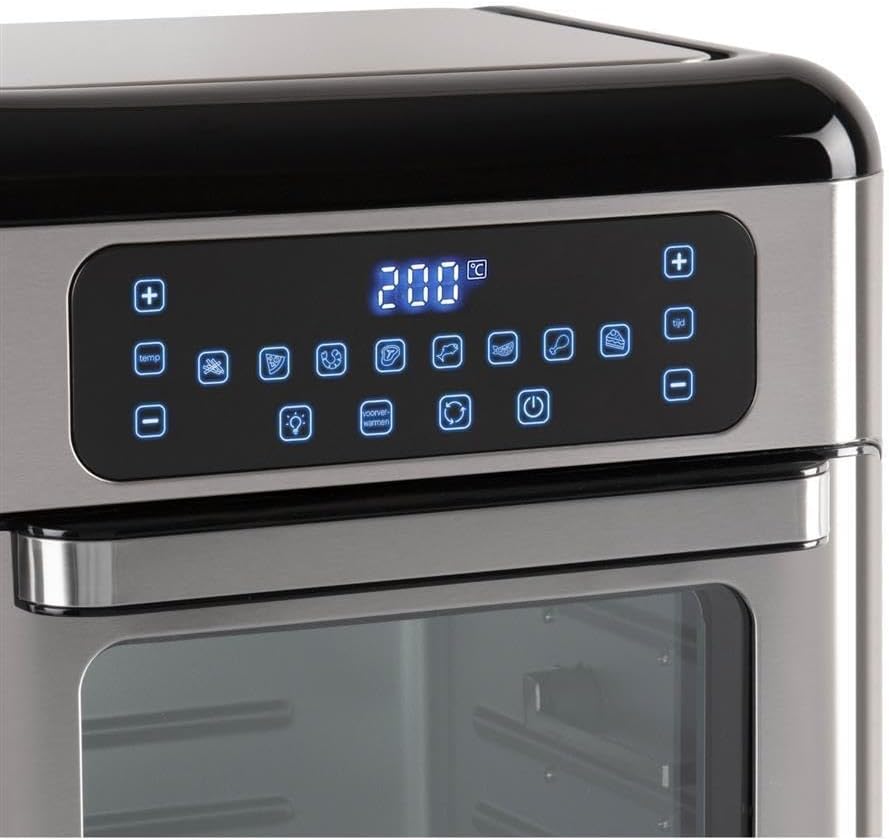
Rajah 2.4: Terperinci view of the touch control panel with digital display and various function icons.
- Baking Shelves (Perforated Trays): Two perforated trays for air frying and baking, allowing for even heat circulation.

Rajah 2.5: Two perforated baking trays, ideal for air frying and ensuring crispy results.
- Crumb Tray (Solid Baking Tray): A solid tray designed to catch crumbs and drips, also suitable for baking.

Rajah 2.6: A solid baking tray, which also functions as a crumb tray to collect food debris.
- Rotisserie Basket: A mesh basket for tumbling smaller items like fries or nuts during rotisserie cooking.

Rajah 2.7: The rotisserie mesh basket, designed for even cooking of smaller food items.
- Rotisserie Spit and Handle: Untuk memanggang keseluruhan ayam atau potongan daging yang lebih besar.

Rajah 2.8: The rotisserie spit with forks and the removal handle for safe handling.
- Manual Pengguna: Dokumen ini.
3. Persediaan dan Penggunaan Pertama
3.1 Membongkar
- Keluarkan semua bahan pembungkusan, pelekat dan label daripada perkakas.
- Pastikan semua komponen yang disenaraikan ada dan tidak rosak.
3.2 Penempatan
- Place the mini oven on a flat, stable, and heat-resistant surface.
- Ensure there is at least 10 cm (4 inches) of clear space on all sides of the oven for proper ventilation.
- Do not place the oven near flammable materials or under wall cabinets.
3.3 Pembersihan Sebelum Penggunaan Pertama
- Lap bahagian luar ketuhar dengan damp kain.
- Wash all removable accessories (baking shelves, crumb tray, rotisserie basket, spit) in warm, soapy water. Rinse thoroughly and dry completely.
- Masukkan dulang serbuk roti di bahagian paling bawah ketuhar.
3.4 Pembakaran Awal
Before cooking food, it is recommended to run the oven empty for approximately 15 minutes to burn off any manufacturing residues.
- Palamkan kord kuasa ke salur keluar elektrik yang dibumikan.
- Tetapkan suhu kepada 200°C (390°F) dan pemasa kepada 15 minit.
- Sedikit bau atau asap mungkin ada semasa penggunaan awal ini; ini adalah perkara biasa. Pastikan kawasan itu mempunyai pengudaraan yang baik.
- Selepas 15 minit, matikan ketuhar dan cabut plagnya. Biarkan ia sejuk sepenuhnya sebelum meneruskan.
4. Arahan Operasi
4.1 Panel Kawalan Selesaiview
The Inventum Mini Oven features an intuitive touch control panel. Refer to Figure 2.4 for a visual guide.
- Butang Kuasa: Menghidupkan/mematikan ketuhar.
- Kawalan Suhu (+/-): Melaraskan suhu memasak.
- Kawalan Masa (+/-): Adjusts the cooking duration.
- Pemilihan Program: Icons representing 8 pre-set cooking programs (e.g., fries, chicken, fish, steak, cake, pizza, toast, dehydrate).
- Butang Cahaya: Turns the internal oven light on/off.
- Convection Fan Button: Activates/deactivates the convection fan for even cooking.
- Butang Rotisserie: Mengaktifkan/menyahaktifkan fungsi rotisserie.
4.2 Operasi Asas
- Menyediakan makanan: Place your food on the appropriate accessory (baking shelf, crumb tray, rotisserie basket, or spit).
- Sisip Aksesori: Carefully slide the accessory with food into the desired rack position inside the oven. Ensure the crumb tray is always at the bottom.
- Tutup Pintu: Tutup pintu ketuhar dengan selamat.
- Hidupkan kuasa: Tekan butang Kuasa. Paparan akan menyala.
- Pilih Tetapan Program atau Manual:
- Pre-set Program: Touch one of the 8 program icons. The oven will automatically set a recommended temperature and time.
- Tetapan Manual: Use the Temperature (+/-) buttons to set the desired temperature and the Time (+/-) buttons to set the cooking duration.
- Mula Memasak: The oven will typically start automatically after a few seconds of setting the time/temperature or selecting a program. Some models may require pressing the Power button again to start.
- Pantau Memasak: Use the internal light button to check on your food without opening the door.
- Tamat Memasak: The oven will beep when the timer expires and automatically turn off the heating elements.
- Keluarkan Makanan: Carefully open the oven door. Using oven mitts, remove the cooked food and accessories. Be aware of hot steam.
- Matikan: Press the Power button to turn off the oven completely, then unplug it from the wall outlet.
4.3 Menggunakan Fungsi Rotisserie
The rotisserie function is ideal for even cooking of whole chickens or other roasts using the rotisserie spit, or for items like fries using the rotisserie basket.
- Menyediakan makanan:
- For Spit: Skewer the food (e.g., whole chicken) onto the rotisserie spit, securing it with the forks. Ensure the food is centered and balanced.
- For Basket: Place smaller items like fries or vegetables into the rotisserie basket and secure the lid.
- Insert Rotisserie: Carefully insert the rotisserie spit or basket into the designated rotisserie slots inside the oven. Ensure it is properly seated and can rotate freely.
- Set Cooking Parameters: Tetapkan suhu dan masa yang dikehendaki menggunakan panel kawalan.
- Activate Rotisserie: Press the Rotisserie button on the control panel. The rotisserie mechanism will begin to rotate.
- Mula Memasak: Begin the cooking cycle as described in "4.2 Basic Operation".
- Keluarkan Makanan: Once cooking is complete, use the rotisserie handle (Figure 2.8) to carefully lift and remove the hot rotisserie assembly from the oven. Place it on a heat-resistant surface before removing the food.
5. Penyelenggaraan dan Pembersihan
Regular cleaning and maintenance will ensure the longevity and optimal performance of your Inventum Mini Oven.
5.1 Pembersihan Am
- Sentiasa cabut plag ketuhar dan biarkan ia sejuk sepenuhnya sebelum dibersihkan.
- Do not use abrasive cleaners, scouring pads, or harsh chemicals, as these can damage surfaces.
5.2 Membersihkan Bahagian Dalaman
- The oven features a stainless steel interior, which is durable and easy to clean.
- Remove the crumb tray and all other accessories. Wash them in warm, soapy water, rinse, and dry.
- Lap dinding dalaman dengan iklanamp cloth and a mild detergent. For stubborn stains, a non-abrasive oven cleaner designed for stainless steel can be used, following the product instructions.
- Lap kering dengan kain bersih.
5.3 Membersihkan Bahagian Luar
- Lap permukaan luar dengan lembut, damp kain.
- For the control panel, use a slightly damp cloth and wipe gently. Do not spray water directly onto the control panel.
- Keringkan dengan teliti.
5.4 Dulang Kerak
- The crumb tray should be emptied and cleaned regularly to prevent grease buildup and potential fire hazards.
- Slide out the crumb tray from the bottom of the oven, discard crumbs, and wash as described above.
6. Penyelesaian masalah
If you encounter issues with your Inventum Mini Oven, consult the following table before contacting customer support.
| Masalah | Kemungkinan Punca | Penyelesaian |
|---|---|---|
| Ketuhar tidak dihidupkan. | Tidak dipasang; kuasa outage; outlet rosak. | Pastikan kord kuasa dipasang dengan selamat ke soket yang berfungsi. Periksa pemutus litar anda. |
| Makanan tidak masak sekata. | Overcrowding; incorrect temperature/time; convection fan off. | Do not overcrowd the oven. Adjust temperature and time as needed. Ensure the convection fan is active for even cooking. Rotate food halfway through cooking. |
| Asap atau bau terbakar semasa operasi. | Food residue on heating elements; crumb tray not cleaned; excessive grease. | Unplug and allow to cool. Clean the interior and crumb tray thoroughly. Ensure food is not touching heating elements. |
| Fungsi rotisserie tidak berfungsi. | Rotisserie not properly seated; function not activated. | Ensure the rotisserie spit/basket is correctly inserted into the drive slots. Press the Rotisserie button on the control panel to activate. |
| Control panel unresponsive. | Gangguan elektronik sementara; isu kuasa. | Unplug the oven for 5 minutes, then plug it back in. If the issue persists, contact customer support. |
7. Spesifikasi Produk
| Ciri | Perincian |
|---|---|
| Jenama | Inventum |
| Nama Model | GF1200HLD |
| Ciri Khas | Saiz padat |
| Jenis Kawalan | Kawalan Sentuh |
| Komponen yang Disertakan | Baking shelves, crumb tray, user manual |
| Sumber Kuasa | Elektrik |
| Output Kuasa | 1500W |
| Kapasiti | 12 Liter |
| Bahan Dalaman | Keluli Tahan Karat |
| Berat Barang | 2.2 paun |
| GTIN | 08712876094305 |
8. Waranti dan Sokongan Pelanggan
8.1 Maklumat Waranti
Inventum products are manufactured to high-quality standards. For specific warranty details regarding your Inventum Mini Oven (Model GF1200HLD), please refer to the warranty card included with your purchase or visit the official Inventum webtapak. Simpan bukti pembelian anda untuk tuntutan waranti.
8.2 Sokongan Pelanggan
If you have any questions, require technical assistance, or need to report a problem with your appliance, please contact Inventum customer support. Contact information can typically be found on the official Inventum webtapak atau pada pembungkusan produk.
When contacting support, please have your product model number (GF1200HLD) and purchase date available.