
1. Produk Lebihview
The RadioShack USB Type-C Headset is designed for clear audio communication and comfortable listening on computers and laptops. It features 40mm drivers for quality sound and an omnidirectional microphone for effective voice capture. The headset connects via a USB Type-C port, offering a stable and reliable connection.
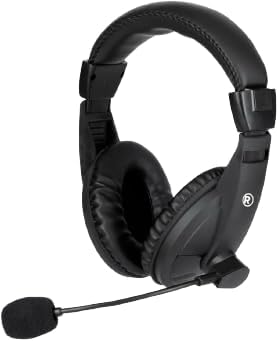
Imej 1.1: Depan view of the RadioShack USB Type-C Headset, showcasing its over-ear design and integrated microphone.

Imej 1.2: sebelah view of the headset, highlighting the adjustable headband and the flexible microphone arm.
2. Arahan Persediaan
- Sambungkan Alat dengar: Locate an available USB Type-C port on your computer or laptop. Insert the USB Type-C connector of the headset firmly into the port.
- Pemasangan Pemandu: The headset is plug-and-play. Your operating system (Windows, macOS, Linux) should automatically detect and install the necessary drivers. This process typically takes a few seconds.
- Sahkan Tetapan Audio: After connecting, open your computer's sound settings. Ensure the RadioShack USB Headset is selected as the default playback and recording device.

Imej 2.1: Satu jarak dekat view of the USB Type-C connector, which plugs into your device.
3. Mengendalikan Alat dengar
3.1 Wearing and Adjusting
- Melaraskan ikat kepala: Extend or retract the headband slides on both sides to achieve a comfortable fit over your head.
- Positioning the Ear Pads: Ensure the soft, cushioned ear pads fully cover your ears for optimal sound isolation and comfort.

Imej 3.1: A person wearing the headset, demonstrating the ergonomic design and comfortable fit for extended use.
3.2 Menggunakan Mikrofon
- Peletakan Mikrofon: Gently bend the flexible microphone arm to position the omnidirectional microphone approximately 1-2 inches (2.5-5 cm) from your mouth for clear voice pickup.
- Redam/Nyahredam: If your headset features an in-line remote control, use the designated button to mute or unmute the microphone as needed.
3.3 Kawalan Kelantangan
- Kawalan Jauh: Utilize the remote control integrated into the cable to adjust the volume up or down.
- Kelantangan Sistem: Alternatively, adjust the volume directly through your computer's operating system sound settings.
4. Penyelenggaraan
- Pembersihan: Use a soft, dry cloth to wipe down the headset, ear pads, and microphone. Avoid using harsh chemicals or abrasive materials.
- Storan: Simpan alat dengar di tempat yang bersih dan kering, jauh daripada suhu ekstrem dan cahaya matahari langsung. Elakkan kabel daripada kusut.
- Penjagaan Kabel: The 110cm (3.5 feet) cable provides ample length. Avoid sharp bends or excessive pulling on the cable to prevent damage.

Imej 4.1: The headset displaying its 110cm (3.5 feet) cable, offering broad length for comfortable movement.
5. Penyelesaian masalah
- Tiada Bunyi dari Alat dengar:
- Ensure the USB Type-C connector is fully inserted into the port.
- Check your computer's sound settings to confirm the RadioShack USB Headset is selected as the default playback device.
- Increase the volume using the in-line remote control or your computer's system volume.
- Try connecting the headset to a different USB Type-C port or another computer to rule out port or device issues.
- Mikrofon Tidak Berfungsi:
- Verify the microphone is not muted via the in-line remote or your computer's sound settings.
- Confirm the RadioShack USB Headset is selected as the default recording device in your computer's sound settings.
- Adjust the microphone's physical position closer to your mouth.
- Check privacy settings on your operating system that might restrict microphone access for certain applications.
- Audio Herot:
- Lower the volume to see if distortion reduces.
- Ensure the audio source is not the cause of the distortion.
- Kemas kini pemacu audio komputer anda jika tersedia.
6. Spesifikasi
| Ciri | Perincian |
|---|---|
| Nombor Model | 2604800 |
| Teknologi Ketersambungan | USB Jenis-C |
| Jenis Pemacu Audio | Pemacu Dinamik (40mm) |
| Jenis Mikrofon | Omnidirectional |
| Bentuk alat dengar | Atas Telinga |
| Panjang Kabel | 110 cm (3.5 kaki) |
| Kaedah Kawalan | Remote (in-line) |
| Peranti Serasi | Computers, Laptops |
| bahan | Akrilonitril Butadiena Stirena (ABS) |
| Berat Barang | 10.6 auns (0.66 paun) |
| warna | Hitam |
7. Waranti dan Sokongan
For warranty information and customer support, please refer to the official RadioShack webtapak atau hubungi perkhidmatan pelanggan mereka secara langsung. Simpan resit pembelian anda sebagai bukti pembelian untuk sebarang tuntutan waranti.
Sokongan dalam talian: melawat www.radioshack.com untuk Soalan Lazim, pendaftaran produk dan pilihan hubungan.