
Mesqool e5a70cca-01be-4e29-bb91-9cfc7e32344
Mesqool Emergency Radio Instruction Manual
Model: e5a70cca-01be-4e29-bb91-9cfc7e32344
Jenama: Mesqool
1. Pengenalan
This manual provides detailed instructions for the Mesqool Emergency Radio, a versatile device designed for emergency preparedness and outdoor activities. It features multiple power sources, including a large-capacity rechargeable battery, hand crank, and solar panel, along with AM/FM/SW radio reception, NOAA weather alerts, a powerful flashlight, a reading lamp, and a cell phone charging function.

Figure 1: Mesqool Emergency Radio in Gray Camo, demonstrating phone charging capability.
2. Kandungan Pakej
Sila tandai kotak untuk item berikut:
- Radio kecemasan
- 5V 2A Adapter and Type C Cord
- Cangkuk logam
- Portable Belt
- Manual Pemilik
3. Ciri-ciri Utama
- NOAA Weather Alert Radio: Receives 7 pre-programmed NOAA weather channels with automatic alert function for severe weather events.
- Radio Berbilang Band: Supports AM, FM, and Shortwave (SW) frequencies for broad reception.
- Bateri Berkapasiti Tinggi: Equipped with a 12000mAh rechargeable Li-ion battery for extended operation and device charging.
- Five Power Sources: Rechargeable battery, USB-C input, hand crank, solar panel, and 3 AAA batteries (not included).
- Pencahayaan Kecemasan: Features a bright flashlight (150-300 Lumens) and a 2-level brightness reading lamp (120-250 Lumens).
- Penggera SOS: Activates a loud 116dB alarm with flashing red light for emergency signaling.
- Cell Phone Charger: Functions as a power bank to charge mobile devices via USB output.
- Skrin LCD: Large, backlit LCD displays radio station, time, and weather channels.
- Ketahanan: IPX-3 waterproof and dust-proof rating.
4. Kawalan dan Komponen
Biasakan diri anda dengan kawalan dan port radio:

Rajah 2: Depan view of the radio highlighting the large LCD display and control buttons.
- Butang Kuasa: Press to turn the radio on or off.
- Butang Jalur: Cycles through AM, FM, SW, and Weather Band (WB) modes.
- WX Alert Button: Activates or deactivates the NOAA weather alert function.
- Kelantangan +/- Butang: Melaraskan kelantangan output audio.
- Butang Tala +/-: Adjusts the radio frequency.
- Butang Kunci: Mencegah butang ditekan secara tidak sengaja.
- Set Time Button: Used to set the current time displayed on the LCD.
- Butang Lampu Belakang: Toggles the LCD screen backlight.
- Lampu suluh: Located on the left side of the radio. Activated via a dedicated button.
- SOS Control Button: Activates the emergency SOS alarm.
- USB Output Charging Port: Untuk mengecas peranti luaran.
- Type-C Input Charging Port: Untuk mengecas bateri dalaman radio.
- Bicu Fon Kepala 3.5mm: Untuk mendengar secara peribadi.
- Antena Teleskopik: Lanjutkan untuk penerimaan radio yang lebih baik.
- Panel Suria: Located on the top, used for trickle charging.
- Engkol Tangan: Foldable crank on the back for manual power generation.
- Membaca Lamp: Located under the solar panel, flips up for illumination.
- Kompartmen Bateri AAA: Located on the bottom, for optional AAA battery power.
- Kompas: Integrated into the portable strap for navigation.

Rajah 3: Sisi view illustrating the SOS alarm and headphone jack.
5. Power Sources and Charging
The Mesqool Emergency Radio offers five flexible ways to ensure you always have power:
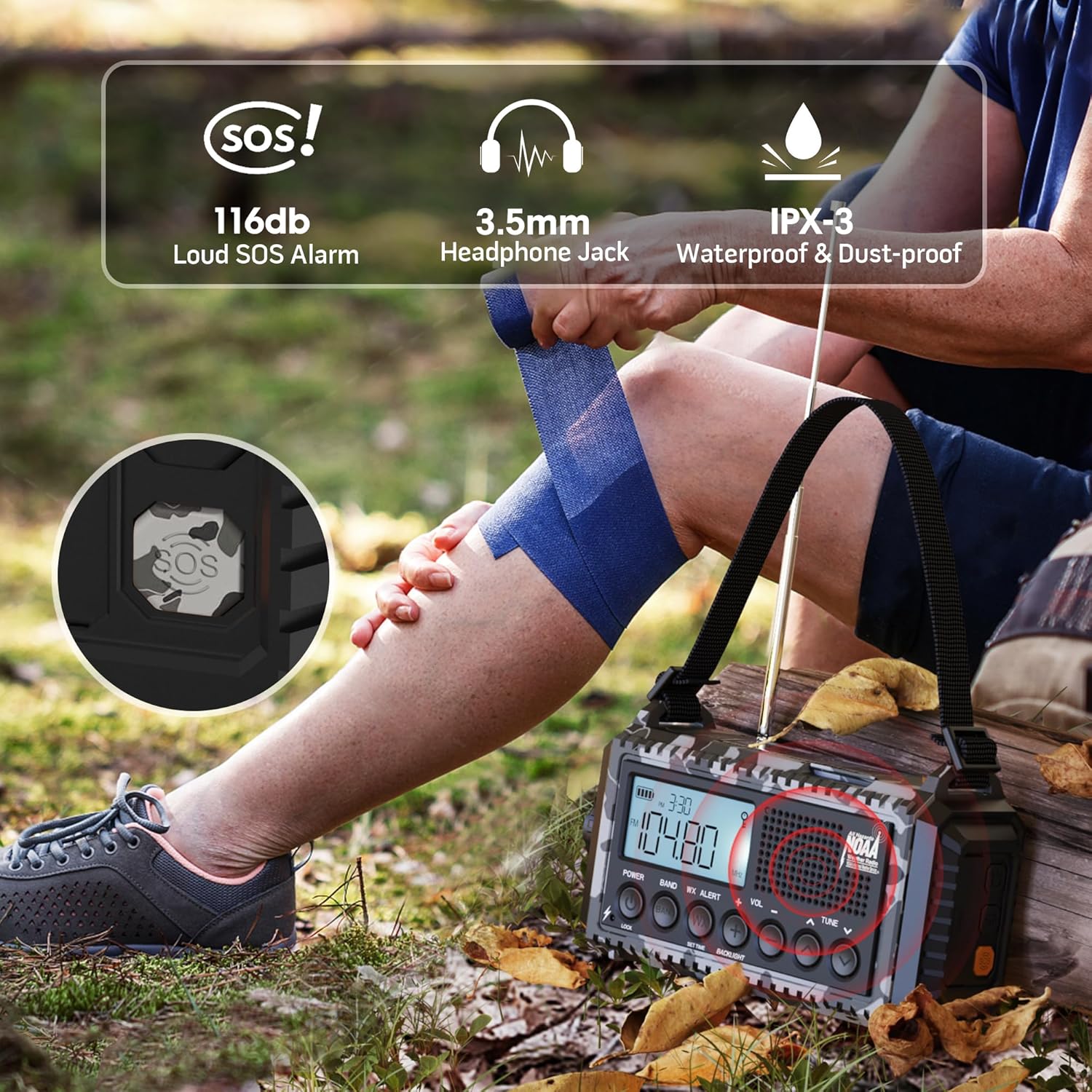
Figure 4: Visual representation of the five power options for the radio.
- 12000mAh Built-in Li-ion Battery: The primary power source. Ensure it is fully charged before extended use.
- Input Jenis-C (5V/2A): Connect the provided Type-C cable to a compatible USB adapter (not included) for the most efficient charging. The charging indicator lights will show progress.
- Engkol Tangan: Rotate the hand crank clockwise or counter-clockwise at a steady pace (approx. 130-150 RPM) for 3-5 minutes to generate enough power for short-term use or to initiate charging.
- Panel Suria: Place the radio in direct sunlight. The solar panel provides trickle charging to maintain the battery level or extend playtime. It is not intended for full charging from a depleted state.
- 3 AAA Batteries (Not Included): Open the battery compartment on the bottom and insert 3 AAA batteries. This serves as a backup power source when the internal Li-ion battery is low or depleted.
The battery indicator on the LCD screen will show the current charge level. A flashing indicator typically means the battery is low and requires charging.
6. Operasi Radio
The radio supports AM, FM, SW, and NOAA Weather Bands.

Figure 5: The radio displaying NOAA Weather Alert functionality.
- Menghidupkan/Mematikan: Tekan ke KUASA butang untuk menghidupkan atau mematikan radio.
- Memilih Band: Tekan ke BAND button repeatedly to cycle through AM, FM, SW, and WB (Weather Band).
- Stesen Penalaan: Gunakan TULA +/- buttons to manually adjust the frequency. For automatic scanning, press and hold the TULA +/- button for 2 seconds. The radio will stop on the next available station.
- Kawalan Kelantangan: Gunakan VOL +/- butang untuk melaraskan kelantangan mendengar.
- Amaran Cuaca NOAA:
- Untuk mendayakan, tekan butang WX ALERT button. The 'WX' icon will appear on the LCD.
- The radio will automatically scan 7 NOAA weather channels. When an alert is received, an audible alarm will sound, and the red alert light will flash.
- To disable, press the WX ALERT butang lagi.
7. Lampu suluh dan Bacaan Lamp Operasi
The radio includes integrated lighting features for various situations.

Figure 6: The radio's reading lamp and flashlight in use.
- Lampu suluh: Press the dedicated flashlight button on the side of the radio to turn it on. Press again to cycle through brightness levels (if applicable) or turn off.
- Membaca Lamp: Flip up the solar panel to reveal the reading lamp. Press the reading lamp button (often located near the flashlight button) to turn it on. Press again to adjust brightness levels or turn off.
8. Fungsi Penggera SOS
In an emergency, the SOS alarm can be activated to attract attention.
- To activate the SOS alarm, press the SOS button (often a distinct yellow or red button, or integrated with a light button). A loud siren will sound, and a red flashing light will activate.
- Untuk menyahaktifkan, tekan SOS butang lagi.
9. Cell Phone Charging
The radio can serve as an emergency power bank for your mobile devices.
- Connect your mobile device to the USB output charging port on the side of the radio using your device's charging cable.
- The radio's internal 12000mAh battery will provide power to your device.
- If the radio's battery is low, you may need to use the hand crank to generate initial power for charging.

Figure 7: The radio connected to a smartphone for charging.
10. Spesifikasi
| Ciri | Perincian |
|---|---|
| Dimensi Produk | 3.7 x 2.48 x 6.8 inci |
| Berat Barang | 1.46 paun |
| Jenis Bateri | 1 bateri Lithium Ion (termasuk) |
| Sumber Kuasa | Rechargeable Battery | Solar Panel | Hand Crank | Type-C Input 5V/2A |
| Pancaragam Radio Disokong | AM/FM/7 Pre-Configured NOAA Stations |
| Teknologi Ketersambungan | NOAA RADIO |
| Ciri Khas | Cellphone USB Charger, Flashlight, Reading Lamp, Strap, Lightweight, SOS Alarm, NOAA Weather Alert |
11. Penyelesaian masalah
- Tiada Kuasa: Ensure the internal battery is charged. Try hand cranking for a few minutes or connecting to a USB power source. Check if AAA batteries are inserted correctly and have charge.
- Penerimaan Radio yang lemah: Extend the telescopic antenna fully. Try repositioning the radio. For AM/SW, rotate the radio for optimal signal.
- NOAA Alert Not Working: Ensure the WX Alert function is enabled. Check if you are within range of a NOAA broadcast.
- Telefon Tidak Mengecas: Ensure the radio has sufficient power. Check the USB cable connection. Some devices may require more power than the radio can provide for rapid charging.
- Butang Tidak Responsif: Check if the Lock function is activated. Deactivate it if necessary.
12. Penyelenggaraan
- Pembersihan: Lap radio dengan lembut, damp kain. Jangan gunakan bahan kimia yang keras atau pembersih yang kasar.
- Storan: Simpan radio di tempat yang sejuk dan kering jauh dari cahaya matahari langsung dan suhu yang melampau.
- Penjagaan Bateri: For optimal battery life, fully charge the internal Li-ion battery at least once every three months, even if not in use.
- Tahan Air: While IPX-3 rated (splash-proof), avoid submerging the radio in water. Ensure all port covers are securely closed when exposed to moisture.
13. Waranti dan Sokongan
For warranty information, technical support, or service inquiries, please refer to the contact details provided on the product packaging or the official Mesqool webtapak. Simpan resit pembelian anda sebagai bukti pembelian.
Ask a question about this manual
Ask about setup, troubleshooting, compatibility, parts, safety, or missing instructions. Manuals+ will review the question and use this page’s manual context to help answer it.