
1. Pengenalan
This manual provides detailed instructions for the proper use, setup, operation, and maintenance of your EBTOOLS Bluetooth Headset. Please read this manual thoroughly before using the product to ensure optimal performance and longevity.
2. Produk Lebihview
2.1 Ciri-ciri Utama
- Mikrofon Boleh Putar: Easily adjust the microphone to the optimal angle for clear voice capture.
- Teknologi Bluetooth 5.0: Ensures faster, more efficient, and stable wireless connectivity with compatible devices.
- Reka bentuk yang selesa: Single-ear design with padded ear cushion and flexible headband for extended wear without discomfort.
- Hayat Bateri yang Panjang: Up to 17 hours of talk time and 200 hours of standby time on a 2-hour charge.
- Keserasian Universal: Works with laptops, cell phones, PCs, tablets, and other Bluetooth-enabled devices. Ideal for office, home, remote work, call centers, VoIP, and Skype.
2.2 Kandungan Pakej
Sahkan bahawa semua item terdapat dalam pakej anda:
- EBTOOLS Bluetooth Headset
- Pangkalan Pengecasan
- Kabel Pengecas USB Mikro
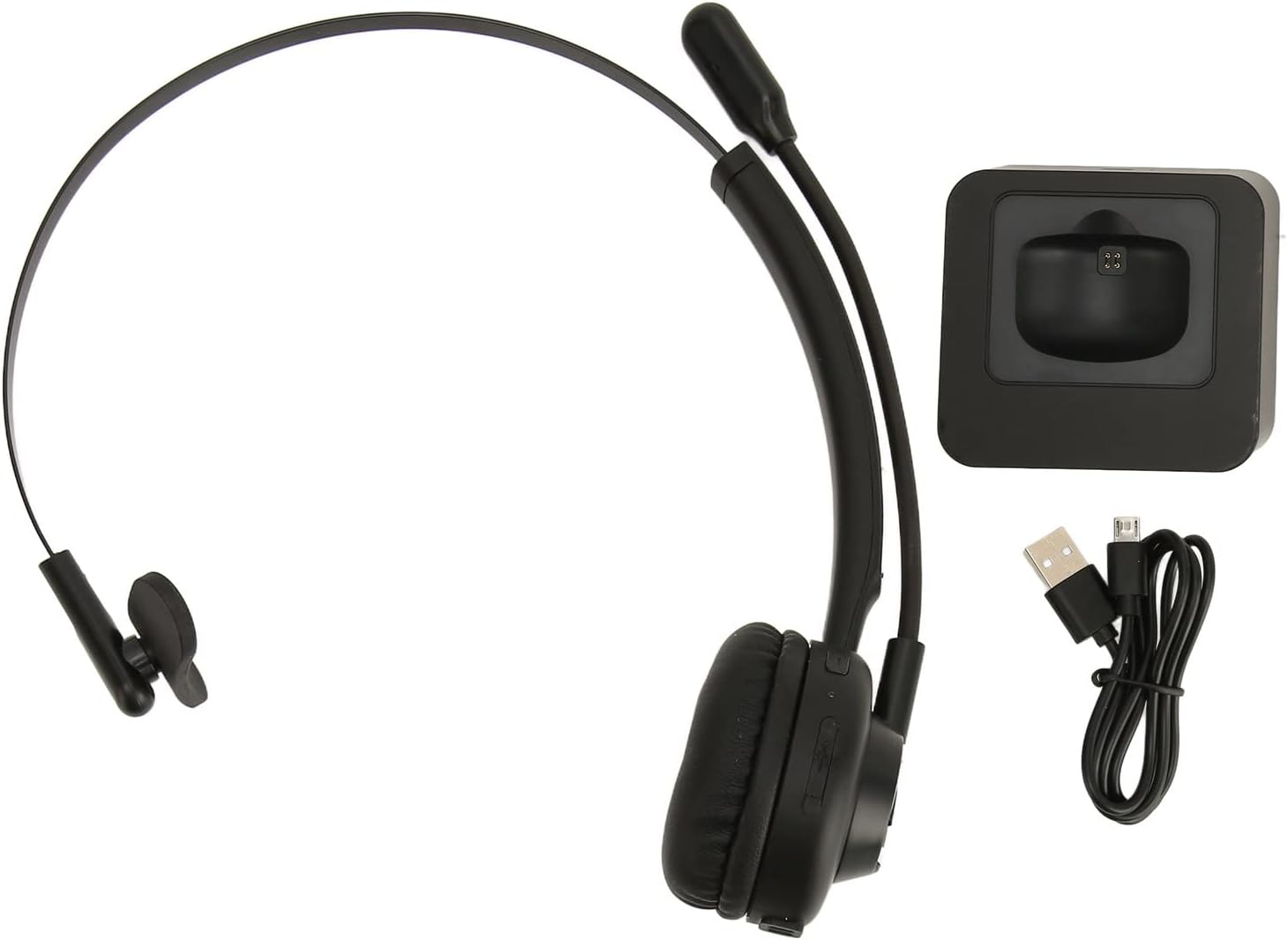
Image: The EBTOOLS Bluetooth Headset, its dedicated charging base, and a Micro USB charging cable, illustrating the complete package contents.
2.3 Headset Controls and Indicators

Image: A detailed diagram highlighting the Micro USB port, LED indicator, Volume Down button, Multifunctional button, and Volume Up button on the EBTOOLS Bluetooth Headset.
- Port USB Mikro: For direct charging of the headset.
- Penunjuk LED: Memaparkan kuasa, pengecasan dan status pasangan.
- Kelantangan - Butang: Mengurangkan kelantangan audio.
- Butang pelbagai fungsi: Controls power, pairing, call answer/end, and music playback.
- Butang Kelantangan +: Meningkatkan kelantangan audio.
3. Persediaan
3.1 Mengecas Alat Dengar
Before first use, fully charge the headset. You can charge it using the included charging base or directly via the Micro USB port.
- Connect the Micro USB cable to the charging base and a power source (e.g., computer USB port, USB wall adapter).
- Place the headset onto the charging base, ensuring the charging contacts align. The LED indicator on the headset will show charging status.
- Alternatively, connect the Micro USB cable directly to the headset's Micro USB port and a power source.
- A full charge typically takes approximately 2 hours. The LED indicator will change color or turn off once fully charged.

Imej: Dari dekat view of the headset's earcup, showing the charging contacts designed to connect with the charging base.
3.2 Berpasangan dengan Peranti Bluetooth
Untuk menyambungkan alat dengar anda ke peranti:
- Pastikan alat dengar dimatikan.
- Tekan dan tahan butang Butang Pelbagai fungsi for approximately 5-7 seconds until the LED indicator flashes red and blue alternately, indicating pairing mode.
- On your device (phone, PC, tablet), enable Bluetooth and search for new devices.
- Select "EBTOOLS Headset" (or similar name) from the list of available devices.
- Once connected, the LED indicator on the headset will typically flash blue slowly or turn solid blue.
- Jika digesa untuk kata laluan, masukkan "0000".
3.3 Memakai Alat dengar
The headset is designed for comfort and flexibility.
- Adjust the flexible headband to fit comfortably over your head.
- The single ear design allows you to remain aware of your surroundings.
- Rotate the microphone boom to position it close to your mouth for optimal voice clarity. The microphone can be rotated 180 degrees to be worn on either the left or right ear.

Image: A person wearing the EBTOOLS Bluetooth Headset, demonstrating the comfortable fit and the adjustable, rotatable microphone positioned for clear communication.
4. Arahan Operasi
4.1 Hidupkan/Mati Kuasa
- Hidupkan kuasa: Tekan dan tahan butang Butang Pelbagai fungsi for approximately 3 seconds until the LED indicator flashes blue.
- Matikan: Tekan dan tahan butang Butang Pelbagai fungsi for approximately 3-5 seconds until the LED indicator flashes red and then turns off.
4.2 Melaraskan Kelantangan
- Tekan ke Butang Kelantangan + to increase the listening volume.
- Tekan ke Kelantangan - Butang untuk mengurangkan kelantangan mendengar.
4.3 Pengurusan Panggilan
- Jawab Panggilan: Tekan pendek Butang Pelbagai fungsi when an incoming call rings.
- Tamatkan Panggilan: Tekan pendek Butang Pelbagai fungsi semasa panggilan.
- Tolak Panggilan: Tekan dan tahan butang Butang Pelbagai fungsi for approximately 2 seconds when an incoming call rings.
- Dail Semula Nombor Terakhir: Tekan dua kali pada Butang Pelbagai fungsi apabila tidak sedang membuat panggilan.
4.4 Music Playback (if supported by device)
- Main/Jeda: Tekan pendek Butang Pelbagai fungsi.
- Lagu Seterusnya: Tekan dan tahan butang Butang Kelantangan +.
- Trek Sebelumnya: Tekan dan tahan butang Kelantangan - Butang.
4.5 Penggunaan Mikrofon
The rotatable microphone ensures your voice is captured clearly.
- Adjust the microphone boom to be approximately 1-2 inches from your mouth.
- The microphone can be rotated 180 degrees to allow wearing the headset on either the left or right ear.

Imej: Dari dekat view of the EBTOOLS headset's flexible microphone boom, highlighting its design for optimal voice pickup.
5. Penyelenggaraan
5.1 Pembersihan
- Wipe the headset with a soft, dry, or slightly damp kain.
- Jangan gunakan bahan kimia yang keras, pelarut pembersih atau detergen yang kuat.
- Elakkan mendapatkan kelembapan ke dalam mana-mana bukaan.
5.2 Penjagaan Bateri
- Cas alat dengar secara berkala, walaupun tidak kerap digunakan, untuk mengekalkan kesihatan bateri.
- Elakkan menyahcas sepenuhnya bateri dengan kerap.
- Simpan set kepala di tempat yang sejuk dan kering jauh dari suhu yang melampau.
6. Penyelesaian masalah
Jika anda menghadapi masalah dengan alat dengar anda, rujuk penyelesaian biasa berikut:
| Masalah | Penyelesaian yang Mungkin |
|---|---|
| Alat dengar tidak dihidupkan. | Ensure the headset is charged. Connect it to the charging base or directly via USB. |
| Tidak boleh berpasangan dengan peranti. | Ensure the headset is in pairing mode (LED flashing red/blue). Turn off and on your device's Bluetooth. Delete previous pairings on your device and try again. Ensure the headset is within range (typically 10 meters). |
| Tiada bunyi atau kelantangan rendah. | Increase volume on both the headset and your connected device. Ensure the headset is selected as the audio output device on your computer or phone. Re-pair the headset. |
| Mikrofon tidak berfungsi. | Ensure the microphone is positioned correctly. Check microphone settings on your connected device to ensure the headset is selected as the input device. |
| Sambungan terputus-putus. | Bergerak lebih dekat dengan peranti anda yang disambungkan. Elakkan halangan antara set kepala dan peranti. Kurangkan gangguan daripada peranti wayarles lain. |
7. Spesifikasi
| Ciri | Perincian |
|---|---|
| Nama Jenama | EBTOOLS |
| Nombor Model | EBTOOLSrsgvuyg5fc |
| Teknologi Ketersambungan | Bluetooth 5.0 |
| Berat Barang | 11.6 auns |
| Dimensi Pakej | 7.09 x 6.69 x 2.36 inci |
| Masa Berbual | Sehingga 17 jam |
| Masa Tunggu Sedia | Sehingga 200 jam |
| Masa Mengecas | Lebih kurang 2 jam |
8. Waranti dan Sokongan
For warranty information or technical support, please refer to the documentation included with your purchase or contact EBTOOLS customer service through the retailer where the product was purchased. Keep your proof of purchase for warranty claims.