
YYK-Q16 Pro
Intelligent Touch Screen Open Bluetooth Earphones User Manual
Model: YYK-Q16 Pro
pengenalan
Thank you for choosing the Intelligent Touch Screen Open Bluetooth Earphones. This manual provides essential information for the proper use, setup, and maintenance of your new earphones. Please read it thoroughly before use to ensure optimal performance and longevity.
These true wireless open-ear earbuds feature Bluetooth 5.4 connectivity, double noise reduction, and a touch screen for intuitive control. They are designed for comfort and functionality during various activities, including fitness, running, and cycling.
Kandungan Pakej
Setelah membuka kotak, sila sahkan bahawa semua item yang disenaraikan di bawah ada:
- Headphones with hanging ears (Earbuds)
- Kabel Pengecasan Jenis-C
- Kes Pelindung
- Product Instruction Manual (this document)

Image: The Intelligent Touch Screen Open Bluetooth Earphones, showing the earbuds and their charging case with a digital display.
Persediaan
1. Pengecasan Awal
Before first use, fully charge the earphones and the charging case. Connect the provided Type-C charging cable to the charging port on the case and plug the other end into a USB power source (e.g., computer USB port, wall adapter). The charging time is approximately 1.5 hours.
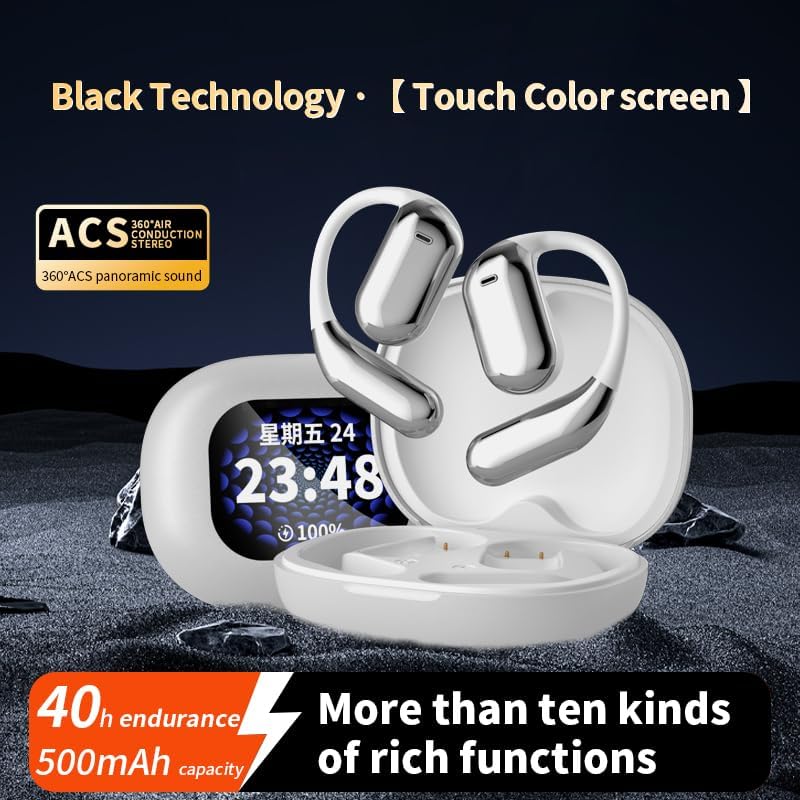
Image: The earbuds and charging case, highlighting the 40-hour endurance and 500mAh battery capacity.
2. Berpasangan dengan Peranti Bluetooth
- Pastikan fon telinga dicas dan di dalam kes pengecasan.
- Buka bekas pengecas. Fon telinga akan memasuki mod berpasangan secara automatik.
- Pada peranti berdaya Bluetooth anda (telefon pintar, tablet, dll.), pergi ke tetapan Bluetooth.
- Cari untuk available devices and select "YYK-Q16 Pro" (or similar name) from the list.
- Once connected, a confirmation sound or indicator will signify successful pairing.
The transmission range is approximately 10 meters (barrier-free).
Arahan Operasi
Kawalan Skrin Sentuh
The earphones feature an LCD full-color touch screen on the charging case for easy control of various functions.

Image: The smart touch screen interface on the charging case, displaying various control options such as equalizer, spatial audio, and music playback.
- Main Balik Muzik: Control play/pause, skip tracks directly from the touch screen.
- Noise Reduction Settings: Adjust Active Noise Cancellation (ANC) modes.
- Equalizer Options: Switch between different sound profiles (Bass, Jazz, Vocals, Balanced).
- Audio Spatial: Activate spatial audio features for an immersive experience.
Pembatalan Bising Aktif (ANC)
The earphones incorporate intelligent broadband deep noise cancellation technology, capable of blocking up to 99.44% of external noise. This feature allows for a quieter listening experience in noisy environments.

Image: Diagram illustrating how Active Noise Cancellation works by counteracting ambient noise with a backward sound wave.
Keselesaan dan Fit
Designed as open-ear earphones, they provide a comfortable fit without entering the ear canal, making them suitable for extended wear and physical activities. Each earbud weighs approximately 8 grams.

Image: A person wearing the open-ear earphones, demonstrating their comfortable and secure fit.
Penyelenggaraan dan Penjagaan
- Pembersihan: Gunakan kain lembut, kering dan bebas serabut untuk membersihkan fon telinga dan sarung pengecas. Jangan gunakan pembersih atau pelarut yang melelas.
- Storan: When not in use, store the earphones in their protective case to prevent damage and keep them clean.
- Tahan Air: The product description mentions IPX5 waterproof rating. While this offers protection against splashes and sweat, avoid submerging the earphones in water.
- Penjagaan Bateri: To prolong battery life, avoid fully discharging the battery frequently. Charge regularly, especially if not used for extended periods.
Menyelesaikan masalah
| Masalah | Kemungkinan Punca | Penyelesaian |
|---|---|---|
| Fon telinga tidak berpasangan | Low battery; Out of range; Device Bluetooth off; Already paired with another device. | Charge earphones; Move closer to device; Enable Bluetooth; Disconnect from other devices and re-pair. |
| Tiada bunyi | Volume too low; Earphones not connected; Media not playing. | Increase volume on device and earphones; Reconnect earphones; Start media playback. |
| Kualiti bunyi yang lemah | Interference; Earphones too far from device; Obstructions. | Move away from sources of interference; Reduce distance to device; Ensure no major obstructions. |
| Paparan bekas pengecasan tidak berfungsi | Case battery depleted. | Caskan kes pengecas. |
Spesifikasi
| Ciri | Perincian |
|---|---|
| Model Produk | Q16 Pro headphones with hanging ears (YYK-Q16 Pro) |
| Versi Bluetooth | V5.4 |
| Julat Kekerapan | 2.4Ghz~2.48Ghz |
| Julat Penghantaran | >=10m (Barrier free) / 32.8 Feet |
| Kapasiti Bateri (Sarung) | 500mAh |
| Endurance Time (Total) | 40 jam |
| Endurance Time (Single Use) | 10 jam |
| Masa Mengecas | Lebih kurang 1.5 jam |
| Antara Muka Pengecasan | Jenis-C |
| Kawalan Bunyi | Pembatalan Bising Aktif (ANC) |
| Jenis Kawalan | Touch Control (LCD Full-Color Touch Screen) |
| Bentuk alat dengar | Buka telinga |
| Impedans | 16 Ohm |
| Tahan Air | IPX5 (from product description) |
Waranti dan Sokongan
For warranty information and customer support, please refer to the contact details provided by your retailer or the manufacturer's official webtapak. Simpan resit pembelian anda sebagai bukti pembelian untuk sebarang tuntutan waranti.
For further assistance or technical inquiries, please contact customer service.
Ask a question about this manual
Ask about setup, troubleshooting, compatibility, parts, safety, or missing instructions. Manuals+ will review the question and use this page’s manual context to help answer it.