
1. Pengenalan
The Betopper LPC010N-4 is a professional 54x4W RGBW (Red, Green, Blue, White) LED Par Light designed for various stage, event, and photography lighting applications. Featuring a high Color Rendering Index (CRI) of over 90, this light ensures accurate and vibrant color reproduction. It delivers up to 5500 lumens of brightness and offers multiple control modes for versatile lighting effects.
2. Maklumat Keselamatan
- Sentiasa sambungkan lekapan ke litar yang dibumikan.
- Pastikan vol dayatage sepadan dengan nilai voltage daripada lekapan.
- Do not open the housing; there are no user-serviceable parts inside. Refer servicing to qualified personnel.
- Elakkan pendedahan mata secara langsung kepada sumber cahaya.
- Keep the fixture away from rain or moisture.
- Pastikan pengudaraan yang mencukupi di sekeliling lekapan untuk mengelakkan terlalu panas.
- Pasangkan lekapan dengan kukuh menggunakan penutup yang sesuaiampdan kabel keselamatan.
3. Kandungan Pakej
Each Betopper LPC010N-4 package includes:
- Betopper LPC010N-4 LED Par Light unit(s)
- Kabel kuasa
- Manual Pengguna
4. Produk Lebihview
4.1 Ciri-ciri Utama
- High CRI (>90): Provides exceptional color accuracy for natural and vibrant object and skin tone reproduction, ideal for photography and video.
- Kecerahan Superior: Equipped with 54*4W LED bulbs, delivering up to 5500 lumens for large venues.
- RGBW Full Color: 4-in-1 LED sources (Red, Green, Blue, White) offer brighter and purer colors than traditional RGB lights.
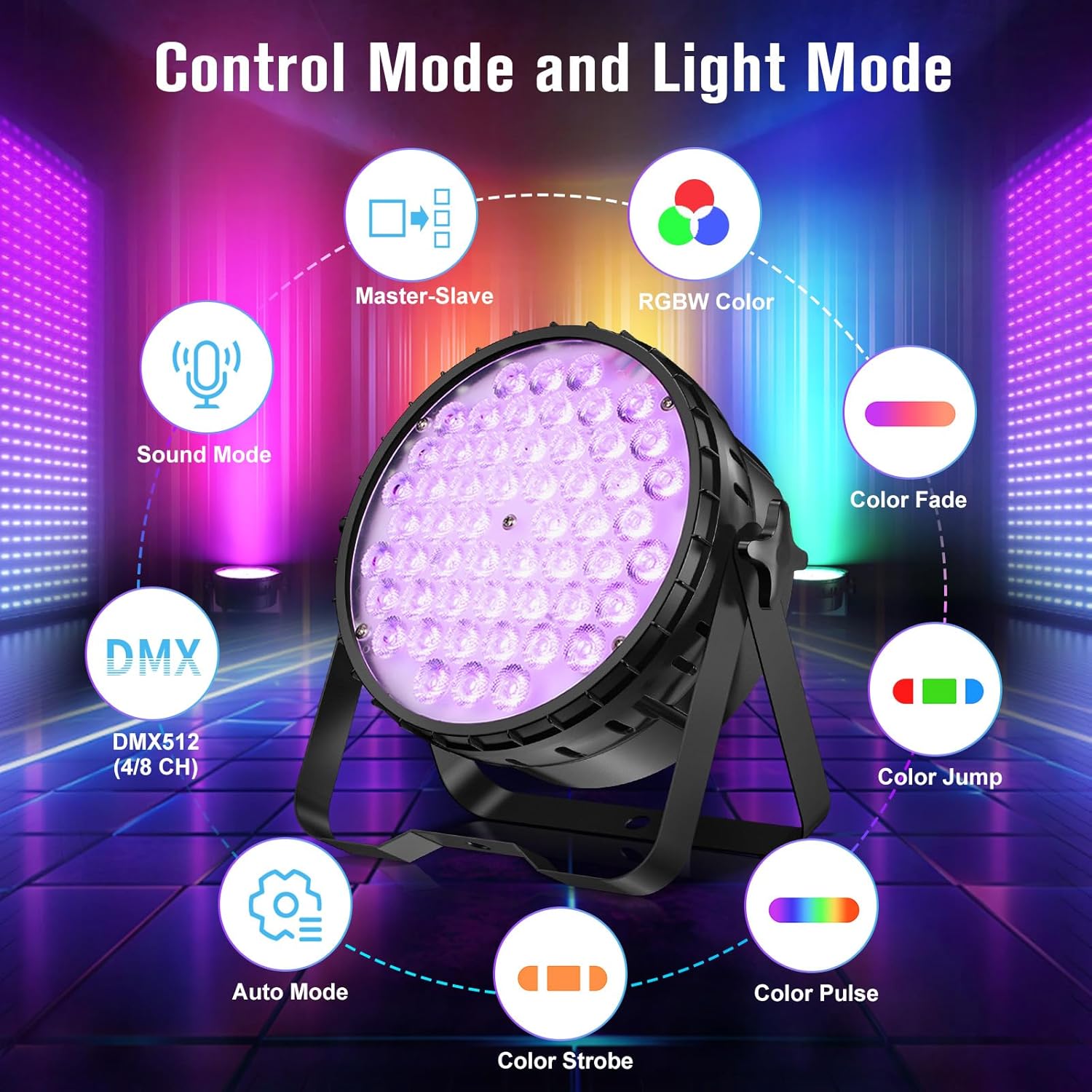
- Flexible Control Modes: Supports DMX, automatic, and sound-activated modes, along with multiple pre-set colors.
- Julat Aplikasi yang Luas: Suitable for parties, discos, bars, clubs, weddings, churches, live performances, studios, and more.
4.2 Komponen Fizikal


The fixture features a robust aluminum housing, a cooling fan for heat dissipation, and a digital display with four control buttons (MENU, UP, DOWN, ENTER) for easy navigation. It includes DMX In/Out ports for external control and Power In/Out for daisy-chaining multiple units.
5. Persediaan
5.1 Pemasangan
The LPC010N-4 can be mounted in various ways:
- Pemasangan Lantai: Use the adjustable bracket to position the light on a flat surface.
- T-Bar/Truss Mount: Secure the fixture to a T-bar or lighting truss using appropriate clamps (not included) and a safety cable. Ensure the mounting surface can support the weight of the fixture.

5.2 Sambungan Kuasa
Connect the provided power cable to the 'POWER IN' port on the rear of the fixture and then to a suitable AC100-240V power outlet. Multiple units can be daisy-chained using the 'POWER OUT' port to connect to the 'POWER IN' of the next fixture.
5.3 Sambungan DMX (Pilihan)
For DMX control, connect a DMX cable from your DMX controller's output to the 'DMX IN' port of the first fixture. To daisy-chain multiple DMX fixtures, connect the 'DMX OUT' of the first fixture to the 'DMX IN' of the next, and so on.
6. Mod Operasi
6.1 Navigasi Panel Kawalan
The rear control panel features a digital display and four buttons:
- MENU: Menelusuri pilihan menu utama.
- KE ATAS: Increases values or navigates up through menu options.
- TURUN: Decreases values or navigates down through menu options.
- MASUK: Mengesahkan pilihan atau memasuki submenu.

6.2 Mod Kawalan DMX
The fixture supports DMX512 protocol with 4 or 8 channel modes. Refer to the DMX channel chart in the appendix (not provided in this manual) for specific channel functions. Set the DMX address using the control panel.
6.3 Mod Automatik
The automatic mode features pre-programmed light shows and color sequences. Use the MENU button to select 'Auto' mode and then UP/DOWN to choose different auto programs.
6.4 Mod Diaktifkan Bunyi
In sound-activated mode, the light reacts to ambient sound or music. Use the MENU button to select 'Sound' mode. The fixture's built-in microphone will detect audio and trigger dynamic lighting effects.
6.5 Mod Tuan-Hamba
Connect multiple fixtures via DMX cables. Set one fixture as the 'Master' (e.g., in Auto or Sound mode) and the others as 'Slave' units. The slave units will then synchronize their effects with the master unit.
7. Kesan Cahaya
The LPC010N-4 offers a variety of dynamic lighting effects:
- Strobo: Rapid flashing of light.
- Gradual Fading Change: Peralihan lancar antara warna.
- lompat: Instantaneous changes between colors.
- Pulse Change: Rhythmic changes in light intensity or color.


7.1 CRI Comparison
The high CRI (>90) of the LPC010N-4 ensures that colors appear more natural and true to life compared to lights with lower CRI values.

7.2 Brightness Comparison
The 54x4W configuration provides significantly higher brightness compared to lights with fewer or lower wattage LED.

7.3 Demonstrasi Video
8. Penyelenggaraan
- Pembersihan: Regularly clean the lens and housing with a soft, lint-free cloth. Do not use abrasive cleaners.
- Penyelenggaraan Kipas: Ensure the cooling fan is free from dust and debris to maintain optimal performance and prevent overheating.
- Storan: When not in use, store the fixture in a dry, dust-free environment.
- Pemeriksaan: Periodically check all cables, connections, and mounting hardware for any signs of wear or damage.
9. Penyelesaian masalah
| Masalah | Kemungkinan Punca | Penyelesaian |
|---|---|---|
| Tiada kuasa | Power cable disconnected; no power from outlet; fuse blown. | Check power cable connection; test outlet; replace fuse if necessary. |
| Tiada keluaran cahaya | Fixture in blackout mode; incorrect mode selected; internal fault. | Check control panel settings; cycle through modes; contact support if fault persists. |
| Kawalan DMX tidak berfungsi | Alamat DMX salah; kabel DMX rosak; isu pengawal DMX; mod DMX salah. | Verify DMX address; check DMX cable integrity; test with another controller; ensure fixture is in DMX mode. |
| Cahaya berkelip-kelip | Unstable power supply; DMX signal interference; loose connection. | Ensure stable power; check DMX termination; secure all connections. |
10. Spesifikasi
| Ciri | Perincian |
|---|---|
| Nombor Model | LPC010N |
| Jenis Sumber Cahaya | Diod Pemancar Cahaya (LED) |
| Bilangan Sumber Cahaya | 54 |
| Wattage (per LED) | 4W |
| Jumlah Wattage | 216 Watt |
| Output Cahaya Maksimum | 5500 Lumen |
| Indeks Paparan Warna (CRI) | 95 (CRI>90) |
| Suhu Warna | 4500 Kelvin |
| Ciri-ciri Mentol | CRI>90, RGBW full color, DMX, automatic, sound-activated |
| bahan | aluminium |
| Jenis Selesai | Disikat |
| Jenis Pemasangan | Lantai Lantai |
| Sumber Kuasa | Elektrik Bertali |
| Dimensi Produk | 9.84"L x 4.5"W x 9.84"H |
| Berat Barang | 16.06 paun |
| Bateri Termasuk | Tidak |
11. Waranti dan Sokongan
For warranty information, technical support, or service inquiries, please contact Betopper customer service. Keep your purchase receipt as proof of purchase.
Visit the official Betopper store for more information: BetopperDirect Store