
1. Pengenalan
Thank you for choosing the MMK Mini Bluetooth Keyboard. This compact and versatile wireless keyboard is designed for enhanced productivity across various devices. It features a comfortable scissor-switch key structure for quiet and efficient typing, an AZERTY layout, and a long-lasting rechargeable battery. This manual provides detailed instructions for setup, operation, maintenance, and troubleshooting to ensure optimal performance.
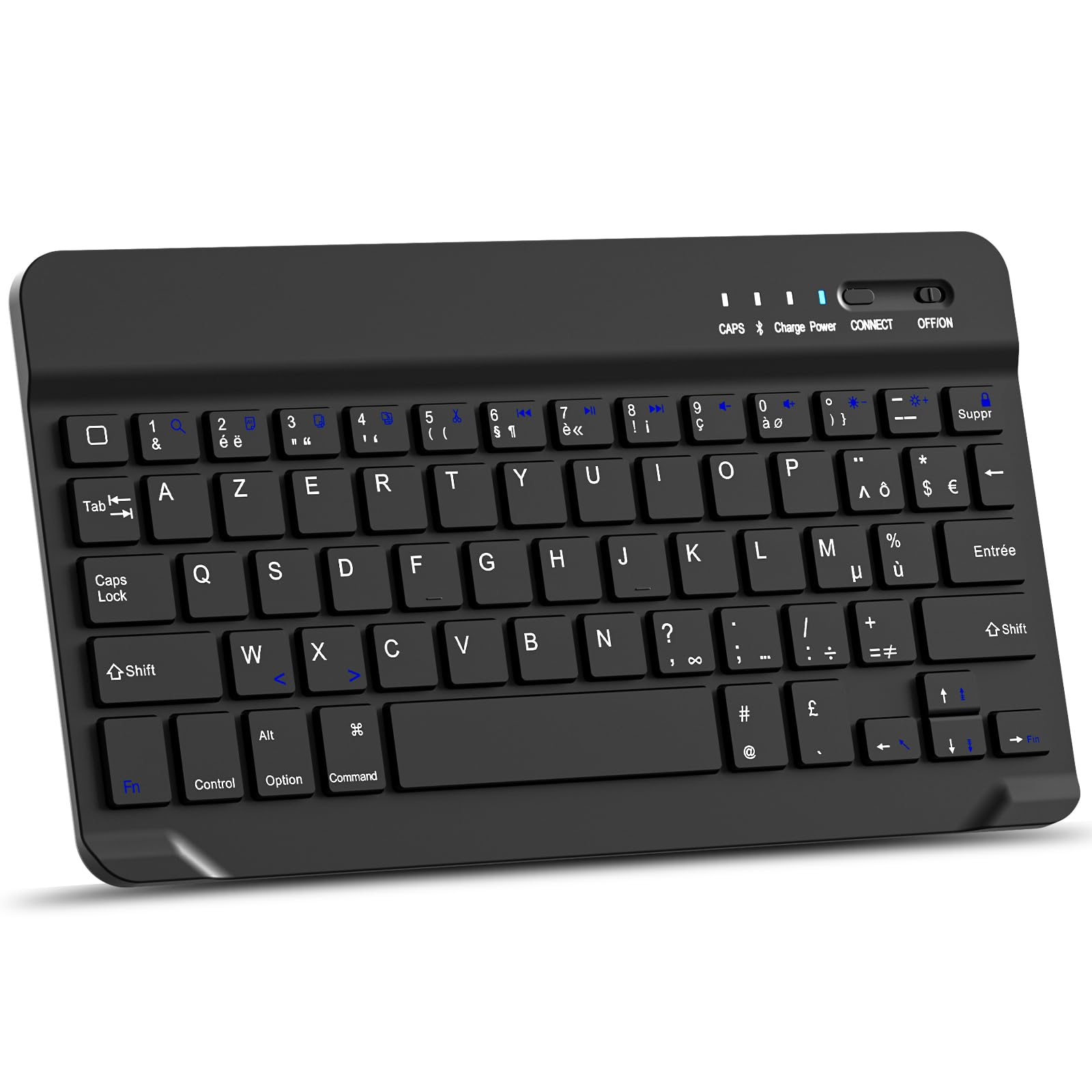
Imej: Atas ke bawah view of the MMK Mini Bluetooth Keyboard, showcasing its compact design and AZERTY key layout.
2. Kandungan Pakej
- MMK Mini Bluetooth Keyboard
- Kabel Pengecas USB
- Manual Pengguna (dokumen ini)
3. Arahan Persediaan
3.1 Mengecas Papan Kekunci
Before first use, fully charge the keyboard.
- Cari port pengecasan pada papan kekunci.
- Sambungkan kabel pengecas USB yang disediakan ke port pengecasan papan kekunci.
- Sambungkan hujung kabel USB yang satu lagi ke sumber kuasa USB (cth, port USB komputer, penyesuai dinding USB).
- The "Charge" indicator light will illuminate during charging. It typically takes 2-3 hours for a full charge.
- Once fully charged, the "Charge" indicator light may turn off or change color, depending on the model.

Imej: Jarak dekat view of the MMK Mini Bluetooth Keyboard showing the charging port with a USB cable connected. Text indicates over 130 days standby time and 2 hours charging time.
3.2 Berpasangan Bluetooth
The MMK Mini Bluetooth Keyboard is compatible with iOS, Android, and Windows devices.
- Ensure the keyboard is charged and turn on the keyboard by sliding the ON/OFF switch to the "ON" position. The "Power" indicator light will briefly illuminate.
- Tekan ke SAMBUNG button on the keyboard. The "CONNECT" indicator light will start blinking, indicating the keyboard is in pairing mode.
- On your device (iPad, iPhone, Android tablet/phone, Windows PC):
- Pergi ke tetapan.
- Navigasi ke Bluetooth.
- Hidupkan Bluetooth.
- Your device will search for available Bluetooth devices. Look for "Bluetooth Keyboard" or a similar name in the list.
- Select the keyboard from the list to initiate pairing.
- If prompted, enter the pairing code displayed on your device using the MMK keyboard and press Masuk.
- Once successfully paired, the "CONNECT" indicator light on the keyboard will stop blinking and turn off. The keyboard is now ready for use.

Image: The MMK Mini Bluetooth Keyboard with icons indicating compatibility with Android, Windows, and iOS operating systems. It also highlights Fn key combinations (Fn+A, Fn+S, Fn+D) for selecting the appropriate system layout.
Penting: After pairing, select the correct operating system mode on the keyboard for optimal functionality:
- For Android: Press fn + A
- Untuk Windows: Tekan Fn + S
- For iOS (iPad/iPhone): Press Fn + D
4. Arahan Operasi
4.1 Penaipan Asas
The keyboard features a standard AZERTY layout. Simply open any text input application on your paired device and begin typing. The scissor-switch keys provide a comfortable and quiet typing experience.

Image: An overhead shot of hands typing on the MMK Mini Bluetooth Keyboard, demonstrating its use in a typical workspace setup.

Image: A close-up of a key on the MMK Mini Bluetooth Keyboard, illustrating the scissor-switch mechanism that provides a comfortable and silent typing experience.
4.2 Kekunci Multimedia dan Pintasan
The keyboard includes 14 shortcut keys for quick access to common functions. These keys are typically activated by pressing the Fn kekunci bersama kekunci fungsi yang dikehendaki.

Imej: A terperinci view of the MMK Mini Bluetooth Keyboard highlighting the multimedia function keys. Labels indicate functions such as Search, Copy, Cut, Play/Pause, Volume control, Brightness adjustment, and Screen Lock.
Common multimedia functions include:
- Kawalan Kelantangan (Naik, Turun, Bisu)
- Media Playback (Play/Pause, Previous Track, Next Track)
- Pelarasan Kecerahan Skrin
- Fungsi Carian
- Copy, Cut, Paste
- Halaman Utama
- Pilih Semua
- Kunci Skrin
Refer to the specific key legends on your keyboard for exact functions.
5. Penyelenggaraan
To ensure the longevity and optimal performance of your MMK Mini Bluetooth Keyboard, follow these maintenance guidelines:
- Pembersihan: Gunakan kain lembut dan tidak berbulu sedikit dampened with water or a mild cleaning solution to wipe the surface of the keyboard. Avoid excessive moisture. Do not spray cleaners directly onto the keyboard.
- Penyingkiran habuk: Gunakan udara termampat untuk mengeluarkan habuk dan serpihan dari antara kekunci.
- Storan: When not in use, store the keyboard in a cool, dry place away from direct sunlight and extreme temperatures. Its compact design makes it easy to store in a laptop bag.
- Elakkan Cecair: Jangan dedahkan papan kekunci kepada cecair. Tumpahan boleh menyebabkan kerosakan kekal.
- Tangani dengan Berhati-hati: Elakkan daripada menjatuhkan papan kekunci atau mendedahkannya kepada hentaman kuat, kerana ini boleh merosakkan komponen dalaman.

Image: The MMK Mini Bluetooth Keyboard neatly tucked into a grey laptop sleeve, demonstrating its portability and ease of storage.
6. Penyelesaian masalah
If you encounter issues with your MMK Mini Bluetooth Keyboard, please refer to the following common problems and solutions:
| Masalah | Kemungkinan Punca / Penyelesaian |
|---|---|
| Keyboard does not connect or frequently disconnects. |
|
| Keys are not responding or require multiple presses. |
|
| Incorrect character output (e.g., QWERTY instead of AZERTY, missing symbols). |
|
| Papan kekunci tidak dihidupkan. |
|
7. Spesifikasi
| Ciri | Perincian |
|---|---|
| Jenama | MMK |
| Teknologi Ketersambungan | Bluetooth 3.0 |
| Peranti Serasi | iOS (iPad, iPhone), Android (Tablets, Smartphones), Windows (PCs, Tablets) |
| Penerangan Papan Kekunci | Multi-functional, Mini Wireless Keyboard |
| Ciri Khas | Portable, Shortcut keys, Multimedia keys, Rechargeable, Silent typing (Scissor-switch mechanism) |
| warna | Hitam |
| Susun atur papan kekunci | AZERTY (Bahasa Perancis) |
| Bilangan Kunci | 78 |
| Sumber Kuasa | Bateri Berkuasa (Bateri Litium Boleh Dicas Semula) |
| Masa Mengecas | 2-3 jam |
| Masa Tunggu Sedia | ≥130 hari |
| Julat Operasi | Sehingga 10 meter (33 kaki) |
| Komponen yang Disertakan | Kabel USB |
8. Maklumat Waranti
The MMK Mini Bluetooth Keyboard comes with a Waranti 360 hari dari tarikh pembelian. Waranti ini meliputi kecacatan pembuatan dan pincang fungsi dalam penggunaan biasa. Ia tidak melindungi kerosakan yang disebabkan oleh penyalahgunaan, kemalangan, pengubahsuaian yang tidak dibenarkan, atau penyelenggaraan yang tidak betul. Sila simpan bukti pembelian anda untuk tuntutan waranti.
9. Sokongan Pelanggan
For any questions, technical assistance, or warranty claims, please contact MMK customer support through the retailer where you purchased the product or visit the official MMK brand store online.
Kedai atas talian: MMK Official Store on Amazon